
If you recently bought a new Amazon Fire TV Stick, you might have noticed something missing. For years, cord-cutters in the US have relied on Fire TV devices to sideload third-party apps and stream their favorite content. However, the release of Amazon’s new operating system has completely changed the game for Vega OS IPTV compatibility.
Amazon is officially phasing out its Android-based Fire OS in favor of a new Linux-based platform called Vega OS. While this promises faster performance, it brings devastating news for streaming enthusiasts. If you are upgrading your entertainment setup in 2026, understanding how this impacts your ability to use custom apps is absolutely critical.
What is Amazon Vega OS and Why Does it Matter?
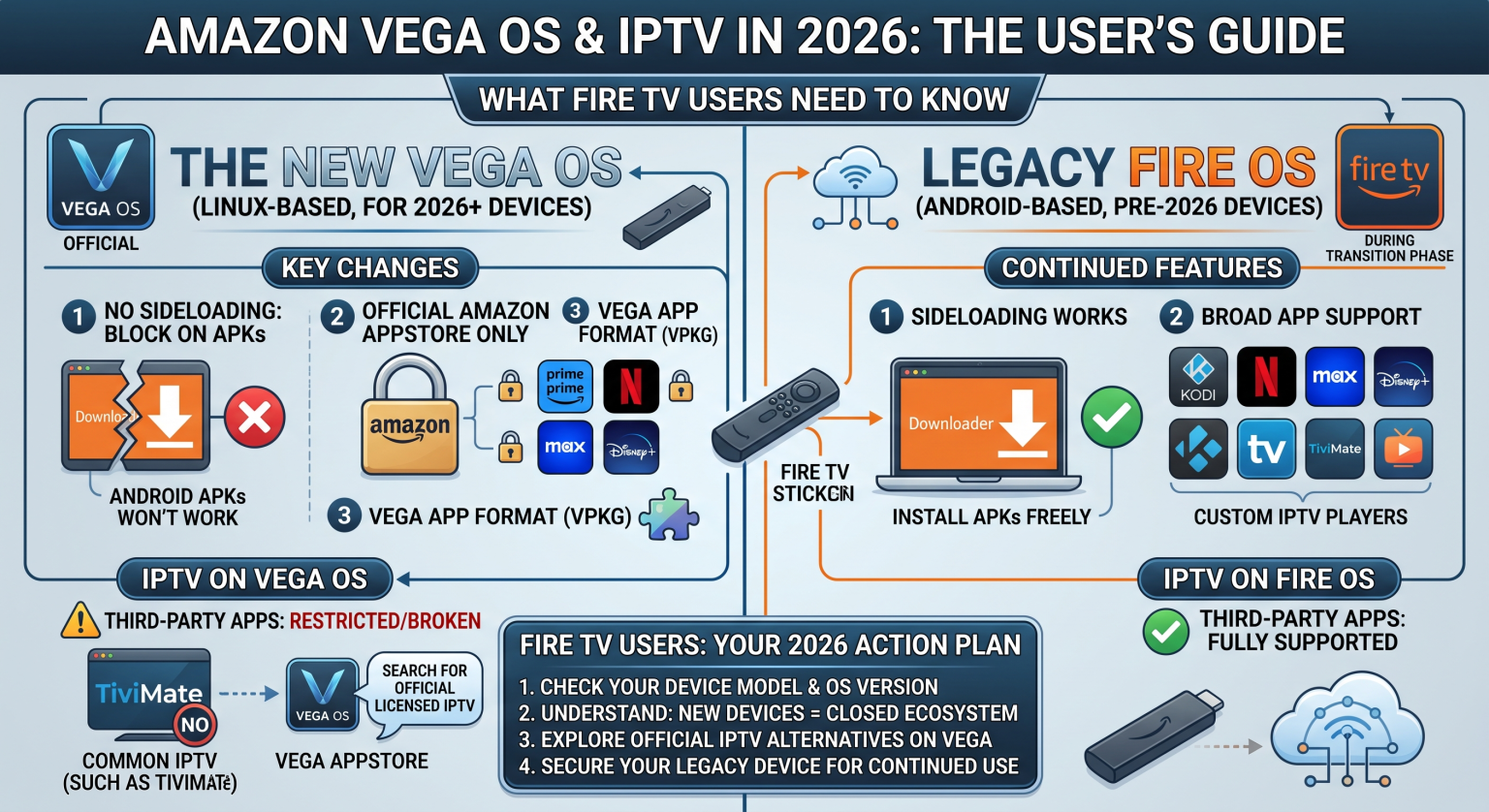
For over a decade, Amazon built its streaming ecosystem on top of an Android framework. This meant users could easily install the Downloader app and sideload third-party Android APKs. However, the transition to Vega OS means the underlying software is now entirely Linux-based.
This shift allows Amazon to run cheaper hardware with less RAM while pushing targeted ads through Alexa. Unfortunately, because the operating system is no longer Android, standard APK files simply will not run. If you heavily rely on a Vega OS IPTV setup, your current favorite apps are likely no longer compatible.
The End of APK Sideloading for Fire TV
The biggest shockwave hitting the US streaming community in 2026 is the complete removal of sideloading capabilities. On new devices like the Fire TV Stick 4K Select and the 2026 Fire TV Stick HD, you cannot enable “Install Unknown Apps” or use ADB debugging. Amazon has disabled these developer options at the system level.
This means popular IPTV players like TiviMate, IPTV Smarters, and Kodi cannot be installed unless they are officially listed in the Amazon Appstore. For most third-party developers, rebuilding their apps for a brand-new Linux ecosystem is simply not worth the effort.
Vega OS vs Fire OS vs Android TV: Which is Best for You?
To help you understand the current landscape, here is a breakdown of how the new ecosystem compares to the older tech and alternative devices.
| Feature | Legacy Fire OS (Older Models) | Vega OS (New 2026 Models) | Android TV (e.g., Walmart ONN Box) |
| Operating System | Android-based | Linux-based | Android TV / Google TV |
| APK Sideloading | Yes (via Downloader) | No (Blocked completely) | Yes (Full freedom) |
| IPTV App Support | Excellent (TiviMate, Smarters) | Very Poor (Official Appstore only) | Excellent |
| Custom Launchers | Yes (with workarounds) | No | Yes |
| Overall Performance | Good | Faster & Lighter | Excellent (depending on hardware) |
Can You Still Run IPTV on Fire TV Sticks?
The short answer is yes, but it depends entirely on the specific hardware you own. If you have an older, pre-2024 model like the Fire TV Stick 4K Max (Gen 1) or the Fire TV Cube, you are still running Android-based Fire OS. On these legacy devices, your standard IPTV setup will continue to work perfectly fine.
However, if you purchase a 2025 or 2026 device equipped with Vega OS, your options are severely limited. There are currently no known jailbreak methods or workarounds to force a Vega OS IPTV installation. You are strictly locked into the official Amazon Appstore.
Best Alternatives for Sideloading in the United States
If you need full app flexibility, it is time to look outside the Amazon ecosystem. The most highly recommended alternative for US consumers is an Android TV device. Products like the Walmart ONN 4K Pro offer identical streaming capabilities without the restrictive censorship of Amazon’s new platform.
Alternatively, the Nvidia Shield TV remains the premium gold standard for power users. By making the switch to a pure Android TV or Google TV device, you bypass the Vega OS limitations entirely and regain total control over your streaming experience.
Ready to Upgrade Your Streaming Experience?
The transition to Vega OS marks the end of an era for Fire TV customization. If you want to keep enjoying uninterrupted, buffer-free live TV, you need the right hardware and a premium streaming service to match.
Don’t let Amazon’s new restrictions ruin your entertainment setup. [Click here to explore our top-rated, Vega-proof IPTV subscription plans today] and secure the ultimate cord-cutting experience before legacy devices sell out!
People Also Ask (FAQ)
Can I install Downloader on Vega OS?
While the Downloader app might appear in the official app store for web browsing, it cannot be used to install APK files on Vega OS devices. Sideloading has been disabled at the system level.
Which Fire TV Stick should I buy for IPTV?
To use custom IPTV apps, you must buy older hardware like the Fire TV Stick 4K Plus or the 4K Max (Gen 1). Avoid the newer Fire TV Stick 4K Select or 2026 Fire TV Stick HD, as these run the locked-down Vega OS.
Will TiviMate or Smarters ever work on Vega OS?
Unless the developers rewrite their entire applications from Android to Amazon’s new Linux-based framework, these apps will not function on Vega OS. Currently, there are no plans for official ports of most popular third-party streaming apps.