
When you watch television through an internet connection, the video data must travel from a server to your screen. This data delivery happens in two main ways: unicast and multicast. Understanding the difference between IPTV multicast vs unicast is important for setting up a stable home network. Your router settings directly affect video quality, especially during live events.
Many users experience buffering or connection drops because their home network is not configured correctly for their specific type of IPTV stream. This article explains how unicast and multicast technologies work. It also explains how to adjust your home network settings to ensure smooth playback on your Smart TV or streaming device.
Quick Answer
What is the difference between IPTV multicast vs unicast?
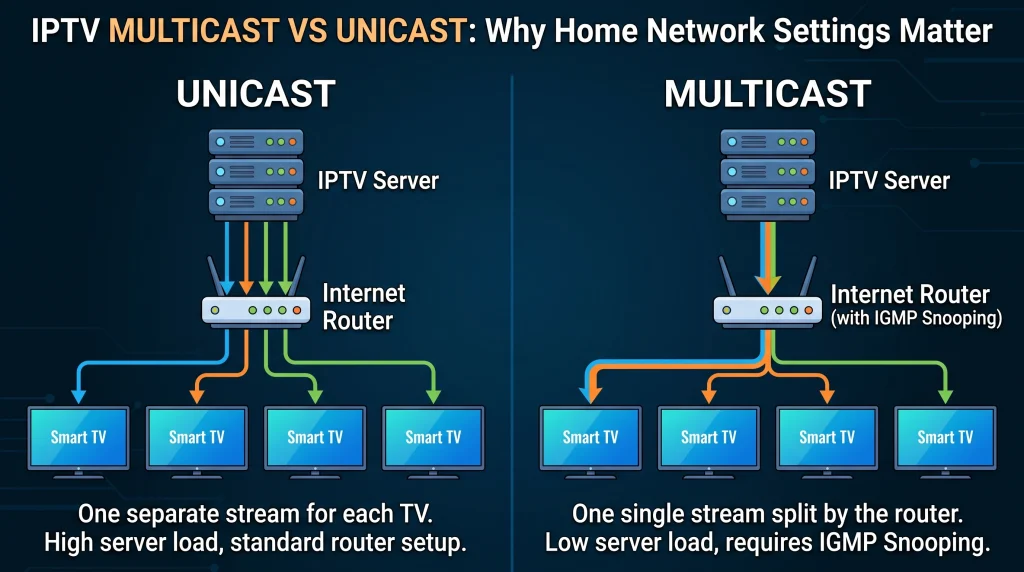
Unicast creates a separate, direct connection between the server and each user. If ten people watch a channel, the server sends ten separate video streams. Most modern streaming services and independent IPTV providers use unicast.
Multicast sends a single video stream to a network router. The network router then copies this single stream to multiple users at the same time. Internet Service Providers (ISPs) usually use multicast for their official cable-style IPTV boxes. For multicast to work correctly on a home network, the internet router must support a feature called IGMP Snooping.
What Is IPTV Unicast?
Unicast is a one-to-one data transmission method. When you select a television channel, your IPTV application requests a private video stream from the server.
The server processes this request and sends data directly to your unique IP address. If your neighbor watches the exact same channel at the exact same time, the server creates a completely separate video stream for your neighbor.
Advantages of Unicast
Network simplicity: Unicast traffic works perfectly on standard internet connections without special router settings.
Broad compatibility: Unicast works on mobile data networks, public Wi-Fi, and standard home networks.
Video on Demand (VOD): Unicast is necessary for movies and series because every user pauses, rewinds, and plays video at different times.
Disadvantages of Unicast
Server load: The server must have massive bandwidth capacity. Millions of simultaneous users require millions of individual video streams.
Buffering risks: If a server becomes overloaded during a popular event, the video stream may pause or buffer.
What Is IPTV Multicast?
Multicast is a one-to-many data transmission method. It is highly efficient for live television.
Instead of sending a separate stream to every user, the server sends one single video stream into the network. Network routers and switches act as distribution points. When your IPTV application requests the channel, your local router simply connects you to the existing stream.
Advantages of Multicast
Bandwidth efficiency: Multicast saves massive amounts of server bandwidth. The server only sends one stream, no matter how many users watch the channel.
High stability for live TV: Multicast provides very stable video during major live events because server load remains low.
Disadvantages of Multicast
Complex network requirements: Multicast requires specific network hardware. Home routers must support specific protocols to handle multicast traffic.
Not suitable for VOD: Multicast only works for live broadcasts where everyone watches the same video frame at the same time.
IPTV Multicast vs Unicast Comparison
This table explains the primary differences between the two delivery methods.
| Feature | IPTV Unicast | IPTV Multicast |
| Connection type | One-to-one | One-to-many |
| Primary use case | Video on Demand and modern IPTV | Live ISP television broadcasts |
| Server bandwidth usage | High (increases with every user) | Low (one stream for many users) |
| Router requirements | Standard internet router | Router with IGMP Snooping support |
| Wi-Fi impact | Minimal impact | Can crash Wi-Fi without IGMP |
| Network configuration | Automatic | Often requires manual configuration |
Why Home Network Settings Matter
If your IPTV service uses unicast, your home network only needs a fast internet connection and good Wi-Fi coverage. However, if your service uses multicast, your router settings become very important.
The Role of IGMP Snooping
Internet Group Management Protocol (IGMP) Snooping is a router feature. If a multicast stream enters a standard router without IGMP Snooping, the router does not know where to send the video data. The router will send the video data to every single device connected to the home network.
This process is called “flooding.” Multicast flooding will quickly overload a home Wi-Fi network. Smart home devices, mobile phones, and laptops will disconnect from the internet.
To fix this problem, you must log into your router settings and enable IGMP Snooping. When IGMP Snooping is active, the router only sends the multicast video stream to the specific device that requested it, such as your Smart TV.
Wi-Fi vs Ethernet for IPTV
Whether you use multicast or unicast, network stability is crucial. We highly recommend connecting your television directly to the internet router using an Ethernet cable. Ethernet prevents wireless interference and ensures a constant data delivery speed.
If you must use Wi-Fi, ensure your television connects to the 5GHz frequency band. The 5GHz band provides much faster speeds than the older 2.4GHz band.
Live Football and Sports Streaming
Watching live sports requires a very stable network connection. Live football contains fast camera movements and unpredictable action. Any network delay will cause the picture to freeze or pixelate.
When you stream live football through a unicast IPTV service, the server works very hard. Millions of fans connect to the server at the exact same time. To avoid buffering, you must ensure your home network has no bottlenecks. A wired Ethernet connection provides the best results for live sports.
If you notice that the football moves blurrily across the screen, the issue might be your television hardware, not your internet connection. A television with a higher refresh rate displays moving objects more clearly. You can read more about television hardware in our guide to 60Hz vs 120Hz TV for Live Football.
Smart TV OS and IPTV Compatibility
The operating system on your Smart TV determines which IPTV applications you can install. TV Shadow IPTV users often ask which television brand provides the best experience.
Most third-party IPTV applications utilize unicast streams. These applications require a television processor capable of decoding high-resolution video quickly.
Google TV and Android TV: Televisions from Sony, Philips, and TCL often use Google TV. The Google Play Store offers hundreds of IPTV player applications. These applications generally handle unicast streams perfectly.
Samsung Tizen: Samsung Smart TVs use the Tizen operating system. Tizen does not support Google Play applications. You must use specific IPTV players available in the Samsung App Store.
LG webOS: LG televisions use the webOS system. Like Samsung, LG requires applications built specifically for its own app store.
If you want to compare television operating systems before buying a new device, you can read our guide to the Best Smart TV OS for IPTV in 2026.
Conclusion
Understanding the difference between IPTV multicast vs unicast helps you optimize your home network. Unicast is the standard delivery method for modern streaming services and independent IPTV platforms. It is simple to use but requires high server capacity. Multicast is highly efficient for Internet Service Providers broadcasting live television, but it requires careful router configuration.
To get the best possible experience with TV Shadow IPTV or any other streaming service, ensure your home network is stable. Connect your Smart TV with an Ethernet cable whenever possible. If your service uses multicast data, remember to enable IGMP Snooping in your router settings to protect your Wi-Fi network from data flooding.
Frequently Asked Questions (FAQ)
Does my IPTV service use multicast or unicast?
Most third-party IPTV services and streaming applications use unicast. Only official cable or fiber-optic television boxes provided directly by your Internet Service Provider typically use multicast.
Why does my Wi-Fi crash when I watch IPTV?
If you are watching a multicast stream, your router might be flooding the network with video data. You must log into your router administrator panel and enable the IGMP Snooping feature.
Is unicast slower than multicast?
Unicast is not inherently slower. However, because unicast requires a separate stream for every user, the main server can become overloaded during popular live events. This server overload causes buffering.
Should I use Wi-Fi or an Ethernet cable for IPTV?
You should always use an Ethernet cable. Ethernet provides a direct, interference-free connection between your router and your television. This provides much smoother video playback.
What is IGMP Snooping?
IGMP Snooping is a network management feature found in modern routers. It prevents multicast data from flooding your entire network. It directs the video stream only to the device that needs it.
Can my Smart TV handle multicast streams?
Most modern Smart TVs can receive multicast streams if you use a compatible IPTV player application. However, the limitation usually comes from your internet router, not the television itself.