
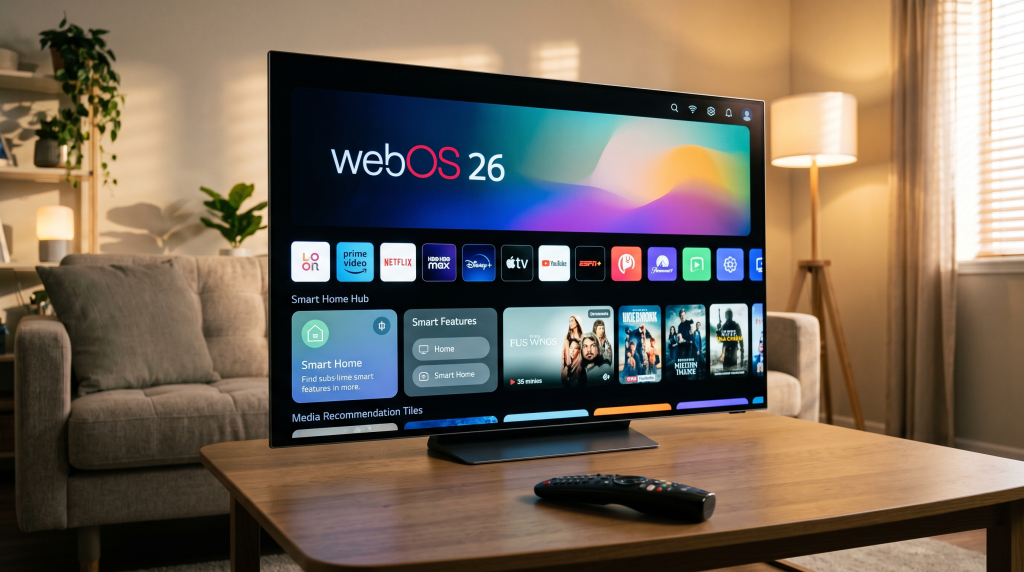
LG webOS 26 is the newest operating system for LG Smart TVs. LG releases a new version of the webOS software every year. This software controls the television interface, streaming applications, and system settings.
Choosing a television with a modern operating system is important. The operating system determines how fast the television responds and which applications you can install. LG webOS 26 introduces important improvements for television viewers in 2026. These improvements include faster menus, better artificial intelligence integration, and a redesigned smart home hub.
This guide explains everything you need to know about LG webOS 26. We will discuss the new features, the compatible television models, and the performance for streaming applications. We will also explain how LG webOS 26 works with IPTV services from TV Shadow IPTV.
Quick Answer
LG webOS 26 is a very fast and capable Smart TV operating system. The software provides excellent support for major streaming applications and popular IPTV players. LG webOS 26 is the best choice for users who want a simple television interface and five years of guaranteed software updates. However, users who specifically want to install native Android applications should consider a television with Google TV instead.
What is LG webOS 26?
LG webOS 26 is the central software that powers LG televisions in 2026. The operating system acts as the brain of the television.
When you press the Home button on an LG remote control, you see the webOS interface. This interface displays your installed applications, television settings, and recommended movies. LG webOS 26 is built on a Linux foundation. This Linux foundation means that LG webOS 26 cannot install Android application files directly.
Instead, LG uses a dedicated application store called the LG Content Store. The LG Content Store contains thousands of applications that are specifically optimized for LG televisions.
Which LG TVs Support webOS 26?
LG provides the webOS 26 software on all new television models released in 2026. This includes the new LG OLED C6, LG OLED G6, and LG QNED television series.
However, LG also offers the software to older televisions through the LG webOS Re:New program. The LG webOS Re:New program guarantees four major software upgrades over a period of five years.
The following television generations will receive the LG webOS 26 update:
2026 LG TVs: These models have webOS 26 installed from the factory.
2025 LG TVs: These models receive the webOS 26 update in late 2026.
2024 LG TVs: These models will receive the webOS 26 update.
2023 LG TVs: These models will receive the webOS 26 update.
2022 LG TVs: These models will receive the webOS 26 update.
The update rolls out gradually. High-end OLED models usually receive the software update before cheaper LCD models.
If you are comparing television operating systems, our guide to Best Smart TV OS for IPTV in 2026: Tizen vs Google TV vs webOS explains the differences between Tizen, Google TV and webOS.
Best Features in webOS 26
LG has added several new features to webOS 26 to improve the user experience.
Faster Interface Performance
LG webOS 26 responds much faster than older software versions. Menu navigation is smooth. Applications open quickly. This speed improvement makes the television more pleasant to use daily.
Redesigned Home Hub
The Home Hub is the central menu for smart home devices. LG has integrated technology from a company named Homey. This integration allows the LG television to control many different smart home devices directly from the television screen.
Google Gemini Integration
LG has integrated Google Gemini into webOS 26. Google Gemini is an advanced artificial intelligence assistant. You can use the microphone in the LG Magic Remote to ask questions, search for movies, or change television settings using natural voice commands.
Kids Mode
LG webOS 26 includes a dedicated Kids Mode. Parents can use Kids Mode to restrict access to certain applications and filter adult content. This feature makes the television safer for children.
LG webOS 26 vs LG webOS 25 Comparison
If you already own an LG television from 2025, you might wonder how the new software compares to the old software.
| Feature | LG webOS 25 | LG webOS 26 |
| Release year | 2025 | 2026 |
| Artificial Intelligence | Basic LG voice control | Google Gemini integration |
| Smart home control | Basic LG ThinQ support | Advanced Homey integration |
| Interface speed | Standard performance | Faster menu navigation |
| Child protection | Standard parental controls | Dedicated Kids Mode |
Is LG webOS 26 Good for IPTV?
Many users want to know if LG webOS 26 is suitable for IPTV streaming. The short answer is yes. LG webOS 26 is an excellent operating system for IPTV.
IPTV App Availability
The LG Content Store contains many excellent IPTV players. Popular applications like IBO Player Pro, Easy IP TV, and SmartOne IPTV are fully compatible with LG webOS 26. These applications allow you to enter an M3U link or Xtream Codes API details.
Performance and EPG
IPTV performance on LG webOS 26 is very strong. Modern LG televisions process large IPTV playlists quickly. The Electronic Program Guide (EPG) loads smoothly without freezing the television.
The LG Magic Remote
The LG Magic Remote acts like a computer mouse on the television screen. This remote control makes it very easy to navigate complicated IPTV menus and select specific channels.
Limitations
LG webOS 26 does have one limitation for IPTV users. You cannot use the popular application TiviMate. TiviMate only works on Android TV and Google TV devices. However, the available LG applications offer very similar features.
If you are deciding between brands, read our comparison: Samsung vs LG Smart TV for IPTV: Tizen vs webOS].
Watching Live Football on webOS 26
LG televisions with webOS 26 are excellent for watching live football and other fast sports.
Motion Handling
Fast sports require a television that handles motion well. LG OLED televisions with webOS 26 have a nearly instantaneous response time. This fast response time means the football moves smoothly across the screen without a blurry trail behind it.
High Refresh Rates
Many premium LG televisions with webOS 26 feature a 120Hz or 144Hz refresh rate. A high refresh rate updates the picture very quickly. This feature creates a very sharp image during fast camera movements.
Stable Connections
For the best live football experience, always connect your LG television to your internet router using an Ethernet cable. A wired Ethernet connection is much more stable than a Wi-Fi connection. A stable connection prevents the football stream from freezing during an important moment.
Conclusion
LG webOS 26 is a significant improvement for LG Smart TVs. The software provides a faster interface, smart home improvements, and excellent artificial intelligence features. The LG webOS Re:New program ensures that millions of older televisions will also benefit from these upgrades.
For users interested in streaming, LG webOS 26 offers fantastic application support. The LG Content Store provides easy access to Netflix, YouTube, and the best IPTV players. When you combine this powerful software with a premium service from TV Shadow IPTV, you get a premium entertainment experience.
FAQ
Can I install Android apps on LG webOS 26?
No, you cannot install Android applications on LG webOS 26. LG televisions use a different operating system. You must download applications from the official LG Content Store.
Will my 2023 LG TV get the webOS 26 update?
Yes, LG televisions from 2023 are part of the LG webOS Re:New program. The television will eventually receive the webOS 26 update, but the update may not arrive until late 2026 or early 2027.
Does TV Shadow IPTV work on LG webOS 26?
Yes, you can use TV Shadow IPTV services on an LG television. You simply need to download a compatible IPTV player from the LG Content Store and enter your subscription details.
Is webOS 26 faster than Google TV?
LG webOS 26 and modern Google TV are both very fast. However, many users feel that LG webOS 26 has slightly faster menu navigation because the software is highly optimized for LG hardware.
How do I update to LG webOS 26?
Go to the television settings menu. Select “Support,” then select “Software Update,” and finally select “Check for Updates.” If the webOS 26 update is available for your specific model, the television will download and install the software.