
Finding specific television channels and video-on-demand content is often difficult on Smart TVs. The o3IPTV application solves this problem with a new intelligent search feature. The o3IPTV natural language search allows users to find content using normal words. This search system looks through live television, movies, series, and the Electronic Program Guide (EPG) at the same time. The system ignores spelling mistakes, missing accents, and incorrect word order. This makes finding entertainment much faster. This article explains how the o3IPTV natural language search works and how you can use this tool to improve your television viewing experience.
Quick Answer
The o3IPTV natural language search is a smart search tool inside the o3IPTV media player. Users can search for content using normal, everyday words. The search system scans live television channels, movies, television series, and the Electronic Program Guide. You do not need to type the exact name of a television program. The system ignores missing accents, incorrect spacing, and mixed word order. This makes the search faster and more accurate than a traditional exact-match search system.
How o3IPTV Natural Language Search Works
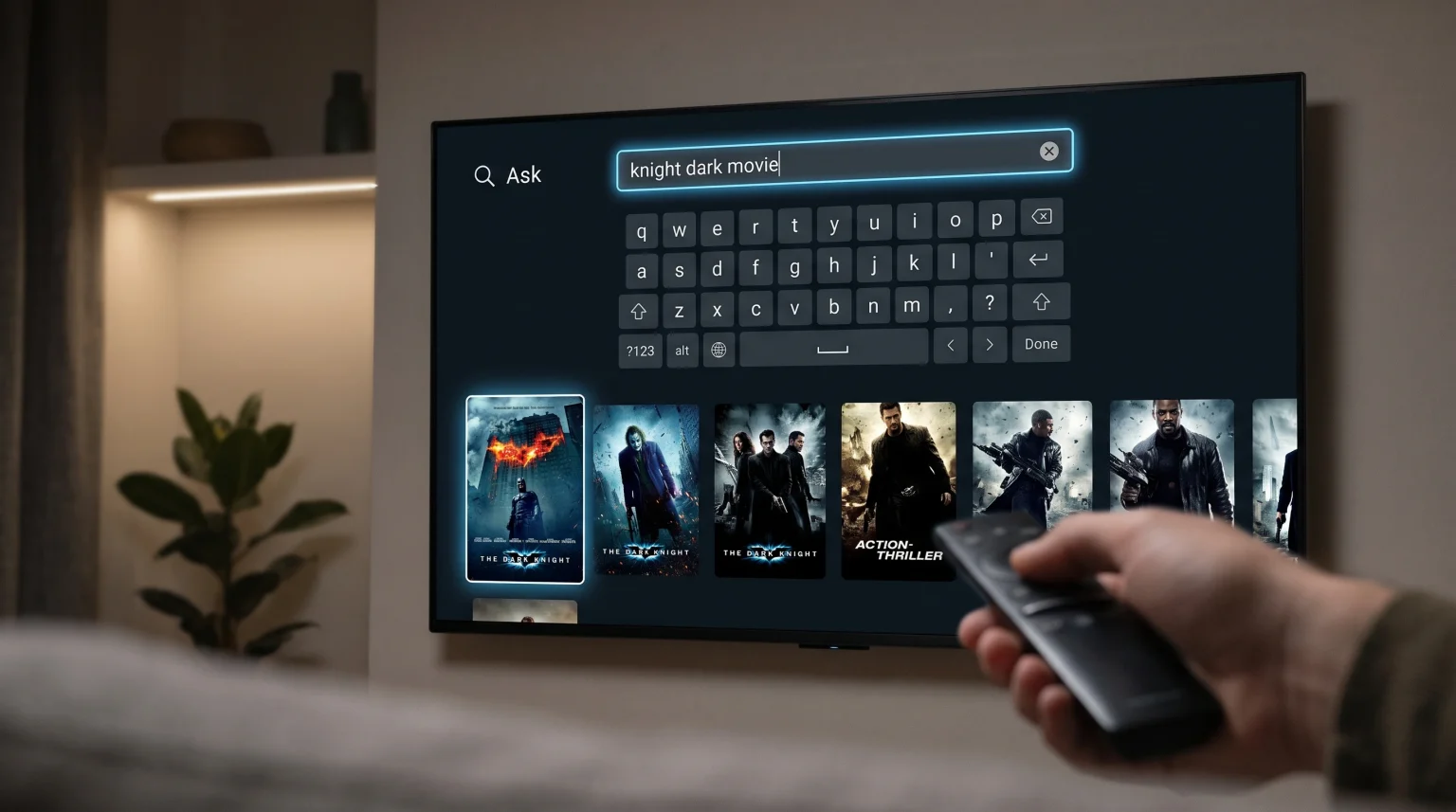
The search feature inside the o3IPTV application is called “Ask”. This tool uses a smart text algorithm to understand user requests. You can type words in any order, and the application will still find the correct result.
For example, if you want to watch the movie “The Dark Knight”, you can type “knight dark movie”. The o3IPTV natural language search will understand your request and display the correct movie.
Ignoring Accents and Special Characters
Many television channels and movies use special characters or accents in their titles. Typing these characters on a television remote control is very slow. The o3IPTV natural language search ignores accents completely. If you search for “sports”, the system will also find results for “SPÖrts” or “Spórts”. This feature saves a lot of time.
Ignoring Incorrect Spacing
Users often make spacing mistakes when typing quickly. The o3IPTV search system ignores incorrect spaces. You can type “sky sports” or “skysports”, and the search results will be exactly the same. The algorithm understands the combined letters.
Standard Search vs Natural Language Search
The table below explains the differences between a traditional Smart TV search and the o3IPTV natural language search.
| Feature | Standard Search | o3IPTV Natural Language Search |
| Word order | Must be exact | Words can be in any order |
| Accents | Requires correct accents | Ignores accents entirely |
| Spacing | Requires correct spacing | Ignores spacing errors |
| Search area | Usually searches titles only | Searches channels, movies, series, and EPG |
| Input method | Requires precise typing | Accepts casual typing |
Searching for Movies and Series
When you connect an IPTV provider to the o3IPTV application, you often receive thousands of movies and television series. Finding a specific video can take a long time in a large list.
The o3IPTV natural language search scans your entire video-on-demand (VOD) library. You can search by movie title, series name, or category. The application shows the results on the screen immediately. Because the application searches across movies and series simultaneously, you do not need to select a specific category before you start typing.
If you are choosing a television for this application, you may want to read our guide about Best Smart TV OS for IPTV in 2026: Tizen vs Google TV vs webOS.
Searching the Electronic Program Guide (EPG)
The o3IPTV application includes full support for an Electronic Program Guide (EPG). The EPG shows the television schedule for the next few days.
The o3IPTV natural language search also scans this EPG schedule data. You can search for a specific television program, even if you do not know which channel broadcasts the program.
If you type “morning news”, the application will show all channels broadcasting morning news right now. The search results update instantly. This feature is excellent because you do not need to scroll through long lists of live television channels manually.
Finding Live Football and Sports
Finding live sports is very important for many IPTV users. The o3IPTV application features a dedicated Sports Hub, but you can also use the text search to find matches quickly.
You can type the name of a football team directly into the search bar. The o3IPTV natural language search will find live channels showing that specific team. The application algorithm recognizes team nicknames and short codes. For example, you can search for “Man Utd” instead of typing “Manchester United”. The search results will show the correct live television channels immediately.
For the best sports viewing experience, hardware is also important. You can learn more in our article about choosing 60Hz vs 120Hz TV for Live Football.
IPTV Compatibility and Setup
To use the o3IPTV natural language search, you need an active IPTV playlist. o3IPTV is a standalone media player. The o3IPTV application does not provide any media content, movies, or live channels.
Xtream Codes API
You must add your own IPTV sources to the application. The o3IPTV application supports the Xtream Codes API. The Xtream Codes system allows the application to download your live channels, movies, and EPG data efficiently.
Once the application downloads the data, the o3IPTV natural language search indexes everything locally on your device. This local index means the search function works very fast.
Cross-Device Synchronization
The o3IPTV application synchronizes your data across multiple devices. If you use the application on a Smart TV and a smartphone, your search history and favorite channels synchronize automatically. This cloud synchronization ensures that you can always find your preferred content quickly, regardless of which device you use.
Conclusion
The o3IPTV natural language search makes finding television channels and movies very easy. The search system ignores bad spelling, missing accents, and incorrect spaces. This flexibility is very useful when you use a Smart TV remote control. By connecting an Xtream Codes account, you can search your entire IPTV playlist in seconds. The system even recognizes football team nicknames. The o3IPTV natural language search is an excellent tool for navigating large IPTV subscriptions quickly and efficiently.
Frequently Asked Questions
Does o3IPTV natural language search require an internet connection?
Yes. You need an internet connection to stream media and synchronize data. However, the search index is saved on your local device. This local index makes the text search extremely fast.
Can I search for television series episodes?
Yes. The o3IPTV natural language search scans series titles and individual episode titles. You can type specific words from an episode description, and the application will find the episode.
Does the search work with Xtream Codes?
Yes. The o3IPTV application is built specifically to work with the Xtream Codes API. The search feature scans all the categories and data provided by your Xtream Codes connection.