
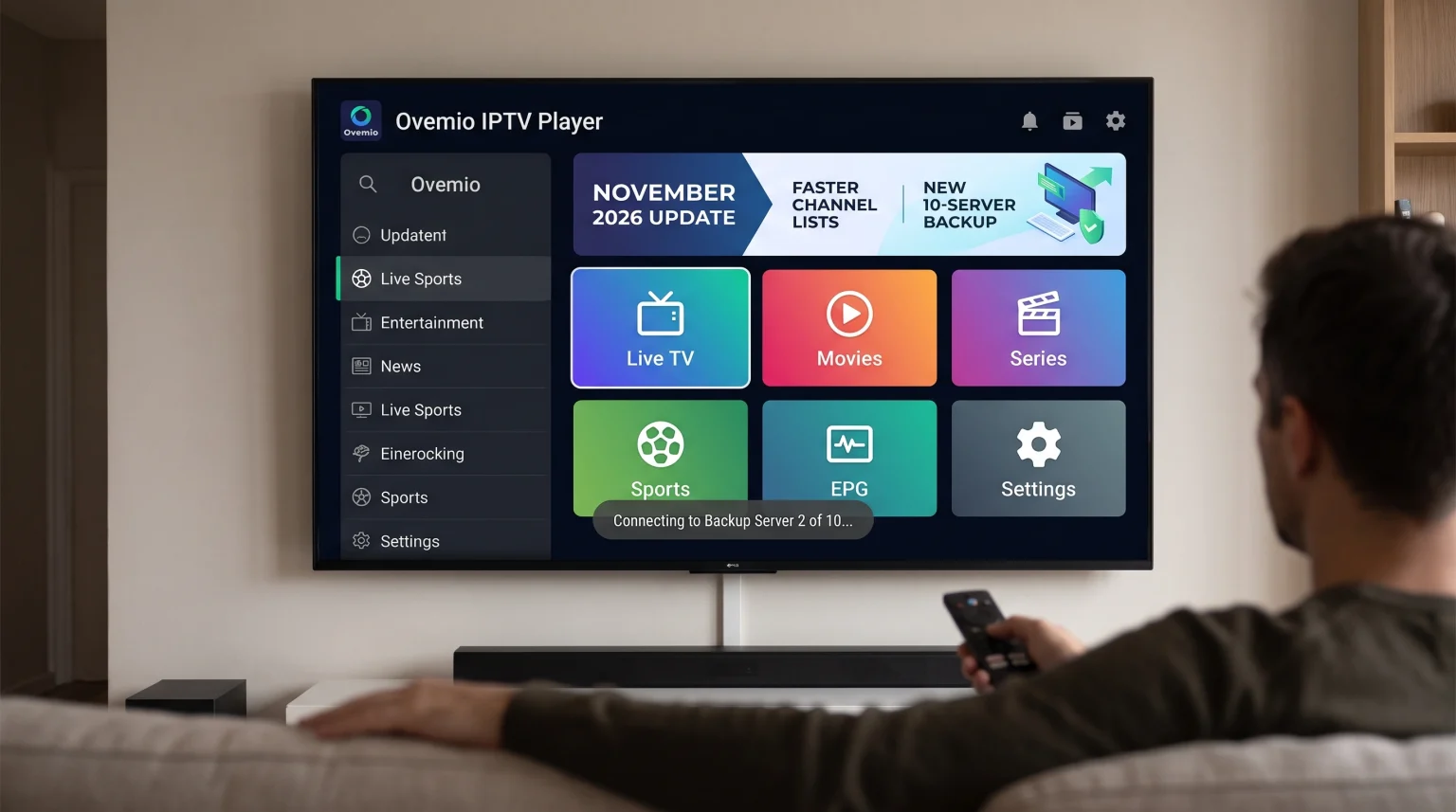
The Ovemio IPTV Player November 2026 update introduces significant improvements for streaming users. This software update provides faster channel lists, better video buffering, and improved user profile management. The developers have added the ability to save up to 10 server addresses for a single playlist. This change helps users maintain a stable connection if the main server goes offline. Ovemio also improved the built-in support chat and fixed a software bug that deleted user profiles on new devices. This article explains the new features, examines the live football capabilities, and shows how the Ovemio IPTV November 2026 update improves the viewing experience.
Quick Answer
The Ovemio IPTV November 2026 update is a major software release that improves connection stability and menu speed. The most important new feature is the support for 10 backup server addresses per playlist. The application also includes an intelligent self-regulating buffer to prevent playback interruptions. For new users, Ovemio provides a fast interface with automatic updates. For advanced users, the player offers deep profile customization and built-in VPN support for Android devices. The software remains a neutral media player and does not provide streaming content itself.
What Is New in the Ovemio IPTV November 2026 Update?
The Ovemio IPTV November 2026 update focuses heavily on streaming stability and interface speed. The application now manages server connections much more efficiently than previous versions.
Support for 10 Server Addresses
Previous versions of the Ovemio application allowed users to enter two extra server addresses. The new November 2026 update allows up to nine extra server URLs alongside the main URL. This means you can save 10 addresses in total. If the main server address goes offline for more than 20 seconds, the application automatically connects to the next available address. This feature ensures uninterrupted streaming when you use an IPTV provider that offers multiple backup servers.
Faster Channel Lists and Support Chat
The application now loads television channel lists much faster. When an IPTV provider updates a server address remotely, Ovemio changes only that specific address in your settings. The application keeps your username, password, and other custom settings. This makes the automatic update process completely unnoticeable for the user.
The built-in support chat also synchronizes faster. The software now checks a small text file on the server instead of continuously asking the server for new messages. This reduces network traffic and displays support messages instantly.
Interface Improvements
The user interface has a new tile design on the start screen. The application now shows exactly six main tiles without unnecessary menus below them. The menu text and the background surfaces now share the same color. This creates a cleaner look, even when you use a custom profile color theme. On desktop computers and tablets, the bottom menu bar now displays the application logo clearly.
Comparing Ovemio IPTV Player and Basic IPTV Apps
Many Smart TV platforms include basic IPTV applications. Ovemio offers more advanced features. This comparison table shows the main technical differences.
| Feature | Ovemio IPTV Player | Basic IPTV Players |
| Server backup addresses | Up to 10 URLs | Usually 1 URL |
| Buffer management | Self-regulating buffer | Manual buffer settings only |
| Profile management | Individual profiles with PIN | Single shared profile |
| Parental controls | Age ratings per profile | Basic channel locking |
| Live sports schedule | Built-in fixtures and scores | Requires external applications |
| Built-in VPN | OpenVPN on Android | No built-in VPN |
The Ovemio IPTV Player is highly suitable for users who want advanced connection settings and multiple user profiles. A basic IPTV application may be more suitable for users who want a very simple setup with only one server URL.
IPTV Compatibility and Features
The Ovemio IPTV Player is highly compatible with modern IPTV services. However, it is a neutral media player. The application does not contain TV channels, films, or playlists. The user must provide their own streaming content.
Playlist Formats and EPG
Ovemio supports Xtream Codes API, M3U playlists, and MAC portal connections. When you add an Xtream Codes account, the application automatically downloads the Electronic Program Guide (EPG). The EPG shows television schedules for up to 26 hours in the future. The application does not support an EPG for standard M3U lists or MAC portals.
Smart TV Operating Systems
Ovemio is available for Android TV boxes, Android smartphones, Windows computers, and Mac computers with Apple Silicon processors. The application is not currently available natively for Samsung Tizen or LG webOS televisions. If you want to use this application, you must connect an external Android TV box. If you want to learn more about TV software, read our guide on Best Smart TV OS for IPTV in 2026.
Built-in VPN Support
The Android version of Ovemio includes a built-in VPN feature. Users can configure up to three OpenVPN accounts directly inside the application. You can switch the VPN on and off without installing a separate VPN application on your Android TV box. The Windows version of Ovemio does not include this feature and uses your standard Windows VPN settings instead.
Easy Device Setup via QR Code
Typing long passwords with a television remote control is frustrating. Ovemio solves this problem with a simple QR code system. Your television screen displays a QR code for 10 minutes. You can scan this code with the Ovemio application on your Android smartphone. The smartphone sends your login details and license key to the television using an encrypted connection.
Watching Live Football on the Ovemio Player
Live football requires a stable connection and a fast television. The Ovemio IPTV November 2026 update includes excellent specific features for sports fans.
Dedicated Sports Section
Ovemio includes a dedicated sports menu. This section shows upcoming fixtures for football, basketball, ice hockey, Formula 1, and darts. The application displays matches up to eight days in the future. The application links a match to a TV channel only if your IPTV provider includes that specific match in the EPG. The application also receives live football score updates every two minutes.
Motion Handling and Buffering
Live football broadcasts often suffer from buffering issues. Ovemio uses a self-regulating buffer. If the video stream stutters, the application automatically increases the buffer size to gather more data. If the stream plays perfectly for 12 minutes, the application reduces the buffer size again. This automatic adjustment is excellent for live sports.
However, the final picture quality also depends heavily on your television hardware. A television with a fast screen will display fast-moving footballs much better than a basic television. You can learn more in our comparison between a 60Hz vs 120Hz TV for Live Football. To find the best hardware, you can also explore the Best Smart TVs for IPTV in 2026: Samsung, Sony, LG & TCL Compared.
Performance and Picture Adjustments
Ovemio includes a built-in hardware performance test. The application measures your device memory, processing power, and interface smoothness in about one minute. It gives your streaming device a grade from “Weak” to “Very good”.
If you use a weak Android TV box, Ovemio automatically adjusts the graphics. It scales down visual effects, such as the transparent glass design menus, to maintain speed. You can also adjust the picture size manually. If your television cuts off the edges of the video, you can set a custom screen margin in the settings. This keeps all menus and buttons visible on your screen.
Profile Management and Parental Controls
The new update fixes a major profile bug. Previously, installing Ovemio on a new device could accidentally delete all user profiles. The November 2026 update completely resolves this problem.
You can create multiple profiles in Ovemio. Each profile has its own color theme, language, and viewing history. Parents can set strict age ratings for children’s profiles. A child profile will only show films and television series that match the approved age limit. Users can also lock adult channels behind a secure four-digit PIN code.
How to Update Your Application
Ovemio handles software updates internally. You do not need to use the Google Play Store or another application store. When a new update is available, the application displays a notification on the screen. You can install the update directly using your television remote control. This system ensures that all users receive the Ovemio IPTV November 2026 update quickly and easily.
Conclusion
The Ovemio IPTV November 2026 update brings important technical upgrades to a very capable media player. The new self-regulating buffer and the expanded 10-server backup system make live streaming much more reliable. The software interface is now cleaner, faster, and better optimized for weak hardware. Ovemio is an excellent choice for Android TV users who want deep profile customization and built-in sports tracking. However, Samsung and LG television owners will still need an external Android device to use this player. Overall, the November update secures Ovemio’s position as a premium choice for managing your IPTV content.
Frequently Asked Questions
Does the Ovemio IPTV Player include TV channels?
No, the Ovemio IPTV Player does not include any TV channels, sports streams, or movies. It is strictly a media player. You must purchase an IPTV subscription from a third-party provider and add your own login details.
What is the main benefit of the November 2026 update?
The main benefit is the ability to add up to 10 server URLs. This prevents playback interruptions if your primary IPTV server stops working. The application will automatically switch to a backup server.
Can I use Ovemio natively on a Samsung Smart TV?
No, Ovemio is not available for Samsung Tizen operating systems. To use Ovemio on a Samsung television, you must connect an external Android TV streaming device. For more details on Samsung compatibility, read our article about Is Samsung Tizen Good for IPTV in 2026?.