
Samsung Tizen OS is the official operating system for all modern Samsung Smart TVs. Samsung uses this software to control the television menu, manage settings, and load applications. When you turn on a new Samsung television, you see the Tizen user interface on the screen. This system allows you to download streaming applications, change picture settings, and connect external devices.
Many buyers choose Samsung televisions because they offer bright screens and clear menus. However, users often want to know how this specific operating system works with IPTV services. Because Samsung does not use Android, the application process is different. This article explains the features of Samsung Tizen OS. We will also explain how you can use IPTV applications on a Samsung Smart TV.
Quick Answer
Samsung Tizen OS is a closed operating system developed specifically for Samsung televisions. For IPTV users, Samsung Tizen offers a good selection of official IPTV player applications directly in the Samsung App Store. You cannot install Android applications from the Google Play Store on a Samsung television. However, you can download dedicated Tizen IPTV applications to enter your M3U playlists or Xtream Codes. Samsung Tizen is very fast and stable, but it offers less flexibility for manual application installation compared to Google TV.
Understanding Samsung Tizen OS
Samsung Tizen is an operating system based on Linux. Samsung designs this software exclusively for its own television hardware. Because Samsung controls both the hardware and the software, the television operates very smoothly.
The main feature of Samsung Tizen OS is the Smart Hub menu. On most Samsung models, this menu appears as a horizontal bar at the bottom of the screen. You can scroll through your installed applications without closing the video you are currently watching.
Samsung regularly updates Tizen OS. Newer television models receive the latest software versions. These updates improve security and add new menu features. However, Samsung usually does not upgrade older televisions to the newest major version of Tizen. Therefore, a Samsung television from 2022 will have a slightly different menu than a Samsung television from 2026.
How Does Samsung Tizen Work for IPTV Applications?
Using IPTV on a Samsung Smart TV requires an IPTV player application. Samsung Tizen has a closed application ecosystem. This means you can only download applications that Samsung officially approves. You must use the official Samsung App Store.
Fortunately, the Samsung App Store contains many popular IPTV players. You download the IPTV player application first. Then, you add your IPTV subscription details into the application.
Most IPTV players on Samsung Tizen support standard connection methods. These methods include M3U playlist links and the Xtream Codes API. The IPTV application simply acts as a media player. The television itself does not provide any video content. You must use a separate service like TV Shadow IPTV to receive the actual media channels.
If you are researching different television brands, our guide to the Best Smart TV OS for IPTV in 2026: Tizen vs Google TV vs webOS explains the differences between Samsung, Sony, and LG software.
Installing IPTV Apps on Samsung Tizen
The installation process on Samsung Tizen is simple. You do not need technical knowledge to install official applications.
Press the “Home” button on the Samsung remote control.
Navigate to the “Apps” icon on the screen.
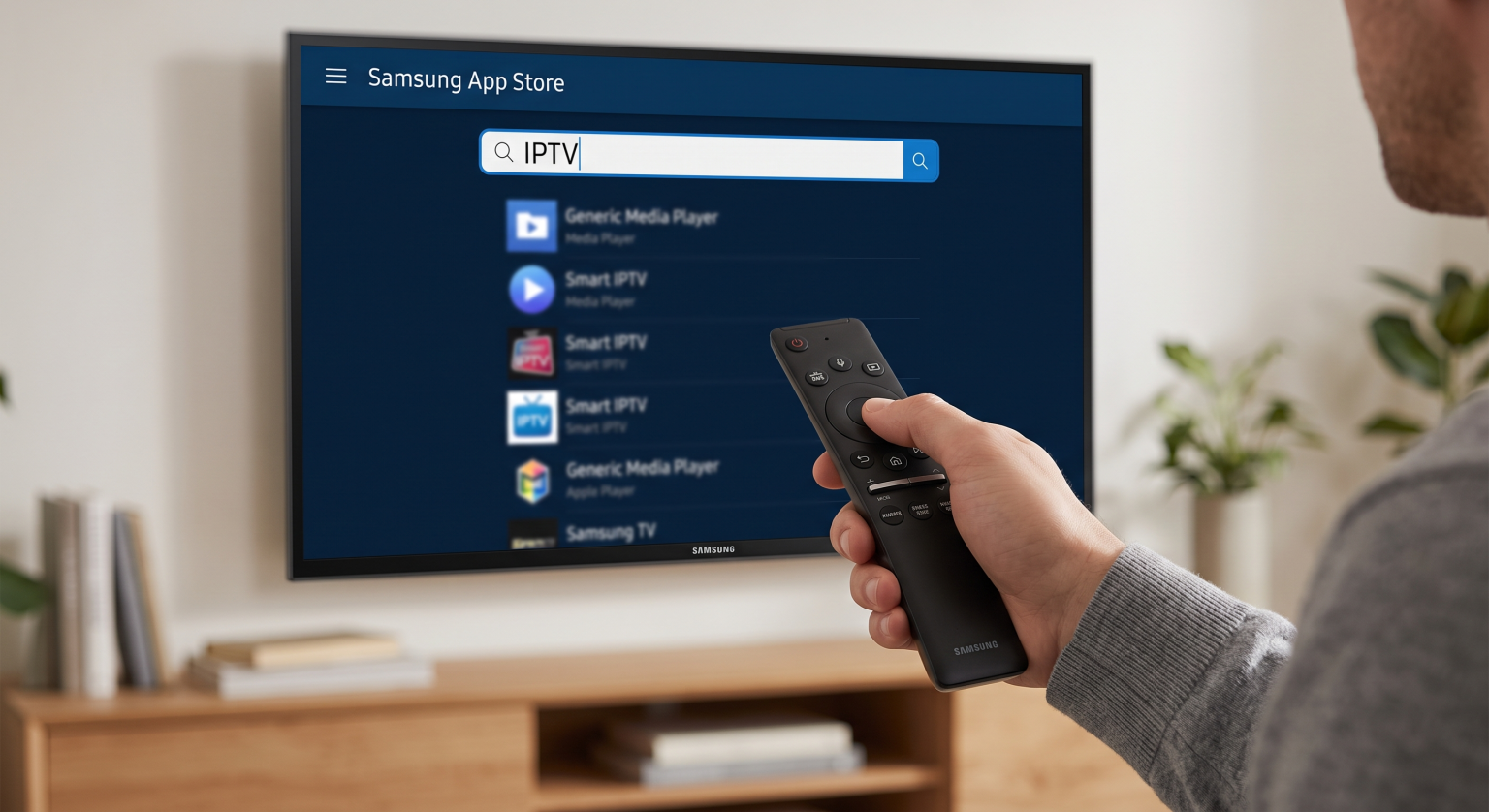
Select the “Search” icon (the magnifying glass).
Type the word “IPTV” using the on-screen keyboard.
Select a highly rated IPTV player from the search results.
Click “Install” to download the application to your television.
After the installation is complete, you open the application and enter your M3U link or Xtream Codes login details. The application will load the Electronic Program Guide (EPG) and the channel list.
Operating System Comparison: Samsung Tizen vs Google TV
To understand how Samsung Tizen OS works, it is helpful to compare it with Google TV. Many buyers choose between Samsung and Sony televisions. Sony televisions use the Google TV operating system.
Here is a simple comparison between the two systems:
| Feature | Samsung Tizen OS | Google TV (Sony, Philips, TCL) |
| Operating System Type | Closed system (Linux-based) | Open system (Android-based) |
| Application Store | Official Samsung App Store | Google Play Store |
| Android App Support | No native support | Full native support |
| Manual App Installation | Very difficult (requires developer mode) | Easy (sideloading APK files) |
| IPTV App Availability | Good selection in the official store | Excellent selection in the official store |
| Menu Speed | Very fast and highly optimized | Good, but can slow down over time |
Samsung Tizen OS is excellent for users who want a simple, fast, and secure television. Google TV is better for users who want maximum freedom to install any Android application. If you want more details on this topic, read our article asking Is Samsung Tizen Good for IPTV in 2026?.
Limitations of Samsung Tizen for IPTV Users
While Samsung Tizen is a powerful operating system, it has some limitations for IPTV users. You must understand these limitations before you buy a Samsung television.
Regional Application Restrictions
Samsung changes the App Store content depending on your country. An IPTV application available in the United Kingdom might not be available in Germany or Sweden. If your favorite IPTV player is not in your local Samsung App Store, you cannot download it normally. You might need to change the entire region setting of the television to find the application.
Difficult Manual Installation
On Android TV devices, you can easily install unofficial applications using an APK file. This process is called sideloading. On Samsung Tizen OS, sideloading is extremely difficult. You cannot use Android APK files. You must use Tizen-specific files, a USB flash drive, and activate a special developer mode on the television. Most standard users will not be able to perform this manual installation. You must rely on the applications that Samsung officially allows.
Watching Live Football on Samsung Tizen IPTV
Many people use IPTV services to watch live sports. Samsung televisions are generally excellent for watching live football. However, the quality of the football match depends on both the television hardware and your network connection.
Motion Handling and Refresh Rates
When watching fast sports like football, the television must update the picture quickly. This prevents the football from looking blurry when it moves across the screen. Modern Samsung televisions have very good motion processing software. However, the hardware is also important. If you watch a lot of sports, you should consider the refresh rate of the television screen. You can learn more in our detailed guide comparing 60Hz vs 120Hz TV for Live Football.
Network Connection Stability
Live IPTV football requires a stable internet connection. Samsung Tizen OS handles network traffic efficiently. However, Wi-Fi connections can lose signal stability, which causes the live football video to stop or buffer. For the best IPTV experience on a Samsung television, you should connect an Ethernet network cable directly from your internet router to the television. A cable connection provides constant speed for high-definition sports streams.
Picture Settings for Sports
Samsung Tizen includes a dedicated “Sports Mode” or special motion settings. These settings make the grass look greener and make the player movements look smoother. For the best IPTV football experience, you should open the Samsung Tizen picture menu. Turn on the “Picture Clarity” or “Auto Motion Plus” setting. This software feature reduces blur during fast camera movements.
Conclusion
Samsung Tizen OS is a fast, reliable, and user-friendly operating system. It works very well for standard television viewers. For IPTV users, Samsung Tizen provides a solid experience. The official Samsung App Store contains enough dedicated IPTV players to connect your M3U playlists and Xtream Codes.
The main disadvantage of Samsung Tizen is the closed ecosystem. You cannot easily install custom applications, and you cannot use Android applications. If you only need a reliable media player for your TV Shadow IPTV subscription, a Samsung television is an excellent choice. However, if you want complete freedom to install any streaming application from the internet, a television with Google TV might be a better option for your specific needs.
Frequently Asked Questions (FAQ)
Can I install Android APK files on Samsung Tizen OS?
No, you cannot. Samsung Tizen does not support Android applications. You can only install applications designed specifically for the Tizen operating system.
Are there good IPTV players in the Samsung App Store?
Yes. The official Samsung App Store includes many well-known IPTV player applications. You will usually find good options by searching for “IPTV” in the application menu.
Does TV Shadow IPTV work on Samsung Tizen?
Yes. TV Shadow IPTV provides standard M3U links and Xtream Codes. You can enter these details into any compatible IPTV player application downloaded from the Samsung App Store.
Why is an IPTV application missing from my Samsung TV?
Samsung controls the application store based on your geographical region. Furthermore, Samsung sometimes removes applications if they violate developer policies. If an application is missing, you must search for an alternative player.
Can I update an older Samsung TV to the newest Tizen version?
Usually, no. Samsung provides security updates for older televisions, but the company rarely updates the main operating system version. A television bought in 2023 will keep the 2023 version of the Tizen menu.
Is an Ethernet cable better than Wi-Fi for Samsung Smart TVs?
Yes. An Ethernet cable provides a much more stable connection than Wi-Fi. This stability is very important for live IPTV streams, especially during live sports broadcasts.