
The Sony BRAVIA 7 II and the Samsung QN90H are two premium Mini-LED televisions released in 2026. Both televisions offer high brightness and advanced picture processing. Many sports fans want to know which television handles live football and fast motion better. This comparison examines the specifications, operating systems, and sports performance of both models. The article also explains how each television works with IPTV applications. Choosing the correct television depends on viewing habits and the brightness of the room.
Quick Answer
The Sony BRAVIA 7 II is the better television for dark rooms and users who prefer the Google TV application ecosystem. The Sony XR Processor provides excellent motion handling for live sports. The Samsung QN90H is the better television for bright rooms. The Samsung television produces higher peak brightness and reduces screen reflections better. The Samsung Tizen operating system offers a fast interface but does not support Google Play applications. Both televisions provide excellent picture quality for live football.
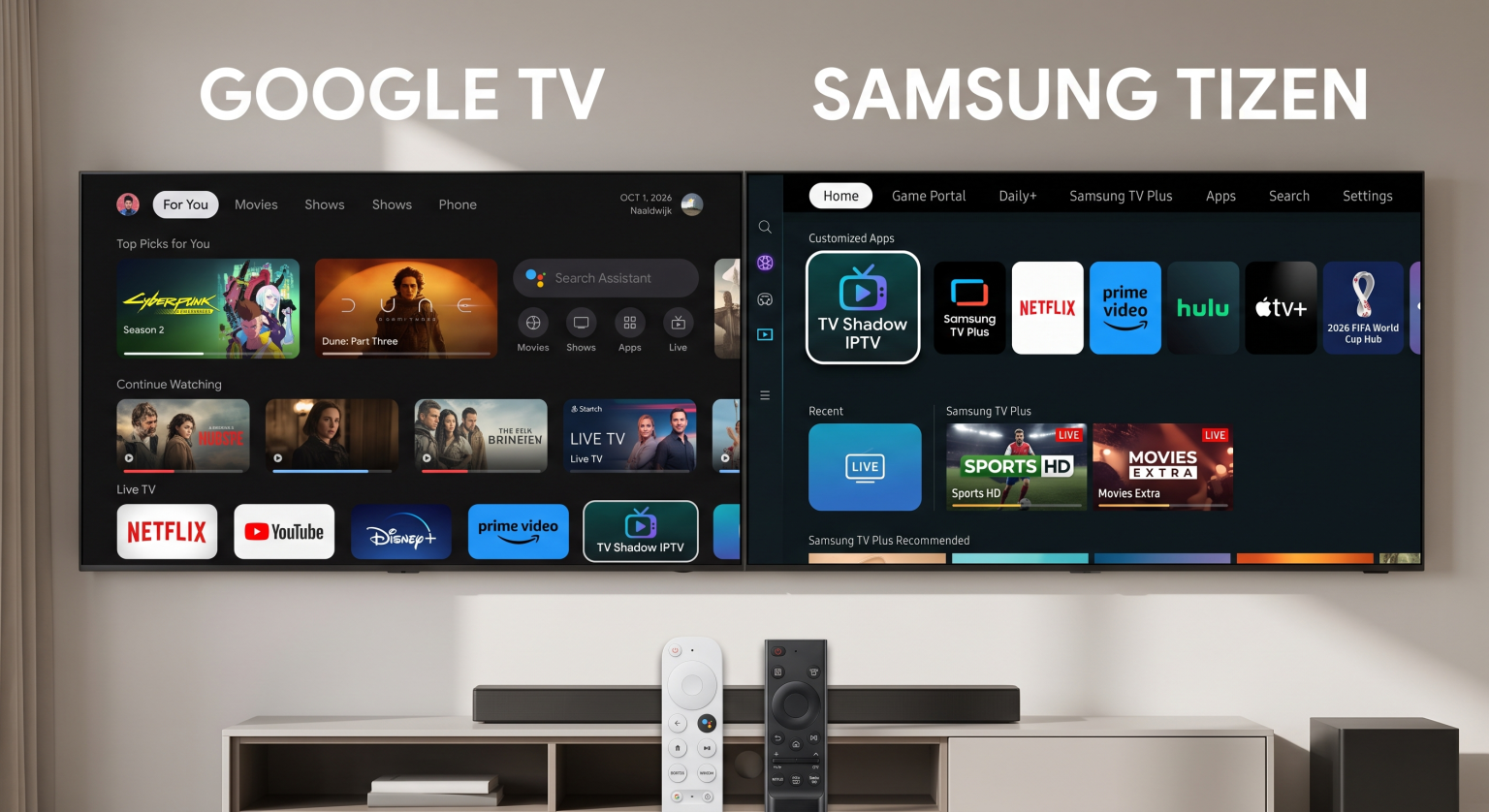
Operating Systems: Google TV vs Samsung Tizen
The Sony BRAVIA 7 II uses the Google TV operating system. Google TV provides access to the Google Play Store. The Google Play Store contains thousands of applications. Users can easily find streaming applications and media players.
The Samsung QN90H uses the Samsung Tizen operating system. Samsung Tizen does not support Android applications. Users must download applications from the official Samsung Apps store. The Samsung interface is fast and very responsive. However, the application selection is smaller than the Google Play Store. If you want to understand the exact software differences, our guide to Samsung Tizen vs Sony BRAVIA Google TV: Which Is Better for IPTV in 2026? explains the operating systems in detail.
Specifications Comparison
The table below compares the main features of the Sony BRAVIA 7 II and the Samsung QN90H.
| Feature | Sony BRAVIA 7 II | Samsung QN90H |
| Panel technology | RGB Mini-LED | Neo QLED (Mini-LED) |
| Operating system | Google TV | Samsung Tizen |
| Application store | Google Play Store | Samsung Apps |
| Maximum refresh rate | 120Hz | 144Hz |
| HDR support | HDR10, HLG, Dolby Vision | HDR10, HLG, HDR10+ |
| Dolby Vision support | Yes | No |
| Best room environment | Dark or medium lighting | Bright lighting |
Picture Quality and HDR Support
Both televisions use Mini-LED backlighting technology. Mini-LED technology uses very small lights behind the screen. These small lights create high contrast and deep black colors.
The Sony BRAVIA 7 II includes Dolby Vision support. Dolby Vision is a High Dynamic Range (HDR) format. Many streaming services use Dolby Vision to improve picture color and brightness.
The Samsung QN90H does not support Dolby Vision. The Samsung television uses HDR10+ instead. The Samsung QN90H produces higher peak brightness than the Sony television. The high brightness makes the Samsung QN90H perfect for watching television during the day.
Live Football Performance
Watching live sports requires smooth motion handling. Fast camera movements can cause blurry pictures on cheap televisions.
The Sony BRAVIA 7 II features a 120Hz (Hertz) screen refresh rate. The television uses the Sony XR Processor. The XR Processor analyzes motion and reduces blur effectively. The sports ball stays clear when the camera moves quickly across the football field.
The Samsung QN90H features a 144Hz screen refresh rate. The Samsung television also handles fast motion very well. The Samsung screen has a special anti-glare coating. The anti-glare coating stops sunlight from ruining the picture during afternoon football matches. If you want to know more about screen speeds, read our article about 60Hz vs 120Hz TV for Live Football.
Internet Connection for Live Sports
Live sports streaming requires a stable internet connection. Both televisions support fast Wi-Fi 5GHz and Wi-Fi 6 connections. Both televisions also include an Ethernet (LAN) port. An Ethernet cable provides a more stable connection than Wi-Fi. A stable connection stops the video from pausing during important sports moments.
IPTV Compatibility for TV Shadow IPTV
Many users connect their televisions to IPTV services. TV Shadow IPTV works on many different devices. However, TV Shadow IPTV does not have an official partnership with Sony or Samsung.
The Sony BRAVIA 7 II is excellent for IPTV. The Sony television uses Google TV. Therefore, users can download many popular IPTV players directly from the Google Play Store. These players support M3U playlists and Xtream Codes. The Google TV Electronic Program Guide (EPG) loads quickly. A fast EPG helps sports fans find match schedules easily.
The Samsung QN90H requires Samsung-specific IPTV applications. The Samsung Apps store contains several good IPTV players. However, some popular Android IPTV applications are not available on Samsung Tizen. Users must check if their favorite IPTV application is available in their local Samsung application store.
Sometimes older video streams look low-quality on modern screens. Our article explaining Why Does IPTV Look Blurry on a New 4K TV? helps users fix picture problems.
Remote Control and Ease of Use
The Sony BRAVIA 7 II includes a backlit remote control. The buttons light up in dark rooms. The Google TV interface recommends content from different streaming services on the home screen.
The Samsung QN90H includes a solar-powered remote control. The Samsung remote control charges itself using indoor room lighting. The remote control does not need replaceable batteries. The Tizen interface places applications in a simple menu at the bottom of the screen.
Conclusion
The Sony BRAVIA 7 II and the Samsung QN90H are excellent televisions for watching live sports. The Sony BRAVIA 7 II provides better motion processing, Dolby Vision support, and more IPTV application choices through Google TV. The Sony television is perfect for users who want accurate cinema colors and easy application installation.
The Samsung QN90H provides incredible brightness, great reflection handling, and a fast 144Hz refresh rate. The Samsung television is the best choice for users who watch afternoon sports in bright rooms. Your choice depends entirely on your room lighting and your preferred smart television operating system.
Frequently Asked Questions
Which television is brighter?
The Samsung QN90H is brighter than the Sony BRAVIA 7 II. The Samsung television uses Neo QLED technology. This technology produces very high peak brightness. The high brightness makes the Samsung QN90H better for rooms with large windows.
Does the Samsung QN90H support Dolby Vision?
No, the Samsung QN90H does not support Dolby Vision. Samsung televisions use a different High Dynamic Range (HDR) format called HDR10+. The Sony BRAVIA 7 II does support Dolby Vision.
Can I install Android applications on the Samsung QN90H?
No, you cannot install Android applications on the Samsung QN90H. The Samsung television uses the Tizen operating system. Tizen does not use the Google Play Store. You must buy the Sony BRAVIA 7 II if you want Android applications.
Is a 120Hz television good for live football?
Yes, a 120Hz television is excellent for live football. A 120Hz screen refreshes the picture 120 times every second. The fast refresh rate keeps the football and the players looking sharp during fast camera movements.
Can I use TV Shadow IPTV on these televisions?
Yes, you can use TV Shadow IPTV on both televisions. You need to download a compatible IPTV player application from the television’s application store. The Sony Google TV store has more application options than the Samsung Tizen store.
Which television has better viewing angles?
The Samsung QN90H provides wider viewing angles than the Sony BRAVIA 7 II. Wide viewing angles mean the picture looks good when you sit to the side of the television. The Samsung QN90H is better if many people watch a football match together in a wide room.
How do I install applications on these televisions?
On the Sony BRAVIA 7 II, you open the Google Play Store application and search for the application name. On the Samsung QN90H, you open the Samsung Apps store from the home screen menu and search for the application name. Both televisions require an internet connection to download applications.