
Modern 4K televisions contain over eight million pixels. However, many video sources do not provide 4K video content. If you watch a standard high-definition (HD) video on a 4K television, the television must fill the empty pixels. This technical process is called TV upscaling.
Users often ask how this technology affects their streaming experience. Most live television streams transmit video in 720p or 1080p resolution. Because these resolutions are much lower than 4K, your television must use an upscaling process to display the image across the entire screen.
This article explains how TV upscaling works. It also explains how television processors affect video quality when you use TV Shadow IPTV or other streaming platforms.
Quick Answer
TV upscaling is a software process inside a television. This process increases the resolution of a low-resolution video signal. The television creates new pixels to make the small video fit a larger, high-resolution screen.
TV upscaling IPTV streams is necessary because most live television broadcasts are 720p or 1080p. If your 4K television has a high-quality upscaling processor, the IPTV stream will look sharper and clearer. However, upscaling cannot fix a heavily compressed or broken video signal. The source video must have adequate quality for the upscaling process to work well.
How TV Upscaling Works
To understand TV upscaling, you must understand television resolution. Resolution refers to the number of individual pixels on a television screen.
A 1080p television screen has approximately two million pixels. A 4K television screen has approximately eight million pixels.
If you send a 1080p video signal to a 4K television, the video only has enough data to fill one quarter of the television screen. If the television did not have an upscaling process, the video would appear as a small box in the center of the screen. The rest of the screen would be black.
To solve this problem, the television stretches the image. The television processor analyzes the original pixels and generates new pixels to fill the empty space. This process happens instantly.
Basic Upscaling vs AI Upscaling
Different televisions use different methods to upscale the image.
Older or cheaper televisions use basic upscaling. Basic upscaling simply copies the colors of the nearest pixels. This basic method fills the screen, but it can make the final picture look soft or blurry.
Modern premium televisions use Artificial Intelligence (AI) upscaling. AI upscaling uses powerful processors. These processors analyze the textures, edges, and colors in the video. The processor then adds fine details that did not exist in the original video signal. This advanced method creates a much clearer image.
Comparison Table: Upscaling Methods
| Feature | Basic Upscaling | AI Upscaling |
| How it works | Copies nearby pixel colors | Analyzes the image and recreates lost details |
| Processor requirement | Basic television processor | Advanced television processor |
| Image sharpness | Often soft or slightly blurry | Very sharp and clear |
| Edge detection | Poor | Excellent |
| Best used for | Small televisions | Large 4K and 8K televisions |
Does TV Upscaling Help IPTV?
Yes, TV upscaling provides a major benefit for IPTV users.
When you use TV Shadow IPTV or another IPTV service, you stream live television channels over the internet. Broadcasters around the world usually transmit live television channels in 720p or 1080p resolution. True 4K live television broadcasts are very rare, even on traditional cable television networks.
Because most IPTV content is 1080p or 720p, your 4K television must always upscale the video.
If you buy a high-quality television with excellent AI upscaling, your 720p and 1080p IPTV streams will look much better. The television will remove digital noise. The television will also make text, faces, and small details look sharp.
If you use a very cheap television with poor upscaling, the exact same IPTV stream will look blurry or blocky. If you want to understand more about video compression and source quality, you can read our guide explaining Why Does IPTV Look Blurry on a New 4K TV?.
Which TV Brands Offer the Best Upscaling?
Television manufacturers use different software and processors for upscaling. The quality of the upscaling processor is a very important factor when you buy a new television for IPTV.
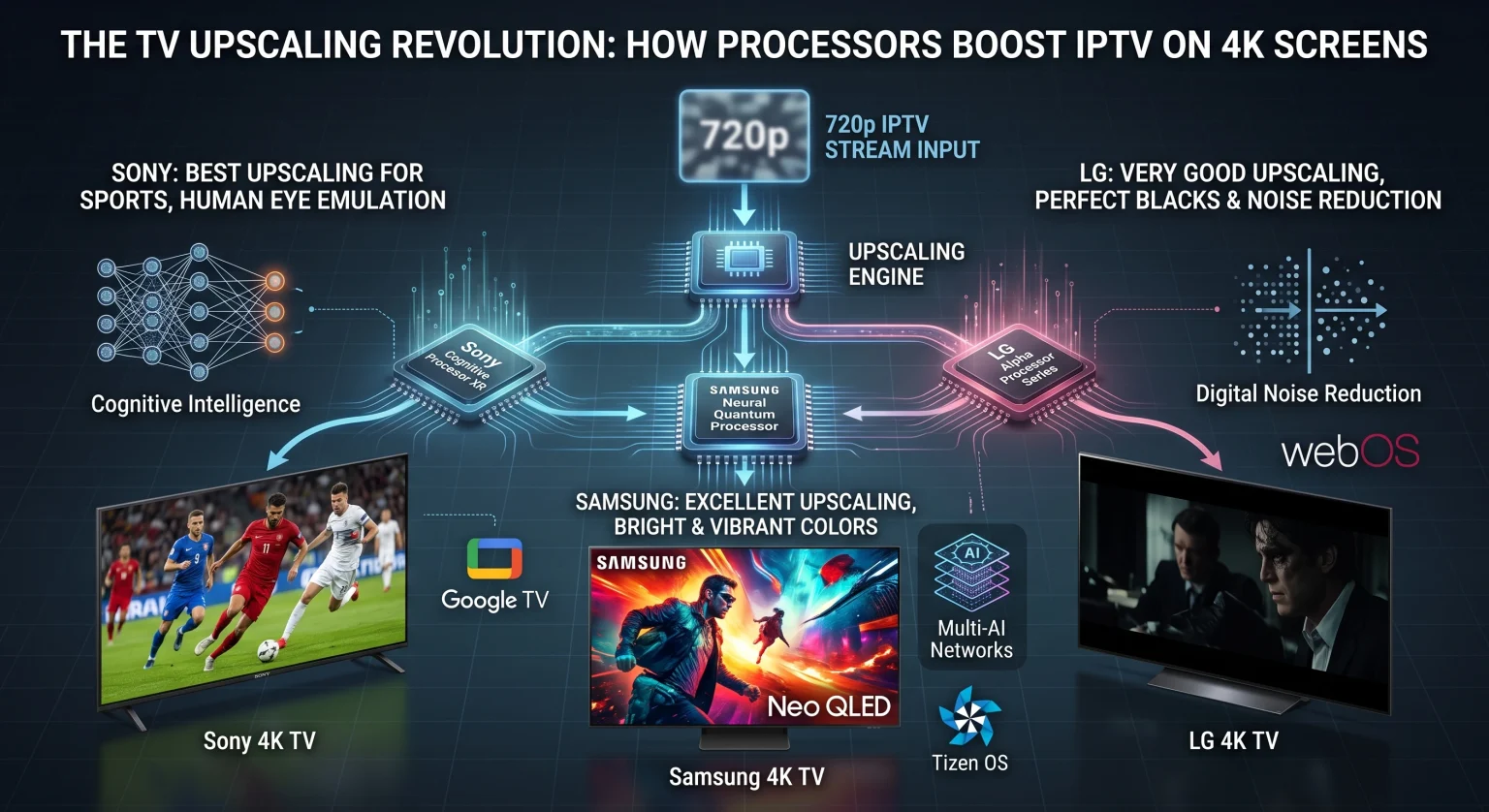
Sony BRAVIA
Many independent testers consider Sony to have the best upscaling technology on the market. Sony uses the Cognitive Processor XR in its premium television models. This processor analyzes the video signal in the same way that a human eye sees the world. Sony televisions are excellent at upscaling low-quality 720p sports streams into sharp 4K images. Sony televisions use the Google TV operating system, which is highly compatible with most IPTV applications.
Samsung
Samsung also provides excellent upscaling, especially on its Neo QLED television models. Samsung uses Neural Quantum Processors. These processors use multiple AI networks to enhance the picture. Samsung upscaling produces very bright and vibrant colors. Samsung televisions use the Tizen operating system. Samsung Tizen requires specific IPTV applications from the Samsung App Store.
LG
LG uses the Alpha processor series for TV upscaling. LG OLED televisions offer very good upscaling performance, particularly for dark movie scenes. The LG processor removes digital noise effectively. LG televisions use the webOS operating system. Like Samsung, LG users must download IPTV applications directly from the LG Content Store.
If you are planning to purchase a new television, you can read our complete comparison of the Best Smart TVs for IPTV in 2026: Samsung, Sony, LG & TCL Compared.
TV Upscaling for Live Football and Sports
Live football is a very popular reason to use IPTV. Watching live football requires more than just high resolution. It also requires excellent motion handling.
When a camera moves quickly across a football pitch, the television must process the moving image perfectly. If the television processor is weak, the football will look blurry when it moves through the air. This problem is called motion blur.
TV upscaling and motion handling work together. When you watch a 720p live football stream, the television must upscale the resolution and smooth the fast movement at the exact same time.
Premium televisions from Sony, Samsung, and LG handle this dual task very well. To get the best results for live football, you should look for a television with a high-quality upscaling processor and a 120Hz display panel. If you do not know which panel to choose, read our guide explaining the differences between 60Hz vs 120Hz TV for Live Football.
How to Get the Best Picture for Live Football
Use an Ethernet cable: Connect your television directly to your router using a network cable. Wi-Fi connections can fluctuate. Ethernet provides a stable connection. A stable connection ensures the IPTV stream maintains its maximum resolution.
Adjust picture settings: Turn off “Eco Mode” or “Energy Saving Mode” on your television. These modes make the screen dark.
Use Sports Mode carefully: Many televisions have a “Sports” picture setting. Sometimes this setting makes the green grass look unnatural. You may prefer the “Standard” or “Cinema” picture setting instead.
Limitations of TV Upscaling
TV upscaling is a powerful technology, but it has limits.
The television processor needs a reasonable amount of data to create a good picture. If an IPTV stream has a very low bitrate (which means the video file contains very little data), the television cannot fix it.
If a video source is heavily compressed, it will contain blocky artifacts. When the television tries to upscale a heavily compressed video, it will also upscale the blocky artifacts. This makes the bad picture look worse.
Therefore, a high-quality IPTV provider with stable servers is essential. TV Shadow IPTV recommends using a fast internet connection (minimum 30 Mbps) to ensure you receive the highest possible video bitrate. The combination of a high-bitrate stream and a good television upscaling processor produces excellent results.
Conclusion
TV upscaling is an essential feature for modern televisions. Because most live television channels and IPTV streams transmit in 720p or 1080p, your 4K television must upscale the image to fill the screen.
If you want the best possible picture quality when using TV Shadow IPTV, invest in a television with a powerful processor. Sony, Samsung, and LG produce excellent processors that use AI to make lower-resolution streams look incredibly sharp. Remember that TV upscaling works best when it receives a stable, high-bitrate video signal. Always use a wired Ethernet connection to ensure your stream maintains the highest possible quality before the television processor begins its work.
Frequently Asked Questions (FAQ)
Does TV upscaling use more internet data?
No. TV upscaling happens entirely inside the television hardware. The television processes the video signal after the video arrives via the internet. Upscaling does not consume any extra internet bandwidth.
Can upscaling make a 720p stream look exactly like true 4K?
No. While AI upscaling can make a 720p stream look much sharper and clearer, it cannot perfectly recreate the detail of a true 4K video source. A true 4K video contains real data for every pixel. Upscaling only predicts the missing pixels.
Can I turn off TV upscaling?
No. If you watch a 1080p video on a 4K television, the television must upscale the video. If the television did not upscale the video, the image would only fill a small square in the middle of your screen.
Does TV upscaling cause input lag during gaming?
Yes, standard upscaling can create a small delay because the processor needs time to analyze the image. However, modern televisions have a “Game Mode”. Game Mode bypasses heavy AI processing to ensure the television responds instantly to your controller. You should not use Game Mode for watching IPTV.
Does TV Shadow IPTV provide 4K streams?
The availability of 4K streams depends on the original broadcaster. Most live television channels broadcast in 1080p or 720p worldwide. When true 4K broadcasts are available for specific sports events, compatible IPTV services can transmit them. However, standard channels will always require TV upscaling on a 4K television.