
Multiview allows viewers to watch multiple live broadcasts on the same television at the same time. Many users successfully use multiview to watch two live events side by side. However, when users try to add a third or fourth screen, the IPTV application often crashes, freezes, or displays a black screen.
This failure happens because video streaming requires specific hardware resources and server permissions. Displaying multiple live video streams consumes a large amount of device memory, processing power, and internet bandwidth. Most standard televisions and streaming devices are not built to process four high-definition video streams simultaneously.
Quick Answer
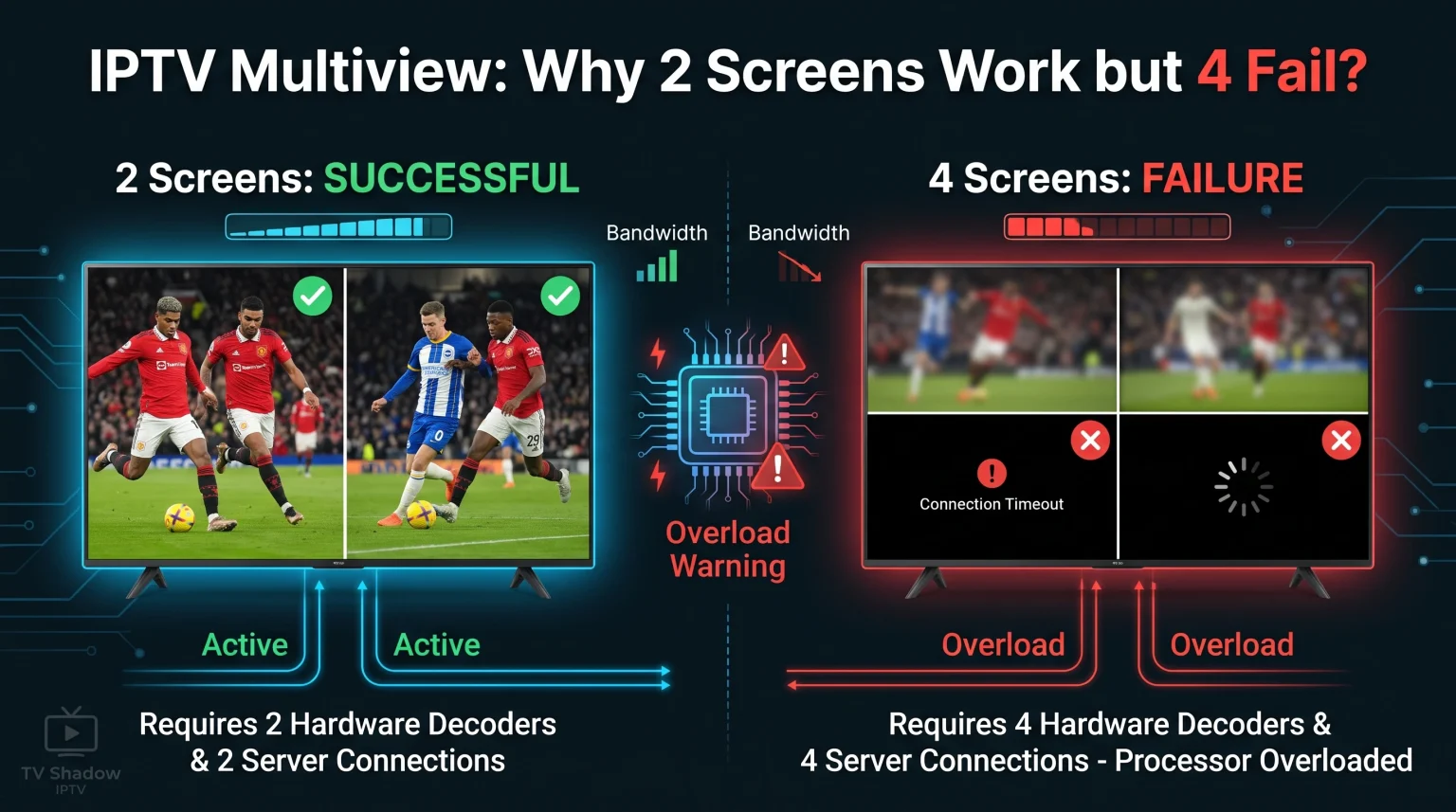
Using IPTV multiview four screens often fails due to three main reasons: hardware decoding limits, subscription connection limits, and internet bandwidth. To display four live video streams at the same time, the streaming device must have four hardware video decoders. Most Smart TVs only have enough processing power to decode two streams. Additionally, opening four screens requires four simultaneous connections from your IPTV provider. If your subscription only allows two connections, the extra screens will fail to load or the server will block your account.
Understanding Video Decoding and Hardware Limits
Every time you open a live video stream, your television or streaming device must decode the video signal. This process is called hardware decoding.
The processor inside your Smart TV or Android box contains specific chips designed for video decoding. Most modern Smart TVs from Samsung, LG, and Sony are designed to decode one 4K video stream or two 1080p video streams at the same time.
When you use multiview with two screens, the television processor uses two hardware decoders. The device can manage this task successfully. When you try to open four screens, the television requires four hardware decoders. Because the television processor does not have four decoders, the processor becomes overloaded.
When the processor is overloaded, the IPTV application cannot render the video. This hardware limitation causes the screen to stay black, the video to freeze, or the application to close completely.
IPTV Provider Connection Limits
Hardware is not the only reason why multiview fails. You must also consider your IPTV provider subscription rules.
When you watch one television channel, you use one connection to the IPTV server. When you use multiview, every individual screen acts as a completely separate connection.
Two screens = Two simultaneous connections
Four screens = Four simultaneous connections
Most standard IPTV subscriptions only include one or two simultaneous connections. If your subscription allows two connections, your IPTV provider will authorize the first two screens. When you try to open the third and fourth screens, the IPTV server will block the request. The IPTV server sees the extra screens as unauthorized connections.
If you want to use multiview with four screens, you must purchase a subscription plan that explicitly allows four simultaneous connections.
Internet Bandwidth Requirements
Streaming live video requires a fast and stable internet connection. Multiview multiplies your internet data requirements.
If one high-definition (HD) video stream requires 10 Megabits per second (Mbps), a two-screen multiview setup requires 20 Mbps. A four-screen multiview setup requires 40 Mbps of continuous, stable download speed. If any of the streams are in 4K resolution, the bandwidth requirement increases significantly.
If your internet connection cannot provide enough speed for four simultaneous streams, the video will buffer constantly.
To improve stability, you should connect your Smart TV or streaming box directly to your internet router using an Ethernet cable. Wi-Fi connections can lose packets of data, which causes live streams to stutter. An Ethernet cable provides the consistent data delivery necessary for multiple video streams.
Comparing Multiview Requirements
| Feature | Two Screens | Four Screens |
| Hardware Decoders Needed | 2 decoders | 4 decoders |
| Simultaneous Connections Needed | 2 connections | 4 connections |
| Minimum Internet Speed (HD) | 20 Mbps | 40 Mbps |
| Smart TV Processing Load | Medium | Very High |
| Device Compatibility | Most modern Smart TVs and streaming sticks | Only high-end streaming boxes (e.g., Nvidia Shield) |
Watching Live Football on Multiple Screens
Live sports broadcasting is the most common reason users want multiview. Fans want to watch multiple live football matches that happen at the exact same time.
Football involves very fast motion. The camera moves quickly across the green grass. Processing fast motion is difficult for television processors. When you divide a television screen into four sections for four different football matches, the television must process the fast motion for all four video streams simultaneously.
This heavy processing load can cause the football to look blurry or stutter. The refresh rate of your television also affects how smooth the motion appears. If you are comparing televisions for sports, choosing a 60Hz vs 120Hz TV for Live Football will change how the television displays the fast-moving ball.
Additionally, if the original broadcast quality is low, the television will try to improve the picture. You can learn more about how televisions improve lower-quality signals in our guide explaining What Is TV Upscaling and Does It Help IPTV?. However, processing four screens of upscaled video at the same time will usually crash standard Smart TV processors.
Device Compatibility for Four Screens
You cannot force a weak television processor to play four video streams. The success of multiview depends directly on the device you use.
Standard Smart TVs: Televisions running Samsung Tizen, LG webOS, or basic Google TV usually fail when attempting four screens. These televisions are built to display one main video source perfectly. They do not have the processor power for complex multiview tasks. If you want to know which television brands handle IPTV applications best, you can read our comparison of the Best Smart TVs for IPTV in 2026: Samsung, Sony, LG & TCL Compared.
High-End Streaming Boxes: To successfully run four screens without freezing, you need a powerful external streaming device. Devices like the Nvidia Shield TV Pro or the Apple TV 4K have very powerful processors. These premium devices have enough RAM and hardware decoding power to manage four video streams simultaneously.
Setting Up Multiview with TV Shadow IPTV
If you use TV Shadow IPTV, you can connect your service to popular IPTV player applications using your M3U link or Xtream Codes API login.
Applications like Tivimate (on Android) or IPTVX (on Apple TV) feature excellent multiview options. These applications allow you to arrange multiple screens easily.
However, TV Shadow IPTV must still follow server connection rules. Before you attempt to use four screens, verify your account connection limits. If you have a standard subscription for one device, multiview will not work correctly. You will need to upgrade your TV Shadow IPTV subscription to include multiple connections.
Conclusion
Making IPTV multiview four screens work requires the correct combination of hardware, internet speed, and provider permissions. Most standard Smart TVs fail to display four screens because their internal processors lack the necessary hardware video decoders. Furthermore, standard IPTV subscriptions usually restrict users to one or two simultaneous connections.
To successfully watch four live football matches or television channels at the same time, you must use a high-end streaming box like the Nvidia Shield TV Pro. You must also connect your device to the internet using an Ethernet cable, and you must upgrade your TV Shadow IPTV subscription to allow four simultaneous connections. By understanding these technical limits, you can avoid application crashes and enjoy a stable viewing experience.
Frequently Asked Questions (FAQ)
Does multiview use more internet data?
Yes. Every screen in a multiview setup downloads its own video stream. Watching four screens at the same time will use four times more internet data than watching one screen.
Can I use four screens on my Samsung Tizen Smart TV?
Usually, no. Samsung Tizen televisions have limited hardware decoders. While you may successfully run two screens, attempting four screens on a Samsung Tizen TV will usually cause the IPTV application to crash or display black boxes.
Why is one screen playing but the other screens are black?
This happens when you exceed your IPTV provider connection limit. If your subscription only allows one connection, the first screen will play normally. The IPTV server will block the second, third, and fourth screens, leaving them black.