
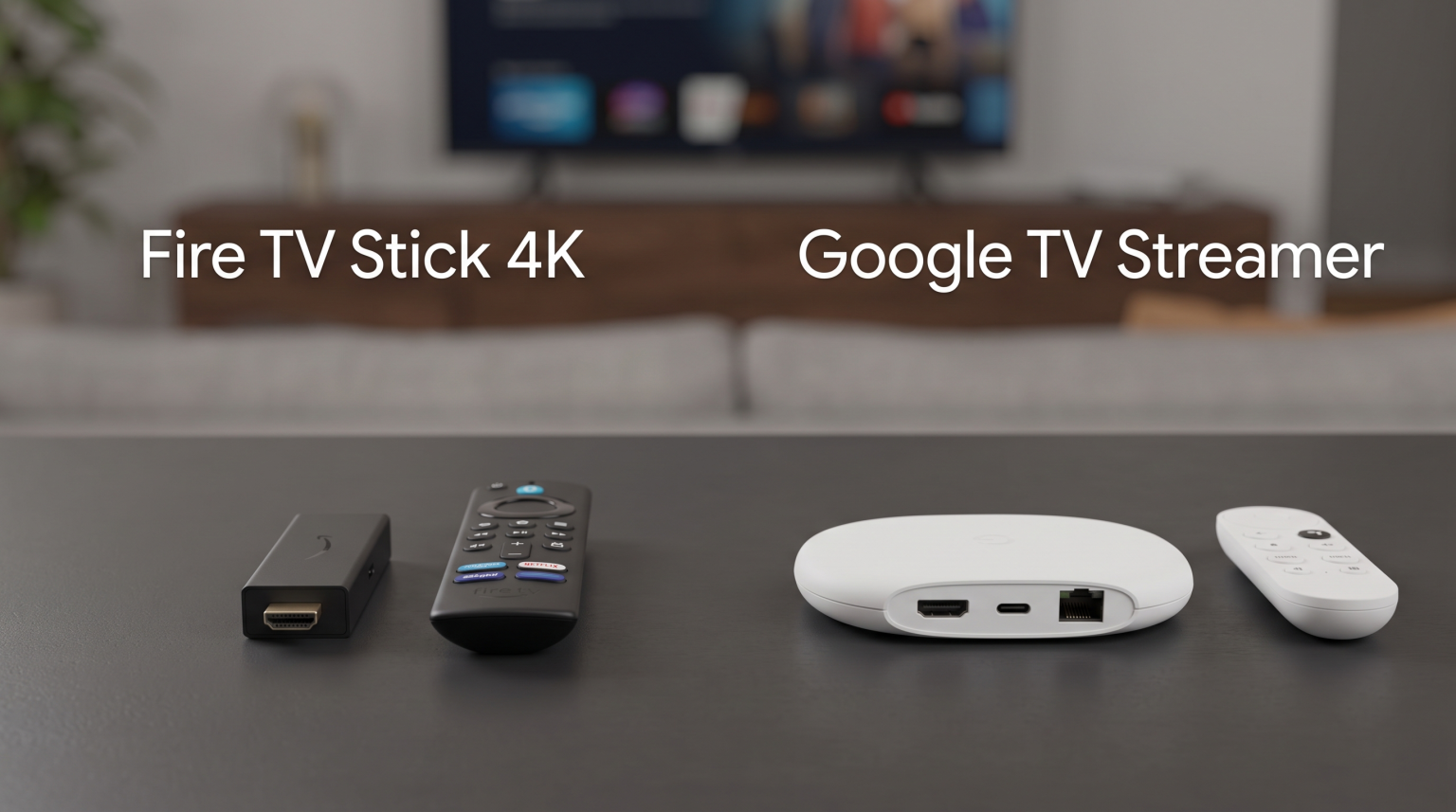
The Amazon Fire TV Stick 4K and the Google TV Streamer are two popular devices for upgrading a television. Both devices support 4K resolution and modern video standards. However, the Fire TV Stick 4K and the Google TV Streamer use different operating systems and have different hardware specifications. Nordic homes often require stable network connections for live sports and reliable software for Internet Protocol Television (IPTV). This article compares the Fire TV Stick vs Google TV Streamer to help you choose the correct device for your television setup.
Hurtigt svar
The Google TV Streamer is better for users who want a built-in Ethernet connection, 32 gigabytes of storage space, and direct access to the Google Play Store for IPTV applications. The Google TV Streamer is a flat box that sits below the television. The Fire TV Stick 4K is better for users who want a hidden device that plugs directly into the back of the television. The Fire TV Stick 4K costs less money and provides modern Wi-Fi 6 technology, but the Fire TV Stick 4K requires users to manually sideload many popular IPTV applications.
Device Design and Installation
The physical design of these two devices is very different.
The Fire TV Stick 4K is a small dongle. The dongle plugs directly into the HDMI port on the back of your television. The Fire TV Stick 4K remains completely hidden behind the screen. This hidden design is excellent for televisions mounted on a wall. The Fire TV Stick 4K requires a power cable connected to a wall outlet.
The Google TV Streamer is a set-top box. The Google TV Streamer does not hang behind the television. Instead, the Google TV Streamer sits flat on a television stand or cabinet. You must connect an HDMI cable from the Google TV Streamer to the television. The Google TV Streamer also requires a power cable connected to a wall outlet.
Storage Capacity and Memory
Storage space is very important for Smart TV devices.
The Fire TV Stick 4K provides 8 gigabytes of internal storage. The system software uses some of this storage space. Users only have approximately 4 gigabytes of free space for downloading applications. If you download many streaming applications, the Fire TV Stick 4K can run out of storage space quickly. The Fire TV Stick 4K features 2 gigabytes of Random Access Memory (RAM).
The Google TV Streamer provides 32 gigabytes of internal storage. This large storage capacity allows users to install dozens of applications without receiving storage error messages. The Google TV Streamer features 4 gigabytes of RAM. The higher RAM helps the Google TV Streamer open applications faster and navigate menus smoothly.
Operating Systems and App Stores
The operating system controls which applications you can install. If you are comparing Tizen vs. Google TV til IPTV-apps: Hvad er forskellen?, you must understand the app ecosystem.
The Google TV Streamer uses the Android TV operating system. This operating system features the Google TV user interface. The Google TV Streamer includes full access to the official Google Play Store. The Google Play Store contains thousands of applications.
The Fire TV Stick 4K uses Fire OS. Fire OS is modified software based on Android. The Fire TV Stick 4K uses the Amazon Appstore instead of the Google Play Store. The Amazon Appstore contains popular streaming applications like Netflix and YouTube. However, the Amazon Appstore has fewer total applications than the Google Play Store.
Network Connection: Wi-Fi vs Ethernet
A stable internet connection is essential for streaming high-quality video.
The Google TV Streamer includes a built-in Ethernet port on the back of the device. Users can connect a network cable directly from their internet router to the Google TV Streamer. A wired Ethernet connection provides the most stable signal for streaming video.
The Fire TV Stick 4K does not have a built-in Ethernet port. To use a network cable, you must purchase a separate Amazon Ethernet Adapter. However, the Fire TV Stick 4K supports Wi-Fi 6 technology. If you have a modern Wi-Fi 6 router in your home, the Fire TV Stick 4K can achieve very fast wireless speeds. The Google TV Streamer only supports older Wi-Fi 5 technology.
Comparison Table
| Funktion | Fire TV Stick 4K | Google TV-streamer |
| Device format | HDMI dongle | Set-top box |
| Internal storage | 8 GB | 32 GB |
| System memory (RAM) | 2 GB | 4 GB |
| Operativsystem | Fire OS | Android TV-operativsystemet |
| Application store | Amazon Appstore | Google Play Store |
| Ethernet port | No (requires adapter) | Yes (built-in) |
| Wi-Fi-teknologi | Wi-Fi 6 | Wi-Fi 5 |
| 4K Resolution | Ja | Ja |
Using IPTV Applications on Both Devices
Many users want to watch international channels using IPTV. When comparing the Fire TV vs Google TV Streamer for IPTV, the installation process is the biggest difference.
The Google TV Streamer is very easy to use for IPTV. The Google Play Store contains many excellent IPTV players. Users can easily download applications like TiviMate, XCIPTV, or Smarters Pro directly from the Google Play Store. Users simply open the application and enter their M3U playlist link or Xtream Codes login details.
The Fire TV Stick 4K is more complicated for IPTV. Amazon frequently removes IPTV applications from the official Amazon Appstore. To install a popular IPTV player on the Fire TV Stick 4K, users must use a process called “sideloading”. Sideloading requires downloading an application called Downloader, typing a web address, and manually installing the IPTV software.
Both devices support Electronic Program Guide (EPG) functionality. The EPG displays the television schedule on the screen. The TV Shadow IPTV service works perfectly on both devices, provided you install a compatible IPTV player.
Watching Live Football and Sports
Nordic homes enjoy watching live football, ice hockey, and winter sports. Live sports require a fast video stream and excellent motion handling.
When a football moves quickly across the screen, a poor connection can cause the picture to freeze. The Google TV Streamer is excellent for live sports because the built-in Ethernet port prevents wireless signal drops. The direct network cable ensures the football match streams without interruption.
The Fire TV Stick 4K also handles live sports very well, especially if your home has a strong Wi-Fi 6 network. For the best sports experience, you must also consider your television capabilities. You can read our guide comparing a 60 Hz kontra 120 Hz-tv til livefodbold to understand how television refresh rates affect fast motion.
Both the Fire TV Stick 4K and the Google TV Streamer support 4K resolution at 60 frames per second. This high frame rate keeps sports broadcasts looking smooth and natural.
Picture Quality and HDR Formats
High Dynamic Range (HDR) improves the colors and brightness of the video picture.
The Fire TV Stick 4K supports HDR10, HDR10+, Hybrid Log-Gamma (HLG), and Dolby Vision. These formats ensure that movies and television shows display correct colors and deep contrast.
The Google TV Streamer also supports HDR10, HDR10+, HLG, and Dolby Vision. Both devices provide identical picture format support. The final picture quality depends primarily on the quality of your actual television screen, not the streaming device.
Remote Controls and User Interface
The remote control is how you interact with the device every day.
The Fire TV Stick 4K includes the Alexa Voice Remote. This remote control has physical buttons for volume, power, and navigation. The Alexa Voice Remote includes a microphone button. Users can press the microphone button and ask the Alexa digital assistant to find movies. The Fire OS user interface displays large advertisements for Amazon Prime Video content.
The Google TV Streamer includes a redesigned voice remote. The Google TV remote features a textured back and comfortable buttons. The Google TV remote includes a microphone for Google Assistant. The Google TV Streamer also features a “Find My Remote” function. If you lose the remote control, you can press a button on the back of the Google TV Streamer box, and the remote control will make a loud beeping sound. The Google TV interface also displays advertisements, but the interface integrates well with various streaming services.
If you are researching operating systems, you can also learn about other television software in our guide to the Det bedste Smart TV-operativsystem til IPTV i 2026: Tizen vs. Google TV vs. webOS.
Konklusion
The choice between the Fire TV Stick 4K and the Google TV Streamer depends on your technical needs and your budget.
The Fire TV Stick 4K is an excellent choice for users who want a compact, hidden device at a lower price. The Fire TV Stick 4K provides fast Wi-Fi 6 wireless connectivity and supports all major HDR formats. However, users must be comfortable manually sideloading IPTV applications because the Amazon Appstore has strict limitations.
The Google TV Streamer is the superior choice for users who prioritize stability and ease of use. The built-in Ethernet port guarantees a reliable connection for live sports. The 32 gigabytes of storage space holds many applications. Furthermore, direct access to the Google Play Store makes installing IPTV software simple and fast. For a premium home entertainment setup, the Google TV Streamer provides the best overall hardware package.
Ofte stillede spørgsmål (FAQ)
Which device is faster for navigating menus?
The Google TV Streamer is generally faster. The Google TV Streamer has 4 gigabytes of RAM, while the Fire TV Stick 4K only has 2 gigabytes of RAM. The extra memory allows the Google TV Streamer to open menus quickly.
Do I need a Smart TV to use these devices?
No, you do not need a Smart TV. You only need a television with an empty HDMI port. Both the Fire TV Stick 4K and the Google TV Streamer add smart capabilities to older televisions.
Can I watch 4K IPTV streams on both devices?
Yes, both devices support 4K resolution. However, your IPTV provider must offer 4K channels, and your internet connection must be fast enough to download the 4K video data.
Is sideloading apps dangerous on the Fire TV Stick 4K?
Sideloading is safe if you download applications from trusted sources. However, sideloading is more difficult for beginners than downloading directly from an official application store.
Does TV Shadow IPTV sell the Fire TV Stick or Google TV Streamer?
No. TV Shadow IPTV is an IPTV service provider. We do not sell hardware devices. You must purchase the streaming devices from an electronics retailer.