
Many users want a reliable streaming device for a bedroom, kitchen, or guest room. A second television requires different features than a main living room screen. You usually need quick setup, stable performance, and easy access to streaming apps.
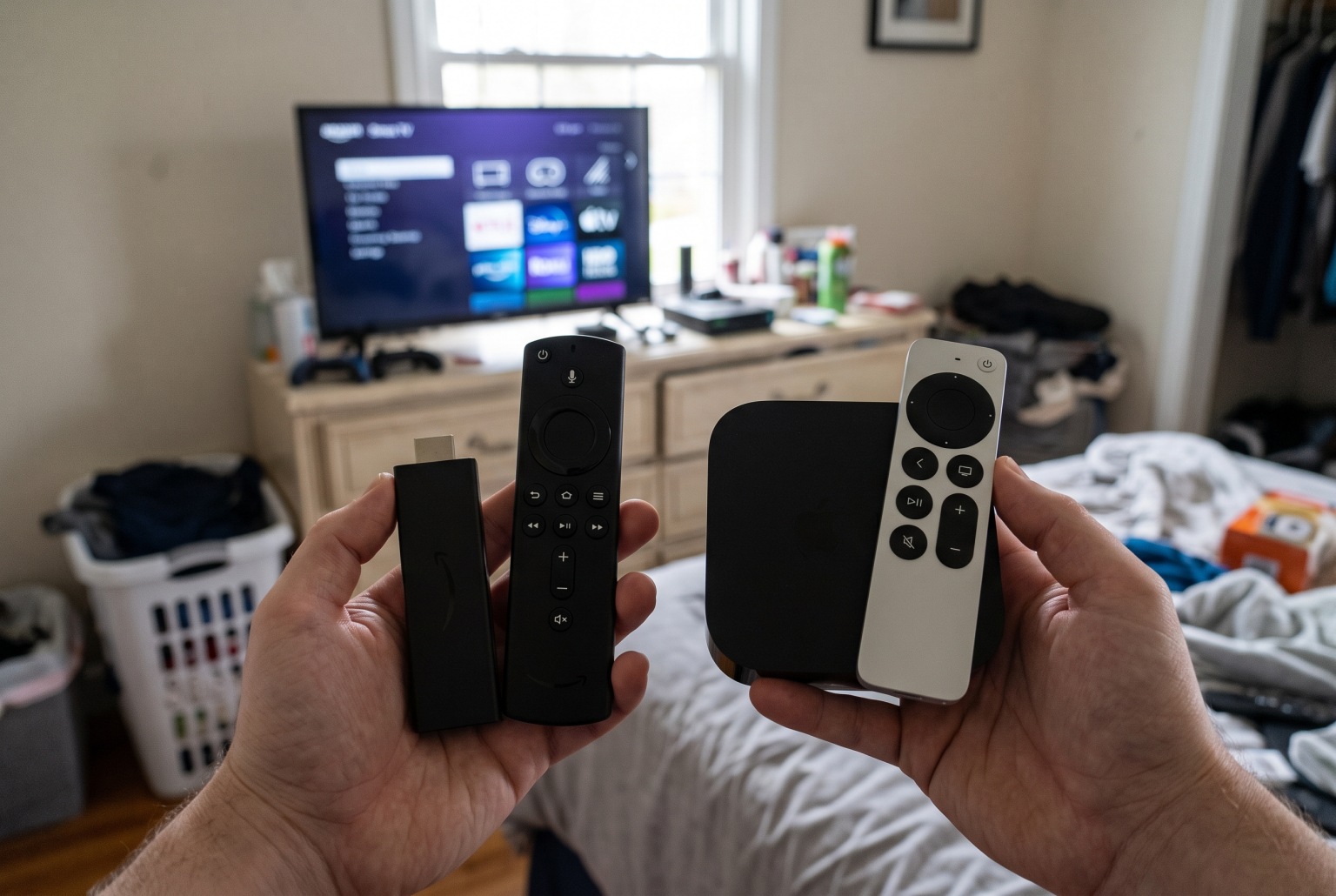
Two popular options for this purpose are the Amazon Fire TV Stick 4K and the Apple TV 4K. Both devices connect to your television using an HDMI port. Both devices support 4K resolution, HDR, and Dolby Vision. However, their hardware, operating systems, and prices are very different.
This article compares the Fire TV Stick 4K and the Apple TV 4K. We explain the differences in operating systems, IPTV compatibility, and streaming quality. This information will help you choose the correct device for your second television.
Hurtigt svar
When comparing Fire TV vs Apple TV for a second television, the best choice depends on your budget and ecosystem. The Fire TV Stick 4K is better for users who want a cheap, hidden device for basic streaming. The Apple TV 4K is better for users who want premium performance, an ad-free interface, and deep integration with Apple products. For IPTV users, the Fire TV Stick 4K offers easy Android app installation. The Apple TV 4K provides excellent processing power for smooth live football streams.
Comparison: Fire TV Stick 4K vs Apple TV 4K
| Funktion | Fire TV Stick 4K | Apple TV 4K |
| Device type | HDMI stick | Set-top box |
| Operativsystem | Fire OS (baseret på Android) | tvOS |
| App-butik | Amazon Appstore | Apple App Store |
| Storage space | 8 GB or 16 GB (Max version) | 64 GB or 128 GB |
| Internet connection | Wi-Fi (Ethernet requires adapter) | Wi-Fi (128 GB version includes Ethernet) |
| Grænseflade | Shows Amazon content and ads | Clean interface without ads |
| IPTV app support | Wide support (Android apps) | Good support (Apple apps) |
Hardware and Performance
The hardware differences between these two devices are significant.
The Apple TV 4K is a set-top box. You must place it on a shelf or attach it behind the television. It uses the powerful Apple A15 Bionic processor. This processor opens apps instantly and handles heavy streaming loads easily. The Apple TV 4K provides 64 GB or 128 GB of storage space. You can install many applications without deleting old ones.
The Fire TV Stick 4K is a small dongle. It plugs directly into the HDMI port and stays hidden behind the television. It uses a standard quad-core processor. This processor works well for everyday streaming. However, it can feel slower than the Apple TV 4K when you open large apps. The standard Fire TV Stick 4K has 8 GB of storage. The upgraded Fire TV Stick 4K Max has 16 GB of storage. If you install many large games or applications, you will fill this space quickly.
Operating System and Interface
The operating system controls how you interact with your television. If you want to compare other operating systems, read our guide to the Det bedste Smart TV-operativsystem til IPTV i 2026: Tizen vs. Google TV vs. webOS.
The Fire TV Stick runs Fire OS. This software is based on Android. The home screen shows your apps, but it also shows many advertisements and Amazon recommendations. The interface focuses heavily on Amazon Prime Video content. This design can feel crowded. However, Fire OS is very flexible. You can install third-party applications easily.
The Apple TV 4K runs tvOS. The interface is clean and simple. The home screen only shows a grid of your installed apps. There are no advertisements on the home screen. You navigate quickly using the Apple remote. tvOS is a closed system. You can only install applications from the official Apple App Store.
Tilgængelighed af IPTV-apps
Using a dedicated streaming device is often better than using native Smart TV software. For example, some users prefer external devices over their television’s native system. You can learn more about this in our article: Er Samsungs Tizen et godt valg til IPTV i 2026?.
For a TV Shadow IPTV setup, app availability is crucial. Both devices support IPTV players, but they handle apps differently.
IPTV on Fire TV Stick 4K
Because Fire OS is an Android system, it offers excellent IPTV flexibility. You can download popular IPTV players directly from the Amazon Appstore. These players support M3U playlists and Xtream Codes.
If an IPTV app is not in the official Amazon store, you can still install it. The Fire TV Stick allows “sideloading”. Sideloading means you can download Android APK files from the internet and install them manually. This feature gives you access to almost any Android IPTV application.
IPTV on Apple TV 4K
The Apple TV 4K also supports IPTV well. The Apple App Store contains many high-quality IPTV players. These applications generally feature clean designs and fast Electronic Program Guide (EPG) loading times.
However, you cannot sideload applications on an Apple TV without specialized developer tools. You must use the IPTV players available in the official Apple App Store. Fortunately, the available apps work perfectly with standard M3U links and Xtream Codes.
At se fodbold live
A second television is often used for watching live football matches or other sports. Live sports require good motion handling and a stable internet connection.
The Apple TV 4K is excellent for live sports. The A15 processor processes video frames quickly. This processing prevents lagging when the football moves fast across the screen. If you buy the 128 GB version, you get an Ethernet port. An Ethernet cable provides the most stable connection for streaming live football without buffering.
The Fire TV Stick 4K handles live football well. It supports 4K resolution at 60 frames per second. However, it only has Wi-Fi connectivity built in. Wi-Fi can be unstable in bedrooms or kitchens that are far from the internet router. If you need a wired connection for your Fire TV Stick, you must buy a separate Ethernet adapter.
Remote Control and Ease of Use
The remote control is very important for a second television. You want a remote that is simple and easy to find.
The Apple TV Siri Remote is made of solid aluminum. It has a touch-sensitive clickpad for fast scrolling. It uses a rechargeable battery. You charge it using a USB-C cable. The remote also controls your television’s power and volume.
The Fire TV Stick remote is made of plastic. It uses traditional click buttons. It uses two removable AAA batteries. The remote has quick-launch buttons for popular streaming services. It also controls your television’s power and volume.
Both remotes feature voice control. The Apple TV uses Siri, while the Fire TV uses Alexa.
Konklusion
Choosing between Fire TV vs Apple TV for a second television depends on your needs.
The Fire TV Stick 4K is the most affordable choice. It hides neatly behind the television. It gives you maximum flexibility for installing Android IPTV applications. It is perfect for a guest room or a kitchen where budget is the main priority.
The Apple TV 4K costs more, but it provides premium quality. The interface is clean and free of advertisements. The processor is incredibly fast. If you want a smooth experience for live football and you already use Apple products, the Apple TV 4K is the best option.
OFTE STILLEDE SPØRGSMÅL
Can I install Android apps on an Apple TV 4K?
Nej. The Apple TV 4K uses tvOS, not Android. You can only install applications from the official Apple App Store.
Does TV Shadow IPTV work on both devices?
Yes. You can use your TV Shadow IPTV subscription on both devices. You just need to install a compatible IPTV player app on the device.
Which device is faster?
The Apple TV 4K is significantly faster. It uses the Apple A15 Bionic chip, which opens apps and loads video streams very quickly.
Skal jeg have et 4K-tv for at kunne bruge disse enheder?
No. Both devices will work on older 1080p high-definition televisions. The device will automatically adjust the video output to match your television.
Can I connect a network cable to the Fire TV Stick?
Not directly. The Fire TV Stick 4K only has Wi-Fi. To use an Ethernet cable, you must purchase a separate Amazon Ethernet adapter.