
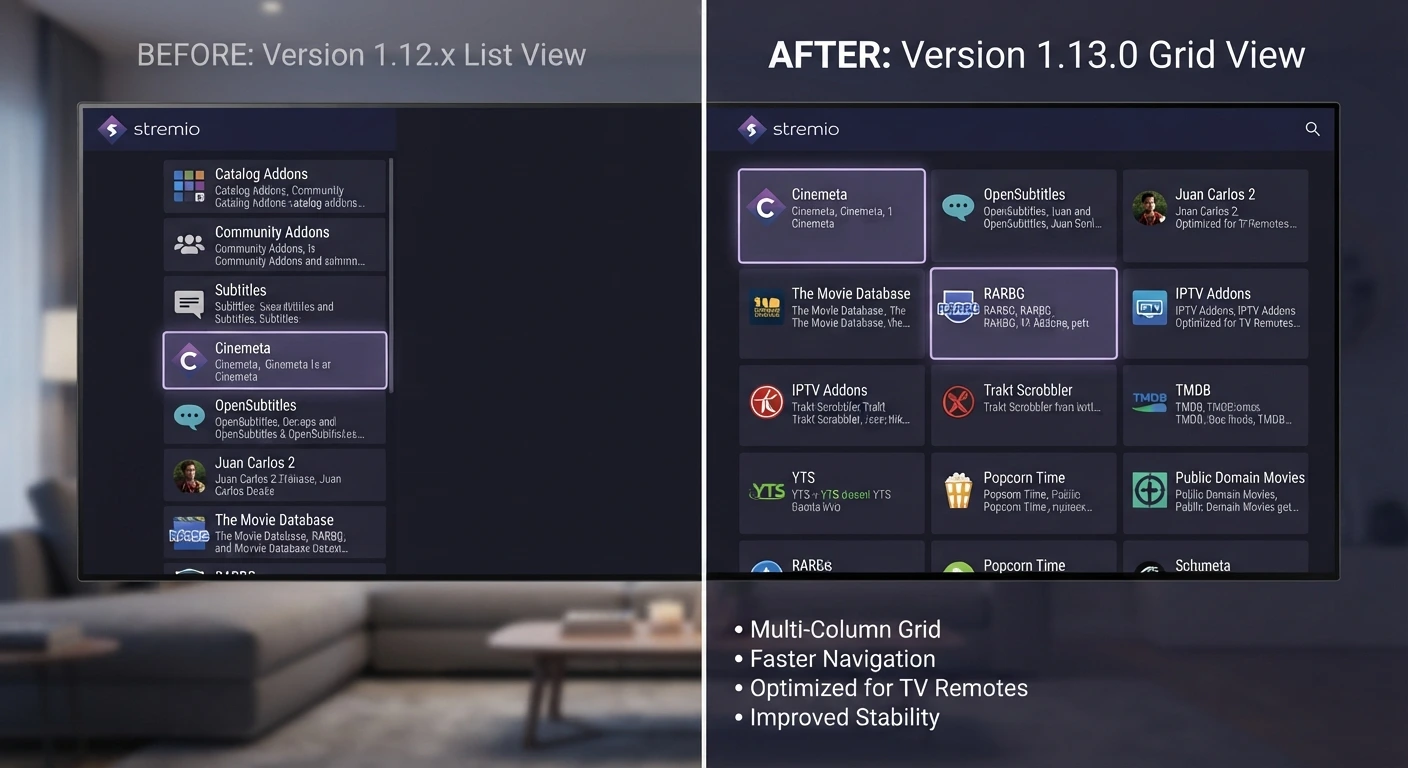
Stremio released version 1.13.0 for Android TV in late November 2026. The main visual change in this update is the new Stremio addons grid Android TV layout. Instead of forcing television users to scroll through one long single-column list, the updated add-ons screen organizes extensions into a multi-column grid. Version 1.13.0 also updates the overall add-ons user interface, improves frame rate matching speed, and fixes several external player bugs. This guide explains every change in Stremio 1.13.0, how the new grid works with a television remote control, and how it affects Internet Protocol Television (IPTV) workflows on Android TV and Google TV devices.
Hurtigt svar
In Stremio Android TV version 1.13.0, the add-ons page replaced its old single-column list with a multi-column grid layout. Users can now view more installed and available add-ons on a single television screen without excessive vertical scrolling. Version 1.13.0 also updates the add-ons user interface, speeds up automatic frame rate matching, and fixes audio passthrough and watch-progress issues when using external media players such as VLC and MPV. The new grid layout is best for users who manage many catalog and streaming add-ons directly on a television, while users who manage add-ons on a phone or computer will still rely on account synchronization.
What Changed in Stremio Android TV 1.13.0?
Stremio announced version 1.13.0 for Android TV alongside Android Mobile version 2.6.0 in Stremio Tech Update #91. The Android TV update focuses on navigation speed, add-on visibility, and playback stability.
The official changelog for Stremio Android TV 1.13.0 includes the following updates:
Grid layout on the add-ons page: The add-ons screen now displays add-on cards in a structured grid instead of a narrow vertical list.
Updated add-ons page user interface (UI): The visual design of the add-ons section has been refreshed to match modern television screen proportions.
Faster frame rate matcher logic: Stremio reworked the frame rate matching system so televisions switch refresh rates faster when playback starts.
Frame rate startup fix: The update fixes a bug where video streams could start in a paused state when frame rate matching was enabled.
Catalog row crash fix: The update resolves an application crash that occurred when remote-control focus moved across catalog rows.
Translated genre and type tags: Genre labels and content-type tags now translate properly across supported interface languages.
External player fixes: Audio passthrough now works correctly with VLC media player, watch progress saves accurately with external players, and MPV media player no longer freezes the app on exit.
How the New Stremio Addons Grid Android TV Layout Works
Before version 1.13.0, the add-ons page on Android TV used a basic vertical layout. Each add-on occupied one horizontal row. If you installed ten or fifteen add-ons for metadata, subtitles, catalogs, and live channels, checking or managing those extensions required repeated downward button presses on your remote control.
In version 1.13.0, the Stremio addons grid Android TV interface arranges add-ons into multiple columns across the width of the television screen.
Key Visual and Navigation Differences
Higher information density: Multiple add-on cards appear side by side in each row. You can identify installed extensions much faster on 4K and Full HD television screens.
Four-way directional pad (D-pad) navigation: Remote-control movement now uses both left-right and up-down navigation across the grid. This matches how users already browse movie and series posters on the Stremio home screen.
Updated add-on detail cards: Selecting an add-on card opens a redesigned action screen where you can view add-on details or remove the extension.
Comparison: Stremio Android TV 1.12.x vs. Version 1.13.0
| Funktion | Stremio Android TV 1.12.x | Stremio Android TV 1.13.0 |
| Add-ons page layout | Single-column vertical list | Multi-column grid layout |
| Add-ons page UI | Older list-based interface | Updated television card interface |
| Remote control navigation | Primarily vertical scrolling | Horizontal and vertical grid navigation |
| Frame rate matching | Standard switching speed | Reworked logic for faster switching |
| VLC audio passthrough | Could fail to enable automatically | Fixed audio passthrough behavior |
| External player progress | Watch progress could fail to save | Watch progress saves accurately |
Known Limitations and Device Differences in Version 1.13.0
While the new grid layout improves usability on standard Android TV and Google TV hardware, users should be aware of two practical details after updating to version 1.13.0.
1. Platform Setting Behavior on Fire OS Devices
Some users running Stremio on Amazon Fire TV Stick devices reported that the add-ons page initially showed a simplified synchronization screen instead of the full add-ons grid. This happened because Fire OS devices historically used a restricted add-on view unless the platform setting was switched to Android TV. Stremio addressed this behavior in a rapid follow-up patch (version 1.13.1) by restoring the platform selection option in settings. If your add-ons grid does not appear on a Fire TV device, check that your app is updated to the latest release and verify that the platform mode is set to Android TV rather than Fire OS.
2. Careful Remote Control Presses Inside Add-on Menus
When you select an add-on inside the new grid layout, the action menu highlights the uninstall button first without an extra confirmation prompt. Avoid pressing the select button twice quickly when opening an add-on card, because a rapid double press can immediately uninstall that add-on.
Why Frame Rate Matching and External Player Fixes Matter
Although the Stremio addons grid Android TV redesign is the headline visual feature, the playback improvements in version 1.13.0 are equally important for daily television viewing.
Faster Automatic Frame Rate Matching
Movies, television series, and live broadcasts use different frame rates, such as 23.976 frames per second (fps), 25 fps, 50 fps, or 60 fps. When Stremio matches the television refresh rate to the video frame rate, motion looks smoother and judder is reduced. Version 1.13.0 speeds up this switching process and prevents videos from starting in a paused state when the television changes refresh rates.
Better External Media Player Support
Many Android TV users configure Stremio to open video streams in external media players such as VLC or MPV. External players offer advanced subtitle controls, software decoding options, and specific audio formats. Version 1.13.0 resolves three long-standing issues with external players:
VLC now properly enables digital audio passthrough to soundbars and AV receivers.
Watched episodes and movie timestamps sync reliably back to your Stremio library after you close the external player.
Closing MPV no longer causes the Stremio Android TV interface to freeze.
If you are choosing between different television platforms to run streaming apps and media players, our comparison of Tizen vs. Google TV til IPTV-apps: Hvad er forskellen? explains how operating-system architecture affects app capabilities.
How Stremio Updates Affect IPTV Setups on Android TV
Many viewers use Android TV and Google TV devices to organize both on-demand streaming apps and Internet Protocol Television (IPTV) services on one television screen. Understanding how Stremio handles add-ons helps you choose the right software setup for your television.
Stremio Add-ons vs. Dedicated IPTV Players
Stremio organizes content through an add-on architecture. Some community add-ons allow users to load playlists, while dedicated IPTV players are built specifically around live television protocols.
When setting up an IPTV service such as TV Shadow IPTV, users typically rely on standard playlist formats:
M3U playlists: A text-based playlist format that lists live television channel URLs and channel names.
Xtream Codes API: A login method that uses a server URL, username, and password to load live channels, movies, series, and catch-up schedules automatically.
Electronic Program Guide (EPG): A digital television schedule that shows current and upcoming programs for each channel.
While Stremio 1.13.0 makes browsing installed add-ons much easier with its grid layout, dedicated Android TV IPTV players still provide faster channel zapping, full multi-day EPG grids, channel favorites, and parental lock controls designed specifically for remote-control use.
Smart TV Operating System Considerations
App availability and installation methods depend on your television operating system, television model, model year, and country:
Android TV and Google TV: Devices such as Sony BRAVIA televisions, TCL Google TV models, NVIDIA Shield TV, and Google TV Streamer support Google Play and direct Android Application Package (APK) installation. You can install Stremio 1.13.0 as well as dedicated M3U and Xtream Codes IPTV players.
Samsung Tizen and LG webOS: Samsung and LG smart televisions run proprietary operating systems. Stremio offers official television apps for compatible 2019 and newer Samsung models and 2020 and newer LG models, but these versions follow separate update schedules from the Android TV app. Furthermore, Tizen and webOS do not support Android APK files.
To learn more about how different television platforms handle streaming and live television applications, read our guide to the Det bedste Smart TV-operativsystem til IPTV i 2026: Tizen vs. Google TV vs. webOS. You can also explore our full hardware comparison in De bedste Smart-tv’er til IPTV i 2026: Sammenligning af Samsung, Sony, LG og TCL.
Note: TV Shadow IPTV is an independent IPTV service provider and is not affiliated with Stremio, Google, Samsung, LG, Sony, or Amazon.
Live Football and Sports Streaming on Android TV
Watching live football and fast-paced sports requires stable network delivery and accurate motion handling. Updates like Stremio 1.13.0 improve playback responsiveness, especially when frame rate matching switches a television into 50Hz or 60Hz mode for live broadcasts.
To get reliable picture quality during live matches on Android TV, pay attention to four technical factors:
Refresh rate matching: European football broadcasts generally run at 50 frames per second, while North American sports broadcasts often run at 60 frames per second. Matching the television output to 50Hz or 60Hz prevents micro-stuttering when the camera pans quickly across the pitch.
Wired Ethernet vs. Wi-Fi: Live sports streams use continuous high-bitrate video feeds. Connecting your Android TV box or smart television to your router with an Ethernet cable reduces packet loss and buffering compared to congested 2.4 GHz Wi-Fi networks.
Motion processing settings: Modern 4K televisions include motion interpolation features that insert artificial frames. During live football, aggressive motion smoothing can create visual artifacts around a fast-moving ball. Setting motion interpolation to a low setting or turning it off produces cleaner ball movement.
Resolution and upscaling: Many live television channels broadcast in 1080p or 720p rather than native 4K. A television processor with good upscaling sharpens lower-resolution feeds on a large 4K screen.
If you want to understand how panel refresh rates affect sports broadcasts, see our comparison of 60 Hz kontra 120 Hz-tv til livefodbold.
How to Update Stremio on Android TV to Version 1.13.0
You can update Stremio on an Android TV or Google TV device in two ways:
Google Play Store: Open the Google Play Store on your television, select your profile icon, open Manage apps & games, and check for available updates for Stremio. Rollouts on Google Play happen in stages, so the update may appear on different days depending on your country and device.
Official Stremio website: Visit the official Stremio downloads page ([stremio.com/downloads](https://stremio.com/downloads)) to check the current Android TV release. Always verify your device processor architecture (such as ARM or ARM64) before installing an update manually.
Your installed add-ons, watch history, and library items are stored in your Stremio cloud account. Updating the application does not erase your synced add-ons.
Konklusion
Stremio Android TV version 1.13.0 delivers a practical interface upgrade for television users. Replacing the old single-column list with the Stremio addons grid Android TV layout makes managing add-ons with a standard remote control much faster. Combined with faster frame rate matching and important fixes for VLC and MPV external players, version 1.13.0 improves both menu navigation and video playback stability. For users who also watch live television through TV Shadow IPTV, Android TV remains a flexible platform because it supports both Stremio for on-demand add-ons and dedicated IPTV players for full EPG and Xtream Codes functionality.
Ofte stillede spørgsmål (FAQ)
What is the new Stremio addons grid on Android TV?
The new Stremio addons grid on Android TV is a multi-column layout introduced in version 1.13.0. It displays add-on cards across the width of the television screen instead of placing them in one long vertical list, which makes browsing extensions with a remote control faster.
Does Stremio Android TV 1.13.0 fix VLC audio passthrough?
Yes, Stremio Android TV 1.13.0 fixes the bug that prevented audio passthrough from working properly with VLC media player. Digital surround sound formats can now pass directly from VLC to compatible soundbars and audio receivers.
Why does my Fire TV Stick not show the new add-ons grid in version 1.13.0?
Some Fire OS devices default to a simplified add-on synchronization view instead of the full Android TV add-ons grid. Updating to the follow-up patch (version 1.13.1) and setting the platform option to Android TV restores the grid layout.