
Watching Albanian television channels on a modern Smart TV is straightforward when you understand how your television operating system works. Many households in Europe, North America, and other regions use Samsung Smart TVs or LG Smart TVs to watch live Albanian news, entertainment, and sports. Because Samsung Smart TVs use the Tizen operating system and LG Smart TVs use the webOS operating system, neither brand supports Android applications from Google Play. Instead, viewers install a compatible Internet Protocol Television (IPTV) player from the television’s built-in app store. This guide explains how to set up an Albanian IPTV Smart TV connection on both Samsung and LG models in 2026, how the two platforms compare, and how to optimize playback for live sports.
Hurtigt svar
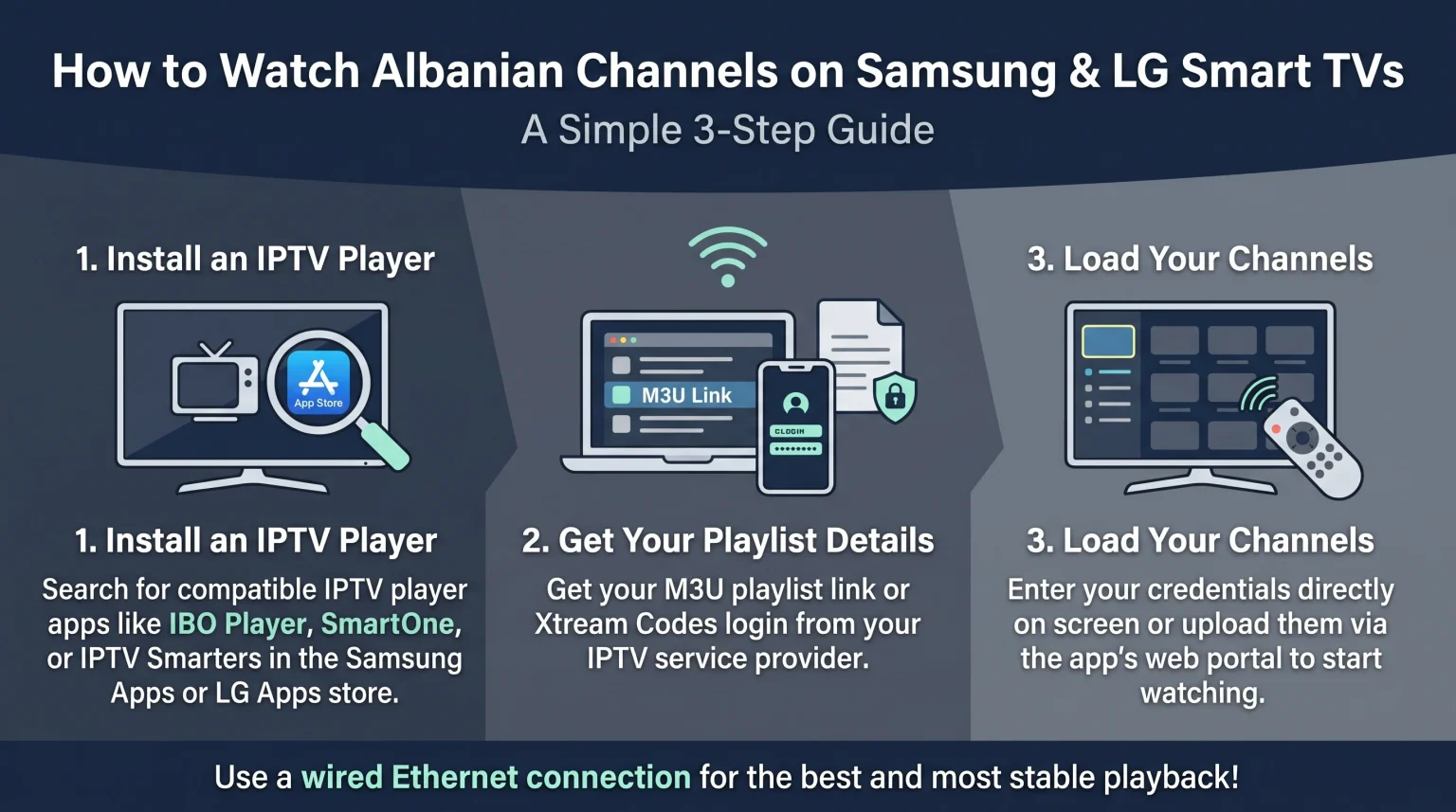
To watch Albanian channels on a Samsung Smart TV or an LG Smart TV, you must install a compatible IPTV player application from the television’s official app store and connect your IPTV playlist. Samsung Smart TVs use Samsung Apps on Tizen, while LG Smart TVs use LG Apps on webOS. Both platforms support popular IPTV players that accept M3U playlists and Xtream Codes login details. Samsung Smart TVs may suit users who prefer the Samsung Smart Hub interface. LG Smart TVs may suit users who prefer the LG Magic Remote pointer for typing and channel navigation.
How Albanian IPTV Works on Smart TVs
Internet Protocol Television (IPTV) delivers live television channels and video-on-demand content over a standard internet connection instead of a satellite dish or cable line. To use an Albanian IPTV Smart TV setup, you need two separate elements:
An IPTV player application: This is the software you install on your Samsung Smart TV or LG Smart TV. The IPTV player provides the menu, channel list, and video playback screen. The IPTV player does not include television channels on its own.
An IPTV service or playlist: This is the subscription or playlist that supplies the Albanian television channels, movies, and series. Services such as TV Shadow IPTV provide access details in the form of an M3U (Moving Picture Experts Group Audio Layer 3 Uniform Resource Locator) link or Xtream Codes credentials.
App availability on Smart TVs is not identical for every user. The selection of IPTV applications depends on your country, your TV model, the model year, the operating-system version, and current app-store policies.
Step-by-Step: How to Watch Albanian Channels on a Samsung Smart TV
Samsung Smart TVs from 2016 and later run the Tizen operating system (OS). Samsung Tizen does not support Android applications or Android Package Kit (APK) files. You must install an IPTV player directly from Samsung Apps inside the Samsung Smart Hub.
Step 1: Check Your Samsung Smart TV Connection and Account
Make sure your Samsung Smart TV is connected to the internet via Wi-Fi (Wireless Fidelity) or an Ethernet cable. Sign in to your Samsung Account on the television, because Samsung Apps requires an active account to download software.
Step 2: Install an IPTV Player from Samsung Apps
Tryk på Hjem button on your Samsung remote control.
Gå til Apps section inside the Samsung Smart Hub.
Select the search icon in the upper-right corner.
Type the name of a compatible IPTV player, such as IBO Player, SmartOne IPTV, IPTV Smarters, or SS IPTV.
Select the official application from the search results and choose Installere.
Vælg Åben once the installation finishes.
Step 3: Load Your Albanian Channel Playlist
Most Samsung Tizen IPTV players use one of two setup methods:
Direct login on the TV: Open the IPTV player and select the Xtream Codes option. Enter the server address, username, and password provided by your IPTV service.
Web portal upload: Open the IPTV player to view your television’s Media Access Control (MAC) address and device key. Visit the IPTV player’s official website on a smartphone or computer. Enter the MAC address and paste your M3U playlist link or Xtream Codes details. Restart the IPTV player on your Samsung Smart TV to load the Albanian channels.
Step-by-Step: How to Watch Albanian Channels on an LG Smart TV
LG Smart TVs run the webOS operating system. Like Samsung Tizen, LG webOS does not support Google Play or Android APK files. In 2026, LG’s official app store is called LG Apps (previously known as the LG Content Store on older software versions).
Step 1: Prepare Your LG Smart TV
Connect your LG Smart TV to your home router using an Ethernet cable or Wi-Fi. Sign in to your LG Account in the television settings so you can download applications from LG Apps.
Step 2: Install an IPTV Player from LG Apps
Tryk på Hjem button on your LG remote control.
Åbn den Apps section on the home screen.
Select the search icon and type the name of a compatible IPTV player, such as IBO Player, Smarters Player Lite, SmartOne IPTV, or SS IPTV.
Select the application and choose Installere.
Launch the application after the download finishes.
Step 3: Connect Your IPTV Playlist on LG webOS
Open the installed IPTV player on your LG Smart TV. If the application supports direct login, enter your Xtream Codes username, password, and server address. If the application uses a web portal, note the MAC address shown on the screen, upload your M3U link or Xtream Codes credentials through a web browser on your phone or computer, and restart the application on your LG Smart TV.
Samsung Tizen vs LG webOS for Albanian IPTV
Both Samsung Smart TVs and LG Smart TVs can run Albanian IPTV playlists smoothly on recent models. However, there are practical differences in their operating systems, remote controls, and software update policies. If you want a deeper breakdown of these two platforms, our comparison of Samsung vs. LG Smart TV til IPTV: Tizen vs. webOS covers their daily performance in detail.
| Funktion | Samsung Tizen | LG webOS |
| Operativsystem | Tizen OS | webOS |
| Official app store | Samsung Apps (Smart Hub) | LG Apps (formerly LG Content Store) |
| Understøttelse af Android APK-filer | No native Google Play or APK support | No native Google Play or APK support |
| Tilgængelighed af IPTV-apps | Depends on country, model, and year | Depends on country, model, and year |
| Remote control navigation | Standard directional pad remote | LG Magic Remote with on-screen pointer (on supported models) |
| Softwareopdateringer | Varies by Samsung model and year | Eligible models receive up to 5 years of upgrades via webOS Re:New |
Samsung Tizen may be a good choice for viewers who prefer a traditional directional remote control and already use other Samsung devices. LG webOS may be a better choice for viewers who like using a point-and-click remote control to scroll through long lists of Albanian channels and on-demand movies.
If you are still deciding between television brands, you can also read our guide to [INTERNAL LINK: the best Smart TV operating systems for IPTV → Best Smart TV OS for IPTV in 2026: Tizen vs Google TV vs webOS] to see how Tizen and webOS compare with Google TV.
IPTV Compatibility and Smart TV Limitations
When setting up an Albanian IPTV Smart TV connection with a service such as TV Shadow IPTV, it is important to understand what Smart TVs can and cannot do. TV Shadow IPTV has no official relationship or partnership with Samsung, LG, or any other television manufacturer.
M3U and Xtream Codes Compatibility
Most modern IPTV players on Samsung Tizen and LG webOS support both M3U playlists and Xtream Codes login credentials. Xtream Codes is often easier to manage because the login details are shorter to type and usually load live channels, movies, and series into separate categories automatically. M3U links are longer web addresses and are usually easier to upload through a web portal on a smartphone or computer.
Electronic Program Guide (EPG) Support
An Electronic Program Guide (EPG) displays current and upcoming television programs in a schedule grid. Most dedicated IPTV players on Samsung and LG Smart TVs support EPG data. However, EPG loading speed depends on the television’s processor and memory. Older Smart TVs from 2016 to 2018 may load large playlists and EPG files slowly.
Operating-System Limitations
Not every IPTV player works on every television. Some popular Android-based IPTV applications, such as TiviMate, are not available on Samsung Tizen or LG webOS. Additionally, Samsung and LG can remove or restrict applications in specific countries due to app-store policy changes. If your television is older than 2017 or does not list your preferred IPTV player in the app store, connecting an external streaming device via High-Definition Multimedia Interface (HDMI) is a practical alternative.
Watching Live Football and Sports on Albanian Channels
Many viewers use an Albanian IPTV Smart TV setup to watch live football and other sports broadcasts. Live sports place higher demands on both your television hardware and your internet connection than standard news or drama programs.
Internet Connection: Ethernet vs Wi-Fi
A wired Ethernet connection between your router and your Smart TV provides more consistent speed and lower latency than Wi-Fi. Wi-Fi signals can drop or experience interference from walls and other household devices, which can cause buffering during live matches. For High Definition (HD) and 4K Ultra High Definition (UHD) streams, a stable internet connection of at least 20 to 25 megabits per second (Mbps) is recommended.
Refresh Rate and Motion Handling
Fast-moving football matches can show motion blur or stutter on some screens. Televisions with a 120 Hertz (Hz) native refresh rate generally handle fast camera pans more smoothly than 60Hz televisions, provided the television’s picture processing is configured properly. To learn more about how refresh rates affect sports, see our guide on 60 Hz kontra 120 Hz-tv til livefodbold.
Picture Quality, Upscaling, and HDR
Many live television channels broadcast in 720p or 1080p resolution rather than native 4K. A 4K television must enlarge that image to fill the screen using a process called upscaling. If the input stream has a low bitrate, the picture may look soft or blurry on a large 4K screen. High Dynamic Range (HDR) can improve contrast and color on supported broadcasts, but standard live TV channels usually look best in a balanced picture mode such as Standard, Cinema, or Sports with excessive sharpness turned off. You can read more about image clarity in our article explaining Hvorfor ser IPTV sløret ud på et nyt 4K-tv?.
Konklusion
Watching Albanian television channels on a Samsung Smart TV or an LG Smart TV is a simple process once you choose a compatible IPTV player from the television’s official app store. Samsung Tizen and LG webOS both support reliable IPTV players that work with M3U playlists and Xtream Codes login details, though neither platform supports Android APK files. Your choice between Samsung and LG mainly depends on your preferred interface, remote control style, and model features. For the best viewing experience with TV Shadow IPTV or any other playlist especially during live football keep your television software updated and use a wired Ethernet connection whenever possible.
Ofte stillede spørgsmål
Can I watch Albanian channels on a Samsung or LG Smart TV without an external box?
Yes, you can watch Albanian channels directly on most Samsung and LG Smart TVs without an external streaming box. You only need to install a compatible IPTV player from Samsung Apps or LG Apps and add your IPTV playlist. However, very old models from 2015 or earlier may require an external streaming device.
Are IPTV player apps free on Samsung and LG Smart TVs?
Some IPTV player apps are free, while others require a one-time or annual activation fee after a short free trial. For example, SS IPTV and Smarters Player Lite are often available for free, whereas IBO Player and SmartOne IPTV typically charge a small activation fee per television. Pricing and trial terms are set by each app developer and can change over time.
Why can I not find a specific IPTV app in my Smart TV app store?
App availability depends on your country, TV model, model year, and operating-system version. If an IPTV player does not appear in Samsung Apps or LG Apps, check that your television software is updated. If the app is still missing, try another supported IPTV player from the store.