
Choosing between Apple TV 4K and Amazon Fire TV Stick 4K is one of the most important hardware decisions for streaming television. Both streaming devices support 4K resolution, High Dynamic Range (HDR), and modern streaming platforms. However, Apple TV 4K and Amazon Fire TV Stick 4K handle IPTV applications differently.
Apple TV 4K uses tvOS. The Apple operating system offers fast hardware performance, smooth navigation, and strict application security. Amazon Fire TV Stick 4K runs on Fire OS, which is based on Android. Fire OS allows users to install third-party Android application package (APK) files.
This guide compares Apple TV 4K and Amazon Fire TV Stick 4K for IPTV users. We evaluate operating systems, IPTV player compatibility, user interfaces, live sports playback, remote controls, and hardware value to help you choose the best streaming device for your television setup.
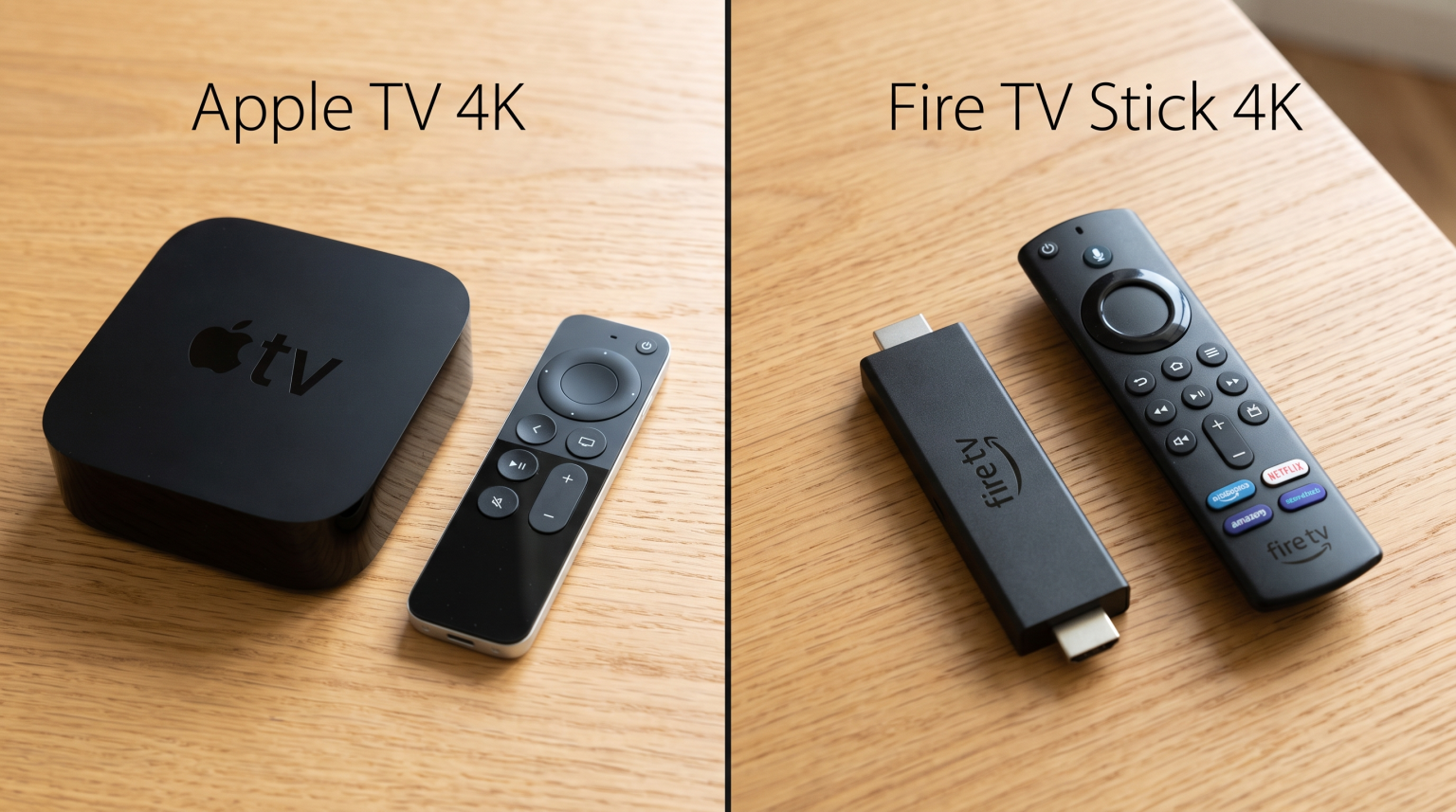
Kurze Antwort
Apple TV 4K is better for users who want high hardware performance, a smooth interface without advertisements, premium build quality, and automatic frame-rate matching for live sports. However, Apple TV 4K restricts app installation strictly to the official Apple App Store.
Amazon Fire TV Stick 4K is better for users who want budget-friendly hardware and maximum flexibility for IPTV player applications. Fire OS allows users to sideload Android IPTV applications easily.
If you prefer maximum speed and system stability, choose Apple TV 4K. If you require access to specific Android-only IPTV players like TiviMate, choose Amazon Fire TV Stick 4K.
Hardware Specifications and Performance Comparison
The technical specifications of Apple TV 4K and Amazon Fire TV Stick 4K create noticeable differences in everyday navigation speed and long-term reliability.
| Funktion | Apple TV 4K | Amazon Fire TV Stick 4K |
| Betriebssystem | tvOS | Fire OS (based on Android) |
| Prozessor | Apple A-series Bionic processor | MediaTek Quad-Core processor |
| System Memory (RAM) | 4 GB RAM | 2 GB RAM |
| Interner Speicher | 64 GB or 128 GB | 8 GB or 16 GB |
| App Sideloading | No (Restricted to App Store) | Yes (Supports Android APK files) |
| Network Connectivity | Wi-Fi 6 + Gigabit Ethernet (on 128 GB model) | Wi-Fi 6 (Ethernet requires an external adapter) |
| Video Formats | Dolby Vision, HDR10+, HDR10, HLG | Dolby Vision, HDR10+, HDR10, HLG |
| Audio Formats | Dolby Atmos, Dolby Digital 5.1, PCM | Dolby Atmos, Dolby Digital Plus |
| Frame Rate Matching | Native system-level matching | Partial (depends on individual app support) |
Processor Speed and Interface Smoothness
Apple TV 4K uses an Apple A-series Bionic processor. This processor is significantly more powerful than the mobile processors found in streaming sticks. Because Apple TV 4K has strong processing power and 4 GB of RAM, the device loads large IPTV channel playlists instantly. Scrolling through thousands of live channels or multi-day Electronic Program Guides (EPG) occurs with no stuttering.
Amazon Fire TV Stick 4K uses a MediaTek quad-core processor and 2 GB of RAM. The device provides adequate performance for standard video playback. However, navigating very large M3U playlists with extensive channel catalogs can cause brief loading delays.
Speicherkapazität
Storage capacity matters when you install multiple applications, buffer live streams, or store extensive EPG program guide data:
Apple TV 4K: Offers 64 GB or 128 GB of internal storage. Users can install hundreds of applications and store extensive local program guides without running out of memory.
Amazon Fire TV Stick 4K: Offers 8 GB of internal storage (or 16 GB on the 4K Max variant). Operating system files occupy approximately half of this storage. As a result, users must manage storage carefully when caching large IPTV guide databases.
Operating Systems: tvOS vs Fire OS
The operating system determines how you install applications, navigate your home screen, and interact with your television.
Apple tvOS
Apple designs tvOS specifically for television screens. The home screen presents a clean grid of applications. Apple tvOS does not display aggressive banner advertisements or sponsored video recommendations.
The main limitation of tvOS is its closed ecosystem. Users can only install applications directly from the official Apple App Store. Apple does not allow direct file downloads from web browsers or installation of third-party software packages without developer tools. For deeper context on platform architectures, read our guide on Das beste Smart-TV-Betriebssystem für IPTV im Jahr 2026.
Amazon Fire OS
Amazon Fire OS is built on Android. The user interface prioritizes content recommendations, including Amazon Prime Video content, sponsored advertisements, and suggested applications.
The primary advantage of Fire OS is open installation. Fire OS allows users to enable installation from unknown sources. Users can use a web browser or download utility to install any compatible Android television APK. This capability gives users access to a large selection of standalone media players.
IPTV App Compatibility and Availability
IPTV services like TV Shadow IPTV deliver streams through standardized protocols such as M3U playlists and the Xtream Codes Application Programming Interface (API). However, the video player application you use determines the viewing experience.
+-------------------------------------------------------------------+
|                        IPTV Player Ecosystem                      |
+---------------------------------+---------------------------------+
|          Apple tvOS             |         Amazon Fire OS          |
|    (Official App Store Only)    |     (Appstore + Sideloading)    |
+---------------------------------+---------------------------------+
| • IPTVX                         | • TiviMate (Via Sideloading)    |
| • UHF                           | • Smarters Pro (Official/APK)   |
| • TiviMax                       | • iMPlayer (Via Sideloading)    |
| • GSE Smart IPTV                | • XCIPTV (Via Sideloading)      |
| • iPlayTV                       | • OTT Navigator (Sideloading)   |
+---------------------------------+---------------------------------+
IPTV Players on Apple TV 4K
Because Apple TV 4K requires official App Store distribution, IPTV developers must follow Apple guidelines. Over recent years, developers have built high-quality, modern applications for tvOS:
IPTVX: Designed specifically for Apple devices. It features an interface that resembles premium video-on-demand services, with full support for M3U playlists, Xtream Codes API, and multi-screen viewing.
UHF: A fast modern player with strong subtitle support, iCloud playlist synchronization across Apple devices, and smooth EPG scrolling.
TiviMax: A player inspired by Android layouts, offering traditional channel grids and quick channel zapping.
GSE Smart IPTV: A long-standing player that supports multiple playlist formats and advanced video player decoders.
All IPTV applications on Apple TV 4K must be downloaded from the App Store. When an app developer updates an app, the update installs safely and automatically through Apple.
IPTV Players on Amazon Fire TV Stick 4K
Amazon Fire TV Stick 4K supports a wide selection of Android IPTV players. While the official Amazon Appstore has a limited selection of players, sideloading unlocks industry-standard applications:
TiviMate: Widely regarded as one of the best Android IPTV players. It offers a classic cable television interface, fast channel switching, multi-view, and custom EPG assignment. TiviMate is not available natively on Apple TV.
Smarters Pro: Available either through the Amazon Appstore or via APK sideloading. It provides simple login fields for Xtream Codes credentials.
iMPlayer: An advanced Android media player with cloud playlist management and catch-up television support.
XCIPTV Player: A customizable media player with simple navigation buttons suitable for non-technical users.
If your preferred IPTV player is an Android-exclusive app like TiviMate, Amazon Fire TV Stick 4K is the necessary hardware choice.
Live Football and Sports Streaming Performance
Streaming live football and sports places strict demands on hardware. Sports broadcasts use high frame rates, typically 50 frames per second (fps) in Europe and 60 fps in North America. If the streaming hardware cannot process high frame rates correctly, sports will look stuttery.
Motion Handling and Frame Rate Matching
One major technical advantage of Apple TV 4K is native system-level frame rate matching. Under video settings, tvOS includes a feature called Match Content: Frame Rate.
When this setting is active, Apple TV 4K automatically switches your television display refresh rate to match the incoming stream:
European sports broadcasts at 50 fps display at 50Hz or 100Hz.
American sports broadcasts at 60 fps display at 60Hz or 120Hz.
Movies at 24 fps display at 24Hz.
This automatic switching prevents frame duplication judder, providing smooth ball movement during football matches. To understand how refresh rates affect fast motion, see our detailed analysis on 60-Hz- vs. 120-Hz-Fernseher für Live-Fußball.
Amazon Fire TV Stick 4K includes an automatic frame rate matching setting, but it only functions within select video applications that implement Amazon’s specific programming code. Many third-party IPTV players on Fire OS do not trigger automatic frame rate matching. Users must manually set display settings to 50Hz or 60Hz, or rely on internal player decoders to smooth out motion.
Network Stability: Wi-Fi vs Ethernet
Live sports streams require continuous data transmission. Even brief network interference can cause video buffering or dropped frames.
Apple TV 4K (128 GB model): Includes a physical Gigabit Ethernet port alongside Wi-Fi 6. Connecting Apple TV 4K directly to your router with an Ethernet cable provides a stable, low-latency connection for uninterrupted live sports viewing.
Amazon Fire TV Stick 4K: Connects via Wi-Fi 6 by default. If your home Wi-Fi suffers from interference, you must buy an optional USB Ethernet adapter. The official Amazon Ethernet adapter is limited to 100 megabits per second (Mbps). While 100 Mbps is sufficient for 4K streaming, an integrated Gigabit port is faster and more reliable.
Picture Quality and Video Upscaling
Both Apple TV 4K and Amazon Fire TV Stick 4K support all major HDR formats:
Dolby Vision
HDR10+
Standard HDR10
Hybrid Log-Gamma (HLG)
Video Processing and Upscaling
Most IPTV channels broadcast in 720p High Definition (HD) or 1080p Full HD. When you display these streams on a modern 4K screen, the hardware must upscale the video signal to 3840 x 2160 pixels.
Apple TV 4K uses Apple video processing algorithms to scale lower-resolution images cleanly. Edge contours remain sharp, and digital noise is minimized.
Amazon Fire TV Stick 4K relies on standard hardware upscaling. While adequate, lower-bitrate 720p streams can look slightly softer on large screens above 65 inches. If your live streams appear soft or pixelated, read our troubleshooting guide explaining Warum sieht IPTV auf einem neuen 4K-Fernseher verschwommen aus?.
Remote Control Usability and EPG Navigation
When watching live television, the remote control is your primary navigation tool. Browsing electronic program guides and switching channels requires precise controls.
Apple Siri Remote                  Amazon Alexa Voice Remote
+-------------------+              +-------------------+
|      [Power]      |              |   [Power] [Input] |
|   ( Touch Click ) |              |   ( Directional ) |
|   (     Pad     ) |              |   (     Ring    ) |
| [Back]     [Play] |              | [Back][Home][Menu]|
| [Mute]     [Vol]  |              | [Rew] [Play][Fwd] |
|                   |              | [Vol] [Mute][Ch+-]|
|   Solid Aluminum  |              | [App Preset Keys] |
+-------------------+              +-------------------+
Apple Siri Remote
The Apple Siri Remote features a solid aluminum body and a rechargeable battery via USB-C.
Navigation Pad: It includes a circular touch-enabled clickpad. You can click standard directional arrows, or swipe your thumb across the surface to scroll through long channel lists rapidly.
Button Layout: The layout is minimalist. It does not have dedicated channel up and down buttons. Users change channels using directional clicks or through the on-screen EPG overlay.
Amazon Alexa Voice Remote
The Amazon Alexa Voice Remote is constructed from textured plastic and uses replaceable AAA batteries.
Dedicated Controls: The remote includes physical navigation buttons, playback controls, volume buttons, and often dedicated channel guide buttons.
Ergonomics: For traditional television viewers, the physical directional buttons on the Fire TV remote feel familiar. The buttons provide tactile feedback, which simplifies channel zapping.
Software Updates and Long-Term Value
Streaming devices require regular operating system updates to maintain security and application compatibility.
Apple Support Lifecycle: Apple historically provides software updates for Apple TV models for six to eight years. The tvOS system receives annual major upgrades alongside regular performance patches. The fast internal hardware ensures that the device remains responsive over several years.
Amazon Support Lifecycle: Amazon updates Fire OS devices regularly with security patches. However, older Fire TV sticks can become slower over time as system updates and advertising services consume available RAM and storage.
Schlussfolgerung
Both Apple TV 4K and Amazon Fire TV Stick 4K are capable streaming devices for television viewers, but they serve different priorities.
Wählen Sie Amazon Fire TV Stick 4K if you want an affordable streaming stick that supports open application installation. It allows you to sideload versatile Android applications like TiviMate and offers a practical remote control with tactile buttons.
Wählen Sie Apple TV 4K if you want premium performance. Its powerful processor, clean user interface without advertisements, built-in Gigabit Ethernet option, and native frame rate matching make it an outstanding device for fast channel navigation and smooth live football streaming.
Services like TV Shadow IPTV deliver reliable M3U and Xtream Codes streams across both platforms. Choose the hardware that best matches your preferred software player, budget, and home entertainment expectations.
Häufig gestellte Fragen
Can I install TiviMate on Apple TV 4K?
No, TiviMate is an Android application and is not available on Apple TV 4K. Apple tvOS does not run Android files. If you use Apple TV 4K, high-quality alternatives include IPTVX, UHF, and TiviMax from the official Apple App Store.
Does Fire TV Stick 4K support M3U playlists and Xtream Codes?
Yes, Amazon Fire TV Stick 4K supports both M3U playlists and Xtream Codes credentials. You can use these connection methods by installing applications such as TiviMate, Smarters Pro, or XCIPTV on your Fire TV device.
Which device switches live channels faster?
Apple TV 4K switches channels faster because its A-series processor decodes video streams and loads data buffers with higher speed. Amazon Fire TV Stick 4K is fast, but channel zapping times can take one or two seconds longer depending on your selected player.
Do I need a Gigabit Ethernet connection for IPTV?
No, a Gigabit connection is not mandatory for IPTV streaming. Standard 4K streams require between 25 Mbps and 40 Mbps of stable bandwidth. However, a wired Gigabit Ethernet connection eliminates wireless interference, which reduces stream buffering during live events.
Is Apple TV 4K worth the higher price for IPTV?
Apple TV 4K is worth the higher price if you value high processing speed, an ad-free interface, smooth 50Hz and 60Hz sports motion matching, and long-term durability. If your primary goal is affordable streaming and sideloading flexibility, Amazon Fire TV Stick 4K offers better economic value.
Can I use a VPN on Apple TV 4K and Fire TV Stick 4K?
Yes, both devices support Virtual Private Network (VPN) applications. Apple tvOS supports native VPN applications directly through the App Store, and Fire OS supports VPN applications through the Amazon Appstore and APK installations.