
Many streaming media players run modified versions of Android instead of official Android TV or Google TV software. Knowing your device status is essential because Google Play Protect certification verifies that your hardware passes Google security and compatibility tests. Uncertified hardware often lacks official digital rights management (DRM) licenses, cannot run official streaming services in high definition, and may expose your home network to security vulnerabilities.
Checking your certification status takes less than two minutes. This guide explains how to verify your Android TV box using official device settings, why certification matters for streaming performance, and what steps you can take if your hardware fails verification.
Kurze Antwort
To verify your device status, open the Google Play Store on your Android TV box, select your profile icon, open Einstellungen, and scroll down to the Über section. Look for Play Protect certification. If the screen displays “Device is certified,” your box passes Google security and compatibility requirements.
If the screen displays “Device is uncertified,” or if the official Google Play Store application is completely missing, your hardware is not verified by Google. Certified devices provide official widevine DRM licenses and regular security updates. Uncertified devices carry higher security risks, frequently limit video resolution to 480p or 720p, and may block banking or premium streaming applications.
What Is Google Play Protect Certification?
Google Play Protect certification confirms that an Android device meets the Android Compatibility Definition Document (CDD) standards and passes Google automated compatibility tests. Google works directly with hardware manufacturers to ensure that devices include genuine Google applications, standard security protections, and proper digital rights management configurations.
Key Requirements of Certified Android TV Hardware
Passed Compatibility Tests: The manufacturer submitted the device firmware to Google for automated suite testing.
Genuine Google Mobile Services (GMS): The box includes authentic Google applications, including the official Google Play Store and Google Play Services.
Security Scanning: Google Play Protect scans installed applications daily to detect and block malicious software.
Hardware DRM Licensing: Certified devices typically include Google Widevine Level 1 (L1) security keys directly on the system chipset, enabling high-definition (HD) and 4K video playback.
Why Certification Matters for Streaming and Security
The difference between certified hardware and uncertified hardware directly affects daily use, privacy, and media playback.
+-----------------------------------+-----------------------------------+
| Certified Android TV Device       | Generic Uncertified Android Box   |
+-----------------------------------+-----------------------------------+
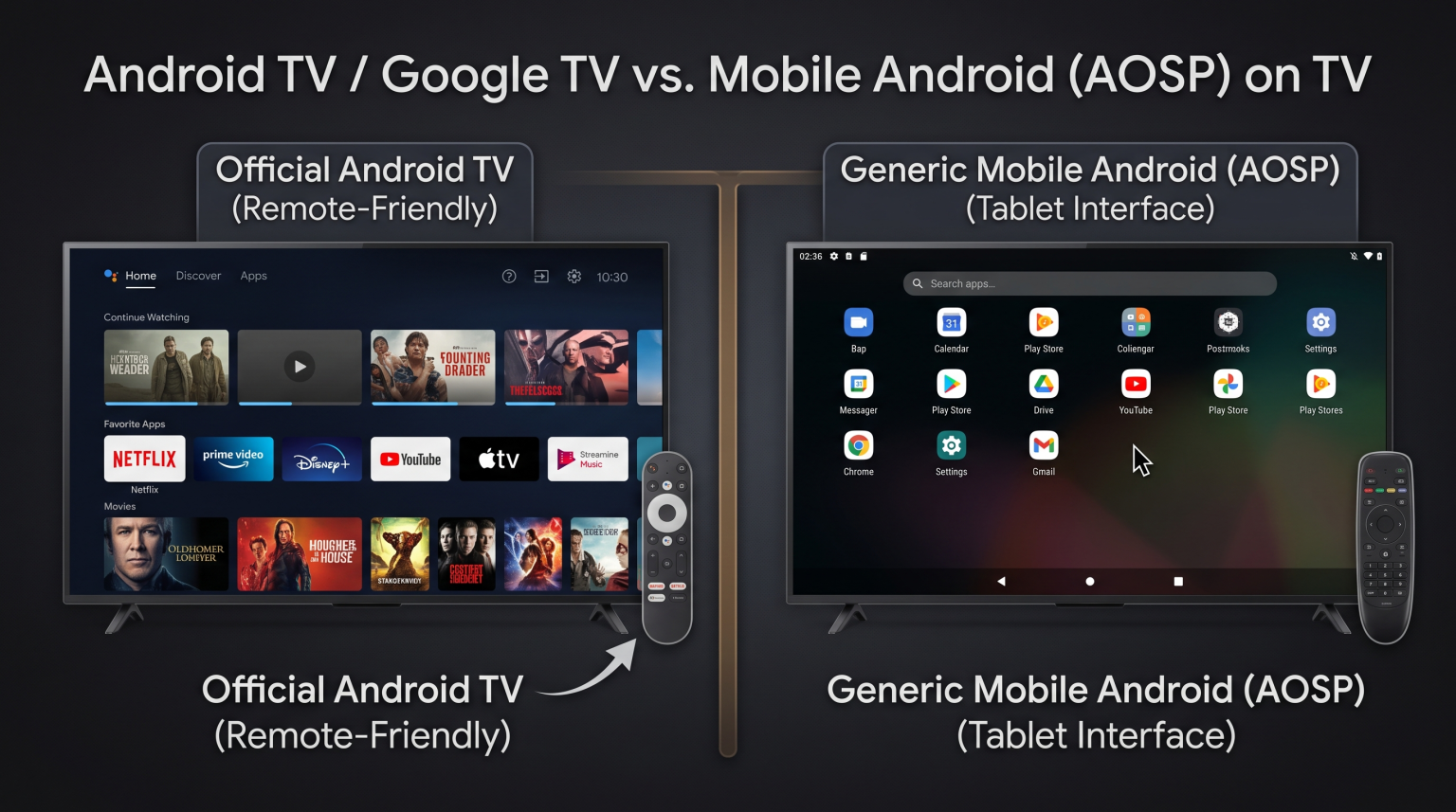
| Official Android TV / Google TV   | Mobile phone Android (AOSP)       |
| Widevine L1 (Full HD & 4K)        | Widevine L3 (Limited to 480p/720p)|
| Official TV Remote Navigation     | Requires mouse pointer / air mouse|
| Regular firmware & security patches| Rarely receives security updates  |
| Safe Google Play ecosystem        | Sideloaded apps / malware risk    |
+-----------------------------------+-----------------------------------+
Video Quality and Digital Rights Management (DRM)
Major streaming platforms require Widevine Level 1 hardware encryption to play 1080p Full HD and 4K Ultra HD video streams. Most uncertified Android boxes only possess Widevine Level 3 or lack DRM keys entirely. As a result, streaming applications automatically downgrade playback quality to standard definition (SD), regardless of your television resolution or internet speed.
Device Security and Privacy
Independent cybersecurity researchers have discovered pre-installed malware and background data transmission on several generic Android TV boxes sold online. Because uncertified boxes do not undergo Google security screening, third-party firmware can contain modified system binaries that compromise your local home network.
Step-by-Step: How to Check Play Protect Certification
Follow these steps to check the official certification status on your television screen.
Method 1: Check Through the Google Play Store (Primary Method)
Turn on your Android TV box and open the Google Play Store.
Select your profile icon in the top-right corner of the screen.
Öffnen Sie die Einstellungen Menü.
Scroll down and expand the Über Abschnitt.
Locate the heading labeled Play Protect certification.
Read the status line:
Device is certified: The device meets all Google security and compatibility standards.
Device is uncertified: The device failed verification or runs unauthorized Google services.
Method 2: Check the Official Google Certified Devices List
Google maintains a public database of every manufacturer and model that holds an official license.
Note the exact model name and build number from your box under Einstellungen → Device Preferences → Über → Model.
Visit the official Google Play Protect certified devices webpage using a computer or smartphone browser.
Search for the manufacturer name or the exact model code.
If your specific model code does not appear on the Google list, the device is uncertified.
Certified Android TV vs. Generic Android AOSP TV Boxes
Many budget TV boxes advertise “Android 12” or “Android 13,” but they run the Android Open Source Project (AOSP) designed for smartphones and tablets, not the specialized Android TV operating system.
When choosing the right platform for your home theater setup, understanding operating-system differences is essential. Our guide to the Das beste Smart-TV-Betriebssystem für IPTV im Jahr 2026: Tizen vs. Google TV vs. webOS breaks down the technical differences between dedicated TV platforms.
| Funktion | Certified Android TV / Google TV Box | Uncertified Generic Android Box |
| Betriebssystem | Official Android TV / Google TV OS | Modified Mobile Android (AOSP) |
| Play Protect Status | Certified | Uncertified |
| Interface Navigation | Optimized for standard directional remote | Often requires mouse mode or air mouse |
| Google Play Store | Official Android TV Play Store | Mobile Play Store or third-party store |
| Widevine DRM Level | Widevine Level 1 (L1) | Widevine Level 3 (L3) or none |
| Netflix / Prime Video | 1080p, 4K, HDR, Dolby Vision | Standard definition (480p) or blocked |
| System Updates | Regular security and OS updates | Infrequent or no software updates |
IPTV Performance and Play Protect Certification
For subscribers using TV Shadow IPTV, the underlying operating system and hardware certification level directly determine application stability, Electronic Program Guide (EPG) loading speed, and video decoding performance.
IPTV Player App Availability and Installation
Certified devices give you direct access to the official Android TV Google Play Store. You can download established IPTV players such as TiviMate, IPTV Smarters Pro, and XCIPTV without sideloading APK files from unverified third-party websites. Certified devices update these media players automatically whenever developers release bug fixes.
If you are comparing different television ecosystems, our detailed comparison of Tizen vs. Google TV für IPTV-Apps: Was ist der Unterschied? explains how app availability varies across systems.
Remote-Control Usability and Interface Design
Certified Android TV applications are built specifically for television screens and standard directional remotes (D-pad). On uncertified AOSP boxes, IPTV menus often load tablet layouts. Users must toggle an awkward virtual mouse pointer on the remote control just to select channel categories or scroll through M3U playlist groups.
Hardware Video Decoding and Format Compatibility
TV Shadow IPTV playlists support multiple stream formats, including M3U links and Xtream Codes API parameters. Certified media players feature dedicated system-on-chip (SoC) hardware decoders for H.264, HEVC (H.265), and AV1 codecs. Certified firmware communicates smoothly with video decoders, preventing audio-video synchronization errors during long viewing sessions.
Live Football and Sports Streaming on Certified Devices
Live sports streaming requires sustained network stability and efficient video frame rendering.
Network Stream ---> Hardware Buffer ---> SoC Video Decoder ---> 60Hz/120Hz Display
  (Low Jitter)         (Clean RAM)           (HEVC / AV1)           (Smooth Motion)
Bewegungsdarstellung und Bildwiederholfrequenz
Live football broadcasts transmit at 50 frames per second (fps) in Europe and 60 fps in the Americas. Certified Android TV boxes support auto-frame-rate switching (AFR). This feature automatically matches the HDMI output frequency of the box to the original frame rate of the sports broadcast. Uncertified boxes often lock output to 60Hz without proper frame matching, resulting in micro-stuttering and uneven ball motion during fast passes.
Streaming Stability: Wi-Fi vs. Ethernet
High-bitrate live football streams require consistent data throughput. Uncertified budget boxes often contain low-cost Wi-Fi chips with high packet jitter, which causes periodic buffering. For reliable sports viewing on TV Shadow IPTV, use an Ethernet cable connection or a certified streaming player equipped with dual-band Wi-Fi 6 hardware.
For deeper analysis on screen motion and panel responsiveness, read our guide on 60-Hz- vs. 120-Hz-Fernseher für Live-Fußball.
What to Do if Your Device Is Uncertified
If your Android TV box shows “Device is uncertified,” evaluate these practical steps:
1. Check for Official Firmware Updates
Open your device settings and check the system update section. In some instances, a manufacturer releases an authorized software patch that resolves a pending Google certification signature.
2. Register Device ID Manually (Advanced / Developer Use)
Google provides a custom device registration page for developers using custom ROMs. You can retrieve your Google Services Framework (GSF) Android ID using a device ID application and submit the ID to Google. Note that manual registration does not grant Widevine L1 DRM licenses or turn an AOSP box into an official Android TV interface.
3. Replace the Hardware with a Certified Media Streamer
If you want secure streaming, high-definition video, and trouble-free navigation, replacing an uncertified box is the most reliable solution. Certified streaming devices are affordable and widely available internationally:
Google Chromecast with Google TV / Google TV Streamer
Xiaomi TV Box S (2. Generation)
NVIDIA Shield TV / Shield TV Pro
Amazon Fire TV Stick 4K Max (Uses Amazon Fire OS with Widevine L1)
Nokia Streaming Box 8000 / 8010
MECOOL certified Google TV models
Schlussfolgerung
Google Play Protect certification is a fundamental indicator of security, software reliability, and video streaming quality. Certified Android TV and Google TV hardware ensures access to the authentic Google Play Store, provides Widevine L1 encryption for high-definition playback, and protects your home network from unverified firmware modifications.
Checking your certification status in the Google Play Store settings takes only seconds. If your current streaming media player is uncertified, upgrading to an officially licensed device ensures smooth app navigation, optimal video decoding, and stable performance when streaming with TV Shadow IPTV.
Häufig gestellte Fragen
Can an uncertified Android TV box stream in 4K?
No, an uncertified Android TV box cannot stream commercial subscription services in 4K. Although the box may output a 4K HDMI signal to your television screen, applications such as Netflix, Disney+, and Prime Video limit playback resolution to 480p or 720p because the hardware lacks Widevine L1 certification.
Is an uncertified Android TV box illegal?
An uncertified Android TV box is not illegal to purchase or own. However, the device does not comply with Google official licensing agreements, and the hardware manufacturer did not obtain permission to bundle Google Play services.
Can I install the official Android TV OS on a generic TV box?
Generally, you cannot install official Android TV OS on a generic box. Official Android TV software requires cryptographically signed hardware keys and manufacturer licensing directly from Google. Sideloading custom operating systems rarely restores Widevine L1 licensing.
Will IPTV players work on uncertified boxes?
Yes, many IPTV players can run on uncertified boxes via sideloaded APK files. However, users frequently encounter navigation issues, missing Google Play license checks, irregular audio sync, and unstable background performance compared to certified hardware.
Why is the Google Play Store missing from my Android TV box?
The Google Play Store is missing because the hardware manufacturer did not pass Google Play Protect certification. Instead of official Google services, these devices usually bundle third-party alternative app stores or modified open-source repositories.
Does Play Protect certification affect internet browsing security?
Yes. Google Play Protect continuously scans installed applications and background processes for dangerous behavior. Certified devices receive security definition updates directly from Google, significantly lowering the risk of credential theft on your home network.