
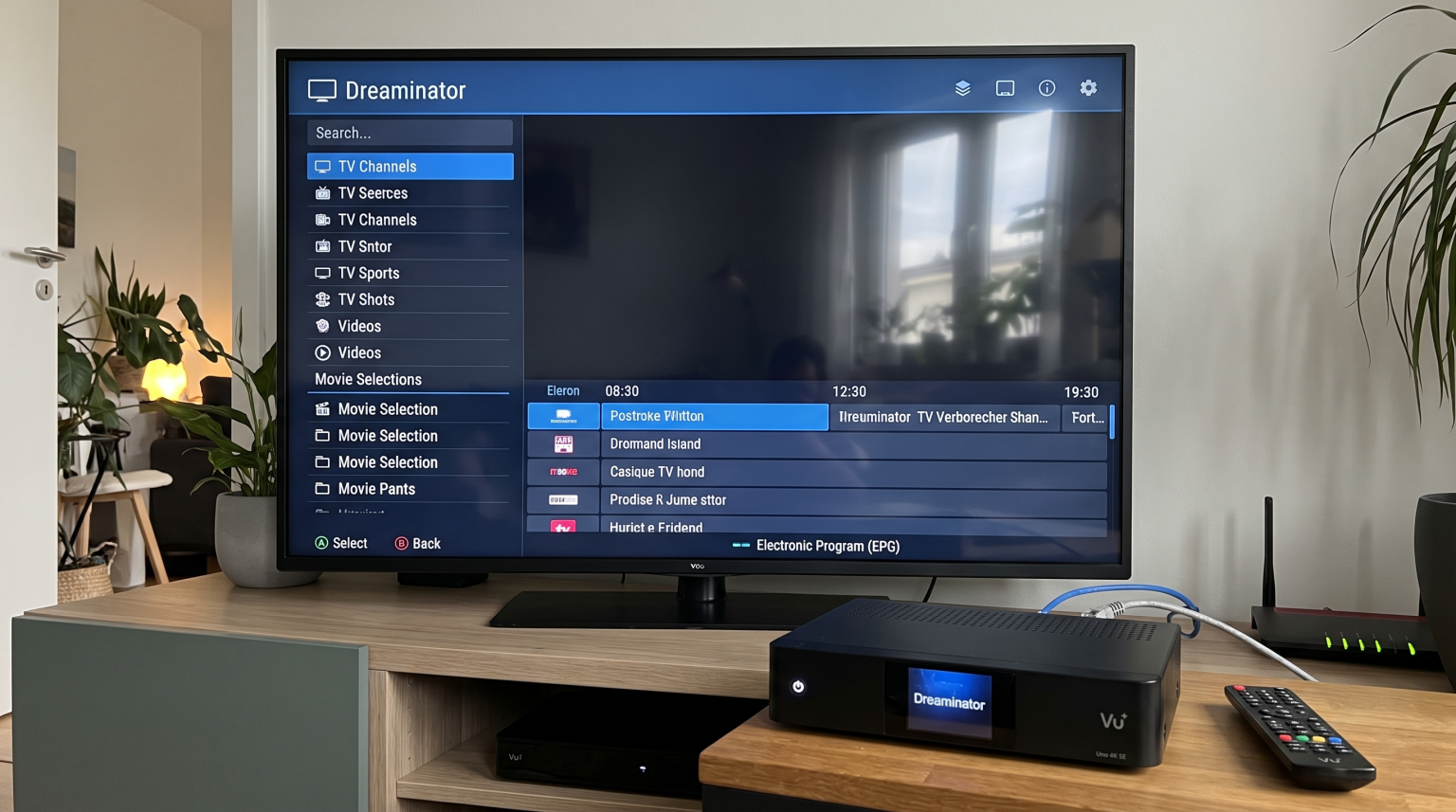
Vu+ satellite receivers run on the Enigma2 operating system. This operating system supports custom plugins for Internet Protocol Television (IPTV). Dreaminator is a standalone IPTV plugin designed specifically for Enigma2 devices. It provides a browser-based playlist manager and a modern viewing interface. Many users install Dreaminator on their Vu+ receivers to manage M3U playlists and Xtream Codes accounts easily. This guide explains which Vu+ models support Dreaminator. It also provides clear instructions for installing the plugin on your receiver. TV Shadow IPTV users can learn how to configure their service using this software.
Kurze Antwort
Dreaminator is a free, open-source IPTV plugin for Enigma2 receivers. It works well on modern Vu+ 4K models, including the Vu+ Uno 4K SE, Vu+ Duo 4K SE, and Vu+ Zero 4K. To install Dreaminator, you must connect to your Vu+ receiver using FTP or Telnet. You then upload the plugin installation file and execute the installation command. Dreaminator provides a browser-based interface to manage your IPTV playlists from a computer. This system makes channel organization much faster than using the standard television remote control.
What is Dreaminator for Enigma2?
Dreaminator is a specialized version of the IPTVnator project. The developers created Dreaminator specifically for Enigma2 satellite receivers. The software acts as both an IPTV player and a playlist manager.
Most traditional IPTV plugins require you to type long URLs using the receiver remote control. Dreaminator solves this problem. The plugin includes a browser-based management tool. You can open a web browser on your computer, connect to your Vu+ receiver over the local network, and upload your IPTV playlists. The receiver then displays the channels on your television screen.
The software supports standard IPTV formats. These formats include local M3U playlists, remote M3U URLs, and the Xtream Codes API. The plugin also supports Electronic Program Guide (EPG) data for television schedules.
Supported Vu+ Receiver Models
Vu+ manufactures high-performance Linux receivers. Dreaminator requires a receiver with enough processing power to handle IPTV streams smoothly.
The developer has officially tested Dreaminator on the Vu+ Uno 4K SE. However, the plugin works on most modern Vu+ 4K models running an up-to-date Enigma2 image. Compatible images include VTi, OpenATV, OpenPLi, and OpenBlackHole.
Compatible Vu+ models include:
Vu+ Uno 4K SE: This model features a fast processor and gigabit Ethernet. It is an excellent choice for stable IPTV streaming.
Vu+ Duo 4K SE: This is a premium model with high processing power. It handles heavy IPTV playlists and high-definition video easily.
Vu+ Zero 4K: This is a compact entry-level 4K receiver. It supports the plugin, but very large playlists may load slightly slower than on the Duo 4K SE.
Vu+ Ultimo 4K: This flagship receiver offers the best performance for running Enigma2 plugins and IPTV applications.
Vu+ Solo 4K: This older 4K model supports the plugin if you install a recent Enigma2 image.
Older non-4K models (such as the Vu+ Solo2 or Vu+ Duo2) have older processors and limited memory. You can attempt to install the plugin on these older models, but the interface performance may be slow.
Comparison: Dreaminator vs Other IPTV Plugins
Many Vu+ owners currently use Xstreamity or XKlass for IPTV. Dreaminator offers a different user experience. Xstreamity manages playlists directly on the television screen. Dreaminator uses a computer browser for playlist management.
| Funktion | Dreaminator | Xstreamity / XKlass |
| Playlist management | Web browser on a computer | Television remote control |
| Enigma2 compatibility | Modern 4K receivers recommended | Almost all Enigma2 receivers |
| Xtream Codes support | Ja | Ja |
| M3U file support | Ja | Ja |
| Setup difficulty | Mittel | Niedrig |
| Interface speed | Very fast on 4K models | Fast on all models |
Dreaminator is suitable for users who want to manage their channels from a computer keyboard. Xstreamity is suitable for users who prefer to control everything using the television remote control. If you are researching Smart TV options instead of Enigma2 receivers, our guide to Das beste Smart-TV-Betriebssystem für IPTV im Jahr 2026 erläutert die Unterschiede zwischen Tizen, Google TV und webOS.
How to Install Dreaminator on a Vu+ Receiver
Installing Dreaminator requires a computer, an FTP client program, and basic Telnet knowledge. Follow these steps carefully.
Step 1: Prepare the Receiver
Turn on your Vu+ receiver. Connect the receiver to your home network router using an Ethernet cable. Find the IP address of your receiver in the network settings menu. You will need this IP address to connect from your computer.
Step 2: Download the Plugin
Visit the official IPTVnator GitHub page on your computer. Find the Dreaminator section. Download the latest installation package for Enigma2. The file will usually have an “.ipk” extension.
Step 3: Transfer the File
Open an FTP program on your computer. You can use FileZilla, DCC (Dreambox Control Center), or WinSCP. Connect to your Vu+ receiver using its IP address. The default username is usually “root”. The password is usually empty or “root”. Transfer the Dreaminator .ipk file to the “/tmp” folder on your Vu+ receiver.
Step 4: Execute the Installation Command
Open a Telnet or SSH connection to your Vu+ receiver. You can use the Putty software or the Telnet tab inside DCC. Log in as “root”. Type the following command and press Enter:
opkg install /tmp/*.ipk
The receiver will extract the file and install the plugin automatically. Wait until the process finishes completely.
Step 5: Restart the Receiver
After the installation finishes, you must restart the Enigma2 software. You can type “killall -9 enigma2” in the Telnet window. Alternatively, you can use the receiver remote control to restart the user interface from the power menu. When the receiver restarts, Dreaminator will appear in your main plugins menu.
IPTV Features: M3U, Xtream Codes, and EPG Support
Dreaminator handles multiple IPTV formats smoothly.
M3U Playlists: You can upload local M3U files from your computer to the receiver. You can also paste an M3U URL. The plugin will download the channel list automatically over the internet.
Xtream Codes: This is the most popular method for IPTV configuration. You enter your server URL, username, and password into the Dreaminator web manager. The plugin connects to the server and downloads live television, movies, and series categories.
Electronic Program Guide (EPG): Dreaminator supports XMLTV EPG data. This feature shows you the television schedule. You can see what program is currently playing and what program will play next.
TV Shadow IPTV provides M3U URLs and Xtream Codes details to customers. You can enter these details into the Dreaminator web manager to start watching. Please note that TV Shadow IPTV does not have an official affiliation with Vu+, Enigma2, or the Dreaminator developers.
Watching Live Football on Vu+ Receivers
Live sports broadcasts require a stable connection and smooth picture processing. Vu+ receivers are excellent devices for watching live football through IPTV.
Always use an Ethernet connection. Wi-Fi connections can lose data packets or suffer from radio interference. An Ethernet cable provides a constant data stream. This physical connection prevents buffering during an important football match.
Vu+ receivers handle motion very well. The Enigma2 software processes the video signal efficiently. This processing results in smooth movement when the camera follows the football across the pitch.
Check your television settings. If you experience blurry motion, the problem might be your television settings, not the Vu+ receiver. You can read more in our article explaining Warum sieht IPTV auf einem neuen 4K-Fernseher verschwommen aus?.
For the best football experience, configure the Vu+ receiver to output the native frame rate of the IPTV stream. Most European sports streams use 50 frames per second (50fps). American sports streams usually use 60 frames per second (60fps).
Troubleshooting Common Installation Problems
Sometimes the installation process fails. Here are common problems and solutions.
Error during installation: If the Telnet window shows an error about missing dependencies, your Enigma2 image might be outdated. Update your receiver software to the latest version and try again.
Plugin does not appear in the menu: Ensure you transferred the installation file to the correct “/tmp” folder. Make sure you fully restarted the Enigma2 interface after the installation.
Cannot connect to the web manager: Check that your computer and the Vu+ receiver are connected to the same local network. Verify that you typed the correct receiver IP address in your computer browser.
Buffering during playback: Buffering is rarely a software plugin problem. Check your home internet speed. Connect the Vu+ receiver with an Ethernet cable instead of Wi-Fi. Contact your IPTV provider to check the server status.
Schlussfolgerung
Dreaminator is a powerful tool for Vu+ receiver owners. It brings modern IPTV playlist management to Enigma2 devices. The browser-based interface makes setting up an IPTV service much easier than typing on a television remote control. Modern models like the Vu+ Uno 4K SE and Vu+ Duo 4K SE run the plugin perfectly. By following the installation steps carefully, you can integrate services like TV Shadow IPTV directly into your Enigma2 system.
Häufig gestellte Fragen (FAQ)
Can I install Dreaminator directly from the Vu+ plugin menu?
No, usually you cannot. Dreaminator is not always available in the standard Enigma2 plugin feeds. You must download the installation file to your computer and install it manually using FTP and Telnet.
Does Dreaminator support Video on Demand (VOD)?
Yes, Dreaminator supports Video on Demand. If you connect using the Xtream Codes method, the plugin will organize your movies and series into separate categories for easy navigation.
Which Vu+ image is best for Dreaminator?
OpenATV and VTi are highly recommended. These images receive regular software updates and provide excellent compatibility with third-party IPTV plugins. The exact image choice depends on your personal preference.