
Amazon changed the Fire TV operating system in late 2025 and 2026. Older Amazon Fire TV devices use Fire OS. Some new Amazon Fire TV devices use Vega OS. This change is very important for users who watch Internet Protocol Television (IPTV).
Fire OS and Vega OS look similar on your television screen. However, the internal software technology is completely different. Fire OS uses Android technology. Vega OS uses Linux technology. This difference affects which applications you can install. It also changes how you install third-party IPTV players.
This article explains the differences between Vega OS and Fire OS. We will compare application compatibility, installation methods, and sports streaming performance. We will help you choose the correct device for your TV Shadow IPTV service in November 2026.
Kurze Antwort
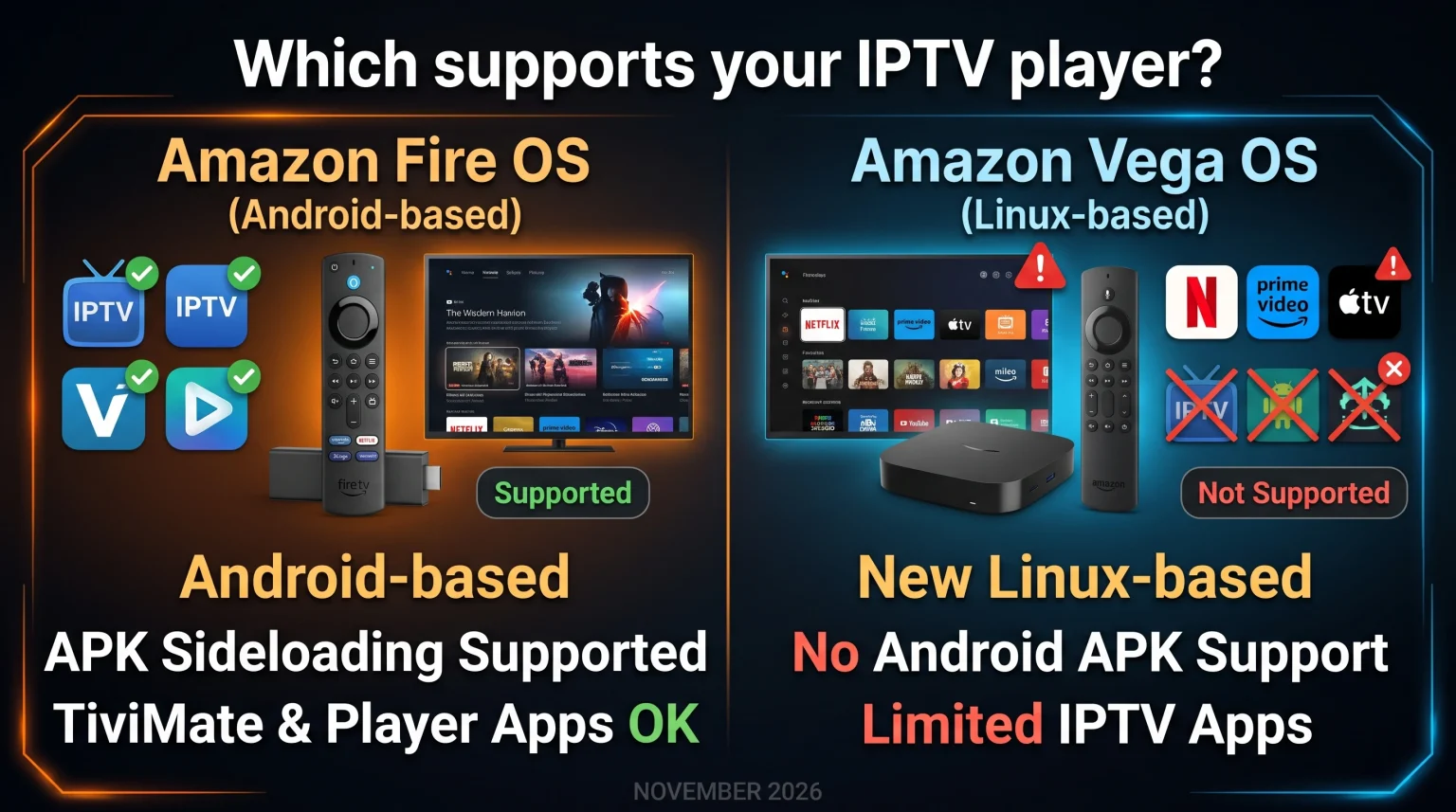
Amazon Fire OS is currently the better choice for IPTV users in November 2026. Fire OS is an Android-based operating system. Fire OS allows you to install popular Android IPTV applications using APK files.
Amazon Vega OS is a new Linux-based operating system. Vega OS does not support standard Android applications. You cannot install traditional Android IPTV applications on Vega OS devices.
Choose a Fire OS device if you want maximum application compatibility. Choose a Vega OS device if you only use official streaming services such as Netflix or Amazon Prime Video.
What is Amazon Fire OS?
Fire OS is the traditional operating system for Amazon Fire TV devices. Amazon built Fire OS using Android technology from Google. Because Fire OS uses Android technology, Fire OS supports Android applications.
Developers create applications for Fire OS using the standard Android APK format. APK means Android Package Kit. If an application is not available in the official Amazon Appstore, users can install the application manually. This manual installation process is called sideloading. Sideloading is very popular among IPTV users.
What is Amazon Vega OS?
Vega OS is the new operating system for specific Amazon Fire TV devices. Amazon built Vega OS using Linux technology. Vega OS does not include any Android code.
Amazon released Vega OS to create a lighter and faster operating system. Amazon also wants tighter control over the application ecosystem. Developers must build applications specifically for Vega OS. They cannot use standard Android code.
Currently, Amazon uses Vega OS on new devices such as the Fire TV Stick HD (2026) and the Fire TV Stick 4K Select (2025).
Comparison Table: Vega OS vs Fire OS
The table below shows the main differences between the two operating systems.
| Funktion | Amazon Fire OS | Amazon Vega OS |
| Technology base | Android | Linux |
| Application format | Android APK | VPKG |
| Installation von Apps von Drittanbietern | Ja | No standard APK support |
| IPTV player availability | Hoch | Very low |
| Device examples | Fire TV Stick 4K Max (2. Generation) | Fire TV Stick HD (2026) |
IPTV-Kompatibilität und TV Shadow IPTV
Internet Protocol Television requires a compatible media player application. TV Shadow IPTV provides high-quality streaming servers. However, you must install an IPTV player on your television device to connect to TV Shadow IPTV.
IPTV on Fire OS
Fire OS is excellent for IPTV. You can install many popular IPTV applications. Examples include TiviMate, IPTV Smarters Pro, and XCIPTV Player. These applications allow you to enter your M3U playlist link or your Xtream Codes login details. The Fire OS remote control works perfectly with these applications. You can easily navigate the Electronic Program Guide (EPG).
IPTV on Vega OS
Vega OS is currently problematic for IPTV users. Vega OS does not support standard Android APK files. Therefore, you cannot install TiviMate or IPTV Smarters Pro on a Vega OS device natively. Most independent IPTV developers have not created Vega OS applications yet. If you buy a Vega OS device in November 2026, you will have very few IPTV player options.
If you are frustrated by these operating system limitations, you might consider changing your television brand. Our guide to Das beste Smart-TV-Betriebssystem für IPTV im Jahr 2026: Tizen vs. Google TV vs. webOS explains the differences between Samsung, Google TV, and LG platforms.
Installing Applications: The Downloader App
The Downloader application is very popular on Fire TV devices. Users type a specific code into the Downloader application. The Downloader application then installs an Android APK file directly from the internet.
On Fire OS, the Downloader application works perfectly. You must enable “Apps from Unknown Sources” in the Fire OS developer settings. After you enable this setting, you can install almost any Android IPTV player.
On Vega OS, the traditional Downloader workflow does not work for Android applications. Even if you install a downloading tool, the Vega OS system cannot read or open an Android APK file. Vega OS requires applications to use the VPKG format.
Watching Live Football on Fire TV Devices
Many users buy TV Shadow IPTV to watch live football. Live sports require good hardware and a stable internet connection.
Motion Handling and Hardware
Football features fast camera movements. If your device processor is slow, the football might look blurry. The Fire OS devices, especially the Fire TV Stick 4K Max, have powerful processors. These processors handle fast motion smoothly. The new Vega OS devices also provide smooth menu navigation, but you must ensure your television supports a good refresh rate.
If you notice blurry images during sports, the problem might be your television screen, not your Fire TV stick. You can read our article about Warum sieht IPTV auf einem neuen 4K-Fernseher verschwommen aus? for more information.
Internetverbindung
Live football requires a constant stream of data. Wi-Fi connections can fluctuate. We recommend using an official Amazon Ethernet adapter. The Ethernet adapter connects your Fire TV stick directly to your internet router with a cable. A cable connection prevents buffering during important football matches. Both Fire OS devices and Vega OS devices support the Ethernet adapter.
Which Operating System Should You Choose?
When you buy a new Amazon device in November 2026, you must check the operating system version. If you want to buy a complete television instead of an Amazon device, you can read our comparison of Samsung Tizen vs. Sony BRAVIA Google TV: Was eignet sich 2026 besser für IPTV?.
Amazon Fire OS is the best choice for users who want freedom. Fire OS allows you to install specific IPTV applications. Fire OS has a massive library of existing IPTV players. The Fire TV Stick 4K Max (2nd Gen) remains a premium Fire OS option.
Amazon Vega OS is suitable for users who want simplicity. Vega OS is fast and efficient. However, Vega OS restricts application installation. Vega OS limits you to the official Amazon Appstore selection. Vega OS is not recommended for dedicated IPTV users in November 2026.
Schlussfolgerung
The introduction of Amazon Vega OS marks a major change for television streaming in November 2026. Vega OS provides a fast experience for standard streaming services. However, Vega OS removes the freedom to install standard Android applications.
Für Nutzer von TV Shadow IPTV, Fire OS remains the superior platform. Fire OS supports the best IPTV players available today. Fire OS allows easy installation through the Downloader application. Until developers create native Vega OS IPTV applications, we strongly recommend buying Fire OS devices for your IPTV needs.
Häufig gestellte Fragen
Can I install TiviMate on Amazon Vega OS?
No. TiviMate is an Android application. Vega OS does not support Android applications. You need a Fire OS device or an Android TV device to use TiviMate.
Does TV Shadow IPTV have an official application for Vega OS?
No. TV Shadow IPTV is a streaming provider. TV Shadow IPTV does not make operating system applications. You must use a third-party IPTV player, which is currently difficult to find on Vega OS.
How do I know if my Fire TV stick uses Vega OS?
You can check the device specifications before purchasing. In November 2026, the Fire TV Stick HD (2026) and Fire TV Stick 4K Select (2025) use Vega OS. Older models generally use Fire OS.