
Testing an IPTV service before Black Friday helps viewers choose the right subscription and avoid costly technical mistakes. Black Friday offers provide large discounts on annual streaming subscriptions, but a low price does not guarantee reliable service. Server stability, application compatibility, and stream responsiveness often decline when thousands of new subscribers connect at the same time during holiday sales.
Eine IPTV Black Friday free trial gives you practical test data before you make a financial commitment. During a trial, you can test video quality, channel changing speed, Electronic Program Guide (EPG) synchronization, and customer support response times. Testing during peak evening hours reveals whether the provider has sufficient server capacity.
This guide explains how to properly evaluate an IPTV trial, which technical metrics matter most, how to verify hardware compatibility across popular Smart TV operating systems, and how to spot misleading sales offers.
Kurze Antwort
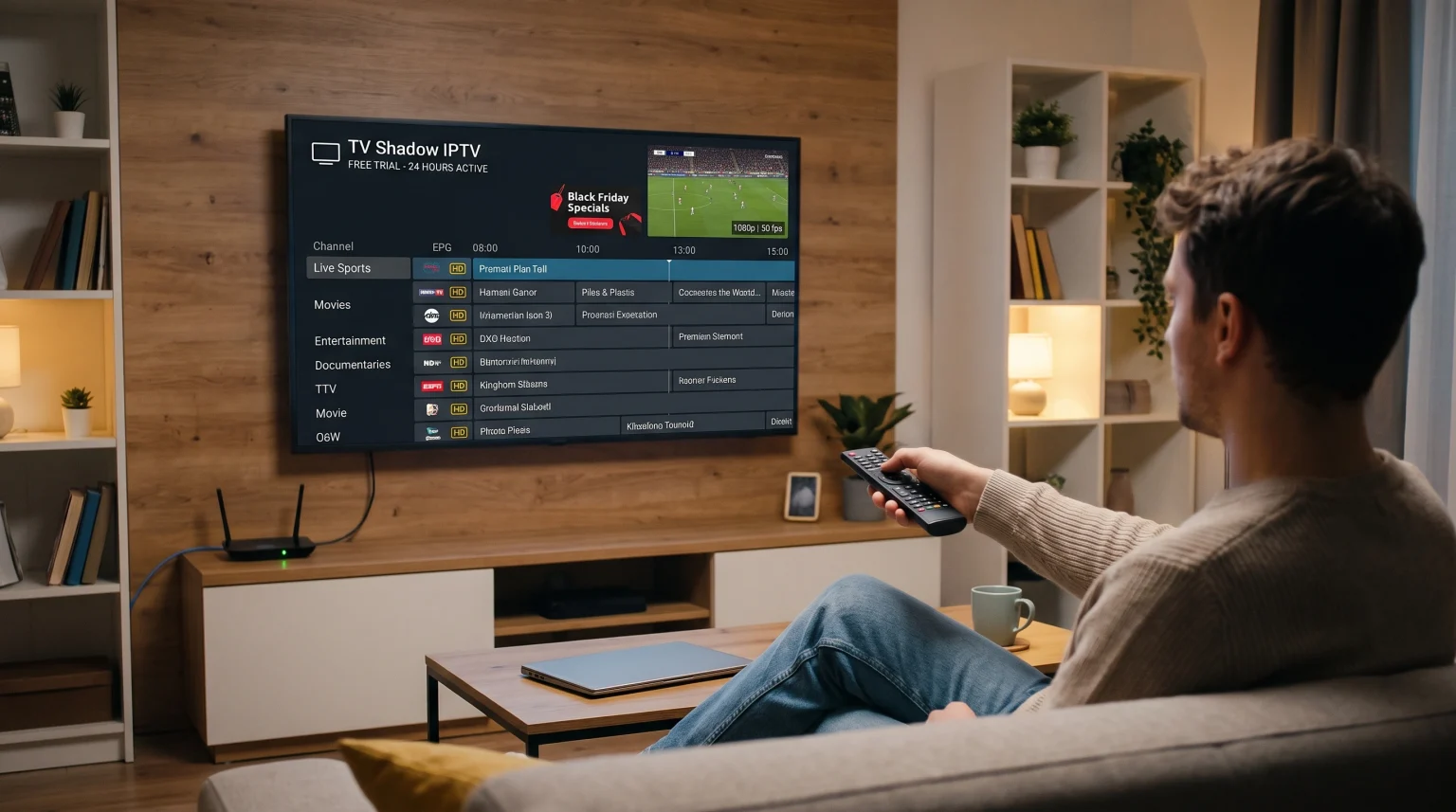
To test an IPTV service before Black Friday, request a 24-hour or 48-hour trial period and evaluate it during peak evening hours (between 19:00 and 22:00) and during live sporting events. Test server response times, audio-video synchronization, and Electronic Program Guide (EPG) reliability across your preferred devices.
For Smart TV users, verify whether your television operating system supports standard IPTV applications such as IPTV Smarters Pro or TiviMate. Sports viewers need high-bitrate 50 fps or 60 fps streams with stable motion handling, while general entertainment viewers should prioritize video-on-demand library size and navigation responsiveness. Always test using a wired Ethernet connection to separate provider server problems from local home network interference.
Why You Should Test an IPTV Service Before Black Friday
Black Friday and Cyber Monday bring substantial promotional discounts across the subscription streaming industry. Many providers advertise annual plans with discounts exceeding 50 percent. However, purchasing an annual subscription without prior testing carries significant technical risk.
+-----------------------------------------------------------------------+
|                 WHY PRE-BLACK FRIDAY TESTING MATTERS                  |
+-----------------------------------------------------------------------+
| 1. SERVER LOAD TESTING      | Discover how servers handle heavy peak  |
|                             | traffic before signing a 12-month plan. |
| 2. HARDWARE COMPATIBILITY   | Confirm the provider supports your TV   |
|                             | operating system (Google TV, Tizen, etc)|
| 3. SPORTS MOTION HANDLING   | Verify native 50fps / 60fps feeds for   |
|                             | football without motion stutter.        |
| 4. PLAYLIST COMPATIBILITY   | Check M3U URL and Xtream Codes API      |
|                             | integration in your chosen player app.  |
+-----------------------------------------------------------------------+
1. High Server Load During Holiday Sales
Discounted subscriptions attract thousands of simultaneous new connections. If a streaming provider does not maintain dynamic server scaling or load balancing across Content Delivery Networks (CDNs), streams will buffer, stutter, or disconnect completely. Testing a service before Black Friday reveals whether the streaming infrastructure can deliver consistent data rates under normal and elevated network demands.
2. Device and Operating System Compatibility
Not every IPTV provider works seamlessly with every Smart TV. Some services rely exclusively on specific third-party media players that may not exist in your television manufacturer’s app store. Testing your subscription on your actual television hardware prevents compatibility surprises after purchase.
3. Avoiding Non-Refundable Long-Term Contracts
Most Black Friday deals require upfront payment for 6-month, 12-month, or 24-month terms. Most digital subscription providers do not offer refunds once account credentials activate. A pre-sale trial provides the evidence you need to purchase with confidence or search for an alternative service.
Key Technical Features to Evaluate During a Trial
Evaluating an IPTV test account requires more than simply checking if a channel turns on. You must assess specific technical indicators that determine everyday viewing quality.
| Evaluation Metric | Acceptable Benchmark | What It Indicates |
| Channel Zapping Speed | Under 2.0 to 2.5 seconds | Server response latency and buffer efficiency |
| Live Sports Frame Rate | 50 frames per second (fps) / 60 fps | Smooth motion display without ball judder |
| Stream-Auflösung | Native 1080p FHD or 4K UHD | True source resolution vs. low-bitrate upscaling |
| Audio/Video Sync | 0 ms perceivable delay | Correct timecode matching in the transport stream |
| EPG Accuracy | 95%+ timeline coverage | Functional metadata delivery and channel mapping |
| Peak-Hour Stability | Zero buffering interruptions | Adequate CDN capacity during high-demand hours |
Channel Zapping Speed
Channel zapping speed measures the elapsed time between pressing a channel button and the appearance of unbuffered live video with audio. High-performance streaming servers usually complete this process within 1.0 to 2.5 seconds. If channel switches consistently require four seconds or longer, the provider’s server distribution points may be overloaded or physically distant from your internet service provider.
True Frame Rate for Live Sports
Standard television broadcasts use 25 fps or 30 fps for static studio programs, but live football requires 50 fps (in European broadcasting formats) or 60 fps (in North American broadcasting formats). A low frame rate makes fast-moving objects, such as a kicked football, look blurry or jumpy across the screen. If you notice motion blur during sports, read our analysis on 60-Hz- vs. 120-Hz-Fernseher für Live-Fußball to understand how display refresh rates interact with stream broadcast formats.
Audio and Video Synchronization
During live broadcasts, transport streams package video frames and audio tracks together. In poorly configured re-encoding setups, video data and audio data can drift out of alignment. If commentary does not align with player movements or speech does not match lip motion, the provider’s stream encoding pipeline is substandard.
Electronic Program Guide (EPG) Completeness
An Electronic Program Guide (EPG) provides channel schedules, program descriptions, and start-and-end times. A reliable IPTV trial should populate the EPG timeline automatically via an XMLTV link or Xtream Codes API integration. If program schedules display as “No Information” across major channels, recording programs and scheduling reminders will not function properly.
Smart TV Operating System Compatibility
Television operating systems handle IPTV applications differently. App availability depends on manufacturer guidelines, local country restrictions, television model year, and software versions.
+----------------------------------------------------------------------+
|                     SMART TV OS COMPATIBILITY                        |
+----------------------------------------------------------------------+
| GOOGLE TV / ANDROID TV                                               |
| - App Store: Google Play Store                                       |
| - IPTV App Selection: High (TiviMate, IPTV Smarters Pro, etc.)        |
| - Sideloading Support: Yes (Direct APK installation supported)       |
+----------------------------------------------------------------------+
| SAMSUNG TIZEN OS                                                     |
| - App Store: Samsung Apps                                            |
| - IPTV App Selection: Moderate (Smart IPTV, Nanomid, IBO Player)     |
| - Sideloading Support: No (Tizen requires signed app packages)       |
+----------------------------------------------------------------------+
| LG WEBOS                                                             |
| - App Store: LG Content Store                                        |
| - IPTV App Selection: Moderate (Smart IPTV, IBO Player, XCIPTV)      |
| - Sideloading Support: No (Proprietary webOS architecture)           |
+----------------------------------------------------------------------+
Google TV and Android TV (Sony, TCL, Philips, Chromecast)
Google TV provides the highest degree of flexibility for streaming media applications. Devices running Google TV or Android TV feature native access to the Google Play Store, where you can download established players such as TiviMate, IPTV Smarters Pro, and Sparkle TV. If an application is not listed in your regional store, Android TV allows users to manually install application packages (APK files).
Samsung Smart TVs (Tizen OS)
Samsung televisions use the proprietary Tizen operating system. Samsung Tizen does not support Android applications, APK installation files, or the Google Play Store. Instead, users must download dedicated Tizen applications from the Samsung App Store, such as Smart IPTV, IBO Player, or Nanomid Player. For a detailed breakdown of how Samsung hardware handles media playback, review our guide on whether Ist Samsung Tizen im Jahr 2026 für IPTV geeignet?.
LG Smart TVs (webOS)
LG televisions use the proprietary webOS platform. Like Samsung, LG webOS does not support Google Android APK files. LG users can install approved media players from the LG Content Store. When testing an IPTV trial on an LG television, verify that your trial credentials format such as an M3U playlist link or an Xtream Codes login is compatible with your installed webOS media player.
Amazon Fire TV OS
Fire TV devices use an operating system derived from Android. While Fire TV utilizes the Amazon Appstore rather than the Google Play Store, it supports third-party media players and manual application package installations.
Step-by-Step Guide: How to Properly Test an IPTV Trial
To test your trial effectively, follow this step-by-step procedure:
[Step 1: Prepare Hardware] -> Use wired Ethernet connection to your router
           |
[Step 2: Install Player]   -> Set up TiviMate, IPTV Smarters, or IBO Player
           |
[Step 3: Load Credentials] -> Enter Xtream Codes API or M3U Playlist URL
           |
[Step 4: Off-Peak Test]    -> Check initial channel line-up and EPG data
           |
[Step 5: Peak-Hour Test]   -> Stream live sports between 19:00 and 22:00
           |
[Step 6: Network Test]     -> Verify speeds and latency to streaming host
Step 1: Connect Your Television with an Ethernet Cable
Always begin your trial evaluation over a wired Ethernet cable connection rather than Wi-Fi. Wi-Fi connections can experience radio frequency interference, wall attenuation, and packet drops from other household devices. Connecting your Smart TV directly to your home router isolates provider server performance from local wireless problems.
Step 2: Install a Compatible Media Player
Select an IPTV player compatible with your television operating system:
For Google TV and Android TV: Install TiviMate or IPTV Smarters Pro.
For Samsung Tizen: Install IBO Player or Smart IPTV from the Samsung App Store.
For LG webOS: Install IBO Player or XCIPTV from the LG Content Store.
Step 3: Enter Your Trial Credentials
Most providers supply trial access through either an M3U playlist URL or Xtream Codes API parameters (Server URL, Username, and Password). Xtream Codes credentials are generally preferable because they load categories, EPG data, and video-on-demand listings more efficiently than raw M3U text files.
Step 4: Run an Off-Peak Baseline Test
Open the application during daytime hours (for example, at 14:00). Check whether all major channel categories load correctly. Verify that the Electronic Program Guide updates and displays accurate program schedules. Note the initial channel switching speed.
Step 5: Run a Peak-Hour Stress Test
Test the service again between 19:00 and 22:00 local time, as well as during a major live football match. This window represents peak worldwide internet traffic. If streams that played smoothly in the afternoon begin to buffer or drop frames during peak hours, the provider’s server distribution network lacks sufficient bandwidth reserves.
Step 6: Test Video Upscaling and Resolution
Check how standard definition (SD) and high definition (HD) streams appear on your 4K screen. Modern 4K televisions use processing chips to upscale lower-resolution signals. To learn why low-bitrate streams look fuzzy on large displays, see our guide on Warum sieht IPTV auf einem neuen 4K-Fernseher verschwommen aus?.
Testing Live Football and Sports Streaming
Live sports streaming requires higher technical standards than watching recorded movies. Movies can buffer several seconds of data ahead of playback, but live sports streams prioritize real-time delivery with minimal latency.
+--------------------------------------------------------------------+
|               SPORTS PERFORMANCE EVALUATION CHECKLIST              |
+--------------------------------------------------------------------+
| [ ] Frame Rate Check: Smooth motion across the pitch (50/60 fps)   |
| [ ] Fast Camera Panning: No horizontal screen tearing or judder    |
| [ ] Audio Sync: Commentary aligns exactly with referee whistles    |
| [ ] Bitrate Stability: Stream maintains sharpness during motion    |
| [ ] Latency: Minimal delay compared to live broadcast scoreboards  |
+--------------------------------------------------------------------+
Frame Rate and Motion Clarity
When watching a football match, the camera pans continuously across the pitch. At 25 fps or 30 fps, the pitch grass and the ball will stutter across your screen. During your trial, open the stream technical information panel inside your media player. Verify that the incoming video stream reads 50.00 fps or 59.94/60.00 fps.
Stream Bitrate vs. Video Compression
Resolution alone does not determine picture quality. A 1080p stream delivered at a low bitrate of 2.5 Megabits per second (Mbps) will show compression artifacts, macroblocking, and pixelation during fast motion. A high-quality 1080p sports feed requires a steady bitrate of 6.0 Mbps to 10.0 Mbps using H.264 or HEVC (H.265) compression.
Stream Latency
Live internet streams inherently experience a small delay compared to traditional over-the-air terrestrial signals. An acceptable internet broadcast delay ranges between 20 and 45 seconds behind real-time action. If your stream lags more than two minutes behind live scores, your social media apps or live score notifications will spoil game events before you see them.
Common Black Friday IPTV Scams and Warning Signs
The holiday shopping season brings numerous fraudulent websites designed to collect money without providing reliable service. Look for these warning signs during your trial evaluation:
1. Refusal to Provide a Trial Before Purchase
Legitimate providers commonly offer a free trial or a low-cost short-term test (such as a 24-hour trial for a small nominal fee). If a vendor refuses all trial options before demanding a multi-year subscription payment, avoid the purchase.
2. Promises of “Lifetime” Access
Be skeptical of promotions offering a “Lifetime Subscription” for a single one-time payment. Streaming television infrastructure requires ongoing expenditures for server hosting, bandwidth distribution, and technical maintenance. Services selling lifetime accounts frequently shut down after several months, leaving customers without recourse.
3. Untraceable Payment Methods Only
Exercise caution if a provider only accepts cryptocurrency, direct peer-to-peer wire transfers, or digital gift cards. While some technical users prefer cryptocurrency for personal privacy, established providers generally offer standard digital checkout methods that protect consumer transactions.
4. Overstated Channel Quantities
Marketing banners advertising “50,000+ Live Channels” usually indicate poor service organization. Such playlists are typically filled with duplicate streams, dead links, unmonitored local broadcasts, and broken links that crash television media players. A well-organized service featuring 5,000 active, monitored, and high-bitrate channels is far more dependable than an uncurated list of 50,000 unverified links.
Schlussfolgerung
Unter Nutzung eines IPTV Black Friday free trial is the most reliable way to protect your entertainment budget. Black Friday discounts provide excellent savings, but a subscription is only valuable if the service delivers consistent uptime, fluid sports motion handling, and full compatibility with your television hardware.
Before committing to a long-term plan, run systematic trials during peak evening hours, connect your devices using wired Ethernet, verify native 50 fps or 60 fps sports feeds, and confirm that your preferred media players run smoothly on your television’s operating system. If you seek a stable streaming experience with dependable server infrastructure and broad application support, test TV Shadow IPTV this holiday season to evaluate our streaming quality firsthand.
Häufig gestellte Fragen
How long does an IPTV free trial usually last?
Lorem ipsum dolor sit amet, consectetur adipiscing elit. Ut elit tellus, luctus nec ullamcorper mattis, pulvinar dapibus leo.
Can I install an IPTV trial directly on my Smart TV without extra hardware?
Yes, you can install an IPTV trial on most Smart TVs if your television operating system supports compatible media player applications. Samsung Tizen and LG webOS televisions support applications such as IBO Player and Smart IPTV from their native app stores. Google TV and Android TV models support a wider variety of players directly from the Google Play Store.
Why do streams buffer during big football matches while movies play fine?
Live football streams buffer more frequently because hundreds of thousands of users access the exact same live server distribution nodes simultaneously. Movies and recorded on-demand content are stored as static files distributed across caching servers worldwide, allowing data to pre-load smoothly into your device’s memory.