
You settle in to watch a game, but the screen freezes. Frustratingly, you check the bedroom, and the stream is absolutely flawless. If your IPTV buffers one TV only, you’re not alone. This specific issue usually points to local network bottlenecks rather than a bad provider.
Many households across the UK face this exact problem when upgrading their home entertainment setups. Let’s dive into why this happens and how you can eliminate video stuttering für immer.
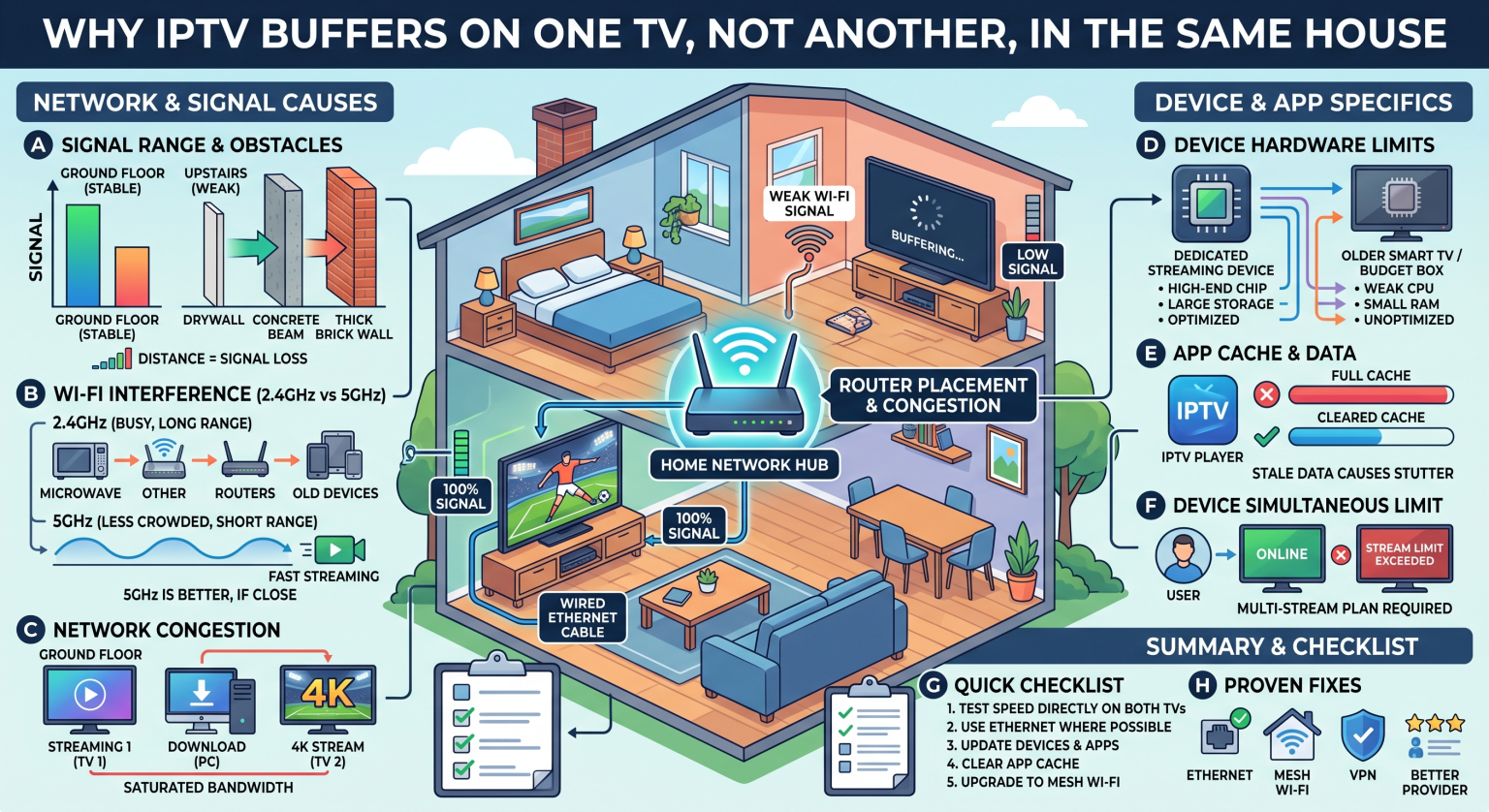
Why Your IPTV Buffers One TV Only in Your UK Home
When one screen streams perfectly but another struggles, the culprit is rarely your overall internet package. Instead, IPTV-Einfrieren is almost always tied to the individual device’s connection. Here are the most common reasons why this happens.
Wi-Fi Dead Zones and Interference
The distance between your TV and the router plays a massive role in internet connection speed. Thick walls, metal appliances, and even neighboring Wi-Fi signals can disrupt the broadcast. If the buffering TV is far from the router, it’s likely starving for data.
Hardware and Processing Power
Not all streaming devices are created equal. An older Smart TV might lack the RAM and processing power to decode high-definition streams efficiently. Meanwhile, a dedicated streaming stick on your other TV might handle the exact same network bandwidth effortlessly.
Ethernet vs. Wireless Connections
Hardwired connections almost always beat wireless setups for live streaming. If your flawless TV is using an Ethernet cable and the buffering one is on Wi-Fi, you have found your answer. Streaming lag thrives on unstable wireless frequencies.
Network Options Compared
To stop the buffering, you need to understand your connection choices. Here is a breakdown of how different setups impact your streaming performance:
| Verbindungstyp | Speed & Stability | Am besten geeignet für |
| Ethernet (Cat 6) | Maximum stability and zero packet loss. | Primary living room TVs and heavy 4K streaming. |
| 5-GHz-WLAN | High speed, but shorter physical range. | Devices in the exact same room as the main router. |
| 2.4GHz Wi-Fi | Slower speed, but passes through walls better. | Distant TVs that only stream standard definition. |
How to Stop the Buffering Right Now
Ready to fix the problem? Try these proven troubleshooting steps to optimize your setup and stabilize your stream:
Connect via Ethernet: Whenever possible, run a direct cable from your router to the struggling TV.
Upgrade your device: Consider buying a dedicated 4K streaming stick (like a Firestick or Roku) if your built-in Smart TV memory is constantly full.
Optimize router placement: Move your router to a central, elevated location away from thick brick walls or metal obstacles.
Cache leeren: Go into your IPTV app settings and clear the cache to free up essential operating resources.
Get Seamless Streaming Across Your Entire Home
Herauszufinden, warum dein IPTV buffers one TV only doesn’t have to be a headache. By fixing your local network, upgrading aging hardware, and making smart connection choices, you can enjoy flawless streams on every screen in your UK home.
Ready to experience buffer-free entertainment with thousands of high-quality channels? [Klicken Sie hier, um unsere Premium-IPTV-Abonnements kennenzulernen] and start your seamless streaming journey today!
Häufig gestellte Fragen (FAQ)
Why does my IPTV freeze every few seconds?
This is usually caused by inconsistent internet connection speed or network jitter. Restarting your router and switching to a wired Ethernet connection can quickly resolve this.
Can my internet provider block IPTV?
Yes, some ISPs throttle heavy streaming traffic during peak hours. Using a reliable VPN can mask your traffic and prevent ISP throttling.
Do I need a VPN for IPTV?
A VPN is highly recommended to protect your privacy and bypass potential speed throttling from your broadband provider.