
Have you ever wondered what actually happens when you load a channel on an IPTV app or set-top box? Traditional television relies on analog signals, satellite dishes, or heavy coaxial cables pulling a continuous broadcast into your living room. Internet Protocol Television (IPTV) completely flips that model.
Instead of broadcasting a massive bundle of channels simultaneously, IPTV delivers television content over the internet, pushing only the specific stream you request directly to your device. This single shift is why streaming is scalable, flexible, and completely dominating the modern entertainment landscape.
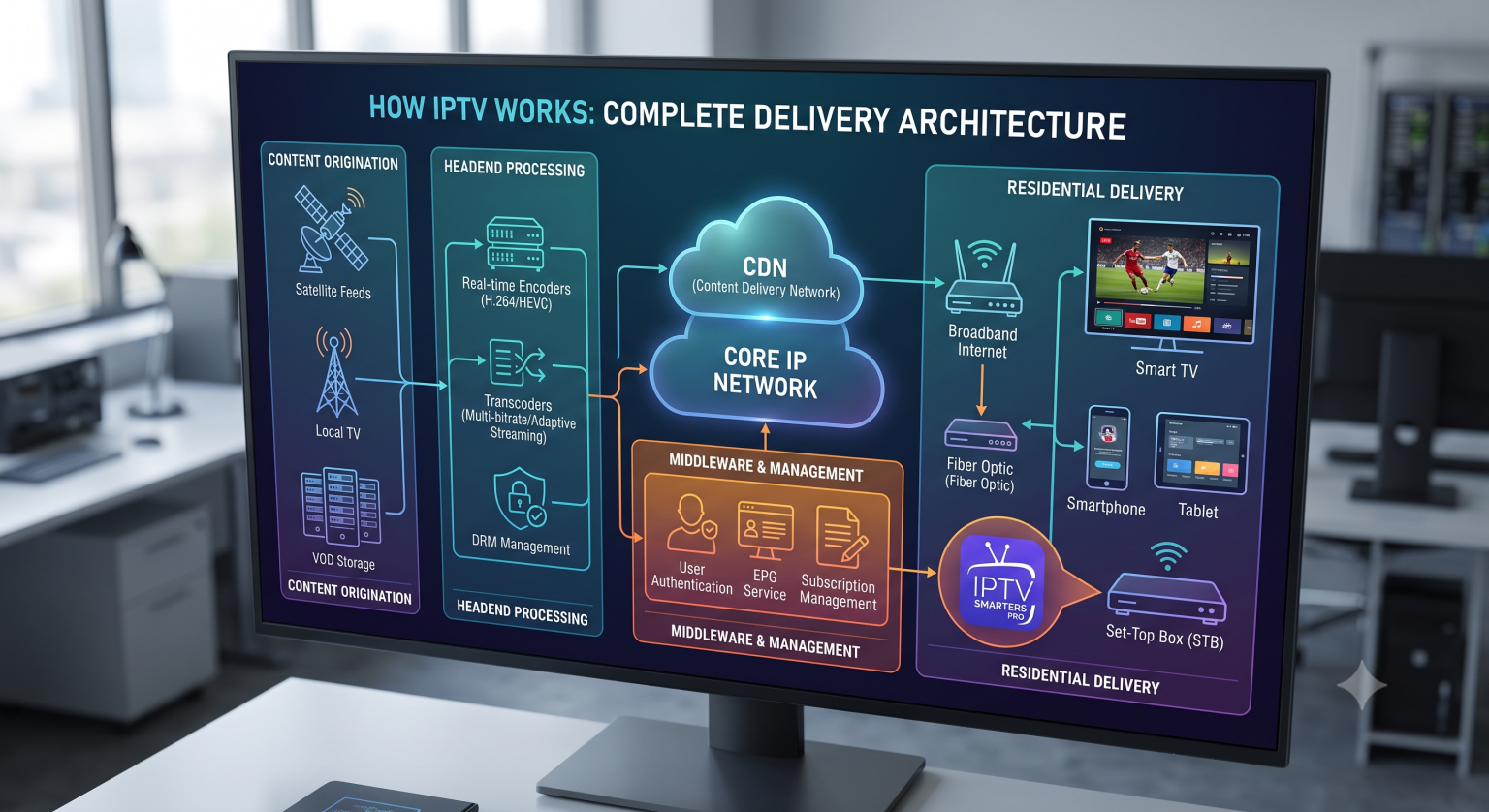
The Three Pillars of IPTV Services
To understand how an IPTV service functions, you have to look at the three main types of content delivery it handles:
Live Television: Broadcasting live events and scheduled programming in real-time, functioning much like traditional TV but routed through IP networks.
Video on Demand (VOD): A stored library of movies and television shows that you can request and watch at any time (think Netflix or Amazon Prime).
Time-Shifted TV: Catch-up services that let you replay broadcasts that aired hours or days ago without needing a personal DVR.
The End-to-End Delivery Architecture
Moving video from a source to your screen requires a multi-step pipeline. If any part of this chain fails, you get the dreaded buffering wheel.
1. Signal Acquisition and the Headend
The process starts at the IPTV Headend, a centralized facility where the provider ingests live feeds from satellites, local broadcasters, or studio cameras. For VOD, this is where massive media libraries are housed on centralized or distributed servers.
2. Encoding and Transcoding
Raw video files are massive. Before they can travel across the web, they must be compressed. Encoders convert the raw video into manageable digital formats using codecs like H.264 (AVC) or H.265 (HEVC).
Transcoding takes it a step further by creating multiple versions of the same stream at different resolutions and bitrates. This enables adaptive bitrate streaming if your internet connection drops suddenly, the server seamlessly shifts you from a 4K stream down to a 1080p stream rather than freezing the video entirely.
3. Middleware and Management
Middleware is the brain of the operation. It manages user authentication, electronic program guides (EPG), subscription billing, and the actual user interface you navigate on your screen. When you click a channel, the middleware validates your account and tells the server to release the stream.
4. Content Delivery Network (CDN)
To prevent latency, providers use a CDN. Instead of pulling a video from a single server halfway across the world, the CDN distributes copies of the content to edge servers located physically closer to the end-users. When you request a stream, it pulls from the closest available node, significantly reducing load times.
5. The End-User Device
Finally, the data packets reach your home network and hit your endpoint. This could be a smart TV, a smartphone, or a dedicated Set-Top Box (STB). The device’s software decodes the IP packets back into raw audio and video and displays it on your screen in real-time.
Unicast vs. Multicast Delivery
The real magic of IPTV lies in its network routing protocols.
When you watch a VOD movie, the system uses Unicast. This is a one-to-one connection. A dedicated stream is sent from the server directly to your specific IP address. You can pause, rewind, and fast-forward because you control that specific data flow.
When you watch Live TV, the system often uses Multicast. Instead of sending 100,000 individual streams to 100,000 people watching the same football game (which would crush server bandwidth), the provider sends a single stream to a network router. Using the Internet Group Management Protocol (IGMP), your device essentially “joins” the group to tap into that single shared broadcast.
Why Speed and Stability Matter
Because IPTV relies entirely on packet-switched networks, your viewing experience is tied directly to your internet stability. A traditional cable signal might look a little fuzzy if the connection is weak, but IP packets either arrive or they don’t. While a 25 Mbps connection is usually the baseline for HD streams, maintaining consistent Quality of Service (QoS) prioritizing video traffic on your network over background downloads is what actually prevents packet loss and keeps the stream perfectly smooth.