
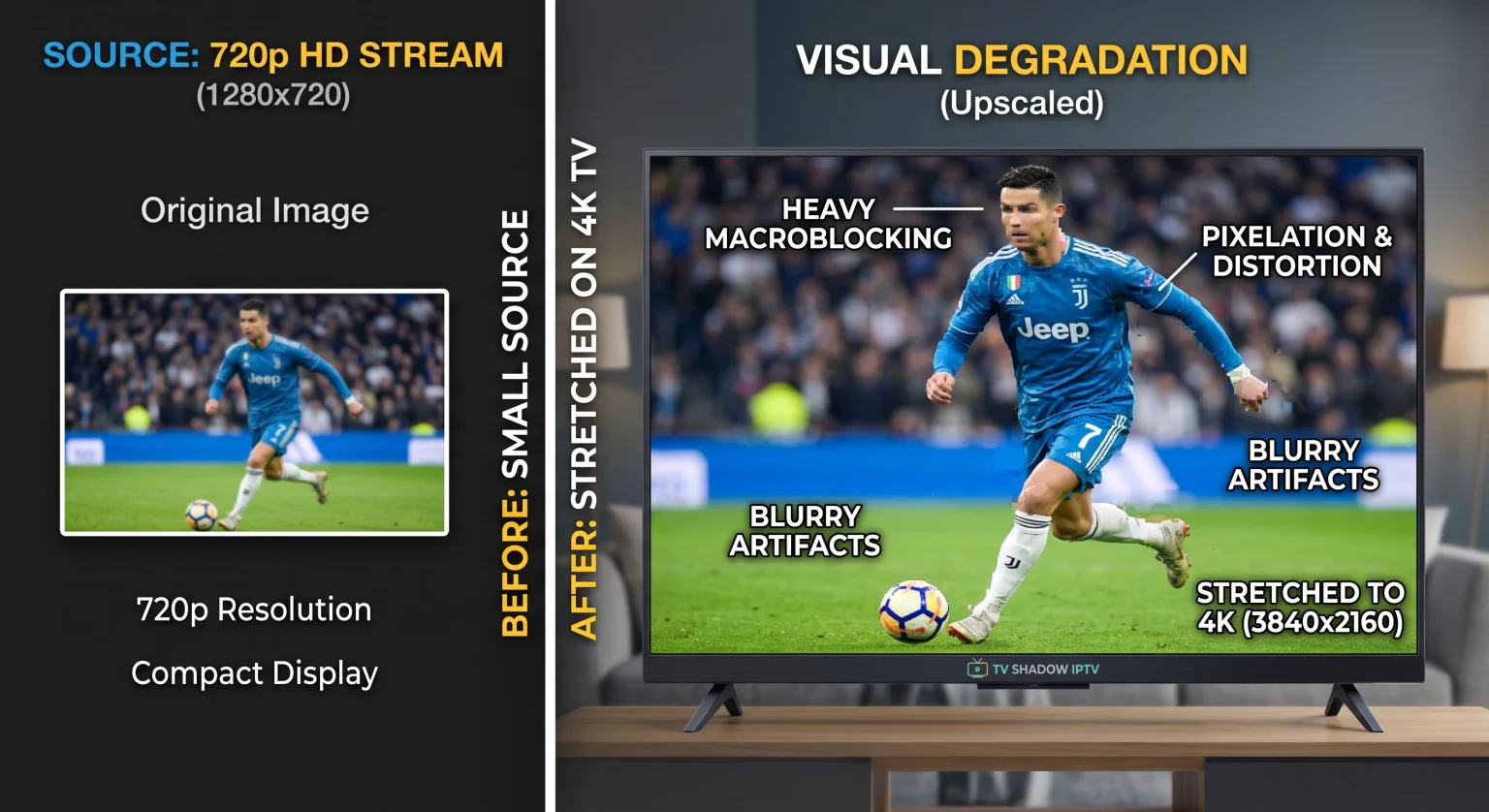
A new 4K television offers excellent picture quality for high-resolution media. However, users often notice a problem when they watch older media or highly compressed live broadcasts. A low quality stream on a 4K TV can look blurry, pixelated, or distorted.
This happens because the 4K television must stretch a small picture to fill a very large screen. The television processor tries to guess the missing visual details. This mathematical process often makes existing visual errors more visible to the viewer.
In this article, we explain how television video upscaling works. We also provide practical solutions to improve your viewing experience when you use TV Shadow IPTV or other digital streaming services.
Quick Answer
If you watch a low quality stream on a 4K TV, the television must artificially add millions of pixels to fill the screen. This process is called upscaling. When the television enlarges the image, the television also magnifies digital errors, compression blocks, and blurriness from the original stream. The 4K television makes these flaws easier to see. To fix this problem, you must find a higher-quality source file or you must change your television picture settings.
The Mathematics of TV Resolution
To understand the problem, you must understand screen resolution. Resolution is the number of pixels on the television screen. A pixel is a tiny dot of light.
Standard Definition (SD): Approximately 345,600 pixels.
High Definition (720p): Approximately 1 million pixels.
Full High Definition (1080p): Approximately 2 million pixels.
4K Ultra High Definition: Approximately 8.3 million pixels.
When you play a 4K movie on a 4K television, every pixel from the movie matches a pixel on the screen. The picture looks perfect.
When you play a Full HD (1080p) stream on a 4K television, the television screen has 6 million empty pixels. The television processor must create new pixels to fill the empty space. This process is called upscaling. You can learn more about What Is TV Upscaling and Does It Help IPTV?].
Why a Low Quality Stream on a 4K TV Looks Bad
Upscaling works very well if the original video signal is clean. However, upscaling fails when the original video signal has poor quality. Three main factors cause the picture to look bad.
1. Magnified Compression Artifacts
Streaming services compress video data to save internet bandwidth. Heavy compression creates digital blocks in the video. These blocks are called macroblocking. On an older television, these blocks are small and difficult to see. When a 4K television upscales the video, the television makes the compression blocks physically larger.
2. Artificial Sharpness
Modern 4K televisions add artificial sharpness to the picture by default. Artificial sharpness looks good on high-quality 4K video. However, artificial sharpness highlights the digital errors in a low quality stream. The television processor sharpens the compression blocks, which makes the picture look unnatural.
3. Screen Size
4K televisions are usually larger than older HD televisions. A popular television size is 65 inches. A larger physical screen makes every visual error bigger. If you sit close to a large 4K television, your eyes will easily see the digital flaws in the video.
Comparison: Video Signals on a 4K Television
| Video Signal Quality | Number of Pixels | Result on a 4K Television |
| SD (Standard) | 345,600 | Looks very blurry; heavy digital blocks |
| HD (720p) | 1,000,000 | Looks soft; some compression is visible |
| Full HD (1080p) | 2,000,000 | Looks clear; upscaling works very well |
| 4K UHD | 8,300,000 | Looks perfect; no upscaling required |
Live Football and Sports Streaming
Sports broadcasts show fast camera movements. Fast movement makes video compression very visible.
When the camera moves quickly across a football pitch, the video stream requires a high data bitrate. If the video bitrate is low, the green grass will look like moving green blocks. A 4K television processor tries to fix these moving blocks, but the processor is often too slow.
For fast sports, the television refresh rate is also important. You can read our guide to 60Hz vs 120Hz TV for Live Football.
To get the best live football experience, always connect your Smart TV to your internet router using an Ethernet cable. An Ethernet cable provides a more stable connection than Wi-Fi. A stable connection helps maintain a high video bitrate.
IPTV and 4K Televisions
IPTV services deliver television channels over the internet. These channels come in different resolutions.
If you use TV Shadow IPTV, you will see that different channels have different quality levels. Some older television stations only broadcast in Standard Definition (SD). If you watch an SD channel on a modern television, you will experience the upscaling problems mentioned above.
However, many premium channels are available in Full HD (1080p) or 4K. If you see a low quality stream on a 4K TV, check if a higher-resolution version of the same channel is available in your IPTV menu. If you continue to experience problems with modern televisions, you can read Why Does IPTV Look Blurry on a New 4K TV?.
How to Fix a Low Quality Stream on a 4K TV
You cannot add missing data to a bad video stream. However, you can change your television settings to hide the visual errors.
Step 1: Reduce Picture Sharpness
Open your television picture settings. Find the “Sharpness” setting. Reduce the sharpness to zero or a very low number. This action stops the television from highlighting the digital blocks.
Step 2: Enable Noise Reduction
Find the setting called “MPEG Noise Reduction” or “Digital Clean View”. Turn this setting on. This software feature smooths the edges of compression blocks. It makes the low quality stream look softer but more natural.
Step 3: Turn Off Motion Smoothing
Motion smoothing can make compression artifacts look worse during fast scenes. Find settings like “TruMotion” (LG), “Motionflow” (Sony), or “Picture Clarity” (Samsung) and turn them off.
Step 4: Increase Viewing Distance
If you sit too close to a large 4K television, you will see every pixel. Move your sofa further away from the television. Physical distance makes the image appear smoother to human eyes.
Conclusion
A 4K television is designed for high-resolution video. When you display a low quality stream on a 4K TV, the television must use mathematics to stretch the image. This upscaling process magnifies video compression and blurriness.
To improve your picture, you should lower your television sharpness settings and turn on digital noise reduction. When using services like TV Shadow IPTV, always select the Full HD or 4K channel versions when they are available. By managing your television settings correctly, you can make older streams and standard broadcasts much more enjoyable to watch.
FAQ
Why does my old TV look better than my new 4K TV when watching old shows?
Your old television has a lower screen resolution. The old television does not need to stretch the small image. The 4K television must stretch the image massively, which reveals all the digital errors in the old video.
Can a new HDMI cable fix a low quality stream?
No. An HDMI cable transfers digital data. If the original stream has low quality, the HDMI cable will perfectly transfer the low quality picture to the television.
Will a faster internet connection improve stream quality?
Yes, but only if the streaming provider offers a higher bitrate. If the provider transmits a highly compressed video file, a faster internet connection will not change the video file.
What is MPEG noise reduction?
MPEG noise reduction is a software feature inside your Smart TV. The software analyzes the video and smooths out the digital blocks caused by video compression.
Do all TV brands upscale video exactly the same way?
No. Different manufacturers use different processors. Sony BRAVIA televisions often focus on natural color upscaling. Samsung Tizen televisions often produce a slightly sharper upscaled image. LG televisions provide very balanced upscaling. The results depend on the specific television model and processor generation.