
Google released a new software update for the Chromecast with Google TV 4K in October 2026. The new firmware includes the August 2026 Android security patch. The update also provides bug fixes and system performance improvements. Google recommends installing the new software to maintain device security and stability.
The Google TV operating system usually downloads updates automatically. However, users can also check for new software manually. This manual check is useful for users who want the latest performance improvements immediately. The October 2026 update applies specifically to the 4K version of the Chromecast device. The High Definition (HD) version of the Chromecast device has a different update schedule.
Respuesta rápida
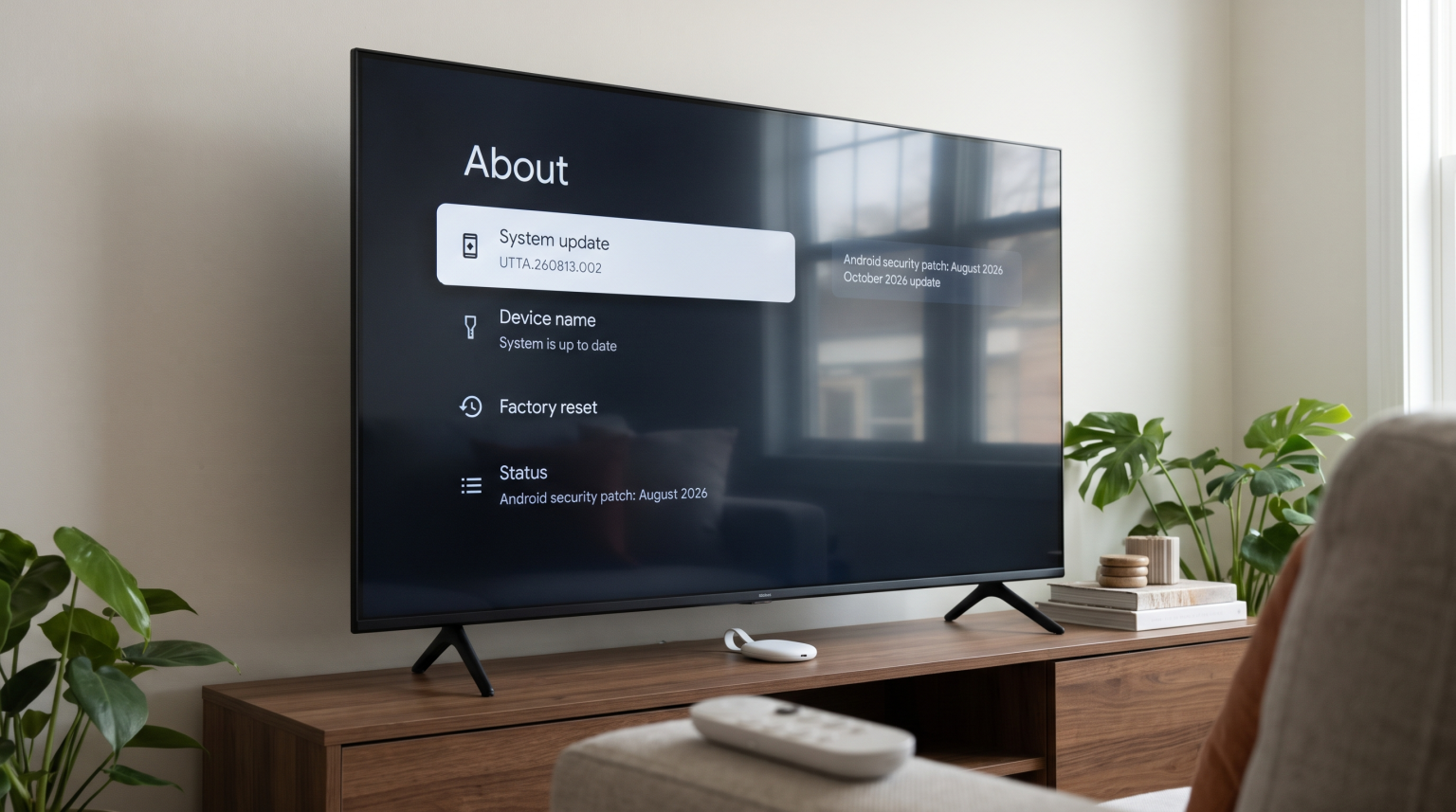
To install the Chromecast October 2026 update, turn on your television. Go to the home screen of the Google TV interface. Select the Settings icon. Choose the System menu, then select About. Finally, select System update.
The Chromecast will check the Google servers for new software. If the update is available, follow the instructions on the television screen. The installation process requires approximately 10 to 12 minutes to complete.
What is New in the Chromecast October 2026 Update?
The Chromecast October 2026 update focuses on system stability and background security. The update does not change the visual appearance of the Google TV home screen. The update does not add new major features to the user interface.
For the Chromecast with Google TV 4K, the new software build number is UTTA.260813.002. This software version upgrades the Android security patch level to August 2026. Security patches protect the device from newly discovered software vulnerabilities.
The Chromecast with Google TV HD uses a different software version. Currently, the HD model uses build number UTTC.250917.004. The HD model remains on the October 2025 security patch level. Google updates different hardware models at different times.
Comparison: Chromecast 4K vs Chromecast HD Firmware
This table shows the current software status for the two Chromecast models as of October 2026.
| Característica | Chromecast with Google TV (4K) | Chromecast with Google TV (HD) |
| October 2026 update | Disponible | Not available currently |
| Software build number | UTTA.260813.002 | UTTC.250917.004 |
| Android security patch | August 2026 | October 2025 |
| Sistema operativo | Sistema operativo Android TV | Sistema operativo Android TV |
| Update installation | Automatic or manual | Automatic or manual |
How to Check and Install the Chromecast October 2026 Update
Users can force the Chromecast device to search for the new software. Follow these exact steps:
Turn on your television and the Chromecast device.
Ensure the Chromecast connects to a stable Wi-Fi network.
Use the remote control to navigate to the home screen.
Select the user profile icon or the Settings gear icon.
Selecciona el Configuración menú.
Desplázate hacia abajo y selecciona System.
Seleccionar Acerca de.
Seleccionar System update.
The device will display a progress screen. The screen will show the file download progress. During the installation phase, the television screen may turn black. The white light on the Chromecast device will pulse. Do not disconnect the power cable while the light is pulsing. Disconnecting the power cable during an update can damage the Chromecast software.
IPTV Compatibility on the New Google TV Version
The Chromecast October 2026 update maintains full compatibility with IPTV applications. The underlying operating system remains the same. Therefore, all applications from the Google Play Store continue to function normally.
Users can install standard IPTV player applications directly from the Google Play Store. The Google TV operating system supports applications that use M3U playlists and Xtream Codes.
The Electronic Program Guide (EPG) functionality depends on the specific IPTV application, not the television operating system. The Chromecast October 2026 update does not limit EPG support.
If you are comparing different streaming devices for IPTV, read our guide explaining the differences in Tizen frente a Google TV para aplicaciones de IPTV: ¿en qué se diferencian?. The Google TV operating system generally offers more flexibility for IPTV applications than closed operating systems.
Live Football and Sports Streaming Performance
Streaming live football requires fast data processing and a stable internet connection. The Chromecast October 2026 update includes general performance improvements that help the device run smoothly.
The Chromecast with Google TV 4K outputs video at a 60Hz refresh rate. This 60Hz refresh rate matches the broadcast standard for most live sports. The television screen displays 60 frames per second. If you want to understand how refresh rates affect sports broadcasts, read our article about choosing a Televisores de 60 Hz frente a 120 Hz para ver el fútbol en directo.
Wireless network stability is very important for live sports. The Chromecast uses Wi-Fi by default. If your Wi-Fi router is far from the television, live football streams may buffer. Users who experience buffering can buy the official Google Ethernet adapter. The Ethernet adapter allows a direct cable connection to the internet router. A wired connection is always more stable than a Wi-Fi connection.
Sometimes, live football streams are broadcast in a lower resolution, such as 720p or 1080p. The Chromecast 4K and the television work together to increase the image size for a 4K screen. To learn more about this process, read our guide: ¿Qué es la mejora de resolución de la televisión y es útil para la IPTV?.
Conclusión
The Chromecast October 2026 update provides an important security patch for the Chromecast with Google TV 4K. Users should navigate to the System menu and select System update to install the new software. The update keeps the device secure and improves general performance. The HD model does not currently receive this specific update. All IPTV applications and streaming features continue to work perfectly on the new software version. For the best live football experience, users should ensure their Chromecast has a strong Wi-Fi connection or a wired Ethernet connection.
Preguntas frecuentes
Does the Chromecast October 2026 update change the Google TV interface?
No, the user interface remains exactly the same. The Chromecast October 2026 update provides security patches and background performance improvements. The update does not change the home screen layout.
Why does my Chromecast HD not have the October 2026 update?
Google releases software updates for different hardware models at different times. In October 2026, Google only released the new software for the 4K model. The HD model will likely receive an update in the future.
Does the software update improve IPTV streaming quality?
The update improves general system stability. However, the update does not directly change video quality. Your IPTV streaming quality depends on your internet connection speed and your specific IPTV service provider.