
Are you suddenly unable to sideload your favorite streaming apps? You are not alone, as millions of users across the United States are discovering Amazon’s massive software shift. Knowing whether your device runs Fire TV Vega OS or Fire OS is critical for customizing your home entertainment experience.
Amazon’s transition to a new Linux-based operating system is already reshaping the American streaming landscape. Let’s break down exactly how you can identify your system and what it means for your smart TV setup.
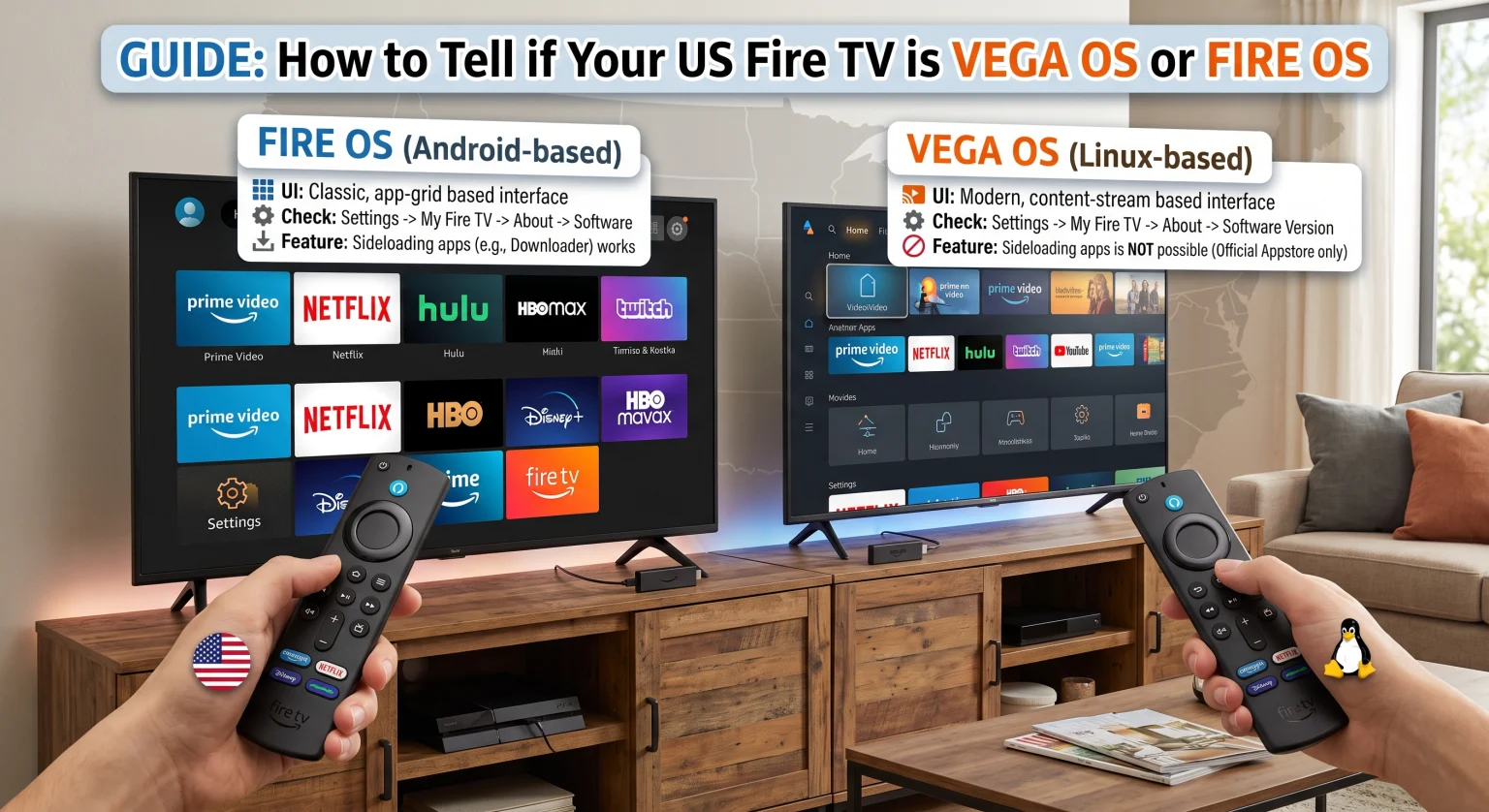
Why the Shift to Fire TV Vega OS or Fire OS Matters for US Users
For over a decade, Amazon relied on Android-based software to power its popular hardware. This allowed users to easily install third-party applications and customize the Fire TV interface.
Now, newer models like the Fire TV Stick 4K Select and Fire TV Stick HD use Vega OS, which is built entirely on Linux. While it offers faster app launches and a smoother experience, it completely removes the capability for sideloading Android apps.
Understanding the differences between Fire TV Vega OS or Fire OS dictates what you can and cannot do with your device. Let’s look at the major distinctions in the US market.
Key Differences at a Glance
App Compatibility: Fire OS supports standard Android APK files, while Vega relies heavily on web-based and React Native frameworks.
Customization: Only Android-powered devices allow custom launchers and extensive menu tweaking.
Performance: The new Vega platform significantly reduces lag on entry-level sticks.
| Característica | Fire OS (basado en Android) | Vega OS (Linux-based) |
| Underlying Architecture | Forked version of Android | Linux-based framework |
| Sideloading Apps (APKs) | Yes, fully supported | No, completely blocked |
| Lanzadores personalizados | Yes, via third-party tools | No, locked ecosystem |
| App Compatibility | Millions of Android apps | Limited to Amazon Appstore |
| Primary Devices | 4K Max, Cube, Smart TVs | 4K Select, HD Stick, Echo Show 15 |
How to Check Your Software Version
If you are wondering whether your streaming stick runs Fire TV Vega OS or Fire OS, the process is simple. Amazon makes it easy to find your device specifications directly from the home screen.
Ve a la Configuración gear icon on your television.
Seleccionar Mi Fire TV (or “Device & Software”).
Haz clic en Acerca de and look at the Software Version.
If your system reads “Fire OS 7” or “Fire OS 8”, you are on the legacy Android platform. If you own a brand-new model like the 4K Select and the OS version does not explicitly say “Fire OS,” you are running the new Vega software.
Navigating App Compatibility in the United States
For tech-savvy users across the United States, sideloading has always been a major selling point for Amazon streaming devices. Losing this feature means you are restricted strictly to official applications found in the built-in app store.
However, if you primarily use your television for mainstream services like Netflix, Hulu, and Prime Video, you might actually prefer Vega. The lightweight code means fewer crashes and much quicker navigation menus.
Maximize Your Smart TV Setup Today
Knowing whether you are using Fire TV Vega OS or Fire OS is the first step to maximizing your streaming setup. As the US market continues to evolve, staying informed ensures you buy the right hardware for your specific needs.
Ready to take your home entertainment to the next level? Suscríbete hoy mismo a nuestro boletín informativo premium sobre tecnología to get exclusive tips, device reviews, and the latest updates on Amazon’s smart TV ecosystem delivered straight to your inbox!
Preguntas frecuentes (FAQ)
Can I update my older device to Vega OS?
No. If your current device runs Fire OS, it will not be updated to the new software. Amazon does not change the underlying operating system on existing hardware.
Will Amazon stop making Fire OS devices?
While all future standard Fire TV Sticks will use Vega, Amazon has confirmed it is a “multi-OS company”. Higher-end devices like smart TVs and potentially new Cubes will continue using Android-based software for the foreseeable future.