
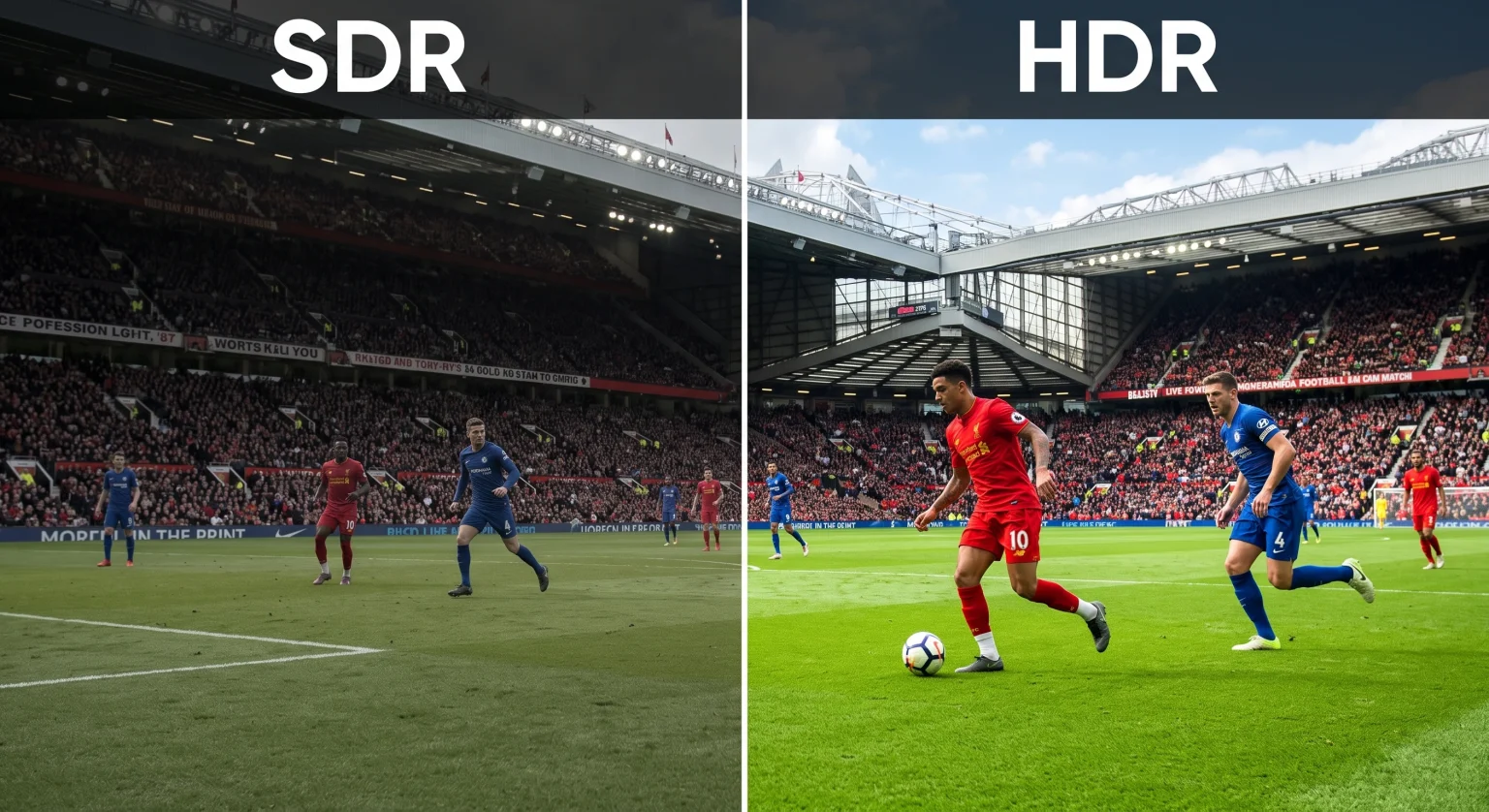
High Dynamic Range (HDR) improves television picture quality. HDR makes bright parts of the video brighter. HDR makes dark parts of the video darker. Many modern televisions support different HDR formats. The three main HDR formats are HDR10, HDR10+, and Dolby Vision.
When you watch IPTV, the HDR format can affect your viewing experience. Different television brands support different HDR formats. This guide explains the technical differences between HDR10, HDR10+, and Dolby Vision. We will also explain how these HDR formats work with IPTV services like TV Shadow IPTV.
Respuesta rápida
HDR10 is the standard video format and works on almost every new 4K television. HDR10+ is an upgraded dynamic format created by Samsung. Dolby Vision is a premium dynamic format that adjusts picture settings for every specific scene.
For an HDR IPTV stream, the resulting picture quality depends on the original video file and your television model. Most live IPTV content uses Standard Dynamic Range (SDR) or basic HDR10. If you buy a new television for IPTV, Dolby Vision offers the highest potential picture quality. However, HDR10+ is also an excellent format for Samsung televisions.
What Is HDR?
HDR10 is the base standard for High Dynamic Range video. Almost all 4K HDR televisions support the HDR10 format.
HDR10 uses static metadata. Metadata is technical information sent to the television about the video file. Static metadata means the television applies one single picture setting for the entire video. The picture setting does not change during the movie or the television show.
The main advantage of HDR10 is compatibility. Every modern Smart TV can play an HDR10 video file. The main disadvantage is that the television cannot optimize the picture for individual dark scenes or bright scenes.
HDR10+ Explained
HDR10+ is an advanced High Dynamic Range format. Samsung created HDR10+ to compete directly with Dolby Vision.
HDR10+ uses dynamic metadata. Dynamic metadata tells the television to adjust the picture settings frame by frame. When a scene is very dark, the television changes the settings to make details easier to see. When a scene is very bright, the television adjusts the settings to show more color detail.
The main advantage of HDR10+ is excellent picture quality without licensing fees for the television manufacturer. The main disadvantage is limited compatibility. HDR10+ is mostly available on Samsung televisions and a few other specific brands. HDR10+ is less common than Dolby Vision.
Dolby Vision Explained
Dolby Vision is a premium HDR format created by Dolby Laboratories. Like HDR10+, Dolby Vision uses dynamic metadata. The television adjusts the brightness and the contrast for every specific scene in the video.
Dolby Vision can theoretically support higher brightness levels and more colors than the HDR10 format. Film studios carefully calibrate Dolby Vision movies to look exactly as the director intended.
The main advantage of Dolby Vision is the highest possible picture quality. LG, Sony, and many popular streaming services support Dolby Vision. The main disadvantage is that Samsung televisions do not support Dolby Vision.
Comparison Table: HDR10 vs HDR10+ vs Dolby Vision
| Característica | HDR10 | HDR10+ | Dolby Vision |
| Metadata type | Estático | Dynamic | Dynamic |
| Color depth | 10-bit | 10-bit | Up to 12-bit |
| Maximum brightness | Up to 1,000 nits | Up to 4,000 nits | Up to 10,000 nits |
| Picture adjustment | Once per video | Scene by scene | Scene by scene |
| Television support | All HDR televisions | Samsung, Panasonic, TCL | LG, Sony, Philips, TCL |
| Manufacturer licensing | Gratis | Gratis | Paid license required |
How HDR Works with IPTV
Watching HDR content through an IPTV service requires specific conditions. Most live television channels currently broadcast in Standard Dynamic Range (SDR). However, some Video on Demand (VOD) movies and premium sports channels broadcast in HDR.
For an IPTV stream to display in HDR, three things must happen simultaneously. First, the original video stream must contain the HDR metadata. Second, your IPTV player application must support HDR video playback. Third, your television hardware must support the specific HDR format.
IPTV Player Application Support
Applications like IPTV Smarters, TiviMate, or other M3U players depend on your television hardware. The television operating system processes the video signal. If the operating system cannot read the Dolby Vision metadata in the IPTV stream, the television will usually show standard HDR10 instead.
If you want to understand how different television software handles video applications, our guide to El mejor sistema operativo para Smart TV para IPTV en 2026] explains the differences between Tizen, Google TV, and webOS.
Smart TV Operating System Limitations
Every television brand uses different software. These software differences affect your HDR IPTV experience.
Samsung Tizen televisions will not play Dolby Vision files correctly. If an IPTV stream uses Dolby Vision, a Samsung television will downgrade the video to standard HDR10 or SDR. LG webOS televisions support Dolby Vision perfectly, but LG televisions do not support HDR10+. Sony televisions with Google TV generally support Dolby Vision and HDR10.
Cuando utilizas TV Shadow IPTV, the application will send the video stream to your television. The television decides how to display the colors based on its format compatibility.
Watching Live Football in HDR
Live football requires fast picture processing. When a football moves quickly across the screen, a good television keeps the image sharp. HDR improves the colors of the football pitch. The green grass looks more natural. The bright stadium lights do not hide the details in the dark areas of the stadium.
Input Signal Quality
The HDR format is only one part of the video quality. The refresh rate of the television is also very important for live football. A television with a 120Hz panel shows smoother movement than a television with a 60Hz panel. If you want to understand how refresh rates affect sports broadcasts, read our comparison of Televisores de 60 Hz frente a 120 Hz para ver el fútbol en directo.
Streaming Stability
High-quality HDR video requires a fast internet connection. HDR video files contain more data than SDR video files. We strongly recommend connecting your Smart TV directly to your internet router with an Ethernet cable. Wi-Fi connections can cause buffering during live football matches.
Sometimes an IPTV stream may look blurry on a new television, even if the stream has HDR. You can read our guide explaining ¿Por qué se ve borrosa la IPTV en un televisor 4K nuevo?] for more information on picture settings and upscaling.
Conclusión
HDR10, HDR10+, and Dolby Vision all improve your television picture quality. HDR10 is the basic format that works on every new television. HDR10+ is an excellent dynamic format for Samsung televisions. Dolby Vision provides the highest premium quality for LG televisions, Sony televisions, and many other brands.
Al utilizar TV Shadow IPTV, your HDR experience depends on the specific video stream and your television hardware. Most current live television broadcasts use standard dynamic range. However, as more channels adopt high dynamic range technology, choosing a television that matches your preferred HDR format will ensure the best possible viewing experience.
Preguntas frecuentes (FAQ)
Does TV Shadow IPTV support HDR video?
Yes, but it depends entirely on the specific video stream. If the original channel or the original VOD file contains HDR data, a compatible television will display the video in HDR.
Can I update my Samsung television to get Dolby Vision?
No. Samsung does not support Dolby Vision on any television model. A software update will not add Dolby Vision to a Samsung television. Samsung uses HDR10+ instead.
Which HDR format is best for IPTV?
Dolby Vision offers the highest potential picture quality. However, standard HDR10 is the most common format for IPTV streams. HDR10 works correctly on almost all modern televisions.
Do I need a special HDMI cable for HDR?
Yes, if you use an external device. You need an HDMI 2.0 or HDMI 2.1 cable to watch 4K HDR video from an external Android box or Apple TV. If you use an IPTV application directly on your Smart TV, you do not need an HDMI cable.
Why are the colors too dark when I watch HDR video?
Your television brightness settings may be wrong. Also, cheaper televisions often accept an HDR signal but lack the hardware brightness required to display true HDR colors. This makes the picture look very dark.
Can I watch Dolby Vision on an Android TV?
Yes, but only if the specific television hardware supports Dolby Vision. The Android TV or Google TV operating system supports Dolby Vision, but the physical television screen must also have a Dolby Vision license.
Does HDR video use more internet data?
Yes. HDR video files contain extra metadata for colors and brightness. An HDR stream requires a faster internet connection than a standard SDR stream.