
Are you tired of missing your favorite live sports or shows because your DVR failed? When streams buffer or recordings abruptly stop, many users ask: is it the IPTV recording app or provider causing the issue? For viewers in the US, solving this mystery is the secret to a flawless offline viewing experience.
The short answer? It depends on both. Your software player executes the commands, but your subscription rules dictate if the action actually works.
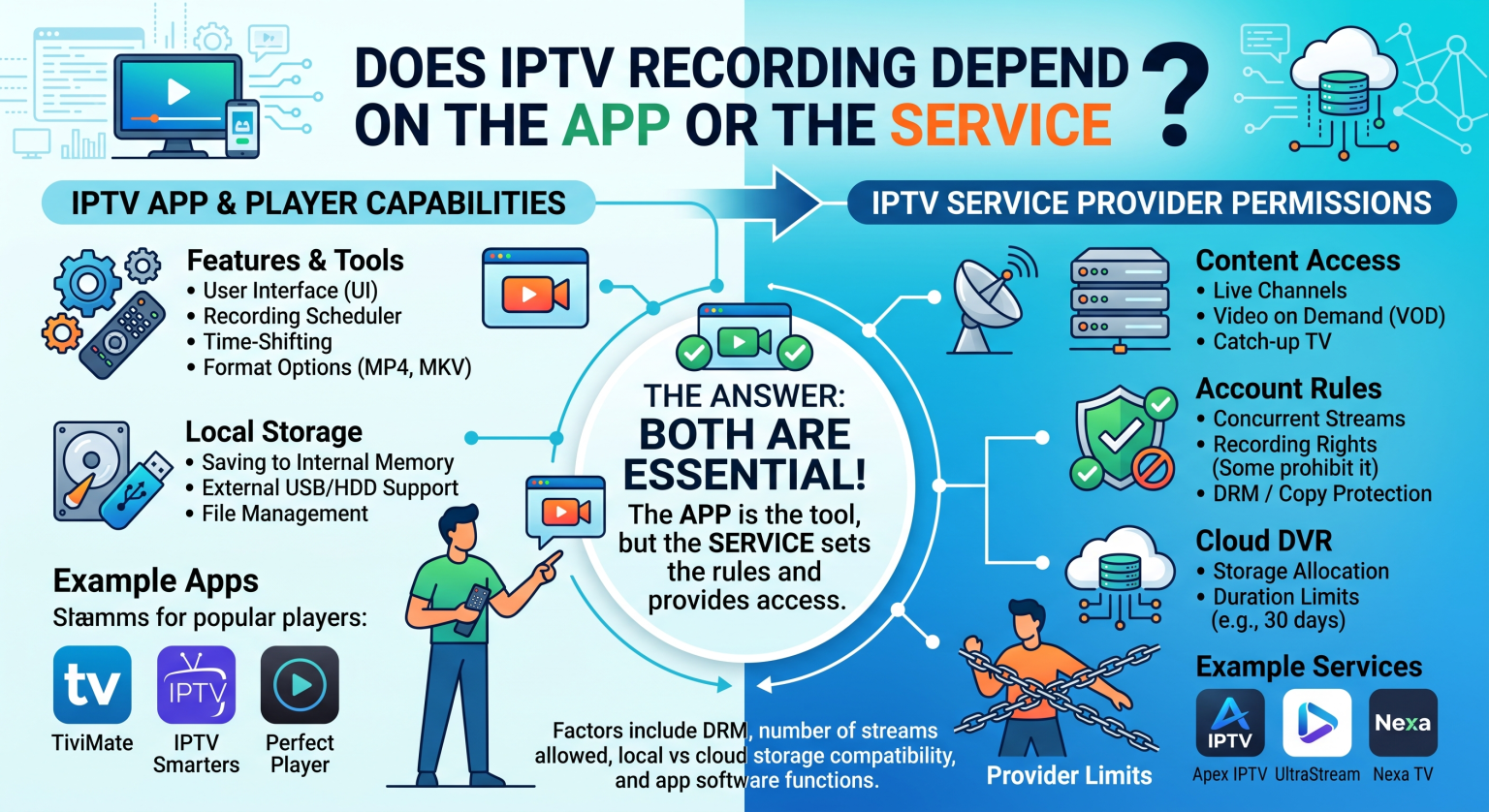
Why You Need a Solid IPTV Recording App or Provider
Recording live television over the internet is not like using an old-school cable box. The responsibility is split between the software you use to navigate channels and the host delivering the signal. If either link in the chain is weak, your IPTV recording app or provider setup will inevitably fail.
Many consumers mistakenly blame their Android TV box when a recording drops. In reality, the issue is often tied to backend streaming limits. Understanding this relationship helps you avoid common pitfalls and optimize your setup.
The Role of Your IPTV Service
Your subscription dictates the baseline rules of your streaming experience. Crucial provider-side elements include:
Concurrent connections: Dictates how many streams you can pull at once, which is mandatory for background recording.
Cloud DVR functionality: Stores your recordings remotely on their servers, saving your local hard drive space.
Televisión a la carta: Automatically archives older broadcasts for a set period without requiring manual scheduling.
If you only have one connection, you cannot watch a live game while recording a movie in the background. The server will simply cut off one of the streams. Upgrading to a multi-connection subscription is an absolute must for DVR power users.
The Role of Your IPTV Player
While your service delivers the signal, your player acts as the engine that captures it. A premium player allows you to seamlessly schedule recordings and route them to local storage.
Whether you are saving files to a USB drive or a network-attached storage (NAS) device, the app handles the scheduling and file creation. However, even the best software cannot magically bypass a provider’s strict connection limits.
Feature Comparison: App vs. Service vs. Hardware
To clear up the confusion, here is a scannable breakdown of how the recording responsibilities are divided.
| Característica | IPTV App (Player) | IPTV Service Provider | Streaming Device (Hardware) |
| Core Function | Provides the user interface and schedules recordings. | Delivers the live stream and sets connection limits. | Runs the app and provides raw processing power. |
| Recording Storage | Directs the media file to local drives or network folders. | Hosts televisión de pago and Cloud DVR on remote servers. | Supplies the internal or USB storage space. |
| Concurrent Limits | Requests multiple streams simultaneously for DVR. | Determines if you are allowed to pull 2+ streams at once. | Processes the bandwidth for multiple heavy streams. |
Navigating Network Limits in the US
For users based in the United States, network throttling by local Internet Service Providers (ISPs) can severely impact recording quality. When your IPTV recording app or provider attempts to pull a heavy 4K stream, your ISP might intentionally slow down your bandwidth.
Using a trusted VPN can encrypt your traffic and prevent this artificial throttling. This ensures that your scheduled overnight recordings complete successfully without buffering artifacts, drop-outs, or file corruption.
Start Recording Flawlessly Today
Stop settling for missed episodes, frozen screens, and corrupted files. Now that you understand the balance between your IPTV recording app or provider, it is time to optimize your setup for users across the US.
Are you ready to unlock true DVR capabilities and never miss a broadcast again? Upgrade to a premium, multi-connection IPTV service today and pair it with a top-tier player to take full control of your entertainment!
Preguntas frecuentes (FAQ)
Can I watch one channel and record another?
Yes, but only if your service plan includes at least two concurrent connections. The player uses one connection for your live view and a second connection to capture the background stream.
Do I need local storage if I have Cloud DVR?
No. If your subscription includes Cloud DVR, the video files are stored directly on the provider’s remote servers. You can access them through your player without needing external USB drives.
Which is more important: the app or the provider?
The provider is generally more important. Even the most advanced premium app cannot record smoothly if the host server drops the connection, provides a weak source, or limits your bandwidth.