
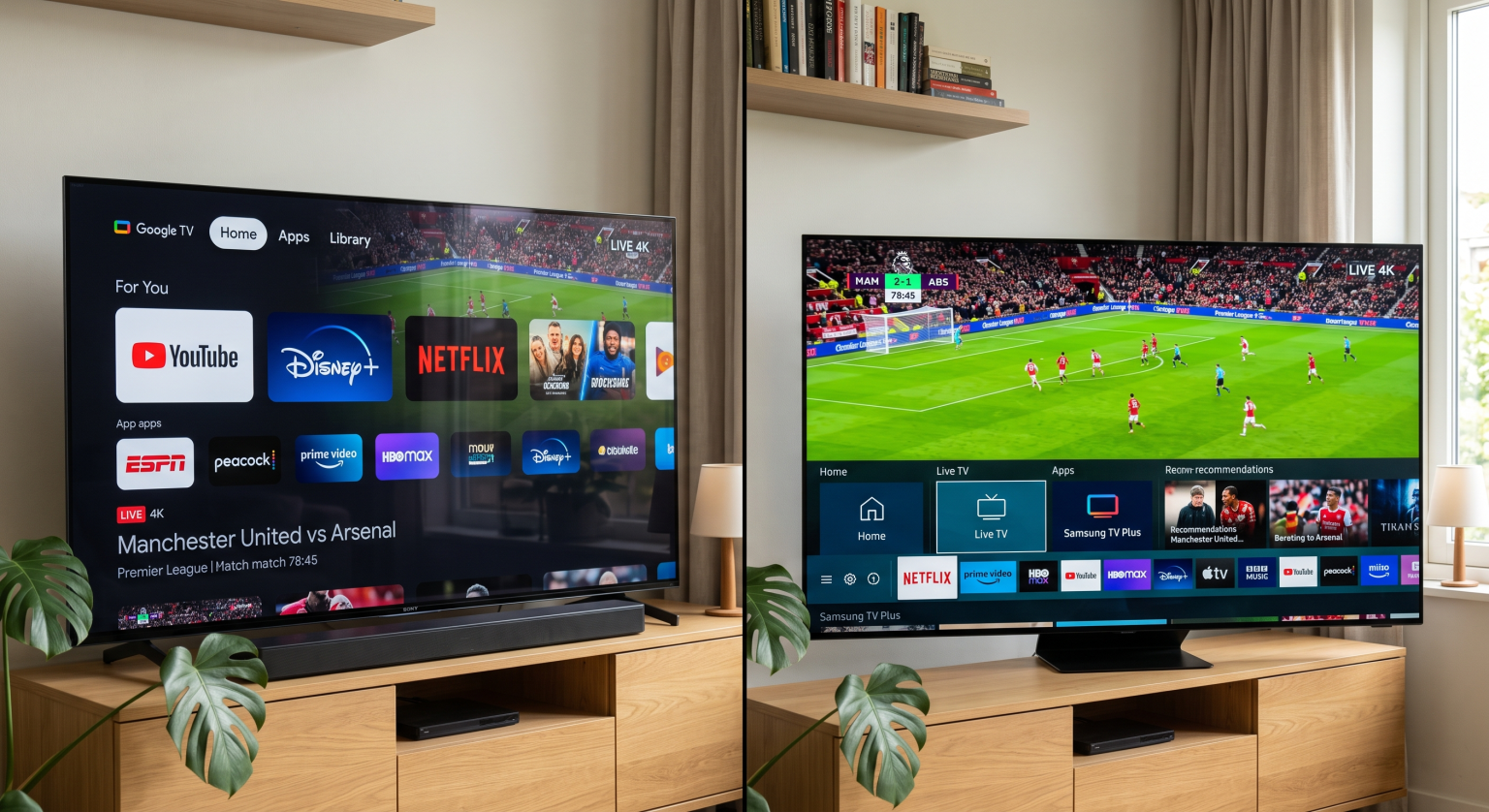
Watching live football requires a television with excellent motion handling and reliable network stability. Two of the most popular premium television brands in 2026 are Sony and Samsung. Many buyers compare Sony BRAVIA OLED and Samsung OLED when they want a new sports television. The display technology is similar, but the software and the picture processing are very different. Sony uses the Google TV operating system and the XR Processor. Samsung uses the Tizen operating system and the NQ4 AI Gen2 Processor.
This article explains the differences between Sony BRAVIA OLED and Samsung OLED for football streaming. We will discuss operating systems, application availability, motion handling, and IPTV compatibility. This guide will help you choose the correct television for TV Shadow IPTV and live sports.
Respuesta rápida
When choosing a Sony vs Samsung football TV in 2026, both brands offer excellent performance but serve different needs. A Sony BRAVIA OLED is generally better for viewers who want the best motion processing and the flexible Google TV application store. A Samsung OLED is generally better for viewers who have very bright rooms and prefer the fast Samsung Tizen operating system. Sony televisions support Dolby Vision technology, while Samsung televisions support HDR10+ technology. Both brands provide very good contrast and color for live football streaming. Your final decision should depend on your preferred IPTV applications and your room lighting.
Operating Systems: Google TV vs Samsung Tizen
The television operating system controls how you navigate the menus. The operating system also decides which applications you can install. You can learn more about the Tizen frente a Google TV para aplicaciones de IPTV: ¿en qué se diferencian? in our separate guide.
Sony BRAVIA and Google TV
Sony BRAVIA OLED televisions use the Google TV operating system. Google TV gives you access to the Google Play Store. The Google Play Store contains thousands of applications. This large selection makes Google TV very flexible for streaming users. You can easily find media players, sports applications, and utility tools.
The Google TV interface recommends content from your connected streaming services. You can also use Google Assistant with the Sony remote control. You can search for football matches using your voice. Google TV allows you to install Android applications. This Android compatibility is very useful for users who want specific video players.
Samsung OLED and Tizen OS
Samsung OLED televisions use the Tizen operating system. Tizen is a closed operating system created by Samsung. You cannot install Android applications directly on a Samsung television. You must use the official Samsung application store.
The Samsung application store is smaller than the Google Play Store. However, Samsung includes all major global streaming applications such as Netflix, Amazon Prime Video, and YouTube. The Tizen interface is fast and very easy to navigate. The television menus are clear. Tizen is an excellent operating system for standard streaming, but Tizen offers fewer choices for independent media players.
Application Availability for TV Shadow IPTV
IPTV users need specific media players to load M3U playlists or Xtream Codes. TV Shadow IPTV provides the streaming service, but you need a compatible player application on your television.
IPTV Players on Sony BRAVIA
Sony BRAVIA televisions are excellent for IPTV users. Because Sony uses Google TV, you can access the Google Play Store. The Google Play Store contains the most popular IPTV player applications. You can download applications such as TiviMate, OTT Navigator, and XCIPTV directly to the Sony television.
These applications support M3U links and Xtream Codes API. The applications also support Electronic Program Guide (EPG) data. EPG data is necessary to see the live football match schedule. Installing these applications on a Sony television is very fast. You do not need special developer tools. You just search the Google Play Store and click download.
IPTV Players on Samsung OLED
Samsung OLED televisions have strict rules for application developers. The availability of IPTV players on Samsung depends on your country and your television model year. You can find some popular applications in the Samsung store, such as IPTV Smarters Pro, Flix IPTV, or Nanomid Player.
However, Samsung sometimes removes these applications from the store without warning. Because Tizen does not support Android applications, you cannot easily install TiviMate or OTT Navigator. If your favorite IPTV player is missing from the Samsung store, you might need to buy an external Android TV device. TV Shadow IPTV works on Samsung televisions, but you must check which player applications are available in your local Samsung store.
Picture Quality for Live Football
Live football streaming is very demanding for a television. The television camera moves very fast. The grass is a bright green color. The television must process all this visual information quickly.
Manejo del movimiento y frecuencia de actualización
Motion handling is the most important feature for a football television. When the camera moves quickly across the football pitch, a bad television will show a blurry image. Both Sony and Samsung OLED televisions have a native 120Hz or 144Hz refresh rate. A high refresh rate helps the television display fast motion clearly. If you want to learn more about refresh rates, read our guide about a Televisores de 60 Hz frente a 120 Hz para ver el fútbol en directo.
Sony BRAVIA OLED televisions are famous for excellent motion processing. For example, the Sony BRAVIA 8 OLED uses the XR Processor to analyze the football match. The XR Processor makes the camera movements look very smooth. The football stays sharp when the football travels through the air. Many technology reviewers consider Sony the best brand for motion handling.
Samsung OLED televisions also offer excellent motion handling. Models like the Samsung S90D and S95D use the NQ4 AI Gen2 Processor. The Samsung television can create extra frames to make the football match look smooth. Both brands perform much better than standard LED televisions during fast sports broadcasts.
Screen Brightness and Anti-Glare Technology
Many people watch football during the day. If your living room has large windows, sunlight can cause reflections on the television screen.
Samsung OLED televisions are usually brighter than Sony BRAVIA OLED televisions. Models like the Samsung S95D use Quantum Dot OLED (QD-OLED) technology. This QD-OLED technology produces very bright colors. The Samsung S95D also features a special matte screen coating. This matte coating stops light reflections very effectively. If you watch weekend football in a very bright room, a Samsung OLED is a fantastic choice.
Sony BRAVIA OLED televisions also produce beautiful colors. Sony OLED televisions have excellent contrast because OLED pixels can turn completely black. However, standard Sony BRAVIA OLED models have a glossy screen. A glossy screen can reflect lamps or windows. Sony OLED televisions are perfect for dark rooms or rooms with controlled lighting.
Upscaling Standard Definition Football
Sometimes you must watch a football match on a lower-quality stream. Many IPTV channels broadcast in 720p or 1080p resolution. Your 4K television must “upscale” this video to fit the large 4K screen. Upscaling means the television processor creates new pixels to make the image sharper. Our article explains ¿Qué es la mejora de resolución de la televisión y es útil para la IPTV? in more detail.
Sony BRAVIA televisions are excellent at upscaling. The Sony XR processor can clean a low-quality IPTV stream. The processor removes digital noise and makes the player faces look clearer.
Samsung televisions also provide very good upscaling. The Samsung AI processor adds detail to the grass and the football shirts. Both televisions will improve a 1080p stream significantly.
HDR Formats: Dolby Vision vs HDR10+
High Dynamic Range (HDR) improves the contrast and color of the video. Some broadcasters are starting to show live football in HDR.
Sony BRAVIA televisions support Dolby Vision and HDR10. Dolby Vision is the most popular premium HDR format. Samsung televisions do not support Dolby Vision. Samsung supports HDR10 and HDR10+.
If your IPTV service provides a football match in Dolby Vision, the Sony television will display the match correctly. The Samsung television will display the match in standard HDR10. For most live sports, this difference is very small.
Network Connection: Wi-Fi vs Ethernet
A stable internet connection is required for TV Shadow IPTV and football streaming. If the internet connection drops, the football match will buffer or stop completely.
Both Sony BRAVIA OLED and Samsung OLED televisions have modern Wi-Fi antennas. These televisions support Wi-Fi 5 or Wi-Fi 6 depending on the exact model. Wi-Fi is convenient if your internet router is in another room.
However, we always recommend using an Ethernet cable for live football. Both Sony and Samsung televisions have an Ethernet port on the back. An Ethernet cable provides a constant data connection. An Ethernet cable stops the buffering that can happen when many devices use the home Wi-Fi at the same time.
Remote Controls and Usability
When you watch live football, you want to change channels quickly. The remote control is very important for this task.
The Sony remote control is traditional but modern. The Sony remote has clear buttons for channel changing and volume. Many Sony remote controls have an internal backlight. The buttons glow in the dark. This light is very useful when watching football at night. The Sony remote control integrates very well with Android IPTV applications.
The Samsung remote control is very small and minimalistic. The Samsung remote has very few buttons. The Samsung remote does not have number buttons. You must use an on-screen menu to type channel numbers. This process can be annoying when you use IPTV applications. However, the Samsung remote control is very environmentally friendly. The Samsung remote charges itself using room light or a USB cable.
Comparison Table: Sony BRAVIA OLED vs Samsung OLED
This table compares the basic features of Sony BRAVIA OLED and Samsung OLED televisions for football streaming in 2026.
| Característica | Sony BRAVIA OLED | Samsung OLED |
| Sistema operativo | Google TV | Samsung Tizen |
| Application ecosystem | Google Play Store | Samsung Apps |
| Android application support | Full Android support | No hay compatibilidad nativa con Android |
| IPTV application availability | Large selection of Android apps | Depende del modelo y del país |
| Motion processing processor | XR Processor | NQ4 AI Gen2 Processor |
| Premium HDR format | Dolby Vision | HDR10+ |
| Native refresh rate | 120 Hz | 120 Hz o 144 Hz |
| Screen finish option | Glossy finish | Matte finish available |
Conclusión
Choosing between a Sony BRAVIA OLED and a Samsung OLED depends on your personal viewing habits. Both brands offer incredible 4K picture quality and fast refresh rates for live football.
Si utilizas TV Shadow IPTV and want the largest choice of media players, the Sony BRAVIA OLED is the better option. The Google TV operating system allows you to install many Android applications easily. Furthermore, the Sony XR processor keeps the football very sharp during fast camera movements.
If your living room has many windows and bright sunlight, a Samsung OLED is a fantastic choice. The Samsung matte screen stops light reflections very effectively. The Tizen operating system is fast, but you will have fewer IPTV application choices unless you buy an external Android streaming device.
Whichever television you choose, we always recommend using an Ethernet cable. A wired internet connection provides the best stability for live football streaming.
Preguntas frecuentes
What is the main difference between Sony and Samsung for football?
The main difference is the operating system and the motion processing. Sony uses Google TV and offers superior motion handling for sports. Samsung uses Tizen and often provides a brighter screen for daytime viewing.
Can I install TiviMate on a Samsung OLED television?
No, you cannot install TiviMate directly on a Samsung OLED television. TiviMate requires an Android operating system. Samsung uses the Tizen operating system. You must connect an external Android device to use TiviMate on a Samsung television.
Is OLED technology safe for watching live football?
Yes, modern OLED televisions are very safe for live football. Both Sony and Samsung include software tools that protect the screen. These tools prevent permanent marks from static television channel logos.
Does TV Shadow IPTV work on both Sony and Samsung televisions?
Yes, TV Shadow IPTV works on both television brands. However, you must download a compatible IPTV player application. Sony offers more application choices than Samsung because Sony uses the Google Play Store.
Which television connection is better for IPTV streaming?
An Ethernet cable connection is always better than a Wi-Fi connection. Both Sony and Samsung televisions have an Ethernet port. A cable connection provides the stability required for live football streaming.
Do I need a 120Hz television for live sports?
Yes, a 120Hz television is strongly recommended for live sports. A 120Hz screen updates the image faster than a standard 60Hz screen. This fast update speed stops the football from looking blurry when the football moves quickly.