
The TIVRA IPTV 3.4.1 update introduces several important features for Android TV, Google TV, and Fire TV users. The developers released this update in November 2026. This new software version improves how users search for content, how users record live television, and how the application manages memory.
TIVRA is a popular media player application. The application does not include any media content. Users must connect their own media servers or IPTV subscriptions to watch video.
This article explains the new changes in the TIVRA IPTV 3.4.1 software. The guide covers the new universal search system, the redesigned series interface, the new add-on support, and improvements to live recording. We also explain how these new features work with TV Shadow IPTV and how the update improves the live sports viewing experience.
Respuesta rápida
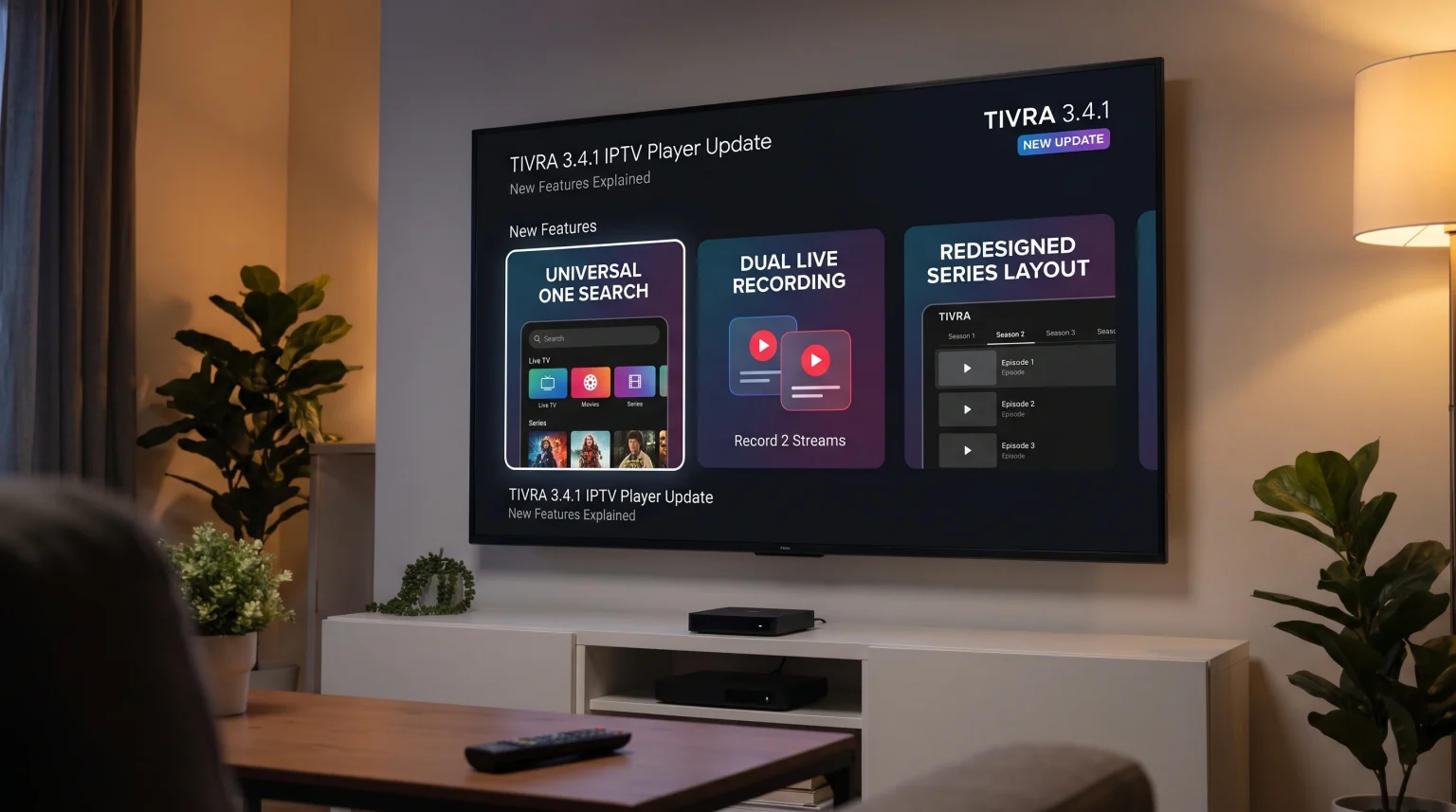
The TIVRA IPTV 3.4.1 update adds universal “One Search”, support for Stremio add-ons, and the ability to record two live streams at the same time. The developers redesigned the television series page to show season tabs on the top and episode lists on the left. The update also fixes video playback bugs and reduces overall device memory usage. This version remains available for Android TV, Google TV, and Fire OS devices.
What is New in TIVRA IPTV 3.4.1?
The new update focuses on content organization and application stability. The following sections explain the most important changes.
Universal “One Search” Feature
Previous versions of TIVRA required users to search different sections of the application separately. The TIVRA IPTV 3.4.1 update introduces “One Search”.
When a user types a search word, the application scans all connected media sources at the same time. The search results appear in organized rows. These rows include live television channels, recorded programs, video-on-demand movies, and television series.
The search function also scans personal media servers such as Jellyfin, Emby, and local network attached storage (NAS) drives. The developers removed the on-screen key grid. The application now uses the standard Android system keyboard for text entry.
Support for Stremio Add-Ons
TIVRA 3.4.1 introduces beta support for Stremio add-ons. This feature allows users to connect third-party media sources directly to the TIVRA application.
Users must bring their own add-on links. TIVRA does not provide any built-in content. The application also does not include a torrent engine. Users must configure external accounts, such as Debrid services, on the specific add-on configuration page. Users cannot configure these external accounts inside the TIVRA menu.
Redesigned Television Series Layout
Users requested a better interface for watching television series. TIVRA IPTV 3.4.1 includes a completely new layout for series pages.
The new layout places season selection tabs at the top of the screen. The episode list appears on the left side of the screen. When a user selects a specific episode, the right side of the screen displays the episode description, a preview image, the original broadcast date, and the total running time. This new layout applies to video-on-demand content and content from personal media servers.
Dual Recording for Live Television
TIVRA includes a digital video recorder (DVR) feature. Users can save live television broadcasts to a USB storage drive or a local network drive.
Before version 3.4.1, the application could only record one channel at a time. If a user scheduled two recordings at the same time, the application would skip the second recording.
TIVRA IPTV 3.4.1 allows the application to record two different streams at exactly the same time. Scheduled recordings no longer fail when another recording is already active. Users need a stable internet connection and a multi-connection IPTV subscription to use this feature without buffering.
Playback and Memory Improvements
The new update improves video playback stability. Older versions sometimes displayed a black screen when switching to full-screen mode, while the video preview continued to play. The developers fixed this bug in version 3.4.1. The bug happened because the application reacted incorrectly to low-memory warnings from the operating system.
The application now manages slow video streams better. If an internet stream starts slowly, the application will wait 45 seconds. The screen will display a “still waiting” message. Previously, the application would silently fail and stop the video. The new update also uses less device memory during normal operation.
Feature Comparison: TIVRA 3.4.1 vs Older Versions
The following table shows the main differences between the new TIVRA update and previous software versions.
| Característica | Older TIVRA Versions | TIVRA IPTV 3.4.1 |
| Search system | Separate searches per section | Universal “One Search” |
| Keyboard style | Custom on-screen key grid | Standard Android keyboard |
| Live TV recording | One recording at a time | Two recordings at a time |
| Slow stream handling | Application fails silently | Waits 45 seconds with message |
| Series page layout | Basic list view | Season tabs and episode details |
| Add-on support | No add-on support | Stremio add-on support (Beta) |
Using TIVRA 3.4.1 with TV Shadow IPTV
TIVRA is a media player application. Users need an IPTV service provider to watch live television channels. TV Shadow IPTV provides high-quality live television, movies, and series.
TIVRA IPTV 3.4.1 is fully compatible with TV Shadow IPTV. Users can connect their TV Shadow IPTV account to the TIVRA application using two standard methods.
Xtream Codes Connection
Xtream Codes is the recommended connection method for TIVRA. This method requires a server URL, a username, and a password. TIVRA processes Xtream Codes very quickly. When a user connects TV Shadow IPTV using this method, the application automatically downloads the channel categories, the video-on-demand library, and the Electronic Program Guide (EPG).
M3U Playlist Connection
TIVRA also supports standard M3U playlist files. Users can paste the TV Shadow IPTV M3U link into the application. Version 3.4.1 handles large M3U playlists efficiently. If the M3U playlist does not include EPG data automatically, users can add a separate XMLTV link inside the TIVRA settings menu.
Web Dashboard Configuration
TIVRA offers a web dashboard at tivratv.com. Users can log into this website on a computer or a mobile phone. The website allows users to paste their TV Shadow IPTV connection details using a standard keyboard. The settings automatically synchronize to the television application. This method is much easier than typing long URLs with a television remote control.
Watching Live Football on TIVRA 3.4.1
Many users install IPTV applications to watch live football and other sports. TIVRA includes a dedicated “Sports Hub” section. The 3.4.1 update improves how the application handles live sports viewing.
Sports Hub Features
The Sports Hub automatically matches live sports games to the channels in your IPTV playlist. Users can select a specific football team. The application creates a special menu row for that team. The application displays live game scores, player statistics, and league standings. Users can also enable a “spoiler-free mode”. This mode hides the final scores until the user decides to read them.
Multi-View Display
TIVRA supports a Multi-View feature. This feature allows users to watch up to four live channels on the screen at the same time. This is very useful for watching multiple live football matches during a tournament. TV Shadow IPTV provides high-quality sports streams. However, to watch four streams at the same time, users need a fast internet connection and an IPTV subscription that permits multiple simultaneous connections.
If you want to understand how your television affects the picture quality during live football matches, read our guide about ¿Qué es la mejora de resolución de la televisión y es útil para la IPTV?.
Smart TV Compatibility for TIVRA
TIVRA is an application designed specifically for the Android operating system. Users must understand which televisions can install this application.
Google TV y Android TV
TIVRA IPTV 3.4.1 is available on the official Google Play Store. Users can install the application directly on televisions that use the Google TV or Android TV operating system. This includes televisions manufactured by Sony, TCL, Philips, and Hisense.
If you are planning to buy a new television, our guide to Los mejores televisores inteligentes para IPTV en 2026: comparación entre Samsung, Sony, LG y TCL compares the most popular brands.
Amazon Fire TV
TIVRA is compatible with Amazon Fire OS devices, including the Fire TV Stick and the Fire TV Cube. The 3.4.1 update includes specific bug fixes for Fire OS 6 devices. Users can install the application on Amazon devices easily.
Samsung Tizen and LG webOS
Samsung Smart TVs use the Tizen operating system. LG Smart TVs use the webOS operating system. TIVRA is not natively available in the Samsung App Store or the LG Content Store. Samsung Tizen and LG webOS do not support Android applications.
Users with a Samsung or LG television cannot install TIVRA directly on the television. These users must connect an external Android TV box, a Google TV Streamer, or an Amazon Fire TV Stick to their television using an HDMI cable. To learn more about television operating systems, read our comparison of El mejor sistema operativo para Smart TV para IPTV en 2026: Tizen, Google TV y webOS.
Conclusión
The TIVRA IPTV 3.4.1 update brings excellent improvements to an already strong media player. The new “One Search” function saves time, while the redesigned television series layout makes navigation much easier. The ability to record two live streams at the same time is a valuable feature for power users. Furthermore, the memory improvements and video playback fixes make the application more stable on older television hardware. When combined with a premium service like TV Shadow IPTV, TIVRA 3.4.1 provides a highly organized, feature-rich entertainment experience for Android TV and Fire TV users.
Preguntas frecuentes (FAQ)
What is TIVRA IPTV 3.4.1?
TIVRA IPTV 3.4.1 is the latest software update for the TIVRA media player application. The update adds new search functions, add-on support, better recording features, and a new television series menu.
Does TIVRA include live television channels?
No, TIVRA does not include any media content or live channels. TIVRA is only a media player. Users must add their own content, such as a TV Shadow IPTV subscription or a personal Jellyfin server.
How do I search for a movie in TIVRA 3.4.1?
You can use the new “One Search” feature. Open the search menu and type the movie name using the standard Android keyboard. The application will search your live television channels, video-on-demand library, and connected personal servers at the same time.