
Watching Albanian TV in Denmark requires an internet-based streaming solution because Danish cable and terrestrial television providers do not include Albanian channels in standard packages. Viewers in Denmark who want Albanian news, entertainment, cultural programs, and live sports generally choose between official broadcaster applications, licensed diaspora streaming platforms, and Internet Protocol Television (IPTV) player applications.
Each streaming method works differently on Smart TVs, streaming boxes, and mobile devices. The best option depends on which Albanian channels you want to watch, which television operating system you use, and how stable your home internet connection is. This guide explains the main streaming options for Albanian TV in Denmark, compares their technical features, and outlines what to consider for Smart TV compatibility and live sports viewing.
Réponse rapide
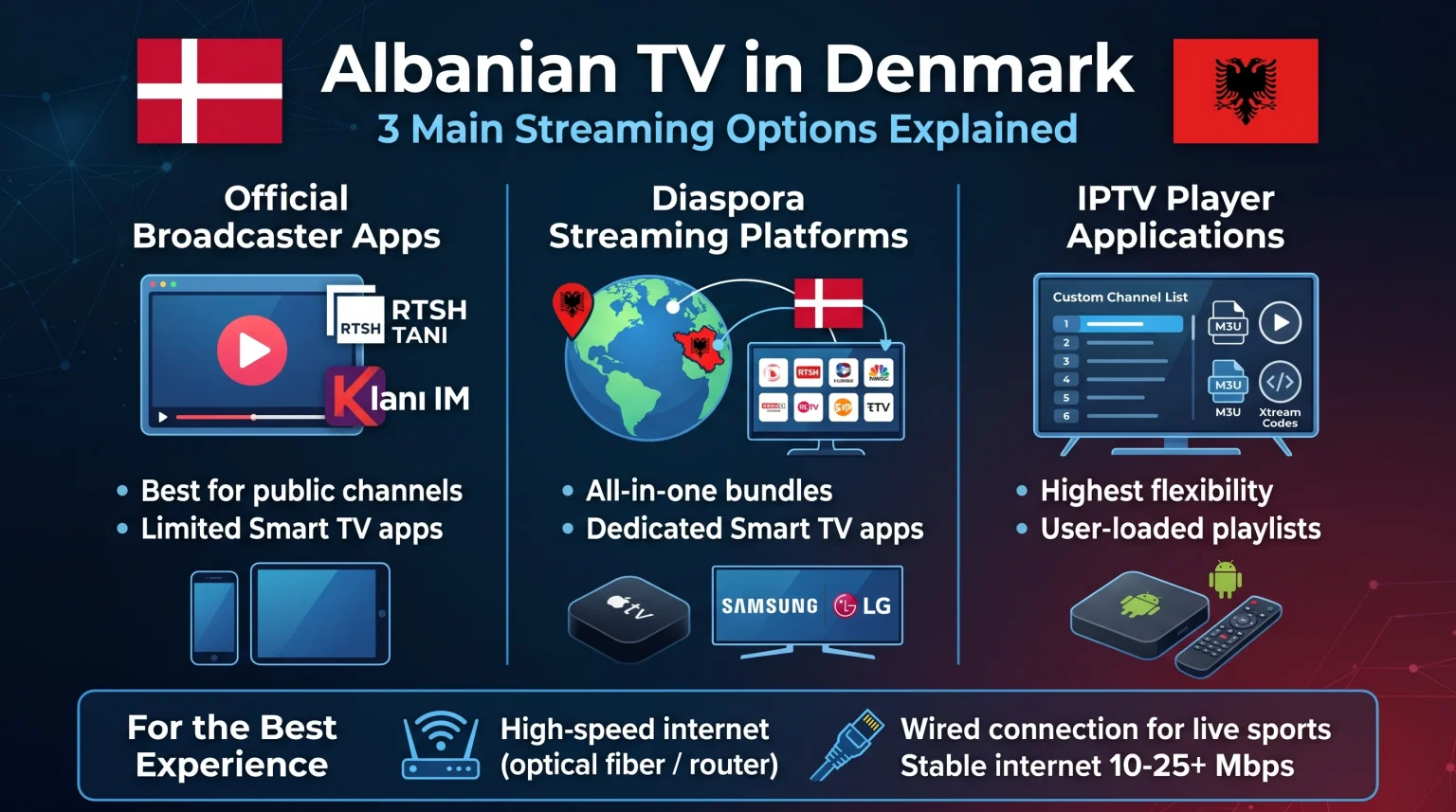
Viewers looking for Albanian TV in Denmark have three main streaming options. Official broadcaster applications such as RTSH TANI are suitable for users who mainly want public television channels and radio. Licensed diaspora platforms such as NimiTV are suitable for households that want bundled access to major Albanian and Kosovar broadcasters in one dedicated application. General IPTV player applications are suitable for users who want to manage their own playlists using M3U or Xtream Codes on compatible Smart TVs or streaming devices.
Official Albanian Broadcaster Apps in Denmark
Several Albanian television networks operate their own Over-The-Top (OTT) streaming applications. OTT means television content is delivered directly over the internet without a traditional cable or satellite subscription.
RTSH TANI
RTSH TANI is the official OTT platform of Radio Televizioni Shqiptar, which is Albania’s public broadcaster. The application provides live streams of RTSH television channels and radio stations. RTSH TANI also includes an Electronic Program Guide (EPG), which is a digital schedule showing current and upcoming programs, as well as catch-up playback for previously aired shows.
RTSH TANI is available on mobile devices, and an account is required to use the service. However, some programs on RTSH TANI may be restricted in certain countries due to regional broadcasting rights.
Klani IM
Klani IM is the official streaming application from TV Klan. The application allows viewers to access TV Klan content on supported mobile devices and Apple TV. Availability of specific programs can vary by region, and users should check the official app store in Denmark to confirm device compatibility.
Limitations of Individual Broadcaster Apps
Individual broadcaster applications are useful if you only watch one network. However, managing multiple separate applications can be inconvenient. Many regional broadcaster apps are designed primarily for smartphones and tablets rather than Smart TV operating systems.
Licensed Diaspora Streaming Platforms
Diaspora streaming platforms are built specifically for Albanian-speaking viewers living outside Albania and Kosovo, including residents in Denmark and other European countries.
NimiTV is one example of a licensed platform operating in Europe. NimiTV aggregates channels from major broadcasters such as DigitAlb, Tring, ArtMotion, and Kujtesa into a single subscription. Platforms in this category typically offer live television channels, Video on Demand (VOD), and catch-up features that allow viewers to replay programs from the past several days.
These diaspora platforms generally provide dedicated applications for Samsung Smart TVs, LG Smart TVs, Android TV, Apple TV, and Amazon Fire TV. Because the channels and the application come from the same provider, setup is usually straightforward. The main limitation is that viewers are restricted to the channel packages and subscription tiers offered by that specific platform.
Comparison of Albanian TV Streaming Options in Denmark
The table below compares the three main ways to watch Albanian TV in Denmark.
| Fonctionnalité | Official Broadcaster Apps | Diaspora Streaming Platforms | IPTV Player Applications |
| Channel selection | Single network only | Multiple bundled Albanian networks | Depends on the user’s playlist or provider |
| Setup process | Download app and create an account | Subscribe and log in to the dedicated app | Install player app and load M3U or Xtream Codes |
| Smart TV app availability | Limited to specific platforms | Wide support on major Smart TV brands | Depends on TV model, country, and app store |
| Guide électronique des programmes (EPG) | Available on supported apps | Included in the platform interface | Supported if the playlist provides EPG data |
| Regional restrictions | Some programs may be geo-blocked | Designed for European diaspora access | Depends on the streaming source |
IPTV Compatibility and Streaming Options
Internet Protocol Television (IPTV) is a method of delivering television channels over an internet connection using a standalone player application. Many viewers in Denmark use IPTV players to organize international and local channels inside a single interface.
M3U and Xtream Codes Compatibility
Most modern IPTV player applications support two standard connection formats:
M3U playlists: An M3U file or link is a plain-text playlist that contains channel names, stream addresses, and category labels.
API Xtream Codes : Xtream Codes is a login method that uses a server URL, a username, and a password to load live channels, movies, and EPG data automatically.
When using a service such as TV Shadow IPTV, viewers typically enter their M3U link or Xtream Codes credentials into a compatible IPTV player application installed on their television or streaming box.
Electronic Program Guide (EPG) Support
A reliable EPG is important for daily television viewing. Good IPTV player applications display program titles, start times, and channel categories in a grid layout. The accuracy of the EPG depends on both the IPTV player software and the data provided by the playlist source.
Remote-Control Usability
Television viewing relies on simple remote-control navigation. Dedicated IPTV players designed for Smart TVs allow users to switch channels with the arrow keys, open favorite lists, and adjust audio or subtitle tracks easily. Mobile apps that are not designed for televisions often work poorly with a standard TV remote control.
Smart TV Operating-System Limitations
Not every IPTV application works on every television. App availability depends on the country, the TV model, the model year, the operating-system version, and the app-store policy of the manufacturer.
Samsung Tizen : Samsung televisions use the Tizen operating system. Samsung Tizen does not support Android applications from Google Play. Users must install IPTV players that are officially listed in the Samsung Apps store.
LG webOS : LG televisions use the webOS operating system. Like Samsung Tizen, LG webOS relies on its own app store, and the selection of IPTV players can change over time.
Google TV and Android TV: Televisions from brands such as Sony BRAVIA and TCL often run Google TV or Android TV. These operating systems provide access to Google Play, which generally offers a wider selection of IPTV player applications.
TV Shadow IPTV does not have an official partnership or affiliation with Samsung, Sony, LG, Google, or any other television manufacturer. If your Smart TV does not support your preferred IPTV player, you can connect an external streaming device such as an Android TV box or Apple TV via an High-Definition Multimedia Interface (HDMI) cable.
If you are comparing television operating systems before buying a new screen, our guide to Meilleur système d'exploitation pour Smart TV dédié à l'IPTV en 2026 : Tizen, Google TV et webOS en comparaison explains the practical differences between Tizen, Google TV, and webOS.
Watching Live Albanian Football and Sports in Denmark
Many viewers in Denmark stream Albanian television to watch live football, including domestic Albanian leagues, regional matches, and international tournaments. Live sports place higher demands on both your television hardware and your internet connection than standard news or drama programs.
Traitement des mouvements et fréquence de rafraîchissement
Football involves fast camera movement and a small ball moving rapidly across a green field. On televisions with basic motion processing, fast action can appear blurry or stutter.
The refresh rate of a television, measured in Hertz (Hz), indicates how many times per second the screen updates the image. Most entry-level televisions use a 60Hz panel, while mid-range and high-end televisions often use a 120Hz panel. While live television broadcasts are typically transmitted at 25 or 50 frames per second in Europe, a 120Hz television often includes stronger picture processing that reduces motion blur. You can read more about this topic in our comparison of Téléviseurs 60 Hz ou 120 Hz pour le football en direct.
Input Signal Quality and 4K Upscaling
Most modern televisions sold in Denmark have a 4K Ultra High Definition (UHD) resolution. However, many live Albanian television channels broadcast in Standard Definition (SD) or High Definition (HD) rather than native 4K.
When a 4K television displays an HD or SD stream, the television’s processor must stretch the image to fit the screen. This process is called upscaling. If the original stream has a low bitrate, the image may look soft or pixelated on a large 4K screen. For a detailed explanation of this issue, see our article on Pourquoi l'IPTV est-elle floue sur un téléviseur 4K neuf ?.
Picture Settings for Live Sports
Default television picture modes such as “Vivid” or “Dynamic” often oversaturate the green grass and create artificial sharpness around players. Switching to “Standard” or “Cinema” mode and adjusting motion smoothing to a low setting usually produces a cleaner and more natural football image.
Streaming Stability: Wi-Fi vs Ethernet
Live sports streams require a consistent data flow. Even a brief drop in connection speed can cause buffering during a critical moment in a match.
Ethernet (Wired Connection): Connecting your Smart TV or streaming box directly to your router with an Ethernet cable provides the most stable connection. Wired connections avoid wireless interference from neighboring apartments and household appliances.
Wi-Fi (Wireless Connection): Modern Wi-Fi networks in Denmark are usually fast enough for HD and 4K streaming, especially on the 5 GHz band. However, thick walls or long distances between the router and the television can reduce signal stability.
Whenever possible, use an Ethernet cable for live sports streaming. Always ensure that you access sports broadcasts through legitimate, authorized services, as TV Shadow IPTV does not own broadcasting rights for UEFA competitions or other sports leagues.
Internet Requirements for Streaming in Denmark
Denmark has strong fiber and broadband infrastructure, which makes streaming international television reliable for most households. Still, your actual viewing experience depends on your home network setup.
Définition standard (SD) : Requires approximately 3 to 5 Megabits per second (Mbps) of stable download speed.
Haute définition (HD / 1080p) : Requires approximately 10 to 15 Mbps of stable download speed.
4K Ultra HD: Requires at least 25 Mbps of stable download speed per active stream.
If multiple people in your home are streaming video, downloading large files, or playing online games at the same time, you should allow extra bandwidth to prevent interruptions. Restarting your router occasionally and keeping your Smart TV firmware updated can also prevent unexpected playback errors.
Conclusion
Viewers who want to watch Albanian TV in Denmark have several reliable streaming options that do not require a satellite dish. Official broadcaster apps such as RTSH TANI and Klani IM are practical for following specific networks. Licensed diaspora platforms such as NimiTV provide a convenient all-in-one experience for households that want major Albanian and Kosovar channels in a single subscription.
For users who prefer managing their own channel lists on compatible Smart TVs or streaming boxes, IPTV player applications with M3U or Xtream Codes support offer flexibility. Regardless of whether you choose a dedicated diaspora app or a compatible IPTV setup with TV Shadow IPTV, pairing a supported Smart TV operating system with a wired Ethernet connection will provide the most consistent viewing experience.
Foire aux questions (FAQ)
Can I watch Albanian TV channels in Denmark without a satellite dish?
Yes, you can watch Albanian TV channels in Denmark without a satellite dish. Internet streaming through official broadcaster apps, licensed diaspora platforms, or IPTV player applications delivers live channels directly over your broadband connection.
Is RTSH TANI available in Denmark?
Yes, RTSH TANI can be downloaded in Denmark on supported mobile devices. RTSH TANI is the official application of Albania’s public broadcaster, though some specific programs may be restricted outside Albania due to regional licensing rules.
Which Smart TV brand is best for watching Albanian TV via IPTV?
No single Smart TV brand is best for every user. Televisions running Google TV or Android TV generally offer a wider selection of IPTV player applications through Google Play, while Samsung Tizen and LG webOS offer built-in app stores that may be sufficient if your preferred application is listed there.