
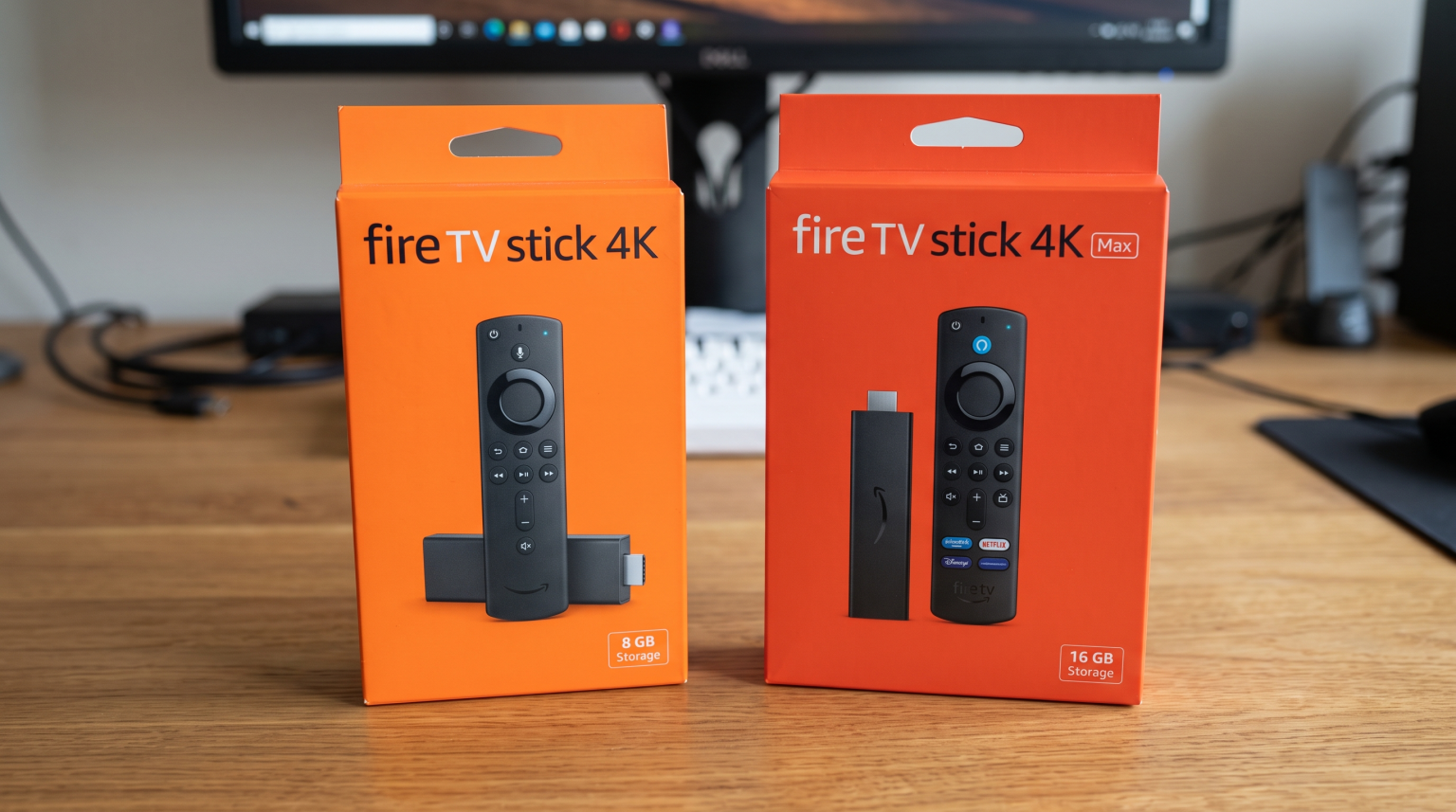
Amazon Fire TV devices usually come with either 8GB or 16GB of internal storage space. When you buy a new streaming device, you might not look closely at the storage capacity. However, storage size is a very important specification.
Streaming applications, system updates, and temporary data require space on the device. If the storage space is too small, the device will stop working correctly. You will see warning messages on your television screen.
This article explains the differences between 8GB and 16GB Fire TV models. We will discuss how storage affects your streaming experience. We will also explain why storage size is important for live sports and IPTV applications.
Réponse rapide
For most users comparing Fire TV 8GB vs 16GB, the 16GB version is the better choice. An 8GB device leaves only about 4GB to 5GB of free space after the operating system is installed. This small space fills up quickly with temporary application data.
A 16GB device offers more than double the usable free space. The 16GB option prevents “Storage Full” errors on your screen. It allows you to install more streaming applications. It also provides better stability for demanding software, such as IPTV players and live sports applications.
Why Storage Matters on Amazon Fire TV
When you read that a Fire TV has 8GB of storage, you cannot use all 8GB for your applications. The Fire OS operating system requires space. System files take up approximately 3GB to 3.5GB of the total storage.
This means a brand new 8GB Fire TV Stick only has about 4.5GB of available space for you to use.
When you install applications like Netflix, YouTube, or an IPTV player, these applications download to the device. However, the applications also generate “cache” data. Cache data consists of temporary files, such as image thumbnails and login information. Over several months, this cache data grows larger. On an 8GB device, this growing data quickly fills the remaining 4.5GB of space.
The Problem with Full Storage
When an 8GB Fire TV becomes completely full, several problems happen:
The device cannot download new software updates.
The device menus become very slow to navigate.
Applications take a long time to open.
Video streams may buffer or freeze because the device cannot store temporary video files.
With a 16GB Fire TV device, you start with approximately 11GB to 12GB of free space. This provides enough room for system updates, many applications, and large amounts of cache data.
Fire TV 8GB vs 16GB: Main Differences
This comparison table shows how the two storage options compare during daily use.
| Fonctionnalité | Fire TV 8GB Models | Fire TV 16GB Models |
| Usable free space | Approximately 4.5 Gigabytes | Approximately 11.5 Gigabytes |
| App capacity | Low to Medium | Élevé |
| Cache data management | Requires frequent manual clearing | Rarely requires manual clearing |
| Mises à jour du système | Can fail if the device is full | Installs easily |
| Background performance | Can become slow when space is low | Remains fast and stable |
| Longevity | May require replacement sooner | Better for long-term use |
How Storage Affects IPTV Performance
If you use a service like TV Shadow IPTV, your hardware must process large amounts of data. IPTV players require more local storage space than standard streaming applications.
There are two main reasons why a 16GB device is better for IPTV.
Electronic Program Guide (EPG) Data
An Electronic Program Guide (EPG) is the digital menu that shows the television schedule. The EPG tells you what programs are playing on live channels.
When you connect your IPTV service to a player application, the application downloads the EPG data to your device. A comprehensive EPG can be very large. If the EPG updates every day, the application stores this data in the device cache. On an 8GB Fire TV, a large EPG can consume all the remaining free space quickly. A 16GB Fire TV holds large EPG files without causing system errors.
Player Application Cache
IPTV applications use temporary memory to ensure smooth video playback. If the device has zero free storage, the application cannot buffer the video properly. This lack of space can cause the live television stream to stutter or pause.
The 16GB models have enough space to handle M3U playlists, Xtream Codes data, and application cache simultaneously.
If you prefer to watch IPTV on a television without a separate Fire TV stick, you might want to read our guide explaining the Les meilleurs téléviseurs connectés pour l'IPTV en 2026 : comparaison entre Samsung, Sony, LG et TCL.
Live Football and Sports Streaming
Watching live football requires excellent device performance. A football moves very fast across the screen. The device must process the video signal quickly to keep the image sharp.
Amazon typically pairs 16GB of storage with faster processors and more Random Access Memory (RAM). For example, the Fire TV Stick 4K Max has 16GB of storage, a faster processor, and Wi-Fi 6E support. The standard Fire TV Stick 4K has 8GB of storage and a slower processor.
When watching live football, the 16GB models provide three main advantages:
Faster Processing: The better processor in the 16GB models handles motion processing more smoothly. The ball will not look blurry when it moves across the pitch.
More Memory: Extra RAM allows the sports application to run without freezing.
Network Stability: The advanced Wi-Fi receivers in the 16GB models maintain a stronger connection to your internet router. A strong connection prevents buffering during important moments in the match.
If you experience poor picture quality during live sports, the device storage might not be the only problem. You can read our article explaining Pourquoi l'IPTV est-elle floue sur un téléviseur 4K neuf ? for more technical details about picture resolution.
Which Fire TV Models Have 8GB and 16GB?
Amazon sells several different versions of the Fire TV. It is important to check the specifications before you purchase a device.
Common 8GB Models:
Fire TV Stick Lite
Fire TV Stick (Standard HD version)
Fire TV Stick 4K (Standard version)
Common 16GB Models:
Fire TV Stick 4K Max (2nd Generation)
Fire TV Cube
If you want the best performance for streaming applications and IPTV, the Fire TV Stick 4K Max (2nd Generation) or the Fire TV Cube are the recommended choices.
How to Manage Space on an 8GB Fire TV
If you already own an 8GB Fire TV device, you do not necessarily need to buy a new one immediately. You can maintain your device by managing the storage space manually.
1. Clear Application Cache
You should clear the cache on your most heavily used applications every month. Go to the Fire TV Settings menu. Select “Applications”. Select “Manage Installed Applications”. Choose an application and click “Clear Cache”. Do not click “Clear Data” unless you want to delete your login information.
2. Uninstall Unused Applications
Many users install applications and never open them again. Look through your application list. Delete any streaming applications or games that you do not use regularly.
3. Use External Storage
On some Fire TV models, you can connect a USB storage drive using a special adapter cable. You can move some applications to this external USB drive. However, this process can be complicated, and not all applications will run from an external drive.
Conclusion
When comparing Fire TV 8GB vs 16GB, the storage capacity has a major impact on your television experience.
An 8GB Fire TV device works acceptably for users who only watch one or two basic streaming services. However, the small amount of usable space means the device will eventually become full. You will need to manually delete files and clear cache to keep the device running.
A 16GB Fire TV device is a much better investment. It provides enough space for system updates, large application data, and temporary cache files. For users of TV Shadow IPTV, the 16GB storage capacity easily handles large Electronic Program Guide data without causing the system to crash. The 16GB models also include better processors, making them the superior choice for watching fast-moving live football matches.
Foire aux questions (FAQ)
Does a 16GB Fire TV Stick run faster than an 8GB model?
Yes, usually it does. The 16GB models, such as the Fire TV Stick 4K Max, contain faster processors and more RAM than the 8GB models. Furthermore, an operating system always runs faster when it has plenty of free storage space available for background tasks.
Why does my Fire TV say "Storage is Full"?
Your Fire TV says this because the 8GB internal memory is full of application files and cache data. The operating system cannot find any empty space to operate normally. You must delete applications or clear cache to fix this error.
How much space does an IPTV app need?
The basic IPTV application usually requires less than 100 Megabytes. However, the downloaded data, including channel logos and the Electronic Program Guide (EPG), can grow to 1 Gigabyte or more over time.
Can I increase the storage on an 8GB Fire TV Stick?
Yes, you can add external storage. You must buy an OTG (On-The-Go) cable adapter and a USB flash drive. You connect the USB drive to the Fire TV Stick. You can then move certain compatible applications to the USB drive to free up internal space.
Does the standard Fire TV Stick 4K have 8GB or 16GB?
The standard Fire TV Stick 4K has 8GB of storage. Only the “Max” version (2nd Generation) and the Fire TV Cube include 16GB of storage.