
Many viewers notice a slight jumping or skipping effect when watching movies through an IPTV service. This visual jumping is called stutter or judder. The problem usually happens because there is a mathematical mismatch between the movie file and the television screen.
Movie directors record almost all cinema films at 24 frames per second. The exact technical number is 23.976fps. However, most standard televisions refresh their screens 60 times per second. This screen speed is called 60Hz.
When a television tries to play a 23.976fps movie on a 60Hz screen, the television must use a digital trick to make the numbers fit. This digital trick causes the IPTV 23.976fps stutter that viewers see during slow camera movements. Understanding how your television processes these frame rates will help you configure your television and your IPTV player for smooth playback.
Réponse rapide
IPTV 23.976fps stutter happens because 60 television screen updates cannot divide evenly by 24 movie frames. To fix this, a 60Hz television displays the first movie frame three times and the second movie frame two times. This uneven repeating pattern creates a small visual jump during camera panning. Viewers can fix this stutter by activating the “Match Frame Rate” setting in their IPTV application. Viewers can also fix this stutter by activating the “Real Cinema” or “Film Mode” setting in their television picture menu.
Understanding Frame Rates and Refresh Rates
To solve playback problems, you must understand the difference between frame rates and refresh rates.
A frame rate is the speed of the video file. The frame rate measures how many still pictures the camera recorded in one second.
23.976fps: This is the standard speed for movies and premium television series.
25fps or 30fps: This is the standard speed for traditional television broadcasts.
50fps or 60fps: This is the standard speed for live sports and news channels.
A refresh rate is the physical speed of your television hardware. The refresh rate measures how many times the screen draws a new image every second.
60Hz: The television updates the screen 60 times per second. This is the standard speed for most televisions.
120Hz: The television updates the screen 120 times per second. This is the standard speed for premium televisions.
Why 23.976fps Movies Stutter on a 60Hz Television
When you watch a 60fps sports channel on a 60Hz television, the playback is perfectly smooth. The television shows exactly one video frame for every screen update.
When you watch a 23.976fps movie on a 60Hz television, the television has a problem. The number 60 does not divide evenly by 24. The television cannot show every movie frame for the same amount of time.
To solve this math problem, the television uses a process called “3:2 pulldown”.
The television shows Frame A for 3 screen updates.
The television shows Frame B for 2 screen updates.
The television shows Frame C for 3 screen updates.
The television shows Frame D for 2 screen updates.
Because some frames stay on the screen longer than other frames, the video looks uneven. The viewer sees this uneven timing as a physical stutter. This stutter is most obvious when the camera moves slowly from left to right across a landscape.
Ajoutez ici le texte de votre titre
| Fonctionnalité | 23.976fps Movie | Téléviseur 60 Hz | Téléviseur 120 Hz |
| Speed | 24 frames per second | 60 screen updates per second | 120 screen updates per second |
| Math calculation | Base video speed | 60 divided by 24 equals 2.5 | 120 divided by 24 equals 5 |
| Playback result | Original timing | Uneven timing (causes stutter) | Perfect timing (smooth playback) |
| Best content type | Cinema films | Standard television programs | All video content |
How to Fix Movie Stutter on Your Smart TV
Modern televisions include specific software settings to remove movie stutter. TV manufacturers use different names for these settings.
If you use a Samsung television, you can learn more about Samsung settings in our guide to Le système Tizen de Samsung est-il adapté à l'IPTV en 2026 ?.
Disable Motion Smoothing
Television manufacturers often activate “Motion Smoothing” by default. This technology creates fake video frames to make the picture look faster. Motion smoothing ruins the natural 23.976fps look of movies. Motion smoothing creates a visual error called the “Soap Opera Effect”. You should disable motion smoothing for movies.
Samsung: Disable “Auto Motion Plus” or “Picture Clarity”.
Sony: Disable “Motionflow”.
LG: Disable “TruMotion”.
Enable Film Mode
Instead of motion smoothing, you should activate the specific setting designed for 24fps movies. This setting tells the television screen to adjust its internal timing to match the movie.
Samsung: Enable “Film Mode”.
Sony: Enable “CineMotion”.
LG: Enable “Real Cinema”.
IPTV Player Settings for Smooth Playback
Your IPTV application also controls how the video reaches your television. Even if your television has the correct settings, the IPTV app can cause stutter if the app processes the video incorrectly.
TV Shadow IPTV provides high-quality movie streams. To watch these streams smoothly, check the settings in your chosen IPTV application.
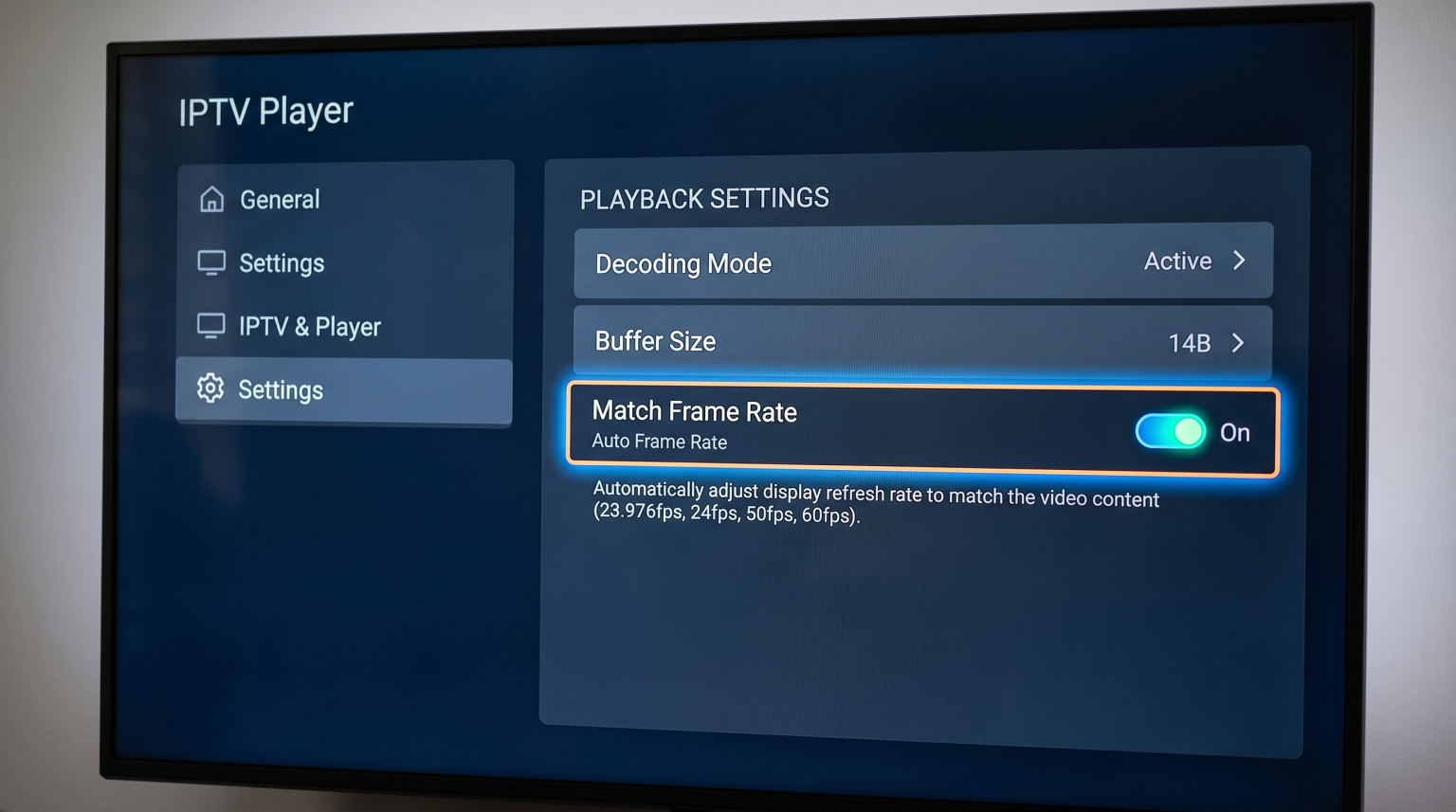
Match Frame Rate
The most important setting in any IPTV application is “Auto Frame Rate” or “Match Frame Rate”. When you activate this setting, the IPTV application tells your television hardware to change its refresh rate to match the video file exactly. If the movie is 23.976fps, the IPTV application forces the television to output exactly 23.976fps. This removes the 3:2 pulldown problem completely.
Décodage matériel
Many IPTV applications offer a choice between Software Decoding and Hardware Decoding. You should always select Hardware Decoding. Hardware Decoding forces the television’s internal computer chip to process the video. The television’s computer chip is much faster and more accurate than the software application. Hardware Decoding prevents visual stutter caused by slow video processing.
Live Football vs Movies: The Frame Rate Difference
Live football has completely different technical requirements than cinema movies. Movies look best at a slow 23.976fps. Live football looks terrible at 23.976fps.
Fast sports require high frame rates. A good IPTV sports channel broadcasts at 50fps or 60fps. When you watch a 50fps or 60fps football stream, a 60Hz television works perfectly. The television shows one video frame for every screen update.
If you watch live sports frequently, you can read our detailed explanation of Téléviseurs 60 Hz ou 120 Hz pour le football en direct.
When switching between movies and live football on your IPTV service, you want the television to adapt automatically. This is why the “Match Frame Rate” setting in your IPTV application is very important. The application will use 24fps for movies and automatically switch to 60fps for live football.
Conclusion
IPTV 23.976fps stutter is a common problem caused by a mathematical mismatch between slow movie files and fast television screens. When a 60Hz television uses uneven timing to display a 24fps movie, the picture skips. Viewers can easily solve this problem. To enjoy perfect playback, you should disable motion smoothing on your television, enable the television’s specific cinema mode, and activate the Auto Frame Rate setting in your IPTV application. These simple steps ensure your television processes both fast sports and cinematic movies correctly.
Foire aux questions (FAQ)
What does 23.976fps mean?
23.976fps is the exact speed of standard cinema movies. The camera records almost 24 frames every second.
Why do my IPTV movies stutter during slow camera movements?
Movies stutter because your 60Hz television cannot display 24 frames evenly. The television repeats some frames more than others, which creates a visual jumping effect.
Can a 60Hz TV play 24fps movies perfectly?
Yes, but only if the television has a specific “Film Mode” or “Real Cinema” setting. This setting forces the 60Hz television to process the 24 frames correctly without uneven repeating.
Does TV Shadow IPTV support 24fps movies?
Yes. TV Shadow IPTV delivers movies in their original recorded frame rates, including 23.976fps, to ensure the highest possible video quality.
Should I use motion smoothing for movies?
No. Motion smoothing creates fake frames that make the movie look unnatural. You should turn off motion smoothing for movies and television series.
Why does live football look smooth but movies stutter?
Live football is broadcast at 50fps or 60fps. These high speeds match a standard 60Hz television screen perfectly, so no stutter happens.
Will a 120Hz television stop movie stutter?
Yes. A 120Hz television fixes the mathematical problem completely. The number 120 divides evenly by 24. The television simply shows every movie frame exactly five times.