
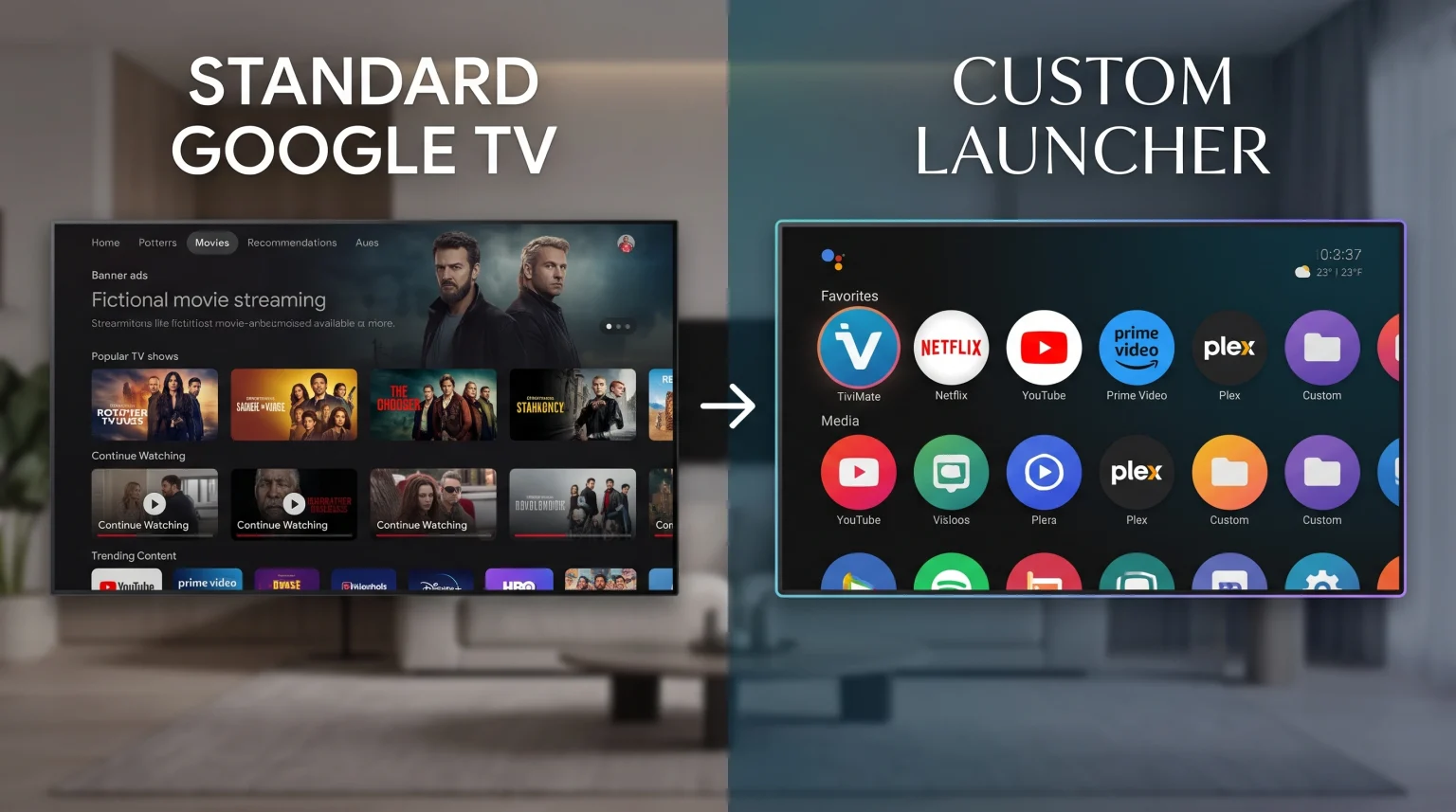
Google TV devices often display large video advertisements and recommended content on the main screen. Many television owners prefer a clean and simple interface. You can solve this problem by installing a custom launcher. A custom launcher replaces the default Google TV home screen with a new design.
Two of the most popular custom launchers in 2026 are Projectivy Launcher and FLauncher. Both applications remove advertisements and give you control over your television interface. This article compares Projectivy Launcher and FLauncher to help you choose the best option for your Google TV or Android TV device.
Réponse rapide
Projectivy Launcher and FLauncher both remove advertisements from your Google TV home screen. Projectivy Launcher is better for users who want advanced customization, parental controls, and premium design features. FLauncher is better for users who want a completely free, open-source, and minimal interface. Both launchers require a button-remapping application to function correctly as your default home screen. Your final choice depends on how much time you want to spend configuring your television layout.
Why Replace the Default Google TV Launcher?
The official Google TV interface requires significant system resources. The operating system uses television memory to download advertisements, load background videos, and track user behavior. This process can make older televisions or budget streaming devices slow.
A custom launcher stops the television from loading these heavy advertisements. When you use a custom launcher, your television uses fewer system resources. This makes navigating menus faster. It also provides more memory for demanding applications, such as high-definition media players or IPTV software.
Projectivy Launcher Overview
Projectivy Launcher is a highly developed custom launcher for Android TV and Google TV devices. The developer updates the application frequently. You can download Projectivy Launcher directly from the Google Play Store.
Design and Interface
Projectivy Launcher uses a horizontal category layout. You can create different categories, such as “Streaming,” “Tools,” or “Games.” You can place your favorite applications inside these categories. The interface looks modern and professional.
Customization Features
This launcher offers deep customization. You can use custom icon packs to change how your applications look. You can also use dynamic wallpapers, video backgrounds, and adaptive colors. The adaptive color feature changes the screen colors to match your current background image.
Premium Version
Projectivy Launcher offers a free version and a Premium version. The free version includes all essential features. The Premium version unlocks advanced visual features, such as specific animated wallpapers and advanced icon controls. The Premium version requires a one-time payment. It does not require a monthly subscription.
Advanced System Tools
Projectivy Launcher includes tools for advanced users. It offers display calibration patterns. These patterns help you configure your television brightness, contrast, and Dolby Vision settings. It also provides a direct shortcut to your television input sources, such as HDMI 1 or HDMI 2.
FLauncher Overview
FLauncher is an open-source application built using the Flutter programming framework. The developer created FLauncher to provide a simple, completely free alternative for Android TV devices. You can download FLauncher from the Google Play Store or install the APK file manually.
Design and Interface
FLauncher provides a very minimal design. You can choose a grid layout or a row layout. The grid layout allows you to see many applications on the screen at the same time. The row layout looks similar to older Android TV interfaces.
Customization Features
FLauncher customization is basic but effective. You can change the background wallpaper. You can create custom categories and manually change the order of your applications. FLauncher does not support animated video backgrounds or custom icon packs.
Open-Source Platform
FLauncher is 100% free. It does not contain any advertisements, and it does not offer a premium version. Because the application is open-source, independent developers can inspect the program code. This ensures the application respects user privacy.
Development Status
FLauncher is a highly capable launcher, but the development team considers it an early-stage project. Some users report minor visual bugs on specific television models. However, FLauncher generally performs very well on most modern Google TV devices.
Tableau comparatif des fonctionnalités
| Fonctionnalité | Projectivy Launcher | FLauncher |
| Price | Free (Premium version available) | 100% Free (Open-source) |
| Removes Advertisements | Oui | Oui |
| Interface Layout | Horizontal rows and channels | Grid or horizontal rows |
| Custom Wallpapers | Yes (Includes animated and video) | Yes (Static images only) |
| Custom App Icons | Yes (Supports icon packs) | Non |
| Contrôle parental | Oui | Non |
| Direct HDMI Access | Oui | Non |
| Stability | Very stable | Good (Still in active development) |
How to Set Up a Custom Launcher
Google TV does not allow you to change the default launcher easily. Google wants users to see the official interface. Therefore, you cannot simply press the “Home” button on your remote control to open Projectivy Launcher or FLauncher.
To fix this problem, you must use a button-remapping application. Most users install an application called “Button Mapper.”
Install Projectivy Launcher or FLauncher.
Install Button Mapper from the Google Play Store.
Open Button Mapper and enable the required accessibility permissions.
Program the “Home” button on your remote control to open your new custom launcher.
After you complete these steps, your television will open your custom launcher every time you press the Home button.
Which Launcher Is Better for IPTV?
Television owners often use custom launchers to access IPTV applications quickly. When you use TV Shadow IPTV, you need a compatible IPTV player application such as TiviMate, XCIPTV, or IBO Player.
The default Google TV interface often hides these applications. Google TV prioritizes official streaming services like Netflix or YouTube.
Both Projectivy Launcher and FLauncher are excellent for IPTV users. They allow you to place your IPTV player at the top of the screen. This makes navigation much faster. When you turn on your television, you can open your IPTV application immediately.
Projectivy Launcher includes a special feature called “Direct Launch.” This feature allows the television to open a specific application automatically when the television starts. You can configure Projectivy Launcher to open your IPTV player automatically. FLauncher does not have this automatic startup feature.
Please note that TV Shadow IPTV is an independent service. TV Shadow IPTV does not have an official partnership with Google, Sony, Samsung, or any custom launcher developer. However, any standard Android IPTV application will work perfectly with both Projectivy Launcher and FLauncher. If you are buying a new television specifically for streaming, you can read our guide comparing Meilleur système d'exploitation pour Smart TV dédié à l'IPTV en 2026 : Tizen, Google TV et webOS en comparaison.
Optimizing Your TV for Live Football
Watching live football requires a stable television system. Sports broadcasts contain fast motion and high data rates. The default Google TV launcher consumes significant system memory to display background video advertisements.
When you install Projectivy Launcher or FLauncher, your television stops loading these heavy advertisements. This frees up system memory. More available memory helps your IPTV application process live football streams smoothly. A lighter operating system reduces application crashes during important sports matches.
For the best live football experience, you should also consider your network connection. Always connect your television to your internet router using an Ethernet cable instead of a Wi-Fi connection. Ethernet provides a more stable connection for live video.
Hardware also matters for sports viewing. If you are upgrading your television, you must decide Téléviseurs 60 Hz ou 120 Hz pour le football en direct. Furthermore, if you use a high-resolution television and notice low picture quality, you may want to learn Pourquoi l'IPTV est-elle floue sur un téléviseur 4K neuf ?.
FLauncher vs Projectivy Launcher: Final Verdict
Projectivy Launcher and FLauncher are both excellent tools for improving your Google TV experience.
Choose Projectivy Launcher if you want a premium design. Projectivy Launcher is the better choice if you want custom icons, animated backgrounds, parental controls, and automatic application startup. The free version provides enough features for most users, and the application is highly stable.
Choose FLauncher if you want a completely minimal, open-source experience. FLauncher is the better choice if you only want a simple grid of applications without complex menus. It is 100% free and respects user privacy, though it lacks advanced visual customization.
Both launchers will remove advertisements, speed up your television, and provide faster access to your favorite streaming applications.
Foire aux questions (FAQ)
Does Projectivy Launcher remove Google TV advertisements?
Yes, Projectivy Launcher completely removes all home screen advertisements. It replaces the entire Google TV interface with a clean screen that only shows the applications you choose.
Is FLauncher completely free?
Yes, FLauncher is 100% free and open-source. The application does not contain in-app purchases, premium versions, or hidden subscription fees.
Do I need to root my television to install these launchers?
No, you do not need to root your television. You can download both Projectivy Launcher and FLauncher directly from the official Google Play Store. You only need a button-remapping application to set them as the default home screen.