
Many users notice that their television menus become slow over time. Applications take a long time to open. The remote control responds slowly to commands. When these same users connect an external streaming device, the experience changes completely. Navigation becomes fast again. Menus load instantly. Video applications open without delay.
You might wonder why a small external device performs better than an expensive new television. The answer involves hardware components, software design, and the main purpose of the device. Television manufacturers and streaming device manufacturers prioritize different features during production. This article explains the technical reasons why a streaming box is faster than a Smart TV, and how this affects your viewing experience.
Réponse rapide
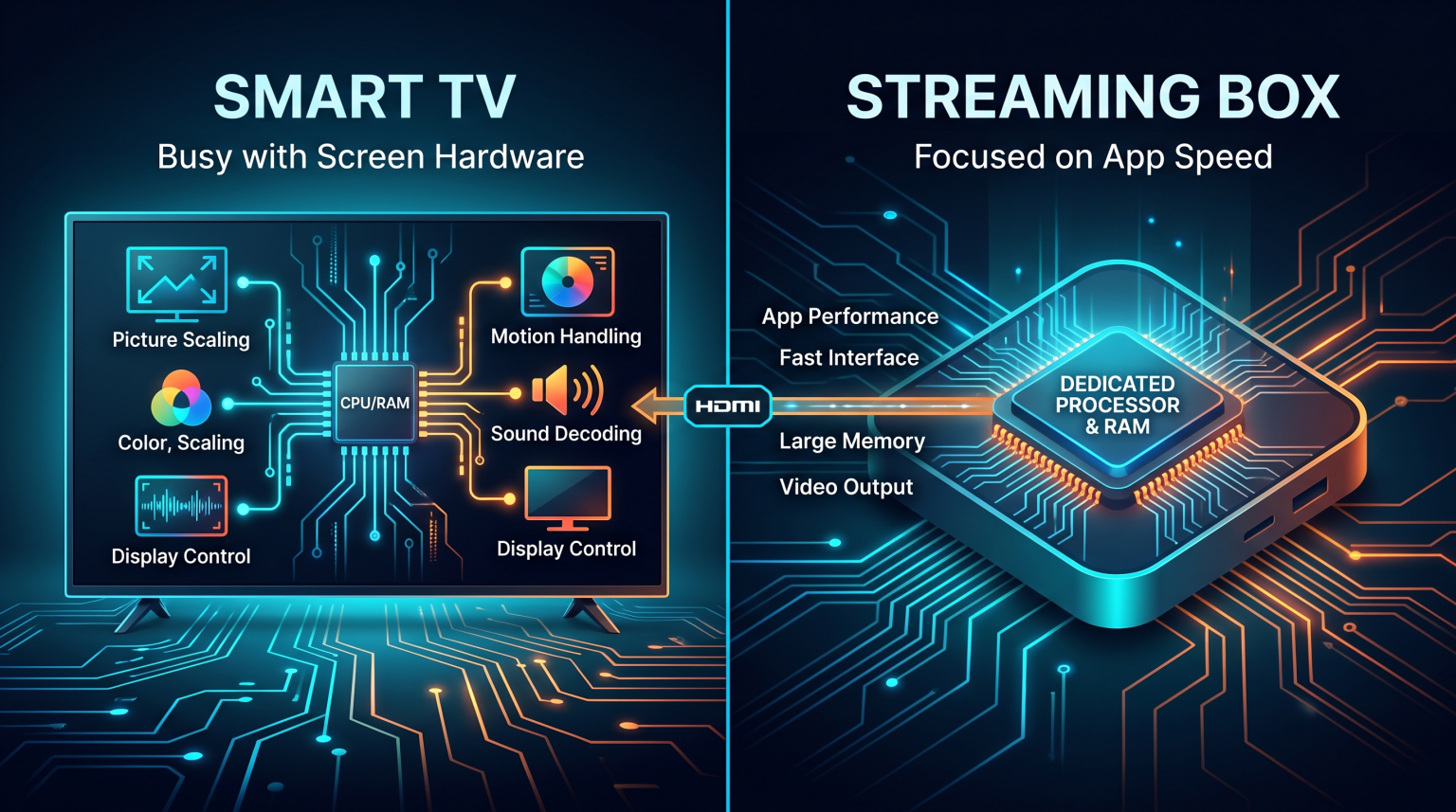
A streaming box is faster than a Smart TV because it has a dedicated processor and more Random Access Memory (RAM) for running applications. A streaming device has one main job: loading apps and streaming video. A Smart TV must divide its processing power. The television processor must manage complex picture upscaling, motion handling, audio decoding, and screen hardware. Television manufacturers often use cheaper computer chips to keep retail prices low. Therefore, a dedicated external device almost always provides a faster and smoother application experience.
Hardware Differences: Processors and Memory
The physical components inside a device determine its speed. The two most important components for speed are the Central Processing Unit (CPU) and Random Access Memory (RAM).
The Role of the Processor
Inside a Smart TV, the processor works very hard. When you watch a movie, the television processor manages the display panel. It applies color correction. It calculates motion smoothing. It adjusts the backlight zones. These tasks require massive processing power. Running the operating system interface is a secondary task for the television.
Inside a streaming box, the processor does not manage a display panel. The streaming box only runs the operating system, loads the application, and sends a standard video signal through the HDMI cable. Because the processor has fewer tasks, the user interface responds much faster.
The Importance of RAM
Random Access Memory (RAM) stores temporary data so the device can access it instantly. Most standard Smart TVs contain between 1.5 gigabytes and 2 gigabytes of RAM. This memory fills up quickly when you open heavy applications. When the RAM is full, the television slows down or crashes.
Premium streaming devices often include 3 gigabytes or 4 gigabytes of RAM. This extra memory allows the device to keep multiple applications open in the background. It also allows the device to load large menus instantly.
Software Design and Operating Systems
Hardware is only one part of the equation. The software running on the device also affects the speed. Different manufacturers use different operating systems. If you want to understand these differences in detail, you can read our guide to Meilleur système d'exploitation pour Smart TV dédié à l'IPTV en 2026 : Tizen, Google TV et webOS en comparaison.
Built-In Television Software
Television manufacturers often load their operating systems with extra software. This is called bloatware. The television menu often displays advertisements, live channel previews, and content recommendations from many different applications. Generating these previews requires processing power and memory. This makes the television interface feel heavy and slow.
Streaming Box Software
External devices often use cleaner software. Devices like the Apple TV 4K or premium Android TV boxes focus purely on application icons. Even devices that show advertisements usually have software optimized specifically for the internal processor.
Software Updates and Lifespan
Television manufacturers release new television models every year. They usually provide software updates for two or three years. After this period, the television stops receiving major operating system updates. The applications become heavier over time, but the television software remains old. This causes the television to become slower every year.
External streaming devices usually receive software updates for many years. Companies that make streaming devices focus entirely on the software experience. This keeps the external device running fast for a much longer time.
Comparison: Streaming Box vs Smart TV
This table compares the basic experience of using an external device versus using built-in television applications.
| Fonctionnalité | Smart TV Built-In Apps | External Streaming Box |
| Main processing focus | Picture and audio processing | Application performance |
| Average RAM | 1.5 GB to 2 GB | 2 GB to 4 GB |
| Application loading | Usually slow | Usually fast |
| Menu navigation | Often delayed | Instant response |
| Software lifespan | 2 to 3 years | 4 to 7 years |
| Storage space | Limited (often 8 GB) | High (often 16 GB to 64 GB) |
Is a Streaming Box Better for IPTV?
Using a dedicated streaming box is highly recommended for IPTV services like TV Shadow IPTV. IPTV applications require specific resources that Smart TVs often lack.
Electronic Program Guide (EPG) Loading
IPTV services use an Electronic Program Guide (EPG) to show the TV schedule. A large M3U playlist or Xtream Codes login can contain thousands of channels and thousands of EPG text entries. Loading this data requires significant RAM.
When a Smart TV tries to load a large EPG, the television often freezes. Sometimes the IPTV application crashes completely. A powerful streaming box has enough RAM to load the entire EPG quickly. The scrolling remains smooth, and the channel information appears instantly.
IPTV App Availability
Smart TV operating systems have strict application stores. Samsung Tizen and LG webOS often remove IPTV players from their stores without warning. This limits your options.
An Android TV streaming box uses the Google Play Store. The Google Play Store offers hundreds of excellent IPTV players. You can also manually install applications on an Android TV box. This gives you complete control over your IPTV experience. If you are comparing new televisions for this purpose, check our review of the Les meilleurs téléviseurs connectés pour l'IPTV en 2026 : comparaison entre Samsung, Sony, LG et TCL.
Live Football and Sports Streaming
Watching live football requires a stable system. When you watch a fast-moving sport, you want the best performance possible.
Streaming Stability
Live sports broadcasts require a continuous download of data. A streaming box usually has superior internal Wi-Fi antennas compared to a Smart TV. Many streaming boxes also include a Gigabit Ethernet port for a direct cable connection. A stable internet connection prevents buffering during important football matches.
Picture Quality and Motion
It is important to understand that a streaming box does not improve the television’s physical screen. The television screen still determines the colors, the brightness, and the maximum refresh rate. If you experience poor image quality during live sports, the streaming box might not fix it. You can learn more about this in our article explaining Pourquoi l'IPTV est-elle floue sur un téléviseur 4K neuf ?.
However, the streaming box ensures the application delivers the video signal smoothly. The box prevents the application from stuttering. The television then processes that smooth signal to display the football match.
Conclusion
A streaming box is faster than a Smart TV because it is a specialized computer. While television manufacturers prioritize screen quality and picture processing, streaming device manufacturers prioritize application speed and navigation. The extra processor power and larger RAM in a streaming box ensure that applications open quickly and run smoothly. For intensive tasks like loading large IPTV playlists on TV Shadow IPTV or streaming live football, a dedicated external device offers a much better experience. Upgrading to a streaming box is the most effective way to solve a slow television interface without buying a completely new screen.
Foire aux questions (FAQ)
Does a streaming box improve picture quality?
No, it does not improve the physical capabilities of your television. A streaming box provides a faster interface and more stable applications. The final picture quality still depends on the television screen.
Why does my Smart TV menu freeze?
Your Smart TV menu freezes because the television lacks Random Access Memory (RAM). When background processes and picture processing use all the memory, the menu interface stops responding.
Is it difficult to connect a streaming box?
No, it is very simple. You connect the streaming box to the television using an HDMI cable. Then you connect the box to an electrical outlet. You will use the remote control provided with the streaming box.
Do I need an internet connection for a streaming box?
Yes. Both Smart TVs and streaming boxes require a strong internet connection to download applications and stream video content.
Can I use a streaming box on an old television?
Yes. If your old television has a working HDMI port, you can connect a streaming box. This is an excellent way to make an old, slow television function like a fast, modern device.
Will a streaming box stop my IPTV from buffering?
It might help. If the buffering is caused by your television’s weak processor or poor Wi-Fi antenna, a powerful streaming box will improve stability. However, if the buffering is caused by your internet service provider, a new device will not fix the issue.