
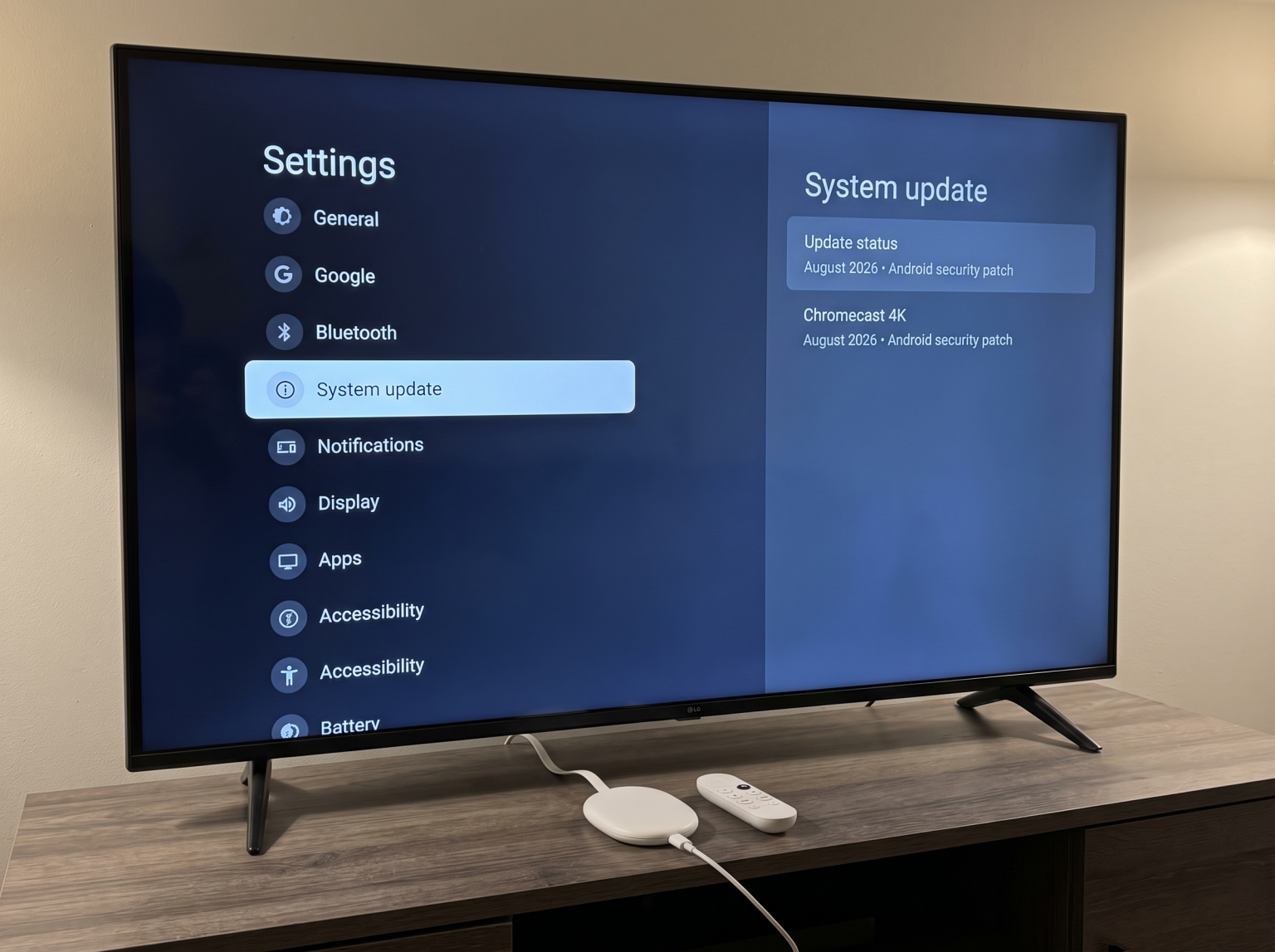
In October 2026, Google released a new software update for the Chromecast with Google TV (4K). This update changes the device security patch level from October 2025 to August 2026. However, Google did not release a corresponding software update for the Chromecast with Google TV (HD). The HD model remains on an older software version from late 2025.
This situation creates questions for users who own the HD device. Software updates are important for device security, application compatibility, and system performance. This article explains the current Chromecast HD update 2026 status. It also details what the new 4K update includes, how users can check their firmware version, and what this software situation means for streaming live sports and IPTV applications.
Kort svar
The Chromecast with Google TV (4K) received a system software update in October 2026. This update includes the August 2026 Android security patch and minor bug fixes. The Chromecast with Google TV (HD) did not receive this update. The HD model currently uses the older October 2025 security patch. The 4K model is better for users who want the most recent security updates. The HD model remains fully functional, but owners must wait to see if Google releases a future update for this specific hardware.
The Chromecast 4K October 2026 Update Explained
Google officially started distributing the new software for the 4K model on October 12, 2026. This is a maintenance release. The update does not include new user interface features. The update does not add new Google applications.
The primary purpose of this software release is security and stability. The software update changes the internal build number to UTTA.260813.002. It upgrades the Android Security Patch Level to August 2026. According to the official release notes, the update also provides general bug fixes and performance improvements.
Updating the security patch is an important process. A newer security patch protects the device against recent software vulnerabilities. Because the 4K device previously used an October 2025 patch, this new installation represents a significant security improvement.
What is the Chromecast HD Update 2026 Status?
Currently, there is no October 2026 software update for the Chromecast with Google TV (HD). The official Google support documentation confirms that the most recent firmware for the HD model is build number UTTC.250917.004. This build uses the October 2025 Android security patch.
Google has not published a reason for excluding the HD model from the recent update cycle. Software release schedules often depend on hardware differences. The 4K model and the HD model use different internal processors. Therefore, they require different software builds.
Users should know that a lack of recent updates does not mean the device is broken. The Chromecast with Google TV (HD) still supports the Google Play Store. It still runs modern streaming applications. However, if you are deciding between the two models today, the 4K version currently offers better software support. If you want to learn more about how different television platforms handle software, read our guide on Det beste Smart TV-operativsystemet for IPTV i 2026: Tizen vs Google TV vs webOS.
Feature Comparison: Chromecast 4K vs Chromecast HD
This table compares the current software status and specifications of the two Google TV devices.
| Funksjon | Chromecast with Google TV (4K) | Chromecast with Google TV (HD) |
| Latest software update date | October 2026 | No update in 2026 |
| Latest security patch | August 2026 | October 2025 |
| Firmware build number | UTTA.260813.002 | UTTC.250917.004 |
| Maximum video resolution | 4K Ultra HD (2160p) | Full HD (1080p) |
| Operativsystem | Google TV (Android TV based) | Google TV (Android TV based) |
| High Dynamic Range (HDR) | HDR10, HDR10+, Dolby Vision | HDR10, HDR10+ |
Why Software Updates Matter for Streaming Devices
System software updates serve three main purposes for streaming devices.
First, updates provide security. Streaming devices connect constantly to the internet. They store user account passwords and payment information. Security patches block malicious software from accessing this private data.
Second, updates ensure application compatibility. Application developers update their software regularly. Sometimes, a new application version requires a specific operating system level to function correctly. If a streaming device uses very old system software, users might not be able to install the newest application versions.
Third, updates improve system performance. The Chromecast with Google TV devices have limited internal memory and processing power. Software updates often include code optimization. This optimization can make the menus load faster and prevent the device from crashing during heavy use.
How to Check for Updates on Google TV
Google TV devices usually download and install software updates automatically when the device is not active. However, users can force the device to check the Google servers manually.
To check your software version and download available updates, follow these exact steps:
Turn on the television and open the Google TV home screen.
Navigate to the top right corner and select the Settings icon (gear symbol).
Scroll down and select the System menu.
Select the About menu.
Select System update.
The device will check for new software. If an update is available, the screen will show a Download button. The download and installation process takes approximately ten minutes. Do not disconnect the power cable during the installation process.
Google TV Operating System and App Availability
Both the Chromecast 4K and the Chromecast HD use the Google TV interface. This interface is built on top of the Android TV operating system. This is a significant advantage for users because it provides direct access to the Google Play Store.
The Google Play Store contains thousands of applications. However, app availability may depend on several factors. These factors include the user’s physical country, the specific device model, and the app-store policy at the time of downloading.
Unlike closed operating systems, the Android TV platform allows users to install applications from outside the official store. This process is called “sideloading”. Sideloading gives users more flexibility to install independent video players.
IPTV Compatibility on Chromecast Devices
Because this article is for TV Shadow IPTV, it is important to explain how these devices handle IPTV services. Both Chromecast models are excellent devices for IPTV playback due to their Android architecture.
IPTV Player Availability
Users can find many popular IPTV player applications directly in the Google Play Store. These players support standard playlist formats. Most modern players offer full M3U compatibility and Xtream Codes compatibility. Users simply download a player, enter their subscription credentials, and start watching.
Electronic Program Guide (EPG) Support
A good IPTV experience requires a working Electronic Program Guide (EPG). The EPG shows the schedule for live television channels. Because the Chromecast devices have dedicated processors for video decoding, they can load large EPG files quickly.
Storage Space Limitations
One disadvantage of the Chromecast design is the limited internal storage space. Both devices have only 8 gigabytes of total storage. The operating system uses nearly half of this space. Users must manage their application installations carefully. If an IPTV player stores a very large EPG file in the device memory, the Chromecast might show a “Storage Full” warning. Users should clear the application cache regularly to maintain system performance.
Please note that TV Shadow IPTV does not have an official relationship with Google, Samsung, Sony, or any hardware manufacturer. No IPTV application is guaranteed to work flawlessly on every device forever.
Watching Live Football on Google TV
Live sports broadcasts push television hardware to its limits. Live football features fast camera movements and complex picture data.
Bevegelseshåndtering og oppdateringsfrekvens
The Chromecast 4K and Chromecast HD can both output a 60Hz video signal. A 60Hz refresh rate is standard for streaming devices and is sufficient for smooth sports viewing. If your television supports 120Hz, you might want to read our article about 60 Hz- og 120 Hz-TV-er til direktesendt fotball.
Stabilitet i nettverkstilkoblingen
Live football requires a stable internet connection. The Chromecast devices rely on Wi-Fi connections out of the box. For the best sports streaming experience, users should connect the Chromecast to a 5GHz Wi-Fi network. 5GHz networks provide faster speeds and less interference than 2.4GHz networks. If Wi-Fi is unstable, users can purchase an official Google Ethernet adapter. The Ethernet adapter allows the user to connect a network cable directly to the Chromecast power supply.
Picture Quality and Resolution
If a broadcaster provides a 4K sports feed, only the Chromecast with Google TV (4K) can display it in true 4K resolution. The HD model will downscale the 4K feed to 1080p resolution. If you recently bought a 4K television and notice that 1080p sports streams look soft, you can learn more in our guide explaining Hvorfor ser IPTV uskarpt ut på en ny 4K-TV?.
Konklusjon
The October 2026 software update creates a clear division between Google’s streaming devices. The Chromecast with Google TV (4K) benefits from a modern August 2026 security patch. This update improves system stability and protects user data. Conversely, the Chromecast with Google TV (HD) remains on software from October 2025.
For users who already own the HD model, there is no need to panic. The device still functions normally and supports all major applications via the Google Play Store. It remains a capable device for TV Shadow IPTV and general streaming.
However, for consumers purchasing a new device today, the 4K model is the superior choice. The 4K model provides better software support, higher resolution video output, and improved long-term reliability.
Ofte stilte spørsmål (FAQ)
Is the Chromecast with Google TV (HD) discontinued?
Google has not announced that the HD model is discontinued. The device is still available for purchase. However, the lack of a 2026 software update suggests that Google is prioritizing newer hardware models.
Does the October 2026 update change the Google TV interface?
No. The October 2026 update for the 4K model only includes security patches and minor performance fixes. It does not change the visual layout of the home screen.
Which device is better for a 1080p television?
The Chromecast with Google TV (HD) is designed specifically for 1080p televisions. However, the 4K model will also work perfectly on a 1080p television. Given the recent software updates, the 4K model is the safer choice for long-term security.