
Viewers in Europe expect high picture quality when watching streaming services. However, achieving 4K resolution and High Dynamic Range (HDR) depends on multiple factors. A user must own a compatible television. The user must also subscribe to the correct Disney Plus plan.
Recently, regional software changes and legal disputes in Europe have altered how specific devices display Disney Plus content. This article explains the current state of Disney Plus HDR Europe 2026 [1]. You will learn why device support differs between television brands. You will also learn how to configure your television for the best possible picture quality.
Whether you use Samsung Tizen, LG webOS, or Sony Google TV, understanding these limitations will help you optimize your home entertainment system.
Kort svar
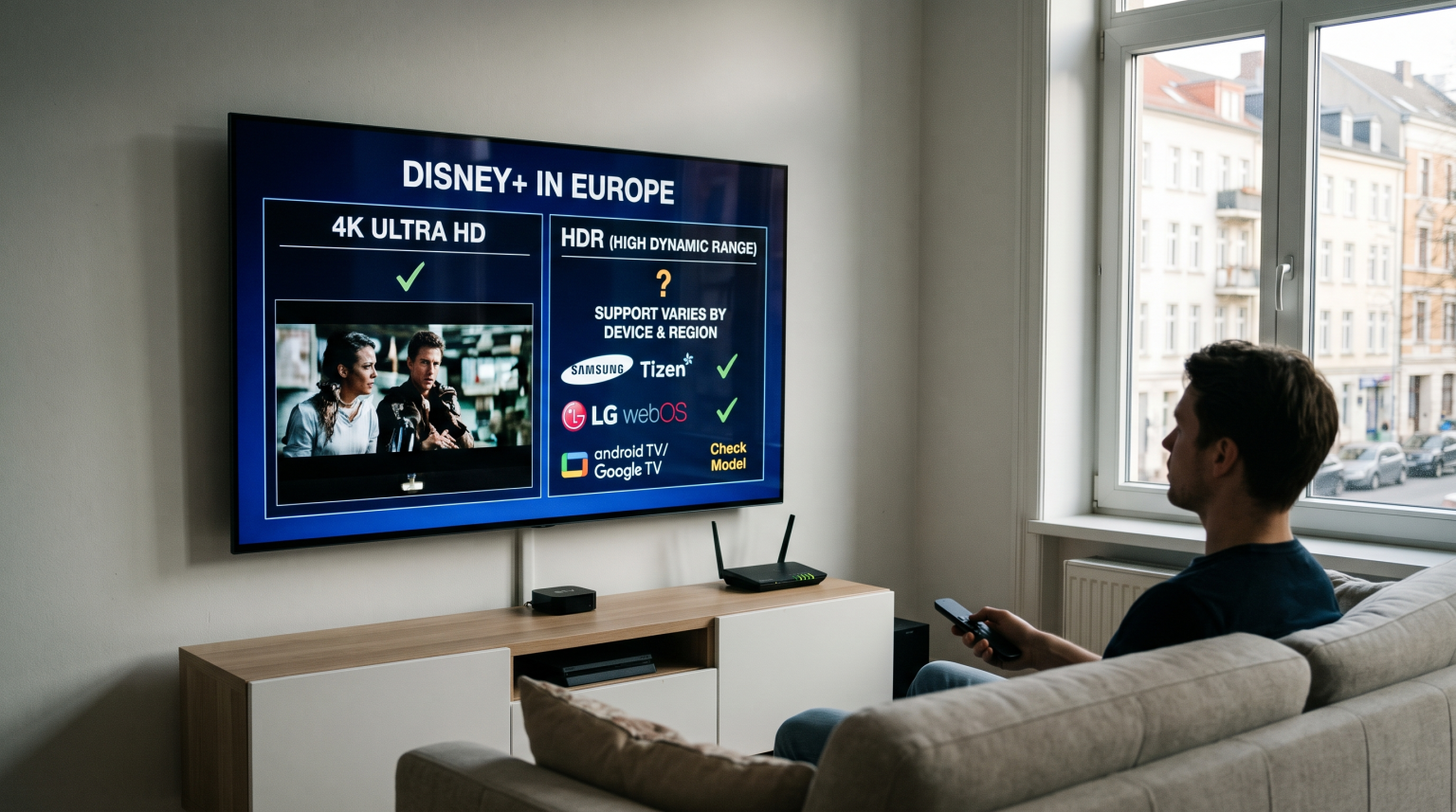
To watch Disney Plus in 4K HDR in Europe during 2026, you must subscribe to the Disney Plus Premium plan [1, 2]. However, device support differs because of regional software restrictions and recent European patent disputes [1]. These disputes temporarily removed HDR support on specific television models in Nordic and European countries [1]. Modern televisions using Google TV, Samsung Tizen, or LG webOS generally support 4K resolution [3]. However, older television models may limit the Disney Plus application to 1080p resolution [2]. Users should always update their television software to ensure the best compatibility.
The Disney Plus Premium Tier in Europe
Disney Plus offers multiple subscription plans in Europe [3]. The available picture quality depends directly on your chosen subscription tier [3].
Standard with Ads: This plan supports 1080p Full HD video [2]. This plan supports 5.1 surround sound [3]. This plan contains advertisements [3].
Standard: This plan supports 1080p Full HD video [2]. This plan supports 5.1 surround sound [3]. This plan does not contain advertisements [3].
Premium: This plan supports 4K Ultra HD (UHD) video and HDR [2]. This plan supports Dolby Atmos audio [3]. This plan allows simultaneous streaming on four devices [2].
If you want to use Disney Plus HDR Europe 2026 features, you must pay for the Premium subscription [1]. A Standard subscription will never output a 4K or HDR signal. The application will restrict the video to 1080p, even if you own a new 4K television.
Why Device Support Differs Across European Countries
Having a Premium subscription and a 4K television does not guarantee 4K HDR playback [1, 2]. Device support differs across Europe for several important reasons.
Software Updates and Licensing Restrictions
In mid-2026, a European patent dispute forced Disney Plus to modify its video streams [1]. This issue primarily affected Nordic countries and specific European regions [1]. Disney removed 4K and HDR support temporarily in these areas due to the legal dispute [1].
Disney later restored 4K video using new technology [1]. However, HDR support remains unavailable on some older television devices in these specific countries [1]. This means a user in the United Kingdom might receive full 4K HDR, while a user in Sweden might only receive 4K without HDR on the exact same television model [1].
Digital Rights Management (DRM)
Television manufacturers must include strict Digital Rights Management (DRM) software. This software prevents video piracy. If a television model fails a security check, the Disney Plus application will lower the video quality to 1080p or 720p. Older televisions often lose 4K support because their DRM software becomes outdated.
Comparing Smart TV Operating Systems for Streaming
The operating system of your television affects how streaming applications perform. Different brands use different operating systems. If you are comparing television operating systems, our guide to Det beste Smart TV-operativsystemet for IPTV i 2026 explains the differences between Tizen, Google TV and webOS.
| Funksjon | Samsung Tizen | Sony Google TV | LG webOS |
| Operativsystem | Tizen | Google TV | webOS |
| App-økosystem | Samsung Apps | Google Play | LG Content Store |
| Støtte for Android-apper | Ingen innebygd støtte for Google Play | Full Google Play support | Ingen innebygd støtte for Google Play |
| Disney Plus 4K HDR | Supported on modern models | Supported on modern models | Supported on modern models |
| HDR Format Support | HDR10 and HDR10+ | HDR10 and Dolby Vision | HDR10 and Dolby Vision |
Samsung Tizen
Samsung uses the Tizen operating system. The Disney Plus application works very well on modern Samsung Tizen televisions. However, Samsung televisions do not support Dolby Vision technology. If a Disney Plus movie uses Dolby Vision, a Samsung television will display the movie in standard HDR10 instead.
Sony Google TV
Sony uses the Google TV operating system. Google TV has native support for Android applications from the Google Play Store. Sony televisions support both standard HDR10 and Dolby Vision. This makes Sony BRAVIA televisions excellent for watching Disney Plus movies in the highest possible HDR quality.
LG webOS
LG uses the webOS operating system. The LG Content Store provides the official Disney Plus application. Similar to Sony, modern LG televisions support standard HDR10 and Dolby Vision. The LG Magic Remote makes navigating the Disney Plus interface very easy.
Hardware Requirements for 4K and HDR Playback
Your television must meet physical hardware requirements to display Disney Plus in 4K HDR.
HDMI Connections
If you use an external streaming device, you must use a compatible HDMI cable. The external device could be an Apple TV or an Nvidia Shield. The HDMI cable must support High-Bandwidth Digital Content Protection (HDCP) 2.2. If the HDMI cable does not support HDCP 2.2, the video quality will drop to 1080p. The HDMI port on the television must also support HDMI 2.0 or HDMI 2.1.
Internet Speed and Wi-Fi
Streaming 4K HDR video requires a fast and stable internet connection. Disney recommends a minimum download speed of 25 Mbps. If your internet speed drops below 25 Mbps, the Disney Plus application will automatically lower the video resolution. To prevent this problem, users should connect their television directly to the internet router using an Ethernet cable.
IPTV Applications on Smart Televisions
Many users watch Disney Plus for movies and use IPTV for live television. Users of TV Shadow IPTV should understand how television operating systems affect IPTV applications.
Application Installation Limitations
Smart TV operating-system limitations dictate which IPTV players you can install. For example, Google TV allows users to install many popular IPTV players directly from the Google Play Store.
Samsung Tizen and LG webOS have fewer IPTV applications in their official stores. Sometimes, a popular IPTV application is removed from the Samsung store or the LG store. Users who want the most freedom for IPTV applications often prefer Android TV or Google TV devices. You can read more in our article about Samsung vs. LG Smart-TV for IPTV: Tizen vs. webOS.
M3U Playlists and EPG Support
Good IPTV players allow users to add an M3U playlist or use Xtream Codes. These applications also support an Electronic Program Guide (EPG). The EPG shows the television schedule on the screen. The availability of reliable EPG applications varies by television brand. Google TV generally offers the largest selection of applications with full EPG support.
Live Football and Picture Quality
Watching live football requires different television specifications than watching a movie. Movies play at 24 frames per second. Live sports require smooth motion handling for fast action.
Bevegelseshåndtering og oppdateringsfrekvenser
A 120Hz television handles fast camera movements better than a 60Hz television. The higher refresh rate prevents a blurry football during a match. You can learn more about this in our guide: 60 Hz- og 120 Hz-TV-er til direktesendt fotball]. Sony BRAVIA televisions often receive excellent reviews for motion processing. Samsung and LG also offer excellent motion handling on their premium models.
Television Picture Settings
When watching live football, users should adjust their television picture settings. Many televisions have a dedicated “Sports Mode”. However, Sports Mode often makes the colors look unnatural. For the best live football experience, users should select the “Standard” picture profile. Users should then manually increase the motion smoothing setting slightly to reduce blur.
Input Signal Quality
Your picture quality depends heavily on the source signal. If a live sports stream provides a 1080p signal, a 4K television will upscale the image. The television will stretch the 1080p image to fit the 4K screen. The television cannot create true 4K details from a 1080p source. A wired Ethernet connection helps maintain the highest possible input signal quality by preventing buffering.
Konklusjon
Achieving the best picture quality with Disney Plus HDR Europe 2026 requires the correct subscription and compatible hardware. Users must purchase the Disney Plus Premium tier to unlock 4K and HDR video. Device support differs because television manufacturers use different operating systems.
Additionally, software changes in Europe during 2026 have temporarily affected HDR availability on some devices [1]. Samsung Tizen, LG webOS, and Sony Google TV all support high-quality streaming, but they handle HDR formats differently. When choosing a television for both streaming applications and IPTV services, consider the operating system and the available application store. TV Shadow IPTV users should ensure their chosen television supports the applications they need for the best viewing experience.
Ofte stilte spørsmål (FAQ)
Why is Disney Plus not playing in 4K on my television?
You must have a Disney Plus Premium subscription. You must also have a 4K television and an internet connection of at least 25 Mbps. Some older televisions may not support the latest 4K application version.
Why does Disney Plus HDR Europe 2026 availability change?
In 2026, European patent disputes temporarily restricted HDR and 4K features in certain countries [1]. Application updates and device capabilities also cause differences between television brands [1].
Does Samsung Tizen support Dolby Vision on Disney Plus?
No. Samsung televisions do not support Dolby Vision technology. Samsung televisions will play Disney Plus HDR content using the standard HDR10 format instead.