
Dolby introduced Dolby Vision 2 in 2026. This new High Dynamic Range (HDR) format replaces the original Dolby Vision standard. Television manufacturers are now adding Dolby Vision 2 to new Smart TV models.
High Dynamic Range technology controls television brightness and color. The technology makes bright areas brighter and dark areas darker. The original Dolby Vision format became very popular on streaming platforms. Now, consumers want to know if Dolby Vision 2 offers a noticeable improvement.
This article explains the technical differences between Dolby Vision 2 and the original Dolby Vision. We will examine the new features. We will also explain how these changes affect daily television viewing, live football broadcasts, and IPTV services like TV Shadow IPTV.
Kort svar
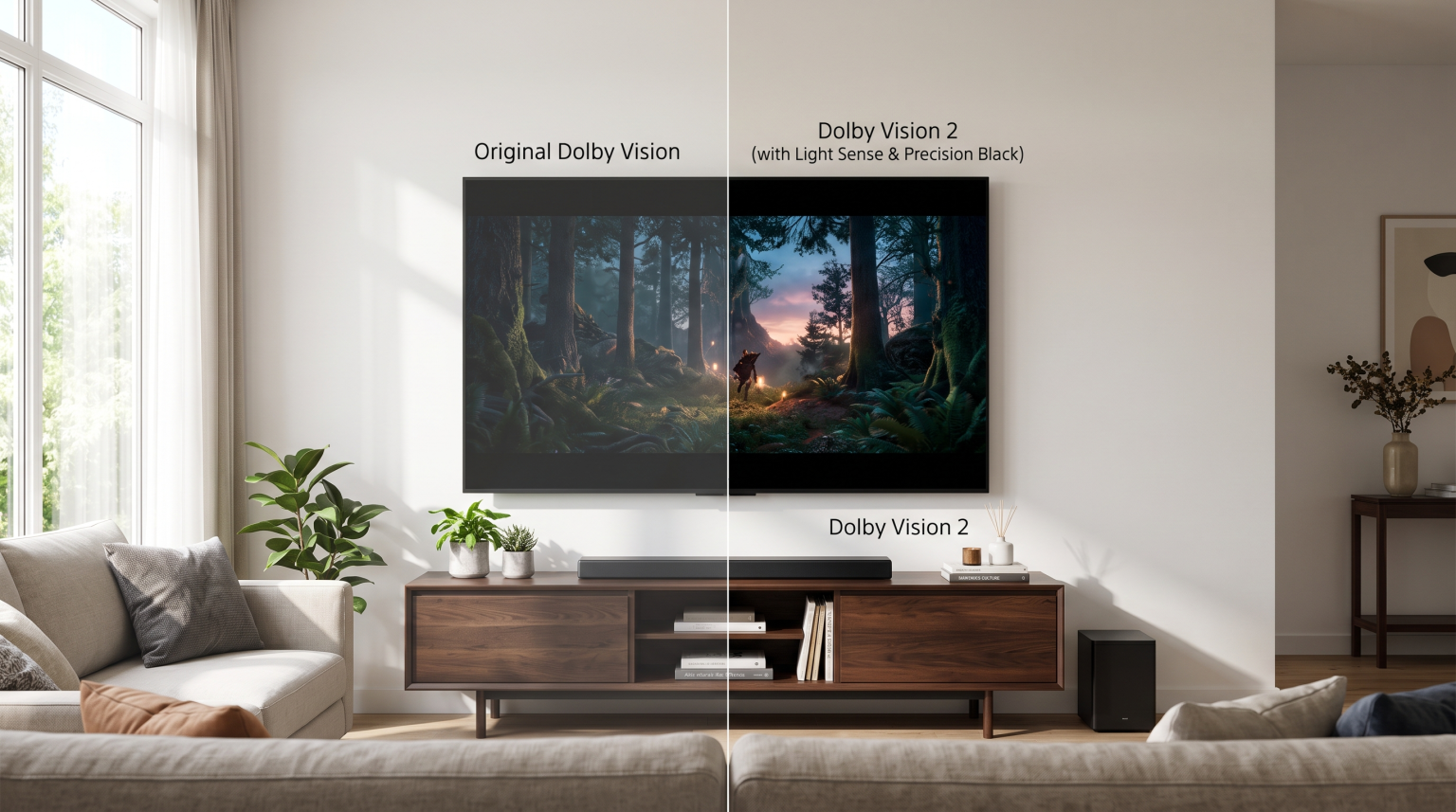
The main difference between Dolby Vision 2 and the original Dolby Vision is hardware processing. The original Dolby Vision sends frame-by-frame brightness instructions to the television. Dolby Vision 2 adds new technologies called Precision Black, Light Sense, and Authentic Motion.
These new technologies adjust the picture based on the room lighting. They also improve motion smoothness during fast action. You need a new 2026 television to use Dolby Vision 2. Older televisions will play Dolby Vision 2 content, but the older television will display the standard Dolby Vision picture. Neither format is “better” for every user, because the viewing experience depends entirely on the television hardware.
What Is High Dynamic Range (HDR)?
To understand Dolby Vision 2, you must understand High Dynamic Range (HDR). Standard Dynamic Range (SDR) is the older video format. Standard Dynamic Range has limited brightness. Standard Dynamic Range also displays fewer colors.
High Dynamic Range expands the contrast. Contrast is the difference between the darkest pixel and the brightest pixel on the screen. HDR allows the television to display bright sunlight and deep shadows at the same time.
The original Dolby Vision uses dynamic metadata. Dynamic metadata means the video file sends specific instructions to the television for every individual scene. If a scene takes place in a dark cave, Dolby Vision tells the television to lower the brightness. If the next scene takes place in a sunny desert, Dolby Vision tells the television to increase the brightness.
The Main Differences: Dolby Vision 2 vs Dolby Vision
Dolby Vision 2 keeps the dynamic metadata system. However, Dolby Vision 2 adds new processing tools. Dolby calls these tools Content Intelligence and the Image Engine. These tools solve common problems that television viewers experience in normal living rooms.
Precision Black and Shadow Detail
The original Dolby Vision sometimes makes dark scenes look grey on cheaper televisions. Dolby Vision 2 introduces Precision Black. Precision Black controls the television backlight more accurately.
This technology helps the television display very fine details in dark areas. For example, if a viewer watches a movie scene at night, the viewer can still see textures on dark clothing. Precision Black prevents the dark areas from merging into one solid black shape.
Light Sense and Room Lighting
Living rooms change brightness during the day. A television picture that looks good at night might look too dark during sunny afternoons.
The original Dolby Vision introduced a feature called Dolby Vision IQ to solve this problem. Dolby Vision 2 replaces Dolby Vision IQ with a new feature called Light Sense. Light Sense continuously measures the light in the room. Light Sense adjusts the picture contrast automatically.
Light Sense ensures the dark scenes remain visible in bright rooms. Light Sense performs this adjustment without changing the original colors chosen by the film director.
Authentic Motion
Modern televisions often use motion smoothing. Motion smoothing creates artificial video frames. This process makes movies look like cheap soap operas.
Dolby Vision 2 includes Authentic Motion. Authentic Motion carries instructions from the content creator. If a movie requires a cinematic 24 frames per second, Authentic Motion tells the television to turn off motion smoothing. If a video requires smooth 60 frames per second, Authentic Motion allows the television processor to handle the fast movement correctly.
What Is Dolby Vision 2 Max?
Dolby also introduced a premium version called Dolby Vision 2 Max. Dolby Vision 2 Max is designed specifically for expensive, high-end Smart TVs.
Dolby Vision 2 is the core software standard. Dolby Vision 2 Max unlocks additional processing features. Dolby Vision 2 Max uses bi-directional mapping. Bi-directional mapping allows the television hardware to communicate directly with the Dolby software.
If a premium television has extremely high brightness, Dolby Vision 2 Max allows the television to use maximum brightness safely. Dolby Vision 2 Max is only available on televisions with flagship hardware.
Comparison Table: Dolby Vision Versions
The table below shows the technical differences between the formats.
| Funksjon | Original Dolby Vision | Dolby Vision 2 | Dolby Vision 2 Max |
| Metadata type | Dynamic | Dynamic | Dynamic |
| Room light adaptation | Requires Dolby Vision IQ | Included (Light Sense) | Included (Advanced Light Sense) |
| Motion control | Controlled by TV settings | Included (Authentic Motion) | Included (Authentic Motion) |
| Shadow processing | Standard mapping | Precision Black | Precision Black |
| Hardware communication | One-way | One-way | Two-way (Bi-directional) |
| Hardware requirement | Standard Dolby Vision TV | 2026 Dolby Vision 2 TV | 2026 Flagship TV |
Do You Need a New Smart TV for Dolby Vision 2?
Many television buyers ask if they must buy a new television to use Dolby Vision 2. The answer depends on the viewer’s current equipment.
You cannot download a software update to get Dolby Vision 2 on an older television. Dolby Vision 2 requires a specific processing chip. The television must also have a light sensor to use the Light Sense feature.
However, Dolby Vision 2 is fully backward compatible. Backward compatible means new video files will work on older televisions. If you play a Dolby Vision 2 movie on a 2023 television, the movie will play successfully. The older television will simply ignore the new Dolby Vision 2 instructions. The older television will display the standard Dolby Vision picture.
If you are planning to buy a television, our guide to the De beste smart-TV-ene for IPTV i 2026: Sammenligning av Samsung, Sony, LG og TCL] compares the newest models from major brands.
Direkte overføring av fotball og andre idretter
Sports broadcasts require excellent television performance. Live football features fast camera movements. Live football also features brightly lit stadiums and dark stadium shadows.
The original Dolby Vision handles colors very well, but the original Dolby Vision does not control motion. Television viewers often experience blurry football players or stuttering camera movements.
Dolby Vision 2 changes sports viewing through the Authentic Motion feature. Authentic Motion identifies fast-moving objects on the screen. Authentic Motion processes the grass texture, the bright stadium lights, and the running players simultaneously.
When combined with a fast television panel, Dolby Vision 2 keeps the football sharp during fast camera pans. The Light Sense feature also prevents the bright green grass from looking unnaturally bright in a dark room. For sports fans, choosing the correct panel hardware is very important. You can read more in our comparison of OLED mot Mini-LED for direktesendt fotball.
How Dolby Vision 2 Affects IPTV Users
TV Shadow IPTV users often stream video content using Smart TV applications. Users want to know if Dolby Vision 2 improves the IPTV experience.
Video Source Quality
IPTV services deliver live television channels and video-on-demand content. The video quality depends on the original broadcast source. Most live television channels broadcast in Standard Dynamic Range (SDR) or basic HDR. Most live television channels do not currently broadcast in Dolby Vision 2.
Therefore, an IPTV application will not activate the Dolby Vision 2 logo during a standard news broadcast or a standard sports broadcast.
Television Processor Benefits
However, owning a Dolby Vision 2 television still benefits IPTV users. A television that supports Dolby Vision 2 contains a very powerful image processor. This powerful processor improves all video sources.
When you watch a standard high-definition (HD) stream on TV Shadow IPTV, the television processor upscales the video. Upscaling makes the HD video look sharper on a 4K screen. The fast processor also reduces video noise and improves motion stability. If you experience poor picture quality on a new television, you can learn how to fix this issue in our article explaining Hvorfor ser IPTV uskarpt ut på en ny 4K-TV?.
IPTV Application Compatibility
TV Shadow IPTV recommends using dedicated IPTV player applications. Popular IPTV applications include Smarters Pro, TiviMate, and XCIPTV. These applications connect to IPTV services using an M3U playlist link or an Xtream Codes login.
These IPTV applications run on the Smart TV operating system. The IPTV applications use the television’s internal video player. If the IPTV application plays a video-on-demand movie encoded with Dolby Vision 2, the Smart TV will recognize the file and activate the Dolby Vision 2 picture mode.
Smart TV Operating Systems and HDR Support
Television buyers must check the operating system before buying a Smart TV. Different brands support different High Dynamic Range formats.
Sony and Google TV
Sony BRAVIA televisions use the Google TV operating system. Sony is a strong supporter of Dolby formats. High-end 2026 Sony televisions support Dolby Vision 2 and Dolby Vision 2 Max. The Google TV operating system also has a very large app store. Users can easily install many different IPTV player applications.
LG and webOS
LG televisions use the webOS operating system. LG also supports Dolby formats. New 2026 LG OLED televisions support Dolby Vision 2. The webOS application store contains many excellent IPTV applications. The LG Magic Remote provides simple navigation for Electronic Program Guides (EPG).
Samsung og Tizen
Samsung televisions use the Tizen operating system. Samsung does not support any version of Dolby Vision. Samsung supports a competing format called HDR10+.
If you play a Dolby Vision 2 video file on a Samsung television, the Samsung television will display the basic HDR10 picture. The Samsung television will not use the advanced Dolby metadata. Samsung televisions still offer excellent picture quality and motion processing, but Samsung buyers will not receive Dolby Vision 2 features.
Konklusjon
Dolby Vision 2 is a significant technical upgrade for home entertainment. The new standard solves common viewing problems. The Light Sense feature prevents the picture from looking too dark in bright living rooms. The Precision Black feature keeps dark shadows clear and detailed. The Authentic Motion feature keeps live sports and fast action looking smooth.
For most viewers, the original Dolby Vision still provides an excellent picture. You do not need to replace a working television immediately. The older televisions will still play new movies perfectly.
However, if you are buying a new television in 2026, checking for Dolby Vision 2 support is a smart decision. The new processing tools provide a more consistent viewing experience. For users of TV Shadow IPTV, buying a modern television ensures the best possible picture quality for live football, movies, and daily television streaming.
Ofte stilte spørsmål (FAQ)
Does Dolby Vision 2 require a special HDMI cable?
No, Dolby Vision 2 does not require a special HDMI cable. Dolby Vision 2 uses the same HDMI 2.1 bandwidth as the original Dolby Vision. If you already own an Ultra High Speed HDMI cable, the cable will transmit Dolby Vision 2 data correctly.
Can I use Dolby Vision 2 on a Samsung Smart TV?
No, you cannot use Dolby Vision 2 on a Samsung Smart TV. Samsung televisions do not support Dolby Vision. Samsung televisions use a different dynamic HDR format called HDR10+.
Will older Dolby Vision movies look better with Dolby Vision 2?
Yes, older Dolby Vision movies can look better on a Dolby Vision 2 television. The new television processor uses the Light Sense feature to adjust the old movie to your room lighting. The new television processor also manages shadow details better than older televisions.
Is Dolby Vision 2 Max a different video format?
No, Dolby Vision 2 Max is not a different video format. Dolby Vision 2 Max uses the exact same video file as standard Dolby Vision 2. The “Max” designation simply means the television hardware has premium capabilities to display the video at the highest possible quality.
Does TV Shadow IPTV stream in Dolby Vision 2?
TV Shadow IPTV delivers content in the format provided by the original broadcaster. Most live television channels broadcast in standard formats. Some video-on-demand content may contain HDR or Dolby Vision metadata, depending on the specific file source.