
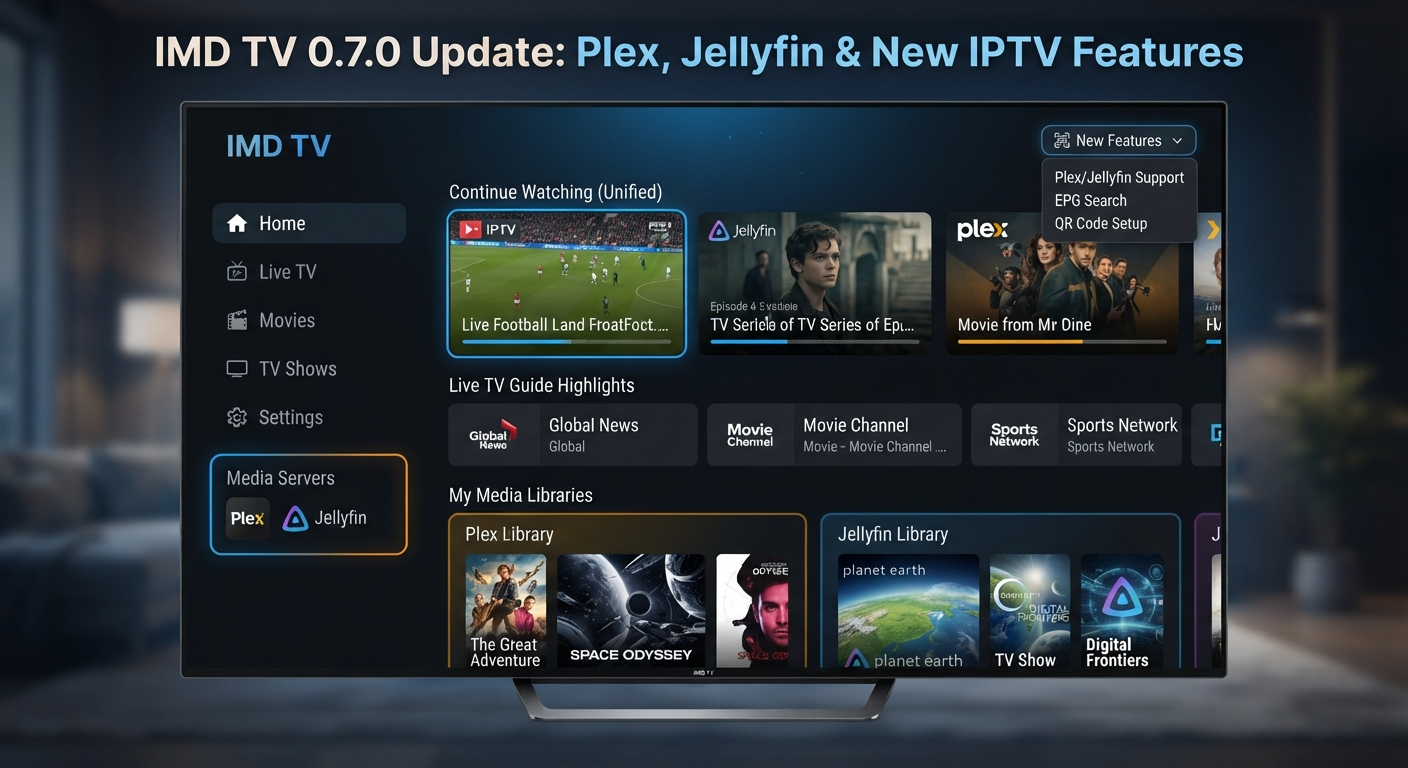
The IMD TV 0.7.0 update turns this free, open-source Android TV and Google TV player into a combined live television and personal media hub. Released in November 2026, version 0.7.0 introduces direct integration for Plex, Jellyfin, and Stremio alongside major upgrades to the Electronic Program Guide (EPG). Users can now search upcoming TV programs, configure parental controls with a Personal Identification Number (PIN), scan a Quick Response (QR) code to add playlists from a smartphone, and organize channels with custom numbering. This guide explains every new feature in IMD TV 0.7.0, how the media server integrations work, and what Smart TV compatibility rules apply.
Kort svar
IMD TV 0.7.0 is a major software update for the free, open-source IMD TV player on Android TV and Google TV. The update allows users to connect their Plex, Jellyfin, and Stremio libraries directly next to their live Internet Protocol Television (IPTV) playlists. IMD TV 0.7.0 is ideal for Android TV and Google TV users who want an ad-free player without subscriptions. However, IMD TV 0.7.0 is not available natively on Samsung Tizen or LG webOS televisions without an external Android streaming device.
What Is IMD TV?
IMD TV is a free, open-source media player licensed under the GNU General Public License version 3 (GPL-3.0). The application is designed specifically for television screens running Android TV or Google TV.
IMD TV does not include any television channels, movies, or video streams. The application does not display advertisements, require user accounts, or collect tracking data. Instead, IMD TV acts as a player interface for playlists and personal media servers that the user already owns.
Before the IMD TV 0.7.0 release, the application supported:
M3U playlist links
Xtream Codes logins
Stalker portals in beta
Electronic Program Guide (EPG) grids with up to 14 days of schedule data
Catch-up television and local or network recording
With version 0.7.0, IMD TV expands beyond live playlists to support personal media servers and video-on-demand catalogs in one unified interface.
Plex, Jellyfin, and Stremio Integration in IMD TV 0.7.0
The central addition in IMD TV 0.7.0 is native support for Plex, Jellyfin, and Stremio. Users no longer need to switch between separate Smart TV applications to watch live channels and personal movie collections.
How Media Server Linking Works
IMD TV 0.7.0 uses standard device-linking codes so users do not need to type complex passwords with a television remote control:
Plex: Users link their account through the official
plex.tv/linkweb address.Jellyfin: Users connect their local or remote server using Jellyfin Quick Connect. Version 0.7.0 also resolves connection issues for Jellyfin servers that redirect Hypertext Transfer Protocol (HTTP) traffic to Hypertext Transfer Protocol Secure (HTTPS).
Stremio: Users pair their account via
link.stremio.comto display catalogs from their installed Stremio add-ons.
After signing in with a code, users select which specific movie and series libraries they want IMD TV to load.
Two-Way Continue Watching Sync
IMD TV 0.7.0 includes two-way playback synchronization for Plex, Jellyfin, and Stremio. If a user starts watching a movie on their television inside IMD TV, the playback position updates automatically on their media server. The user can later open the official Plex, Jellyfin, or Stremio app on a smartphone or tablet and resume playback from the exact same timestamp.
Fast Incremental Library Updates
Large media libraries often take a long time to scan on streaming devices. After the initial library import in IMD TV 0.7.0, subsequent background updates fetch only newly added or modified titles. As a result, library refreshes complete in a few seconds even on large Plex or Jellyfin servers.
Known Limitations for Media Servers
Users should note two technical limitations in IMD TV 0.7.0:
Direct links only for Stremio: IMD TV does not contain a BitTorrent engine. Stremio add-on catalogs only play titles that provide direct HTTP or HTTPS video streams. Torrent-only links will not play.
Backup exclusions: When users create a settings backup file in IMD TV 0.7.0, Plex, Jellyfin, and Stremio connections are not saved in the backup file. Users must re-link those media servers after restoring a backup.
New IPTV and EPG Features in IMD TV 0.7.0
Alongside media server integration, IMD TV 0.7.0 introduces several upgrades for live television playlists and Electronic Program Guide (EPG) navigation.
EPG Program Search
Previous versions of IMD TV allowed users to search by channel name. In IMD TV 0.7.0, the search tool searches inside EPG program titles and descriptions. Search results appear in two organized rows: Today og Later. Selecting a program that is currently airing starts live playback immediately, while selecting an upcoming program allows the user to schedule a recording with one button press.
Unified Favorites and Continue Watching
Users who load multiple IPTV playlists alongside Plex or Jellyfin servers now have a single global Favorites list and one combined Continue Watching row. Any channel, movie, or television series marked as a favorite remains accessible regardless of which playlist is currently active. Additionally, selecting the Movies > All category displays categories from every connected playlist and media server in one unified view.
Smartphone QR Code Playlist Setup
Typing long M3U Uniform Resource Locators (URLs) or Xtream Codes credentials with a standard television remote control is slow and prone to typing errors. IMD TV 0.7.0 adds a mobile setup option. Users scan a QR code displayed on the television screen with their smartphone camera and type the login details on their phone keyboard. This transfer works strictly over the local home Wi-Fi or Ethernet network, and login passwords are never sent outside the home network.
Parental Controls with PIN and Backup Word
IMD TV 0.7.0 adds customizable parental locks to restrict access to specific channels or content. Users set a numeric PIN together with a recovery backup word in case they forget the PIN. Restrictions can be applied in three ways:
By content age rating (PG, 12A, 15, or 18)
By an entire channel category
By individual television channels
Users can also choose whether unlocking a restricted item lasts for a single program, until the app closes, or requires the PIN every time.
Custom TV Guide Layout and Channel Numbering
IMD TV 0.7.0 gives users detailed control over how the channel list and TV guide appear on screen:
Custom channel numbers: Users can assign custom numbers to any channel. If a number is already assigned to another channel, IMD TV offers to swap the two channel numbers automatically.
Category sorting: Any channel group can be sorted by the original playlist order, alphabetically from A to Z, or in a custom manual order.
Display options: Users can display channels by name only, by channel logo only, or by both name and logo. The TV guide’s built-in icons now act as a fourth logo fallback source.
Text scaling: Interface font sizes can be adjusted from Small to Extra-Large to improve readability on different screen sizes.
Background updates: Playlists and media servers refresh automatically in the background every 6, 12, 24, or 48 hours.
Language support: IMD TV 0.7.0 supports 13 interface languages, including English, German, Swedish, Dutch, French, Spanish, Polish, and Albanian.
IMD TV 0.6.0 vs IMD TV 0.7.0 Comparison
The following table compares the core capabilities of IMD TV 0.6.0 with the new features added in IMD TV 0.7.0.
| Funksjon | IMD TV 0.6.0 | IMD TV 0.7.0 |
| Playlist formats | M3U, Xtream Codes, Stalker (beta) | M3U, Xtream Codes, Stalker (beta) |
| Media server support | Støttes ikke | Plex, Jellyfin, and Stremio |
| Continue Watching sync | Local app progress only | Two-way sync with Plex, Jellyfin, and Stremio |
| Search function | Channel name search | Channel search and EPG program search |
| Playlist setup | On-screen remote keyboard | On-screen keyboard or smartphone QR code scan |
| Parental controls | Støttes ikke | PIN and backup word with rating, category, or channel locks |
| Channel numbering | Playlist default numbering | Custom user-assigned channel numbers with swap option |
| Interface languages | 12 languages | 13 languages (Albanian added) |
Smart TV Operating System Compatibility for IMD TV 0.7.0
Understanding Smart TV operating systems is essential before trying to install IMD TV 0.7.0. App availability always depends on the television brand, operating system, model year, and regional app store policies.
Android TV og Google TV
IMD TV 0.7.0 is built natively for Android TV og Google TV devices. This includes televisions from Sony BRAVIA, TCL, Hisense, and Philips that run Google TV, as well as dedicated streaming boxes such as the NVIDIA Shield TV, Google TV Streamer, and Xiaomi TV Box. Users can install IMD TV via the official GitHub release page or by using a Downloader code on Android-based devices. Version 0.7.0 also fixes user-interface scaling bugs that previously caused menus to appear too large or too small on uncertified Android TV boxes.
Samsung Tizen and LG webOS Limitations
IMD TV 0.7.0 does ikke run natively on Samsung Smart TVs using the Tizen operating system or LG Smart TVs using webOS. Neither Samsung Tizen nor LG webOS supports Android Application Package (APK) files. If you own a Samsung or LG television and want to use IMD TV 0.7.0, you must connect an external Android TV or Google TV streaming device to a High-Definition Multimedia Interface (HDMI) port.
If you are deciding which television platform fits your setup best, our comparison of Tizen vs. Google TV for IPTV-apper: Hva er forskjellen? explains how app ecosystems differ across major television brands. You can also review our guide on the Det beste Smart TV-operativsystemet for IPTV i 2026: Tizen vs Google TV vs webOS before buying a new television.
IPTV Compatibility and Setup Tips for TV Shadow IPTV Users
For users managing playlists on TV Shadow IPTV, IMD TV 0.7.0 provides full compatibility with standard streaming protocols. Note that TV Shadow IPTV is an independent service and has no official affiliation with IMD TV, Google, Samsung, Sony, or LG.
To get reliable performance from IMD TV 0.7.0 with your playlist:
Use Xtream Codes or M3U links: Both login formats work in IMD TV 0.7.0, and both support automatic EPG loading and catch-up playback when provided by your service.
Enable stream merging: If your playlist includes separate SD, HD, and 4K versions of the same channel, use IMD TV’s channel-merging tool to combine duplicates into a single guide entry.
Note the v0.7.1 Plex EPG hotfix: Shortly after releasing version 0.7.0, the developer published a small v0.7.1 hotfix. In version 0.7.0, linking a Plex server could occasionally override the live TV guide and display an empty EPG. Updating to v0.7.1 automatically restores your IPTV playlist guide while keeping all 0.7.0 features intact.
Use wired Ethernet for live sports: Live football and high-bitrate 4K streams require consistent network bandwidth. Connecting your Android TV or Google TV box via an Ethernet cable reduces packet loss and buffering compared to Wi-Fi.
If live sports picture clarity is a priority on your television, our guide to 60 Hz- og 120 Hz-TV-er til direktesendt fotball explains how panel refresh rates affect fast motion on screen.
Konklusjon
The IMD TV 0.7.0 update transforms an already capable open-source IPTV player into a complete media hub for Android TV and Google TV. By combining Plex, Jellyfin, and Stremio libraries with M3U and Xtream Codes playlists, users can manage live television and on-demand collections in one ad-free interface. Practical additions such as EPG program search, smartphone QR code setup, custom channel numbering, and PIN parental controls make daily navigation faster and easier. For TV Shadow IPTV users running Android TV or Google TV devices, IMD TV 0.7.0 paired with the 0.7.1 EPG hotfix offers a clean, reliable way to organize live streams and personal media servers side by side.
Ofte stilte spørsmål (FAQ)
Is IMD TV 0.7.0 completely free to use?
Yes, IMD TV 0.7.0 is completely free and open-source software. The application contains no advertisements, no paid subscriptions, and no locked premium features.
Does IMD TV 0.7.0 include live TV channels or movies?
No, IMD TV 0.7.0 does not provide any channels, movies, or video streams. You must add your own M3U playlist, Xtream Codes login, Stalker portal, or personal Plex, Jellyfin, and Stremio libraries.
Can I install IMD TV 0.7.0 on a Samsung or LG Smart TV?
No, IMD TV 0.7.0 is built exclusively for Android TV and Google TV. Samsung Tizen and LG webOS televisions cannot install Android applications directly, so you need an external Android TV or Google TV streaming device connected via HDMI.