
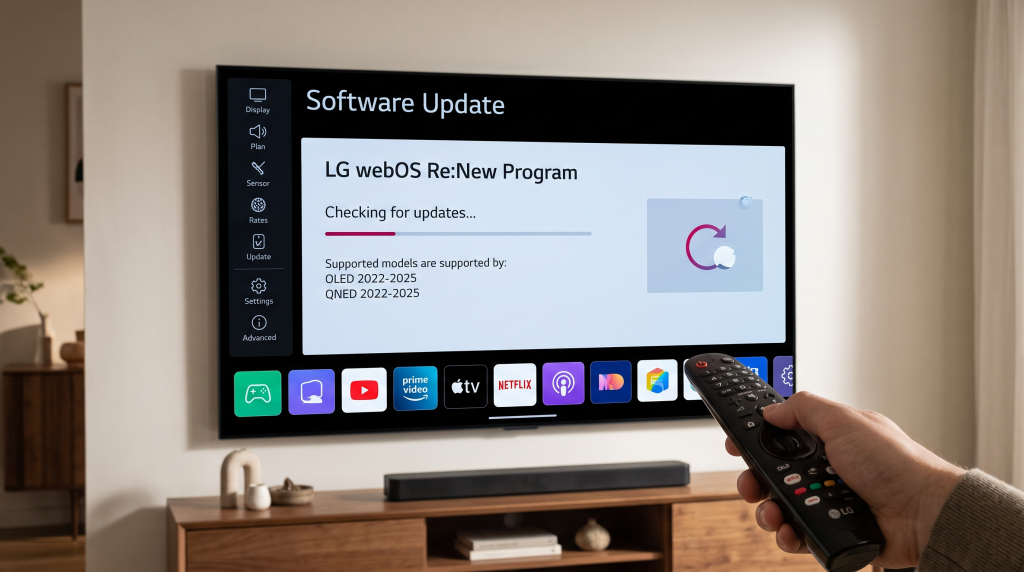
The LG Re:New program is a software support policy for LG Smart televisions. In the past, LG television owners usually kept the same operating system version that came with their television. Now, LG provides full operating system upgrades for up to five years on selected models. This means older televisions can receive the latest webOS features, menus, and application support long after you buy them.
Understanding this program is important if you want to use modern streaming applications or IPTV players. App developers eventually stop supporting older operating systems. By updating your television through the LG Re:New program, you keep your device compatible with new software. This article explains exactly how the program works, which television models are eligible in 2026, and how these updates affect your daily viewing experience.
Kort svar
The LG Re:New program guarantees up to four major webOS upgrades over five years for specific LG Smart TVs. The program currently includes all LG OLED televisions from 2022, 2023, 2024, and 2025, plus select 8K QNED models. For example, a 2022 LG OLED TV launched with webOS 22 but can now update to newer versions like webOS 24 or webOS 25. This program keeps your television secure and ensures compatibility with the newest streaming applications and IPTV players. You can check for updates in the settings menu of your LG television.
What is the LG Re:New Program?
LG announced the webOS Re:New program to extend the useful life of its Smart TVs. Before this program existed, LG provided small security patches and bug fixes for older televisions, but the main operating system version remained the same.
Under the Re:New program, LG delivers full operating system upgrades. If you buy a television with webOS 24, you will eventually receive webOS 25, webOS 26, webOS 27, and webOS 28. This mirrors the update cycle seen on modern smartphones.
This change is highly beneficial for users. New webOS versions often introduce a faster home screen, better voice search, new user profiles, and improved smart home controls. Most importantly, newer operating systems support the newest applications. If you want to use the latest IPTV applications, a newer webOS version gives you more options in the LG Content Store.
Which LG TVs Are Included in the Re:New Program?
LG does not update every television it manufactures. The Re:New program focuses on premium television models. If you have an entry-level LCD television, it might not receive major webOS upgrades.
Here is the current eligibility list based on the release year of the television.
Eligible 2022 Models
LG started the Re:New program with its 2022 premium televisions. The following 2022 models are eligible for upgrades:
LG OLED Z2, G2, C2, B2, and A2 series
LG OLED Flex and LG OLED Objet Collection
LG QNED99 and QNED95 (8K Mini-LED models)
These televisions launched with webOS 22. Through the Re:New program, they have received webOS 23 and webOS 24, and they are scheduled to receive webOS 25 and webOS 26 as the rollout continues.
Eligible 2023 Models
Most premium 2023 televisions are included in the Re:New program. This includes:
All 2023 LG OLED models (such as the Z3, G3, C3, and B3)
Select 2023 QNED models
These televisions started with webOS 23 and will receive updates up to webOS 27.
Eligible 2024 and 2025 Models
For 2024 and 2025, LG expanded the Re:New program.
All 2024 and 2025 LG OLED models are included.
All 2024 and 2025 LG QNED models are included.
LG also lists select NanoCell and UHD televisions from 2025 as eligible for the Re:New program.
If you buy a new premium LG television today, you can expect five years of operating system support.
webOS Versions Explained
LG previously named its operating systems using numbers like webOS 5.0 or webOS 6.0. Starting in 2022, LG changed the naming system to match the release year.
webOS 22: Released in 2022. Introduced user profiles.
webOS 23: Released in 2023. Introduced a simplified home screen with “Quick Cards” for easy navigation.
webOS 24: Released in 2024. Added built-in Google Cast (Chromecast) support and improved user profiles.
webOS 25: Released in 2025. Improved smart home controls and added new artificial intelligence features.
webOS 26: Released in 2026. Delivers a faster interface, a new Home Hub, and advanced artificial intelligence search functions.
If you are curious about how LG’s system compares to competitors, you can read our guide to the Det beste Smart TV-operativsystemet for IPTV i 2026: Tizen vs Google TV vs webOS].
How to Check Your Current webOS Version
You can easily check which webOS version your television currently uses.
Turn on your LG television.
Press the Settings button on your remote control.
Select “All Settings”.
Go to “General” and then select “About This TV”.
The screen will display your current webOS version and software version.
Alternatively, on some models, you can press the Mute button on the remote control three times quickly to see the software version information.
Comparison: LG webOS vs Samsung Tizen Update Policies
Both LG and Samsung now offer five to seven years of software updates for their premium televisions. This is a major improvement for the television industry.
Here is a factual comparison of how the two brands handle television updates in 2026.
| Funksjon | LG webOS (Re:New Program) | Samsung Tizen OS |
| Update duration | Up to 5 years | Up to 7 years (for newer models) |
| Eligible models | 2022-2026 OLED and select QNED/UHD TVs | Premium 2023-2026 Neo QLED and OLED TVs |
| Main benefit | Full home screen redesigns | Long-term app compatibility |
| Tilgjengelighet av IPTV-apper | Excellent on recent webOS versions | Excellent on recent Tizen versions |
To understand the differences in daily use, read our detailed comparison of Samsung vs. LG Smart-TV for IPTV: Tizen vs. webOS].
How to Update Your LG TV to the Latest webOS
When LG releases a new webOS version, it does not arrive on all televisions on the same day. LG uses a gradual rollout schedule. This means televisions in different countries receive the update at different times.
To check for a new update manually:
Open the Settings menu.
Select “All Settings”.
Navigate to “Support” or “General” (depending on your current webOS version).
Select “Software Update”.
Click “Check for Updates”.
If an update is available, the television will download and install it. Ensure your television is connected to a stable internet connection during this process. Do not turn off the television while it is installing the update.
Please note that once you upgrade to a major new webOS version (for example, from webOS 25 to webOS 26), you cannot revert to the older version.
Does the webOS Update Improve IPTV Apps?
For users of TV Shadow IPTV, keeping your LG television updated is highly recommended.
IPTV players, such as those using M3U playlists or Xtream Codes, require regular software maintenance. App developers optimize their applications for the latest operating systems.
When you update your LG TV through the Re:New program, you gain several IPTV benefits:
Better App Availability: Developers eventually stop updating applications for old operating systems. A newer webOS version ensures you keep access to the most popular IPTV players in the LG Content Store.
Improved Performance: Newer webOS versions often manage the television’s memory better. This can result in faster menu navigation within your IPTV application and quicker loading times for the Electronic Program Guide (EPG).
Security: Software updates include important security certificates. These certificates are sometimes necessary for streaming video securely from external servers.
However, an operating system update does not increase your internet speed. If your IPTV stream buffers because of a slow Wi-Fi connection, updating webOS will not solve the network problem. For the most stable IPTV experience, we recommend connecting your LG television to your router using an Ethernet cable.
Is the Latest webOS Better for Live Football?
Watching live football requires a television that handles fast motion well.
The webOS software update itself does not change the physical hardware of your television. If you have an LG C2 OLED from 2022 with a 120Hz refresh rate, it will still have a 120Hz refresh rate after updating to webOS 26.
However, LG sometimes improves its picture processing software during major updates. The Re:New program updates may bring:
Refined Picture Modes: LG often adjusts its “Sports” picture mode or its motion smoothing algorithms (called TruMotion). These software adjustments can reduce motion blur when watching a fast-moving football.
Better Upscaling Algorithms: If your IPTV sports channel broadcasts in 1080p, the television must upscale the image to fit a 4K screen. Software updates can sometimes improve the artificial intelligence algorithms used for Hva er TV-oppskalering, og er det nyttig for IPTV?].
For the best live football experience, ensure you manually check your picture settings after a major webOS upgrade, because updates sometimes reset your customized picture modes to the factory defaults. Turn off heavy motion smoothing if you notice unnatural movement around the players.
Konklusjon
The LG Re:New program is a massive benefit for LG Smart TV owners. By providing up to five years of webOS upgrades, LG ensures that older premium televisions remain modern and functional. If you own an eligible OLED or QNED television from 2022 onwards, you can enjoy new home screens, better menus, and continued access to the latest applications.
For users of TV Shadow IPTV, keeping your television updated is the best way to ensure maximum compatibility with modern IPTV players. Check your television settings today to see if a new webOS version is waiting for you.
Ofte stilte spørsmål (FAQ)
Does the LG Re:New program cost money?
No. The LG Re:New program is completely free. It is a standard software support policy provided by LG for eligible televisions.
Can I go back to an older webOS version if I do not like the update?
Nei. Once you install a major webOS update on your LG television, it is not possible to downgrade to the previous version. You should read about the new features before installing the update.
Why does my 2022 LG TV not have the update yet?
LG rolls out updates gradually based on the exact model number and region. The rollout process can take several months. If your television is eligible, the update will eventually appear in your settings menu.
Does updating webOS delete my IPTV apps?
No. Updating the operating system does not delete your installed applications. Your IPTV players, streaming apps, and account login details will remain on the television after the upgrade.
Is my LG NanoCell TV included in the Re:New program?
Only select 2025 and newer NanoCell models are officially confirmed for the full five-year Re:New program. Older NanoCell models from 2022 or 2023 generally do not receive major webOS version upgrades, though they still receive security updates.
Will webOS 26 make my old TV slower?
LG optimizes the new webOS versions to work on the hardware of the eligible televisions. The company claims webOS 26 delivers a faster experience. However, loading times may occasionally feel slightly longer immediately after an update as the system organizes its files.