
The Sony BRAVIA 7 II and the Sony BRAVIA 9 II are premium televisions released in 2026. Both televisions use Mini-LED technology and Quantum Dot filters. These filters produce excellent RGB (Red, Green, Blue) color reproduction. Buyers often struggle to choose between these two high-end models because they share many similar features. Both televisions operate on the Google TV platform. Both models support modern streaming applications.
This article compares the picture quality, hardware specifications, and software features of the Sony BRAVIA 7 II vs 9 II. The comparison focuses on important factors for home entertainment. These factors include HDR brightness, live sports performance, and IPTV compatibility.
Kort svar
The main difference between the Sony BRAVIA 7 II and the Sony BRAVIA 9 II is peak brightness and backlight control.
Choose the Sony BRAVIA 7 II if you want excellent Mini-LED picture quality for a standard living room. The Sony BRAVIA 7 II offers great contrast and fast processing at a lower price.
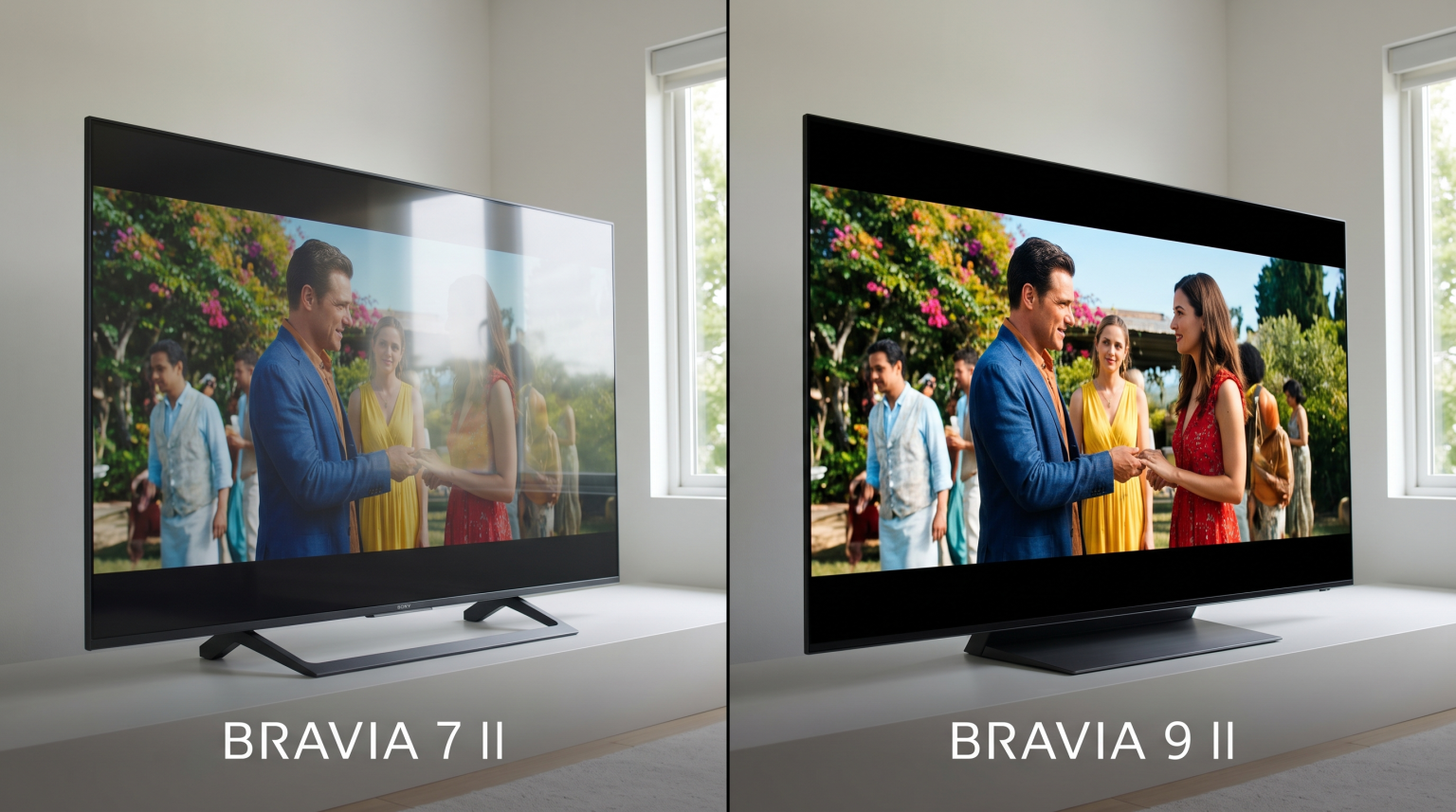
Choose the Sony BRAVIA 9 II if you watch television in a very bright room. The Sony BRAVIA 9 II has more local dimming zones, higher peak brightness, and superior anti-reflection screen coating. The Sony BRAVIA 9 II is the better choice for dedicated home theater rooms.
Display Technology and Picture Quality
Both televisions use LCD panels with Mini-LED backlights. Mini-LED technology uses thousands of tiny light-emitting diodes behind the screen. This system allows the television to control brightness precisely.
Local Dimming and Contrast
The Sony BRAVIA 9 II contains significantly more local dimming zones than the Sony BRAVIA 7 II. Local dimming zones are small sections of the screen that can turn dark or bright independently. More zones reduce a visual problem called “blooming.” Blooming happens when light bleeds into dark areas of the picture. Because the Sony BRAVIA 9 II has more dimming zones, it displays deeper black colors.
Peak Brightness
Brightness is important for watching television during the day. Brightness is also important for HDR (High Dynamic Range) video. The Sony BRAVIA 9 II produces higher peak brightness than the Sony BRAVIA 7 II. The extra brightness makes explosions, sunlight, and bright colors look more realistic. However, the Sony BRAVIA 7 II is still very bright compared to standard LED televisions.
Screen Coating and Viewing Angles
The Sony BRAVIA 9 II includes X-Anti Reflection technology and X-Wide Angle technology. The anti-reflection coating reduces glare from windows and lamps. The wide-angle technology ensures colors remain accurate when you sit at the side of the room. The Sony BRAVIA 7 II lacks these advanced screen layers. If your viewing room has many windows, the Sony BRAVIA 9 II is a better choice.
Operating System: Google TV
Both the Sony BRAVIA 7 II and the Sony BRAVIA 9 II use the Google TV operating system. Google TV is based on Android TV.
The Google TV interface organizes movies, television shows, and live broadcasts on the home screen. Both televisions respond quickly to remote control commands. Both models feature the exact same Google TV software version. The menu systems are identical. If you want to understand more about this operating system, read our guide explaining Er Sony BRAVIA et godt valg for IPTV i 2026?.
App Store and Application Installation
Because both televisions use Google TV, both televisions connect to the Google Play Store. The Google Play Store contains thousands of applications. You can install standard streaming applications like Netflix, Amazon Prime Video, and YouTube. You can also install media players and utility applications.
Both televisions receive automatic software updates from Sony and Google. These updates improve security and add new features.
IPTV Compatibility on Sony BRAVIA
Many users buy premium televisions to watch IPTV (Internet Protocol Television). Both the Sony BRAVIA 7 II and the Sony BRAVIA 9 II are excellent choices for IPTV.
Tilgjengelighet av IPTV-apper
The Google Play Store provides direct access to many popular IPTV players. You can install applications like TiviMate, Smarters Player Lite, and Televizo directly from the official store. You do not need to use complicated methods to install these applications.
M3U and Xtream Codes Support
The televisions themselves do not process IPTV playlists directly. Instead, you must use an IPTV application. The IPTV applications available on Google TV fully support M3U playlists and Xtream Codes API login methods. Once you configure your application, the Sony BRAVIA processor will handle the video playback smoothly.
Elektronisk programguide (EPG)
An EPG shows the schedule for live television channels. The speed of the EPG depends on the television processor. Both the Sony BRAVIA 7 II and the Sony BRAVIA 9 II feature powerful Sony XR processors. These processors load heavy EPG data quickly. Scrolling through channel lists is fast on both models.
Direkte fotball og sportsprestasjoner
Watching live football requires a television that can handle fast motion. When the camera moves quickly across the football pitch, a low-quality television will display a blurry image.
Motion Handling
Both televisions include Sony’s XR Motion Clarity technology. This technology inserts black frames between video frames to reduce motion blur. The football remains sharp when players run. Both televisions perform excellently during fast sports broadcasts.
Oppdateringsfrekvens
The Sony BRAVIA 7 II and the Sony BRAVIA 9 II both feature 120Hz native refresh rate panels. A 120Hz panel updates the image 120 times every second. This high refresh rate is ideal for sports. You can learn more about how refresh rates affect sports in our article comparing 60 Hz- og 120 Hz-TV-er til direktesendt fotball.
Image Upscaling
IPTV sports broadcasts often transmit in 1080p (Full HD) resolution. The Sony BRAVIA 7 II and 9 II both have 4K resolution screens. Therefore, the television must enlarge the 1080p image to fit the 4K screen. This process is called upscaling.
The Sony XR processor in both televisions is famous for excellent upscaling. The processor adds artificial detail to the grass and player faces. The Sony BRAVIA 9 II has a slightly more advanced processor version, but the difference in live sports upscaling is very small. Read our guide to understand Hva er TV-oppskalering, og er det nyttig for IPTV?.
Internet Connection for Sports
Live football requires a stable internet connection. Both televisions include dual-band Wi-Fi and a physical Ethernet port. For the best live sports experience with TV Shadow IPTV, connect your Sony television directly to your router using an Ethernet cable. A cable connection prevents video buffering during important football matches.
Sony BRAVIA 7 II vs 9 II Comparison Table
| Funksjon | Sony BRAVIA 7 II | Sony BRAVIA 9 II |
| Panelteknologi | Mini-LED | Mini-LED |
| Operativsystem | Google TV | Google TV |
| Resolusjon | 4K | 4K |
| Native Refresh Rate | 120 Hz | 120 Hz |
| Lokale dimmesoner | High amount | Very high amount |
| Peak Brightness | Utmerket | Flagship level |
| Anti-Reflection Screen | Nei | Ja |
| Wide Viewing Angle | Nei | Ja |
| Støtte for IPTV-apper | Google Play-butikken | Google Play-butikken |
Spillfunksjoner
If you connect a modern gaming console like the PlayStation 5 or Xbox Series X, both televisions offer similar gaming features. Both models include HDMI 2.1 ports. Both televisions support 4K resolution gaming at 120 frames per second.
Both models support Variable Refresh Rate (VRR) and Auto Low Latency Mode (ALLM). VRR prevents the screen from tearing during complex video games. ALLM automatically switches the television to gaming mode when you turn on your console. Gaming mode reduces the delay between pressing a button and seeing the action on the screen.
Audio Quality
Thin televisions often have weak speakers. Sony uses a technology called Acoustic Multi-Audio. This technology places sound-positioning tweeters on the frame of the television.
The Sony BRAVIA 9 II has a more powerful internal speaker system than the Sony BRAVIA 7 II. The BRAVIA 9 II produces stronger bass and clearer dialogue. However, for a true home theater experience, buyers of both televisions should consider purchasing a separate soundbar or surround sound system. Both televisions support eARC (Enhanced Audio Return Channel) for easy connection to modern soundbars.
Konklusjon
Choosing between the Sony BRAVIA 7 II and the Sony BRAVIA 9 II depends on your room environment and your budget.
The Sony BRAVIA 7 II is an outstanding television for most users. It provides the core benefits of Mini-LED technology, an excellent 120Hz panel for live football, and full Google TV compatibility for IPTV applications. It offers premium performance without the highest price tag.
The Sony BRAVIA 9 II is the ultimate choice for video enthusiasts. The extra local dimming zones provide superior contrast. The higher peak brightness and anti-reflection screen make it perfect for rooms with large windows.
Hvis du bruker TV Shadow IPTV, both televisions will run your favorite IPTV player applications perfectly. Both televisions will deliver smooth sports processing and sharp 4K upscaling for your daily entertainment.
Ofte stilte spørsmål (FAQ)
Can I install IPTV applications on the Sony BRAVIA 7 II and 9 II?
Yes. Both televisions use the Google TV operating system. You can open the Google Play Store and download popular IPTV applications directly to the television.
Which television is brighter, the Sony BRAVIA 7 II or the BRAVIA 9 II?
The Sony BRAVIA 9 II is brighter. It has more Mini-LED backlights and can achieve a higher peak brightness level for HDR content and daytime viewing.
Do both televisions support a 120Hz refresh rate?
Yes. Both the Sony BRAVIA 7 II and the BRAVIA 9 II feature native 120Hz display panels. This makes both televisions excellent for watching fast sports like live football.
Does the Sony BRAVIA 9 II reduce glare from windows?
Yes. The Sony BRAVIA 9 II includes a special anti-reflection coating on the screen. This coating significantly reduces reflections from lamps and sunlight. The BRAVIA 7 II does not have this special coating.
Do I need an external Android TV box if I buy one of these televisions?
No. Because both televisions use Google TV, the internal software is very powerful. You do not need an external streaming stick to watch IPTV or Netflix.