
Dreaminator is a popular IPTV plugin for Enigma2 receivers such as Dreambox and Vu+. It allows users to watch live television, catch-up programs, and on-demand video (VOD). Sometimes, users configure their IPTV playlist but cannot find their video-on-demand content. You might see live channels, but movies and series are missing.
This happens because Dreaminator handles live television and VOD differently. Live channels integrate directly into the Enigma2 bouquet system. However, movies and series never become live TV bouquet entries. They remain separate. In this article, we explain why your movies and series are missing. We also provide clear steps to fix the Dreaminator movies not showing problem.
Snabbsvar
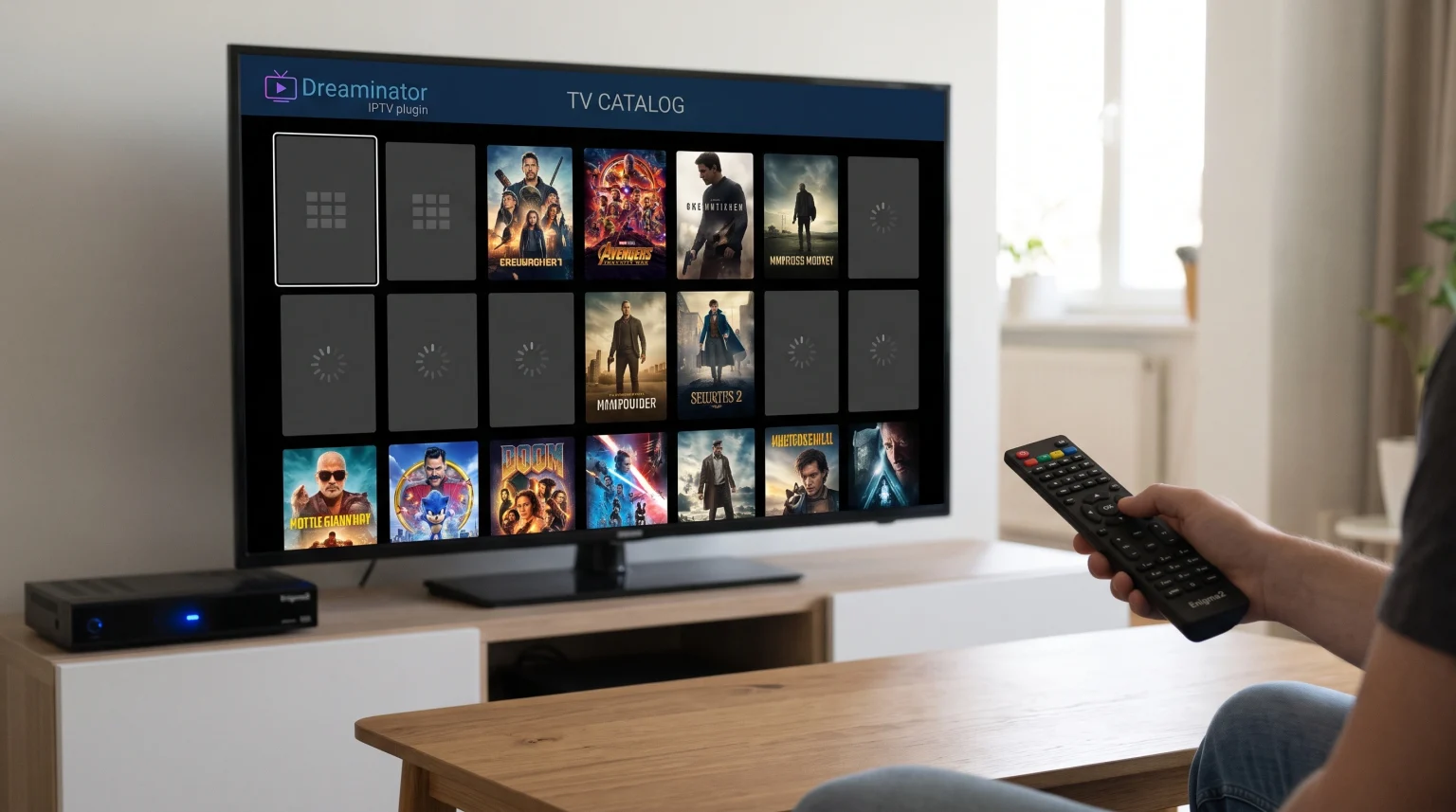
If you experience the Dreaminator movies not showing issue, the most common reason is looking in the wrong place. Dreaminator does not place movies and series into Enigma2 live TV bouquets. You must open the native Dreaminator TV catalog or the web interface to see VOD content. If the catalog is empty, your receiver may have missed the automatic 04:00 overnight sync. Keep the receiver in standby mode overnight to ensure the VOD library updates correctly.
How Dreaminator Handles Movies and Series
Many IPTV players combine live television and VOD in one main menu. Dreaminator works differently. It integrates live television channels directly into your Enigma2 receiver’s bouquet list. This allows you to use your standard television remote control to change channels normally.
However, movies and series never become live TV bouquet entries. The Enigma2 bouquet system is designed for live broadcasts. It is not designed for browsing large movie libraries. Therefore, Dreaminator separates VOD content. To access movies and series, you must open the dedicated Dreaminator TV catalog from the plugins menu. You can also view them using the Dreaminator web interface on your mobile phone or computer.
Common Reasons for Dreaminator Movies Not Showing
If you open the Dreaminator TV catalog and the library is empty, check these common causes.
The Overnight Sync Failed
Dreaminator automatically refreshes IPTV playlists and Electronic Program Guides (EPG) every day at 04:00. This process downloads the latest movie and series lists from your IPTV provider. If you completely turn off the power to your Enigma2 receiver at night, this synchronization cannot happen. You must leave the receiver in standby mode. If the receiver loses power, the sync will start the next time you turn the device on. However, large libraries can take time to download.
VOD Is Not Included in Your IPTV Plan
If live television works but the Dreaminator TV catalog is empty, check your IPTV subscription. Many IPTV providers sell separate packages for live television and on-demand video. If your current plan does not include movies and series, Dreaminator will not show any VOD content. Contact your provider to confirm your subscription details.
Provider Server Maintenance
IPTV providers use different servers for live television and on-demand video. A provider can experience a VOD server failure while the live television server continues to work perfectly. If your movies and series disappear suddenly, the provider’s VOD server might be offline for maintenance.
How to Fix Missing Content in Dreaminator
Follow these steps to solve the missing VOD problem on your receiver.
Open the correct menu: Do not look for movies in the Enigma2 bouquet list. Open the main Menu, go to Plugins, and select Dreaminator to view the TV catalog.
Check the web interface: Open a web browser on your computer. Enter your receiver’s IP address followed by port 8088 (for example, http://192.168.1.50:8088). If the web interface shows movies but the television does not, the receiver may need a software restart.
Allow a full sync: If you just added a new Xtream Codes or M3U playlist, wait for Dreaminator to download the VOD data. Large movie libraries require several minutes to load completely.
Check your network: Ensure the receiver has an active internet connection.
Dreaminator TV Catalog vs Enigma2 Bouquets
Understanding the difference between the plugin interfaces helps prevent missing content issues.
| Funktion | Enigma2 Live Bouquets | Dreaminator TV Catalog |
| Content type | Live television channels only | Movies, series, and live channels |
| Access method | Standard channel up/down buttons | Plugins menu or web interface |
| EPG support | Yes, via EPGImport plugin | Yes, via native interface |
| Loading speed | Instant channel switching | Requires library synchronization |
Using TV Shadow IPTV with Dreaminator
TV Shadow IPTV provides a large selection of live channels and VOD content. When you connect our service to an Enigma2 receiver, Dreaminator is an excellent plugin choice. It supports Xtream Codes, M3U URLs, and M3U files perfectly.
Because TV Shadow IPTV offers a comprehensive movie and series library, the initial synchronization in Dreaminator may take a few minutes. We recommend setting your receiver to standby mode at night. This ensures Dreaminator can process our daily library updates at 04:00. If you need help choosing the best software for different devices, read our guide to Det bästa operativsystemet för smart-tv för IPTV år 2026.
Watching Live Football on Enigma2 Receivers
Sports fans often use Enigma2 receivers for live football because these devices offer excellent picture quality. Live sports require a fast refresh rate and stable motion handling. If you watch live football through Dreaminator, the plugin passes the video stream directly to the Enigma2 native player. This ensures the best possible motion handling.
For the most stable live football experience, always connect your Enigma2 receiver to your router using an Ethernet cable. Wi-Fi connections can cause buffering during important sports events. If you experience poor picture quality on a modern television, read our guide explaining Varför ser IPTV suddigt ut på en ny 4K-TV?.
Slutsats
Den Dreaminator movies not showing issue is usually simple to fix. Most users simply look for on-demand video in the wrong menu. Remember that Dreaminator keeps movies and series in its own TV catalog, not in the standard Enigma2 live bouquets. Ensure your receiver stays in standby mode overnight so the automatic 04:00 sync can download new movies. If you use a high-quality service like TV Shadow IPTV, keeping the plugin updated will provide a smooth and organized viewing experience.
VANLIGA FRÅGOR
What is the Dreaminator plugin?
Dreaminator is an IPTV plugin for Enigma2 receivers. It organizes live television, catch-up programs, and on-demand video using a web interface and a native television catalog.
Why do I see live channels but no movies in Dreaminator?
Live channels are sent directly to the Enigma2 bouquet list. Movies and series are kept separate. You must open the Dreaminator TV catalog from the plugins menu to see movies.
How do I update the movie list in Dreaminator?
Dreaminator automatically updates playlists and electronic program guides every day at 04:00. You must leave your receiver in standby mode overnight to allow this update.