
When you buy a new Smart TV, the operating system controls which applications you can install. Sony BRAVIA televisions use the Google TV operating system. Samsung televisions use the Tizen operating system. These two systems handle applications very differently. The difference is especially important for users who want to watch live television, stream movies, or install Internet Protocol Television (IPTV) applications.
This article compares the Sony Google TV platform and the Samsung Tizen platform. We examine the official app stores, manual application installation, and system performance. We also explain how each television platform supports IPTV services. Understanding these technical differences will help you choose the correct television for your specific streaming needs.
Snabbsvar
Sony BRAVIA with Google TV offers maximum flexibility because the television uses the Google Play Store. Sony televisions allow you to install third-party Android applications manually. Samsung Tizen provides a very fast interface and includes all major streaming services. However, Samsung Tizen does not support Android applications. Samsung Tizen may be suitable for users who prefer a simple menu and official applications. Sony BRAVIA with Google TV may be more suitable for users who want deep integration with Google applications and total control over IPTV software.
Operating System and Interface Overview
Every Smart TV requires an operating system to function. The operating system provides the main menu, manages the remote control inputs, and connects to the internet.
Sony BRAVIA Google TV
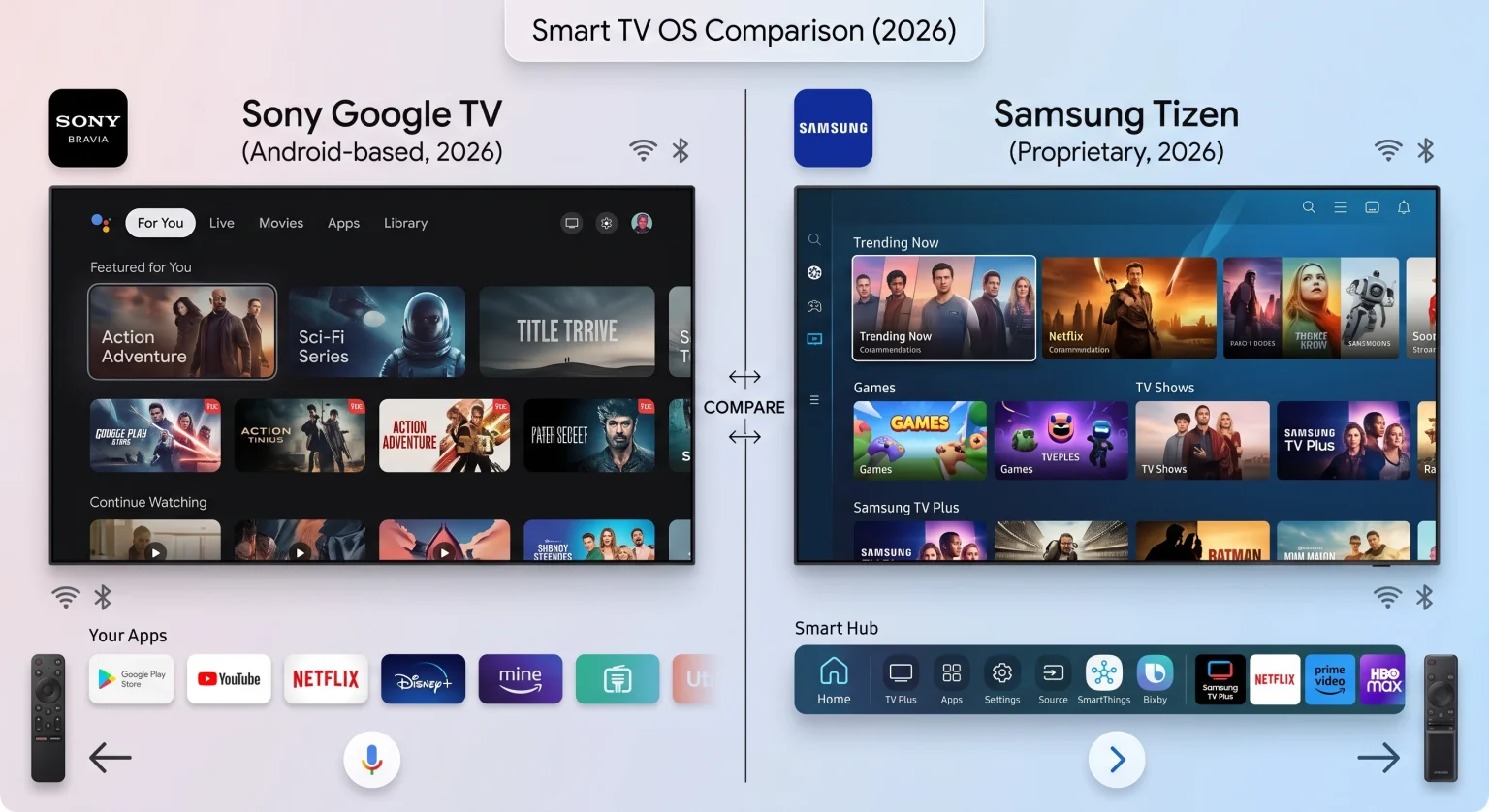
Sony currently uses Google TV on its BRAVIA televisions. Google TV is a customized version of the Android TV operating system. The Google TV interface focuses heavily on content recommendations. When you open the Sony main menu, you see movies and television shows from your installed applications. The system groups similar content together. Google TV integrates directly with Google Assistant. You can use your voice to search for applications or movies.
Samsung Tizen
Samsung builds its televisions with the Tizen operating system. Tizen is a proprietary operating system created by Samsung. The Tizen interface uses a horizontal menu at the bottom or side of the screen. This menu allows you to switch between applications quickly. Samsung Tizen generally runs very smoothly and responds quickly to the remote control. Samsung does not use the Android operating system. Therefore, Samsung Tizen functions completely differently from Sony Google TV underneath the visual menu.
App Store Ecosystem
The television app store decides which streaming services you can download easily.
Google Play Store on Sony
Sony televisions connect directly to the Google Play Store. The Google Play Store contains thousands of applications modified specifically for television screens. You can download popular services such as Netflix, Amazon Prime Video, and YouTube. You can also download specialized network tools, internet speed testers, and advanced media players. Because Google manages the store, developers update their applications frequently.
Samsung Smart Hub App Store
Samsung uses the Samsung Smart Hub to distribute applications. The Samsung app store includes all major global streaming services. You will find Netflix, Disney+, and Spotify without problems. However, the Samsung app store contains fewer specialized applications than the Google Play Store. Independent developers often build applications for Android first. Those developers might never release a Tizen version of the same application.
Comparison Table: Sony Google TV vs Samsung Tizen
| Funktion | Samsung Tizen | Sony Google TV |
| Operativsystem | Tizen | Google TV (Android base) |
| App-ekosystem | Samsung Smart Hub | Google Play-butiken |
| Stöd för Android-appar | Inget inbyggt stöd för Android | Full Android TV app support |
| Manual app installation | Not possible for regular users | Yes, via APK files |
| Voice assistant | Bixby, Amazon Alexa | Google Assistant |
| Tillgänglighet för IPTV-appar | Selected apps in the official store | Massive selection in Google Play |
| Interface style | Fast navigation bar | Content recommendation screen |
IPTV App Compatibility
Internet Protocol Television (IPTV) allows you to stream live television channels over the internet. To watch IPTV, you need an IPTV player application. TV Shadow IPTV provides the channel list, but the television must run a compatible player application.
IPTV on Sony BRAVIA Google TV
Sony BRAVIA televisions are excellent for IPTV streaming. Because Sony uses Google TV, you can access the best IPTV players available. The Google Play Store contains powerful applications such as TiviMate, XCIPTV, and Televizo. These applications support M3U playlists and Xtream Codes login methods. An M3U playlist is a digital file containing television channel links. Xtream Codes is a login system using a username and password.
Google TV applications usually process the Electronic Program Guide (EPG) very quickly. The EPG is the digital menu that shows current and future television programs. If you are comparing television operating systems, our guide to the Det bästa operativsystemet för smart-tv för IPTV år 2026 explains the differences between Tizen, Google TV and webOS in more detail.
IPTV on Samsung Tizen OS
Samsung Tizen also supports IPTV, but the options are restricted. You cannot install Android IPTV applications on a Samsung television. Instead, you must use Tizen-specific IPTV players from the Samsung Smart Hub. Popular options include IBO Player, Smart IPTV, and IPTV Smarters Pro.
These Samsung applications work well for basic live television streaming. However, Tizen IPTV applications sometimes load large EPG files slower than Google TV applications. Additionally, Samsung sometimes removes certain IPTV applications from the Smart Hub without warning. If Samsung removes your favorite IPTV application, you cannot easily install the application again. Read our article Är Samsungs Tizen ett bra val för IPTV år 2026? to understand Tizen’s specific limitations.
Appinstallation och sidladdning
Sideloading means installing an application manually from a file, instead of downloading the application from the official store.
Sideloading on Sony Google TV
Sony Google TV allows sideloading. You can download an Android Package Kit (APK) file from the internet. An APK is the standard file format for Android applications. You can place the APK file on a USB flash drive. You can then plug the USB flash drive into the Sony television and install the application directly. This feature is very useful if an application is not available in your local Google Play Store.
App Installation on Samsung Tizen
Samsung Tizen does not support sideloading for normal users. You cannot install an APK file on a Samsung television. You can only install applications that Samsung officially approves and places in the Samsung Smart Hub. Some developers offer computer methods to install unofficial Tizen applications. However, these methods are difficult and often break when Samsung updates the television software.
Remote Control and Navigation
The physical remote control changes how you interact with television applications.
Sony BRAVIA Remote Control
Sony provides a traditional remote control with its televisions. The Sony remote control includes physical number buttons. Number buttons are very helpful when you use an IPTV application. You can type a channel number directly to switch channels quickly. The Sony remote control also includes a dedicated Google Assistant button for voice commands.
Samsung Smart Remote
Samsung uses a minimalist remote control called the SolarCell Remote. This remote control has very few physical buttons and relies on a directional navigation pad. The Samsung remote control does not have physical number buttons. To type a channel number, you must open an on-screen digital keypad. This process makes changing live television channels slower on a Samsung television compared to a Sony television.
Fotbollssändningar och rörelsehantering
When you watch live football, the television must process fast movement clearly. Both Sony and Samsung build excellent hardware for live sports.
Sony Motion Processing
Sony BRAVIA televisions use a technology called Motionflow XR. The Sony processor analyzes the football broadcast and makes the moving ball look sharp. Sony televisions generally provide very natural motion processing. A 120Hz (Hertz) screen refreshes the image 120 times per second. Sony 120Hz models are perfect for high-speed football matches.
Samsung Motion Processing
Samsung televisions use a technology called Motion Xcelerator. Samsung processors enhance the image to reduce blur when the camera moves quickly across the football pitch. Samsung televisions often produce very bright colors, which makes the green football grass look vivid. To understand how screen speed affects sports, read our guide comparing TV med 60 Hz jämfört med 120 Hz för direktsänd fotboll .
Network Connectivity: Wi-Fi and Ethernet
Streaming high-quality video requires a stable internet connection.
Both Sony BRAVIA and Samsung televisions include modern Wi-Fi receivers. Wi-Fi is convenient because it removes the need for cables. However, Wi-Fi signals can drop temporarily. A dropped signal causes the video stream to pause or buffer.
For the best streaming reliability, you should use an Ethernet cable. An Ethernet cable connects the television directly to your internet router. Both Sony and Samsung televisions feature an Ethernet port on the back. A direct cable connection provides a constant data stream. A stable connection is particularly important when watching live sports through an IPTV application, because live video cannot load far in advance.
Software Updates and Long-Term Support
A Smart TV needs regular software updates to remain secure and compatible with new applications.
Sony Software Updates
Because Google develops the core operating system, Sony Google TV receives regular security updates. Google updates the Google Play Store services automatically in the background. This automatic update process ensures your streaming applications continue working correctly for many years.
Samsung Software Updates
Samsung provides regular Tizen software updates for new televisions. However, Samsung rarely upgrades the core Tizen operating system version on older televisions. A Samsung television bought in 2026 will keep its 2026 interface style forever. Application developers eventually stop supporting older Tizen versions. After four or five years, you might lose access to certain updated applications on a Samsung television.
Slutsats
Choosing between Sony BRAVIA Google TV and Samsung Tizen depends entirely on how you want to use the television. Samsung Tizen provides a very bright, fast, and simple television experience. The Samsung platform is perfect if you only want to watch official streaming services like Netflix and Disney+.
However, Sony BRAVIA Google TV is superior for application flexibility. The Google Play Store gives you access to a massive library of software. For users who stream live sports or use complex IPTV setups, the Sony Google TV platform offers much better application support. Sony allows you to install APK files manually, giving you complete control over your television software.
Vanliga frågor (FAQ)
Can I install Android apps on a Samsung Tizen TV?
No, you cannot install Android applications on a Samsung Tizen television. Samsung Tizen is a completely different operating system and cannot read Android APK files. You must use the official Samsung Smart Hub to download applications.
Which TV brand has better apps for IPTV?
Sony BRAVIA Google TV has better applications for IPTV. The Google Play Store offers advanced IPTV players with excellent EPG support. Samsung has good basic IPTV players, but the selection is much smaller.
Do I need a separate Android box if I buy a Sony Google TV?
No, you usually do not need a separate Android box. The Sony Google TV interface provides the same features as an external Android television box. You can install all your required streaming applications directly on the Sony television.
Why did my IPTV app disappear from the Samsung TV?
Samsung regularly removes unauthorized or outdated applications from the Tizen app store. If Samsung removes an application, the application will disappear from your television. You must then find an alternative application in the store.
Does TV Shadow IPTV work on both Sony and Samsung?
Yes, IPTV services function on both television brands. TV Shadow IPTV provides the playlist, but you must download a compatible player application on your television. Both Sony and Samsung stores offer compatible player applications.
Which TV is easier to set up for live streaming?
Sony Google TV is generally easier for advanced live streaming setup. The ability to install APK files manually and manage large EPG files makes the Sony system more flexible for users.