
Live sports broadcasting requires high visual clarity, accurate colors, and smooth motion handling. In 2026, many broadcasters and streaming platforms distribute live sporting events in 4K HDR. 4K HDR sports streaming combines ultra-high screen resolution with High Dynamic Range (HDR) color processing. This combination improves how home viewers perceive fast player movement, stadium grass, and direct sunlight.
However, watching live sports in 4K HDR requires modern television hardware, supported streaming applications, and a fast internet connection. Upgrading to a 4K HDR stream is not always necessary for every viewer. This article explains the technical differences between regular 4K and 4K HDR. This guide also explains the network requirements, television display technologies, and IPTV software settings required to achieve the best sports viewing experience.
Snabbsvar
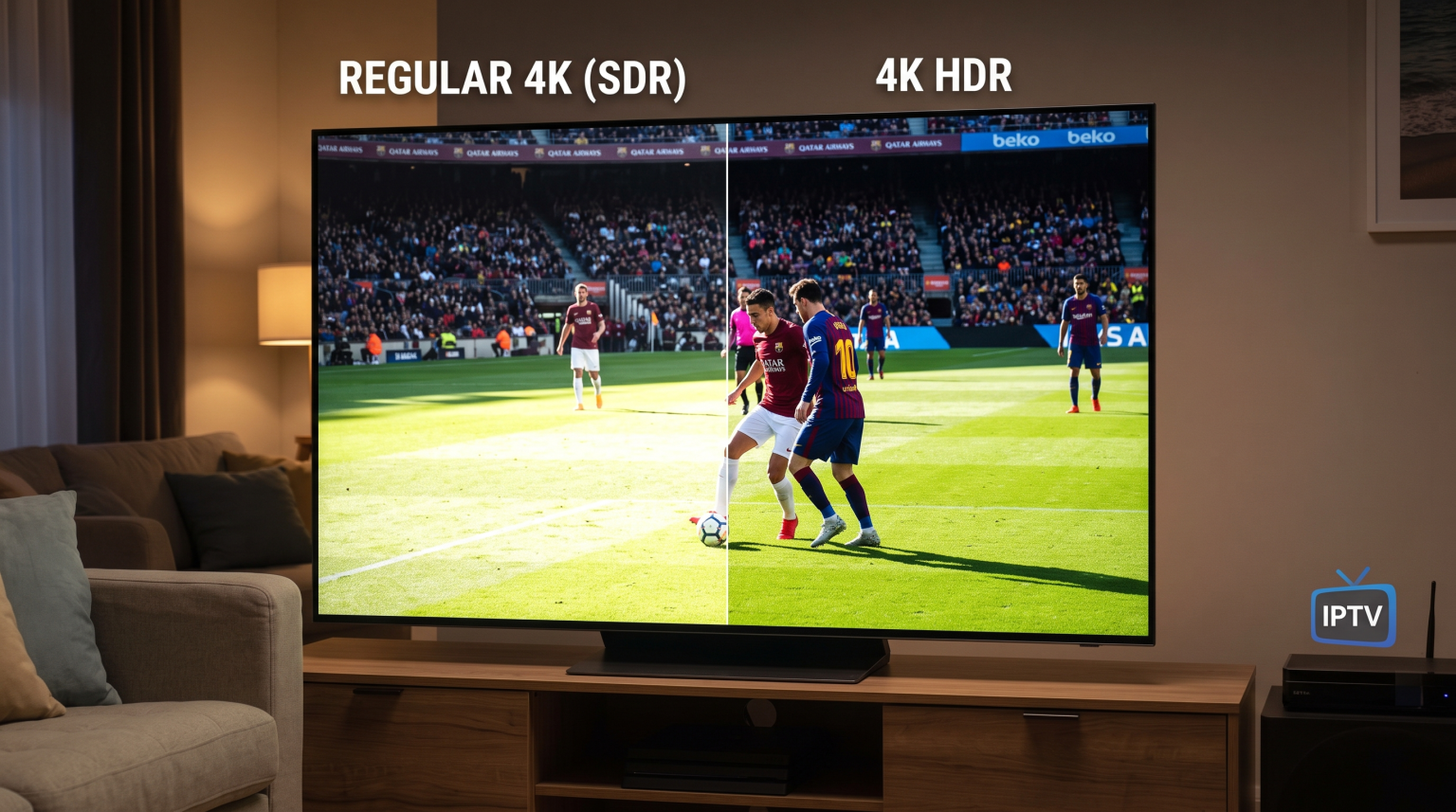
4K HDR sports streaming combines 4K resolution (3,840 x 2,160 pixels) with High Dynamic Range (HDR). Regular 4K uses Standard Dynamic Range (SDR). 4K HDR is better than regular 4K because HDR provides higher contrast, brighter highlights, and billions of colors. This technology prevents bright stadium sunlight and dark stadium shadows from losing detail. Regular 4K only improves image sharpness. 4K HDR is the superior choice for viewers who own an HDR-compatible television and have an internet connection above 25 Megabits per second (Mbps). Regular 4K is more suitable for viewers with standard 4K displays or slower internet connections.
Understanding Regular 4K Sports Streaming
Regular 4K refers exclusively to the pixel resolution of a video signal. A standard 4K display contains 3,840 horizontal pixels and 2,160 vertical pixels. This pixel count equals approximately 8.3 million pixels on the screen.
In comparison, a standard High Definition (1080p Full HD) screen contains approximately 2.1 million pixels. Because regular 4K provides four times more pixels than Full HD, the picture looks significantly sharper. Small details become visible from greater viewing distances. Viewers can easily read the numbers on player jerseys, see player facial expressions, and distinguish individual blades of grass on a sports pitch.
However, regular 4K video relies on Standard Dynamic Range (SDR). Standard Dynamic Range was originally developed for older cathode-ray tube (CRT) televisions. SDR limits the maximum brightness of the video signal to approximately 100 nits. SDR also uses an 8-bit color depth. An 8-bit color depth limits the broadcast signal to approximately 16.7 million distinct colors. While regular 4K provides sharp outlines and high detail, regular 4K cannot display extreme brightness or deep shadow detail simultaneously.
What Is 4K HDR Sports Streaming?
4K HDR sports streaming keeps the 3,840 x 2,160 pixel resolution of regular 4K, but the video signal adds High Dynamic Range (HDR) metadata. High Dynamic Range expands the contrast ratio of the television display. The contrast ratio is the luminance difference between the brightest white tones and the darkest black tones that a television screen can show.
HDR video signals use a 10-bit or 12-bit color depth. A 10-bit color signal allows a television to display over one billion individual colors. This expanded color space matches the DCI-P3 and Rec. 2020 color standards used in professional digital cinema.
When a television receives a 4K HDR sports stream, the television panel can display much brighter highlights without washing out the rest of the image. The stadium floodlights look intense and luminous, while the dark areas under the stadium stands maintain clear image texture. Colors also look more natural and saturated. Grass looks rich and realistic rather than neon green or dull gray.
HDR Formats Used in Live Sports Broadcasting
Live sports broadcasts do not always use the same HDR formats as recorded movies. Movie streaming services often use HDR10 or Dolby Vision. Live sports broadcasts use specific broadcast formats designed for real-time video delivery.
1. Hybrid Log-Gamma (HLG)
Hybrid Log-Gamma (HLG) is the primary HDR format used for live television broadcasts and live sports streams. The British Broadcasting Corporation (BBC) and the Japanese broadcaster NHK developed HLG together.
HLG does not use pre-calculated static or dynamic metadata. Instead, HLG combines standard gamma curves and logarithmic curves into a single video signal. This design makes HLG backwards-compatible with standard SDR televisions. If a television supports HDR, the television displays the HLG signal in High Dynamic Range. If an older television does not support HDR, the television displays the HLG signal in Standard Dynamic Range without color distortion.
2. HDR10
HDR10 is an open-standard HDR format supported by all 4K HDR televisions. HDR10 uses 10-bit color depth and static metadata. Static metadata sets a single brightness parameter for an entire video broadcast. Some sports streaming platforms convert live feeds into HDR10 for internet distribution.
3. Dolby Vision and HDR10+
Dolby Vision and HDR10+ are dynamic HDR formats. Dynamic HDR formats adjust brightness and color settings continuously on a scene-by-scene or frame-by-frame basis. While dynamic formats provide exceptional visual quality, broadcasters rarely use dynamic formats for live sports. Dynamic metadata requires real-time computational processing that can introduce broadcast latency during fast-moving sports matches.
Regular 4K vs 4K HDR Sports Streaming Comparison
The table below summarizes the technical specifications of regular 4K SDR sports streaming and 4K HDR sports streaming.
| Funktion | Regular 4K (SDR) | 4K HDR Sports Streaming |
| Pixel Resolution | 3,840 x 2,160 pixels | 3,840 x 2,160 pixels |
| Dynamic Range | Standard Dynamic Range (SDR) | High Dynamic Range (HDR) |
| Common Formats | Rec. 709 | HLG, HDR10 |
| Color Depth | 8-bit (16.7 million colors) | 10-bit (1.07 billion colors) |
| Color Gamut | Rec. 709 (Standard color gamut) | DCI-P3 / Rec. 2020 (Wide color gamut) |
| Peak Brightness Target | ~100 to 300 nits | Up to 1,000 nits or higher |
| Shadow and Highlight Detail | Limited highlight and shadow range | High detail in direct sun and deep shadows |
| Minimum Internet Speed | 15–25 Mbps | 25–50 Mbps |
| Television Requirements | Standard 4K television | 4K television with HDR10 or HLG support |
Why HDR Is Important for Live Football and Stadium Sports
Live football matches present extreme lighting difficulties for video cameras. Major matches frequently occur in outdoor stadiums during late afternoons. In these conditions, stadium architecture causes high-contrast lighting across the pitch. One half of the playing surface may remain in direct sunlight, while the other half of the playing surface sits under heavy roof shadows.
In regular 4K SDR broadcasts, the camera sensor must compromise on exposure settings. If the broadcast camera exposes the image for the dark shadow area, the sunlit section of the pitch becomes overexposed and completely white. If the broadcast camera exposes the image for the bright sunlight, the players running through the stadium shadows appear as dark, undefined silhouettes.
4K HDR sports streaming solves this lighting problem. The wider dynamic range preserves pixel information at both ends of the luminance scale. Viewers can track the ball accurately when the ball moves from bright sunlight into deep shade.
Furthermore, HDR improves uniform visibility. Team colors appear rich and distinct, even under artificial stadium floodlights at night. If your sports stream lacks clarity despite having a high resolution, read our guide on Varför ser IPTV suddigt ut på en ny 4K-TV? to optimize your display configuration.
Motion Handling and Refresh Rates: 60Hz vs 120Hz
Resolution and dynamic range only represent two parts of video quality. The third essential component for live sports is motion handling. Live sports involve continuous camera panning, fast ball trajectories, and rapid athlete sprints.
If a television has poor motion processing, a 4K HDR stream can still look blurry during fast action. Motion clarity depends heavily on the native refresh rate of the television panel:
60Hz Televisions: A 60Hz television refreshes the image 60 times per second. Most sports broadcasts stream at 50 frames per second (in Europe) or 60 frames per second (in North America). A 60Hz panel can display these broadcasts adequately, but fast-moving balls can show slight trailing or judder.
120Hz Televisions: A 120Hz television refreshes the image 120 times per second. A 120Hz panel can repeat frames cleanly or insert black frames to reduce motion blur. This creates a sharper image when the camera pans rapidly across a stadium.
To choose the right screen hardware for competitive sports, consult our comparison explaining TV med 60 Hz jämfört med 120 Hz för direktsänd fotboll.
Television Display Technology: OLED vs Mini-LED
A 4K HDR signal requires capable television display hardware to reproduce wide dynamic range accurately. The two leading display technologies for HDR sports viewing are OLED and Mini-LED.
OLED Televisions
OLED (Organic Light Emitting Diode) televisions use self-emissive pixels. Every single pixel generates its own light and can turn off completely. This design delivers perfect black levels and infinite contrast. OLED televisions offer wide viewing angles, which is helpful when multiple people watch a football match from different positions in a living room. However, standard OLED panels have lower overall peak brightness than Mini-LED panels.
Mini-LED Televisions
Mini-LED televisions use thousands of miniature LED backlights behind an LCD panel. These backlights are grouped into local dimming zones. Mini-LED televisions can reach peak brightness levels between 1,500 nits and 3,000 nits. This extreme brightness makes Mini-LED displays ideal for bright living rooms with large windows. However, viewing angles on Mini-LED screens are generally narrower than viewing angles on OLED screens.
For an extensive evaluation of panel characteristics, check our analysis of OLED vs Mini-LED for Live Football.
Internet Speed and Network Requirements for 4K HDR
4K HDR video streams carry significantly more data than standard definition or Full HD video. In addition to high-resolution pixel data, the video container must transmit 10-bit color information and HDR metadata packets.
To maintain a smooth video stream without buffering or resolution drops, home networks must meet specific performance standards:
Bandwidth: Viewers need a consistent internet download speed of at least 25 Mbps for a single 4K HDR stream. An internet plan providing 50 Mbps to 100 Mbps is recommended if multiple devices share the home network.
Connection Type: A wired Ethernet cable connection is always superior to a Wi-Fi connection for live 4K HDR sports. Wi-Fi connections are susceptible to radio frequency interference, signal attenuation through walls, and temporary latency spikes. An Ethernet cable ensures a constant bitrate and reduces frame drops.
Router Quality: Viewers using Wi-Fi should connect their Smart TV or streaming box to the 5 GHz or 6 GHz wireless band rather than the 2.4 GHz band. The 5 GHz band provides higher data throughput and lower latency.
IPTV Compatibility and TV Shadow IPTV
Many sports enthusiasts use IPTV services to access global sports channels. Understanding how IPTV software processes 4K HDR video is critical for maintaining stable video playback.
TV Shadow IPTV supports high-resolution video streams provided by your IPTV subscription source. When a service provider offers a live channel in 4K HDR, TV Shadow IPTV can deliver that stream directly to your media player application. However, several technical components must align to display the stream correctly:
Hardware Decoding vs Software Decoding: 4K HDR streams typically use modern video codecs such as HEVC (H.265) or AV1. These video codecs require substantial computational power. IPTV applications should be configured to use Hårdvaruavkodning. Hardware decoding forces the television’s dedicated graphics chip to decode the video. Software decoding uses the television’s general CPU, which often causes stuttering, frame drops, and audio desynchronization on 4K HDR streams.
IPTV Player Application Support: Not every IPTV player supports HDR pass-through. Popular applications such as TiviMate, IPTV Smarters Pro, and XCIPTV handle modern codecs differently depending on the operating system. Viewers should verify that their chosen IPTV player supports 4K HEVC playback and HLG format recognition.
Smart TV Operating System Variations:
Google TV and Android TV: These platforms generally offer the broadest support for third-party IPTV applications and direct hardware decoding.
Samsung Tizen: Samsung TVs support 4K and HDR, but app installation is limited to the Samsung App Store. Certain third-party IPTV players on Tizen may convert HDR signals to SDR internally.
LG webOS: LG webOS supports HLG and HDR10 natively, but users must select media player applications from the LG Content Store that support 10-bit color rendering.
To find the most capable television platform for running IPTV applications, see our ranked guide to De bästa smart-tv-apparaterna för IPTV år 2026: Jämförelse mellan Samsung, Sony, LG och TCL.
Recommended Television Settings for 4K HDR Sports
After connecting a 4K HDR stream, users must configure their television settings to avoid unnatural image processing. Manufacturers often enable aggressive processing modes by default.
Follow these configuration steps for the best sports presentation:
Select the Correct Picture Preset: Avoid using the “Vivid” or “Dynamic” picture modes. These modes oversaturate colors and introduce severe clipping in bright whites. Select “Cinema”, “Movie”, or “Calibrated” picture mode for accurate color reproduction.
Disable Motion Smoothing Artifacts: Aggressive motion interpolation (often called TruMotion, Auto Motion Plus, or Motionflow) can create a fake “soap opera effect” and cause visual tearing around fast-moving footballs. Set motion interpolation to a low custom value or turn off de-judder processing completely.
Verify HDMI Port Configuration: If you stream using an external streaming box or satellite receiver, check your television’s HDMI input settings. Modern televisions require users to enable “Enhanced HDMI”, “HDMI Deep Color”, or “HDMI Ultra HD Color” on the specific port to receive a 10-bit HDR signal.
Adjust Peak Luminance: Ensure that the television’s HDR peak brightness or backlight setting is set to maximum when receiving an HDR signal. Lowering the backlight on an HDR signal darkens the entire picture rather than saving power.
Slutsats
4K HDR sports streaming provides a substantial visual upgrade over regular 4K streaming. Regular 4K increases image resolution and sharpness, but 4K HDR improves color depth, shadow visibility, and highlight brightness. These improvements allow sports fans to see clear pitch details, accurate uniform colors, and continuous play across bright sunlight and deep stadium shadows.
However, enjoying 4K HDR live sports requires the correct ecosystem. Viewers need a stable internet connection with speeds above 25 Mbps, an HDR-capable television with sufficient peak brightness, and a media player that supports hardware decoding. When streaming via TV Shadow IPTV, ensuring that your hardware and player settings are configured correctly will deliver the highest quality viewing experience for every live match.
Vanliga frågor (FAQ)
Does 4K HDR streaming use more internet data than regular 4K?
Yes, 4K HDR streaming uses more internet data than regular 4K streaming. 4K HDR video uses 10-bit color depth and HDR metadata, which increases the total file size. A 4K HDR stream typically requires 20% to 30% more data bandwidth than an equivalent regular 4K SDR stream.
Why does my 4K HDR sports stream appear dark or washed out?
A 4K HDR sports stream appears dark if the television panel has low peak brightness. Budget 4K televisions can decode an HDR signal, but their backlights cannot produce the high luminance levels required for HDR highlights. Setting the television picture mode to “Cinema” and raising the panel brightness setting can improve visibility.
Can I watch 4K HDR sports on a Full HD 1080p television?
No, you cannot watch 4K HDR sports on a 1080p television. A 1080p television lacks the physical pixel resolution for 4K and cannot process 10-bit HDR color signals. The streaming device or television will downscale the video signal to standard 1080p SDR.
What is the primary difference between HLG and HDR10 for sports?
HLG is designed for live broadcasting, while HDR10 is designed for pre-recorded content. HLG carries both standard dynamic range and high dynamic range in a single signal, making HLG compatible with older displays. HDR10 requires static metadata that can add slight latency during live sports transmissions.
Is an Ethernet connection necessary for streaming 4K HDR sports?
An Ethernet connection is not strictly mandatory, but an Ethernet connection is strongly recommended. Wi-Fi connections can suffer from intermittent signal interference and latency spikes. A wired Ethernet connection provides constant data speeds, which prevents video buffering during crucial moments of a live match.
Can all IPTV applications play 4K HDR streams?
No, not all IPTV applications can play 4K HDR streams. Some basic IPTV applications only support 8-bit SDR video decoding. Viewers must use a modern IPTV player that supports HEVC (H.265) hardware decoding and HLG or HDR10 color pass-through.