
Are you worried your internet service provider (ISP) will throttle your connection or hit you with unexpected overage fees while streaming live TV? Knowing how much data does IPTV use is critical for managing your monthly data caps and ensuring smooth, buffer-free entertainment.
Whether you stream sports, movies, or 24/7 live channels across home broadband or mobile networks, your total bandwidth consumption depends heavily on stream resolution, frame rate, and compression codecs.
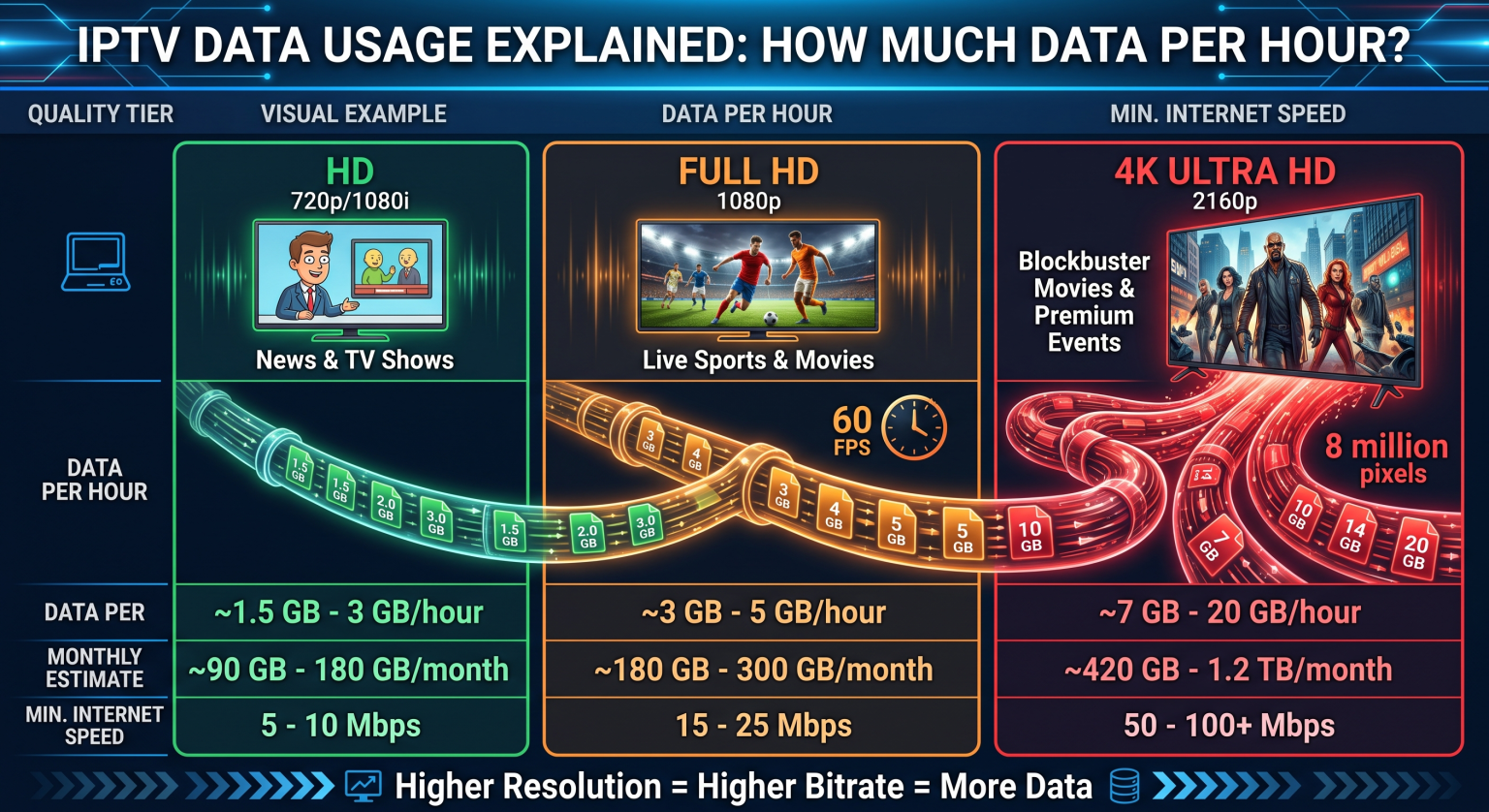
Exactly How Much Data Does IPTV Use?
IPTV data consumption scales directly with the video quality you choose. A standard definition (SD) feed uses minimal bandwidth, whereas an uncompressed 4K sports stream consumes massive amounts of data per hour.
On average, streaming IPTV consumes between 1.5 GB to 7 GB per hour under typical home viewing conditions. If you leave your IPTV setup running in the background for several hours a day, monthly usage can easily exceed hundreds of gigabytes.
IPTV Data Usage Breakdown by Resolution
To understand where your internet bandwidth goes, let’s examine the exact data consumption across different streaming resolutions.
1. Standard Definition (SD – 480p)
Average Bitrate: 1.5 Mbps to 3 Mbps
Hourly Data Usage: ~0.7 GB to 1.3 GB
Am besten geeignet für: Mobile data connections, limited broadband plans, and smaller secondary screens.
2. High Definition (HD – 720p)
Average Bitrate: 3 Mbps to 6 Mbps
Hourly Data Usage: ~1.5 GB to 2.5 GB
Am besten geeignet für: Standard TV viewing where balancing picture quality and data conservation is important.
3. Full High Definition (FHD – 1080p)
Average Bitrate: 6 Mbps to 12 Mbps
Hourly Data Usage: ~2.7 GB to 4.5 GB
Am besten geeignet für: High-refresh live sports (60 FPS) and premium movie channels on modern smart TVs.
4. Ultra High Definition (4K – 2160p)
Average Bitrate: 15 Mbps to 30 Mbps
Hourly Data Usage: ~7.0 GB to 14.0 GB
Am besten geeignet für: Large screen displays with high-speed, uncapped fiber optic connections.
IPTV Data Consumption & Speed Comparison Table
The table below outlines the expected bandwidth requirements and projected data consumption across standard daily usage patterns:
| Video Quality (Resolution) | Recommended Internet Speed | Data Usage per Hour | Daily Data (4 Hours/Day) | Monthly Data (30 Days @ 4 Hrs/Day) |
| SD (480p) | 3 – 5 Mbps | ~0.9 GB | 3.6 GB | 108 GB |
| HD (720p) | 8 – 10 Mbps | ~1.8 GB | 7.2 GB | 216 GB |
| Full HD (1080p @ 60fps) | 15 – 25 Mbps | ~3.2 GB | 12.8 GB | 384 GB |
| 4K UHD (2160p) | 35 – 50 Mbps | ~8.5 GB | 34.0 GB |
Key Factors Influencing IPTV Bandwidth Usage
Beyond resolution, several technical variables impact your overall internet data consumption:
Frame Rate (FPS): Live sports broadcasting at 60 frames per second (FPS) uses roughly 30–50% more data than movies streaming at 24 or 30 FPS.
Video Compression Codecs: Providers utilizing H.265 (HEVC) deliver the same visual fidelity at half the data footprint compared to older H.264 (AVC) encoding.
Multi-Screen Connections: Running multiple streams simultaneously on different devices multiplies your network usage proportionally.
Background Streaming: Forgetting to exit your IPTV player app when turning off the TV can silently burn through tens of gigabytes overnight.
Proven Tips to Reduce IPTV Data Consumption
If your ISP enforces strict monthly data caps, implement these optimization practices to keep your usage within safe limits:
Adjust Default Stream Resolution: Lower your IPTV player app settings from 1080p to 720p for daily viewing; reserve Full HD or 4K for marquee events.
Enable Sleep Timers: Set auto-standby on your Firestick, Android TV box, or Apple TV to prevent streaming when no one is watching.
Use Modern Streaming Apps: Opt for IPTV-Spieler wie TiviMate or IPTV Smarter Pro that support advanced hardware decoding and efficient caching buffers.
Monitor Network Traffic: Use your router’s traffic monitor or ISP management dashboard to track your weekly data patterns.
Häufig gestellte Fragen (PAA)
Will an IPTV stream work on a mobile hotspot?
Yes, IPTV works over 4G and 5G mobile hotspots. However, streaming in HD will consume around 2 GB per hour, which can rapidly deplete limited mobile data allowances.
What internet speed do I need for buffer-free IPTV?
A stable connection of at least 15–25 Mbps is recommended for uninterrupted 1080p streaming. For 4K live broadcasts, aim for 50 Mbps or higher to accommodate network fluctuations.
Does using a VPN increase IPTV data consumption?
Using a secure VPN adds a slight overhead of roughly 5% to 10% to your total data transfer due to encryption protocols, but it protects against ISP bandwidth throttling.