
Are you wondering who else is watching when you turn on your television? In the United States, modern displays track everything from your favorite shows to your daily schedule. Updating your smart TV privacy settings is the fastest way to reclaim your digital privacy footprint and stop corporate surveillance.
As state-level consumer protections like the California Consumer Privacy Act (CCPA) continue to evolve, taking proactive control of your living room data is crucial. Let’s dive into the most vital privacy adjustments you need to make to keep your household data secure this year.
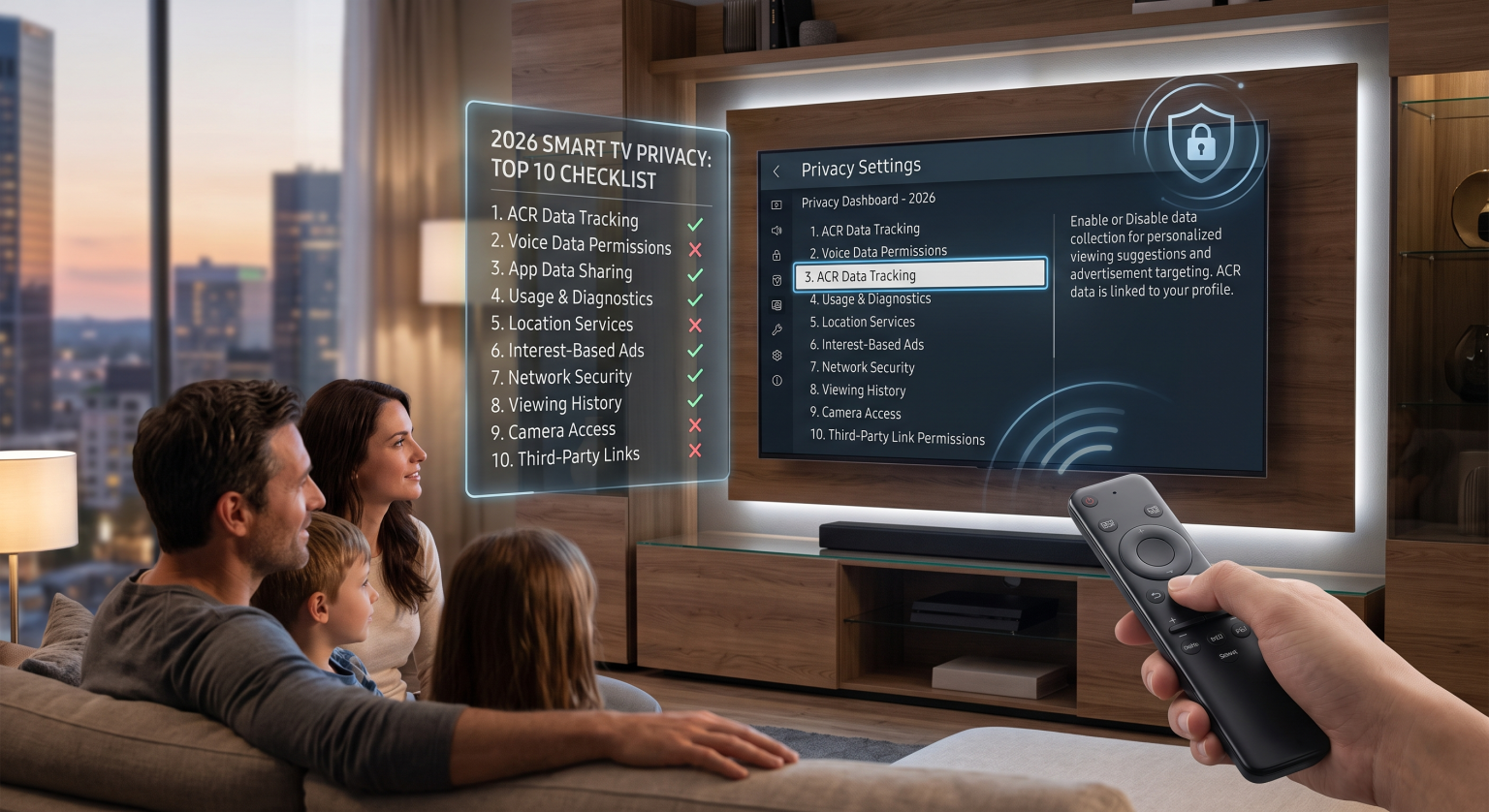
Why US Households Must Update Smart TV Privacy Settings
Your television collects massive amounts of data through Automatic Content Recognition (ACR). This underlying technology analyzes the pixels on your screen to build a highly detailed consumer profile. For viewers across the United States, this means your viewing habits are frequently sold to regional data brokers without your explicit knowledge.
By neglecting these configurations, you unknowingly share:
Live viewing habits and specific streaming app usage times.
Network information including your local IP address and Wi-Fi data.
Voice recordings captured by integrated remotes and virtual assistants.
Taking ten minutes to adjust your smart TV privacy settings can completely block this invasive surveillance. By disabling specific menus, you successfully cut off the pipeline of connected TV data that fuels the aggressive advertising industry.
Major Brand Comparison: Disabling ACR Tracking
Before we cover all ten steps, it helps to understand how different manufacturers hide their tracking options. This breakdown shows exactly where to look on the most popular US television brands.
| TV Brand | Privacy Feature Name | Menu Path to Disable Tracking |
| Samsung | Viewing Information Services | Settings > General & Privacy > Terms & Privacy |
| LG | Live Plus | Settings > General > System > Additional Settings |
| Roku | Smart TV Experience | Settings > Privacy > Smart TV Experience |
10 Crucial Television Privacy Features to Check
To fully secure your home entertainment setup, you need a comprehensive approach. Make sure to actively review and adjust the following areas on your specific device.
1. Disable Automatic Content Recognition (ACR)
ACR tracking is the primary tool advertisers use to monitor what you watch. By turning off this feature, you instantly block the screen-scraping technology built into most modern displays.
2. Turn Off Interest-Based Advertising
Most televisions come pre-set to serve you targeted commercials based on your connected TV data. Disabling personalized ad tracking ensures your viewing habits aren’t monetized by third-party marketers.
3. Mute Always-On Voice Recognition
Voice assistants are incredibly convenient, but they constantly listen for wake words in your living room. Revoking microphone permissions stops your device from uploading unauthorized audio snippets to remote cloud servers.
4. Limit Third-Party App Data Sharing
Streaming apps often request broad permissions that go far beyond basic functionality. Reviewing these television privacy features helps you restrict unnecessary data flow to external corporate networks.
5. Restrict Camera Permissions
If your display includes a built-in camera for video calls, it poses a significant local security risk. Always cover the physical lens when not in use and completely revoke software camera access.
6. Opt Out of Usage Diagnostics
Manufacturers frequently collect device analytics to monitor hardware performance and software glitches. While supposedly anonymous, this smart TV tracking can still expose your local IP address and daily routine.
7. Disconnect Unused Smart Home Integrations
Linking your television to smart lights and thermostats creates multiple vulnerable entry points for hackers. Disconnect any IoT devices you rarely use to actively shrink your digital privacy footprint.
8. Clear Your Viewing History Regularly
Just like a desktop web browser, your television stores a detailed cache of your recent searches. Purging this local data monthly prevents robust consumer profiles from accumulating on your internal storage.
9. Disable Location Tracking
Your precise geographical location is highly valuable to regional advertisers and US data brokers. Turn off Wi-Fi location services to prevent aggressive apps from pinpointing your exact residential address.
10. Consider an External Streaming Device
Standalone dongles like an Apple TV often feature stricter user privacy controls than built-in smart interfaces. Relying on a secure external device allows you to keep your actual television completely disconnected from the internet.
Reclaim Your US Digital Privacy Today
Protecting your home network is a continuous, evolving process for households across the United States. By auditing your smart TV privacy settings regularly, you ensure your personal viewing habits remain strictly confidential. Don’t let advertisers passively profit off your family’s living room downtime.
People Also Ask (FAQ)
What are smart TV privacy settings?
They are internal system controls that manage how your television collects and shares your personal data. Adjusting these settings helps limit invasive analytics, voice recordings, and targeted advertising.
Can my smart TV listen to my private conversations?
Yes, if your television has voice recognition enabled, it constantly listens for wake words in the background. Disabling microphone permissions ensures your private conversations stay within your living room.
Does disabling ACR tracking affect my viewing experience?
No, disabling ACR will not stop you from using streaming apps or watching live television. It simply stops the manufacturer from analyzing your screen to serve you highly targeted advertisements.