
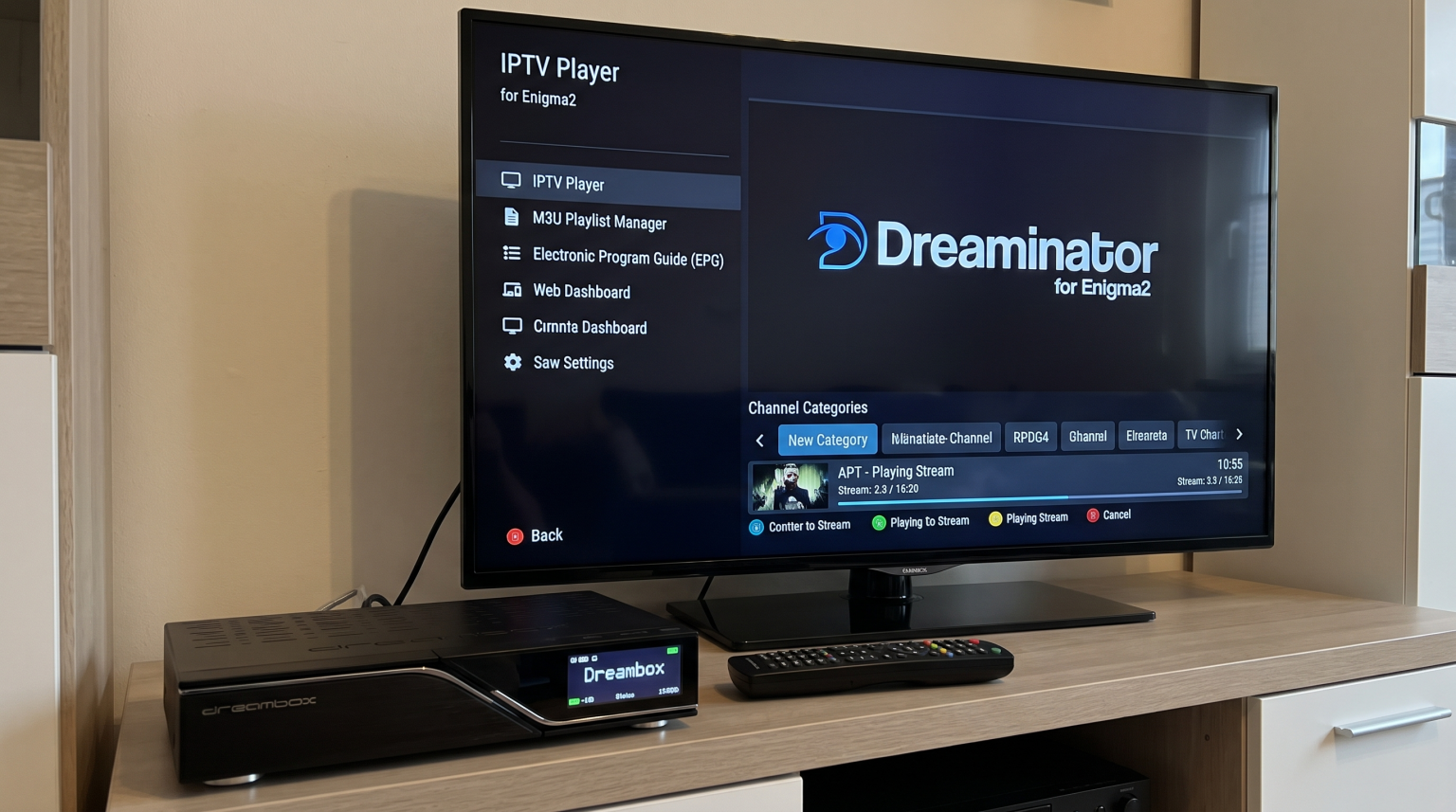
Dreambox users can now manage IPTV playlists easily with Dreaminator. Dreaminator is a new standalone IPTV plugin for Enigma2 receivers. This plugin allows users to organize M3U playlists in a web browser and watch live television using the standard Dreambox remote control.
Traditional Enigma2 systems require complex tools to handle IPTV streams. Users normally must convert IPTV links into Enigma2 bouquets. Dreaminator simplifies this process. The plugin connects the satellite receiver to a computer or smartphone over the local home network. Users can edit television channels on a computer screen. The changes appear immediately on the Dreambox television interface.
Dreaminator Enigma2 works with popular Linux devices, including the Dreambox DM520, Dreambox DM900, and Vu+ Uno 4K SE. This article explains the new features of Dreaminator and explains how this plugin improves the IPTV viewing experience on Enigma2 satellite receivers.
Respuesta rápida
Dreaminator for Enigma2 is a dedicated IPTV player plugin and playlist manager for Linux-based satellite receivers. Dreaminator solves the problem of difficult playlist management on devices like Dreambox.
Users upload and organize M3U playlists or Xtream Codes using a web browser interface on a computer. The user then watches the IPTV channels on the television using the regular Enigma2 remote control. Dreaminator is highly suitable for users who want a modern, visual interface for IPTV without mixing internet streams into traditional Enigma2 satellite channel bouquets.
Main Features of Dreaminator Enigma2
Dreaminator brings modern IPTV player features to Linux satellite receivers. The plugin separates internet streaming from satellite television. This separation makes the receiver much easier to use.
Browser-Based Playlist Management
The most important feature of Dreaminator Enigma2 is the web browser interface. Traditional Enigma2 receivers use text files or complex File Transfer Protocol (FTP) software to add IPTV channels. Dreaminator changes this workflow completely.
The user opens a web browser on a computer or smartphone. The user enters the IP address of the Dreambox. The browser then displays a visual Dreaminator dashboard. In this dashboard, the user can add M3U links, enter Xtream Codes server credentials, and organize channels. The user can also delete unwanted channel categories using the computer mouse. This is much faster than using a television remote control to edit lists.
Television Interface and Remote Control
When the user finishes organizing channels in the web browser, the channels appear in the Dreaminator plugin on the television. The television interface is designed specifically for the standard Enigma2 remote control.
Users do not need a special keyboard or a computer mouse for the television. The directional buttons on the remote control navigate the channel list. The OK button starts the video stream. The interface is clean, dark, and easy to read from a distance. The plugin loads category folders exactly as the user arranged them in the browser manager.
Electronic Program Guide (EPG) Support
A good IPTV experience requires a working Electronic Program Guide. The Electronic Program Guide shows the user what television show is currently playing. Dreaminator supports XMLTV links.
When the user adds an XMLTV link in the web browser manager, the Dreambox downloads the television schedule from the internet. The television screen then displays the current program name, the next program, and the broadcast times next to the channel name. This feature makes Dreaminator feel like a premium Smart TV application.
Dreaminator vs Traditional Enigma2 Bouquets
Many Dreambox users currently use Enigma2 bouquets for IPTV. A bouquet is a traditional channel list in the Enigma2 operating system. Compare Dreaminator with traditional bouquets to see which method is better for your needs.
| Característica | Dreaminator Plugin | Traditional Enigma2 Bouquets |
| Setup method | Web browser interface | FTP software or Bouquet converter tools |
| Playlist format | M3U and Xtream Codes API | Converted Enigma2 text format |
| Channel separation | Keeps IPTV separate | Mixes IPTV with satellite channels |
| Update process | Automatic through the plugin | Often requires manual conversion |
| Ease of use | Simple for beginners | Requires technical Linux knowledge |
Dreaminator Enigma2 is better for users who update IPTV playlists frequently. The web manager makes updates very fast. Traditional Enigma2 bouquets may be better for users who strictly want IPTV channels and satellite channels merged into one single television list.
Using Dreaminator for TV Shadow IPTV
For customers of TV Shadow IPTV, the Dreaminator plugin provides a very stable viewing experience on Dreambox receivers. TV Shadow IPTV supplies high-quality M3U playlists and Xtream Codes. Both connection formats work perfectly with Dreaminator Enigma2.
Because Dreaminator handles the IPTV streams independently from the satellite tuners, the Dreambox processor can focus entirely on decoding the video over the internet. Users will experience fast channel switching and a highly responsive menu. The plugin handles large channel lists without crashing the Enigma2 operating system.
If you are deciding between a new Smart TV and a Linux receiver, our guide to El mejor sistema operativo para Smart TV para IPTV en 2026 explains how Linux-based Enigma2 compares to commercial Smart TV systems like Samsung Tizen or Google TV.
Watching Live Football on Enigma2
Live football requires smooth video playback. Enigma2 receivers are excellent for sports because they have powerful internal video processors. When you watch live football through Dreaminator Enigma2, the picture quality depends on your internet connection and the receiver hardware.
To get the best result during a live football match, connect the Dreambox directly to the internet router using an Ethernet cable. Wi-Fi connections can cause buffering or stuttering during fast motion. Ethernet provides a stable connection for high-definition sports streams.
Modern Enigma2 receivers support 50 frames per second and 60 frames per second output. Ensure the Dreambox picture settings match the refresh rate of the television screen. If you use a new television and the picture looks bad, ¿Por qué se ve borrosa la IPTV en un televisor 4K nuevo? before you change the Dreambox hardware settings.
Installation and Software Updates
Installing Dreaminator requires basic knowledge of Enigma2 plugins. The user cannot download this plugin from a standard Smart TV app store.
To install the software, the user must download the Dreaminator installation file to a computer. This file is usually an IPK file or a DEB file, depending on the exact Dreambox model. The user transfers this file to the receiver using an FTP program. Finally, the user installs the file using the Dreambox menu or through a Telnet command on the computer.
Software updates for Dreaminator Enigma2 are released through the developer’s Github page. Users should check for updates regularly. Software updates ensure compatibility with new M3U playlist formats and fix software bugs.
Conclusión
Dreaminator Enigma2 provides a modern, fast solution for watching IPTV on Dreambox receivers. The web browser playlist manager makes adding M3U links and Xtream Codes very simple. Users no longer need complex FTP tools to convert internet playlists into Enigma2 bouquets.
Dreaminator keeps IPTV streams perfectly separate from satellite channels. The plugin provides a clean interface that works perfectly with the television remote control. For users of TV Shadow IPTV, this plugin offers an excellent, stable way to watch live television and live football on powerful Linux hardware.
Preguntas frecuentes
What is Dreaminator Enigma2?
Dreaminator Enigma2 is a software plugin for Linux-based satellite receivers like Dreambox. The plugin allows users to manage IPTV playlists using a computer browser and watch the television channels on the receiver.
Does Dreaminator work with Xtream Codes?
Yes, Dreaminator supports the Xtream Codes API. Users can enter a username, password, and server URL in the web browser manager. This is the easiest way to load an IPTV subscription.
Can I use Dreaminator on a Smart TV?
No, Dreaminator is designed specifically for Linux Enigma2 operating systems. If you have a Smart TV, you need an application from your television app store. For example, ¿Es Samsung Tizen una buena opción para la IPTV en 2026? to learn about Smart TV options.