
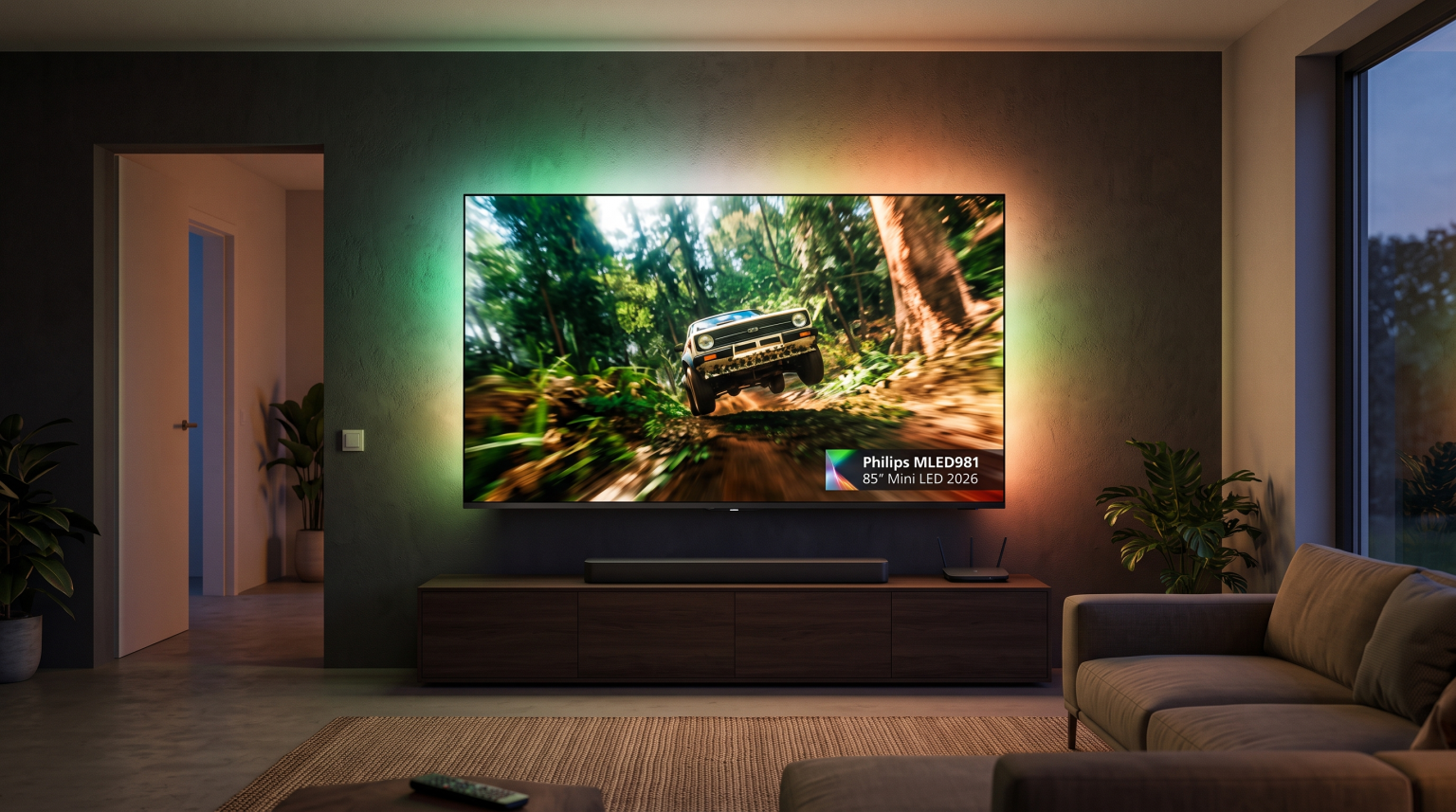
The Philips MLED981 is an 85-inch television introduced for 2026. This model represents a significant hardware step for Philips and TP Vision because it uses direct RGB Mini LED backlight technology. It targets home cinema enthusiasts, sports viewers, and console gamers who want a very large display with high brightness and deep black levels.
However, hardware is only one half of the television experience. In 2026, Philips equipped the MLED981 with Titan OS rather than Google TV. This operating-system choice directly influences how you stream media, install applications, and watch live television. This detailed guide examines the picture performance, sports handling, gaming features, and streaming capabilities of the Philips MLED981 to help you decide if it fits your living room.
Respuesta rápida
The 85-inch Philips MLED981 is worth buying if you want outstanding peak brightness, three-sided Ambilight immersion, and high-level HDR performance for movies, gaming, and live sports in bright or dark rooms. It delivers exceptional contrast through its RGB Mini LED backlight.
The television is less suitable for users who want complete freedom with native streaming applications. Because the MLED981 runs on Titan OS instead of Google TV, native app availablity is limited. For advanced IPTV streaming, you will likely need an external streaming device such as an Apple TV or Google TV box to achieve full flexibility.
Technical Specifications: Philips MLED981 (2026)
| Característica | Philips MLED981 Specification | Real-World Impact |
| Screen Size | 85 inches (216 cm) | Cinema-scale viewing for medium to large living rooms |
| Display Technology | RGB Mini LED LCD | Pure red, green, and blue LEDs for wide color volume |
| Local Dimming | 3,840 zones (11,520 RGB controls) | High contrast with minimal halo effects around bright objects |
| Peak Brightness | Up to 2,500 nits | High specular highlight brightness in bright living rooms |
| Frecuencia de actualización de la pantalla | Native 165Hz | Smooth motion clarity for high-speed sports and gaming |
| Picture Processor | 10th Generation P5 AI Processor | Real-time upscaling, noise reduction, and tone mapping |
| Compatibilidad con HDR | Dolby Vision 2 Max, Dolby Vision, HDR10+, HDR10, HLG | Complete playback support across all streaming formats |
| Smart TV OS | Titan OS | Fast interface, but smaller app ecosystem than Android/Google TV |
| HDMI Ports | 4x HDMI 2.1 (supports 4K, VRR, eARC) | Full bandwidth connectivity for modern gaming consoles and soundbars |
| Integrated Audio | 70W 4.1-channel sound system | Clear dialogue and built-in rear low-frequency output |
| Ambilight | Three-sided Ambilight with AmbiScape support | Projects backlighting onto the wall to reduce eye strain |
Picture Quality and RGB Mini LED Technology
The defining feature of the Philips MLED981 is its RGB Mini LED backlight structure. Standard LED and traditional Mini LED televisions use blue or white LEDs combined with a phosphor or quantum-dot film. In contrast, the MLED981 uses direct red, green, and blue micro-diodes.
This design provides two clear benefits:
Accurate Color Volume: The panel reaches approximately 97% of the DCI-P3 color spectrum without sacrificing color saturation at high brightness levels.
Backlight Precision: The system features 3,840 physical dimming zones and 11,520 individual RGB controls.
The television achieves up to 2,500 nits of peak brightness. In daytime conditions, sunlight reflection is well suppressed, keeping dark scenes visible. In a dark room, the local dimming algorithms effectively prevent blooming around white subtitles or bright logos. While an OLED display still offers per-pixel black control, the MLED981 comes very close while delivering far higher sustained full-screen brightness.
If you are deciding between screen technologies for your entertainment space, our technical comparison between OLED frente a Mini-LED para el fútbol en directo explains how these panel types manage sustained light output and motion.
Operating System: Titan OS in 2026
For 2026, TP Vision transitioned its high-end Philips displays from Google TV to Titan OS. Titan OS is a Linux-based operating system engineered for fast navigation and quick home-screen responses.
The home screen presents major subscription streaming apps directly, including Netflix, Amazon Prime Video, Disney+, HBO Max, and YouTube. Navigation between these services is responsive, and software startup times are fast.
However, the transition away from Google TV brings clear limitations:
No Google Play Store: You cannot download Android APK files or access the vast Google TV app catalog.
Limited Niche Apps: Specialized media players, custom network tools, and third-party utility applications are not present in the Titan OS store.
Closed Ecosystem: Users cannot sideload software from a USB drive.
IPTV Compatibility on the Philips MLED981
If you plan to use the Philips MLED981 for live television streaming with TV Shadow IPTV, you must understand the software environment of Titan OS.
Because Titan OS does not use the Android operating system, popular Android-based IPTV applications cannot be installed directly on this TV.
Native App Availability
The Titan OS app store features a limited number of general web-based media players. Certain generic players can load an M3U playlist link or connect to Xtream Codes application programming interfaces (APIs). However, availability depends heavily on your country, model year, and local app store policies. Native IPTV players on Titan OS often lack advanced features, such as multi-screen viewing or customizable catch-up archives.
EPG and Channel Navigation
Electronic Program Guide (EPG) functionality on native web-based players can be slow when processing large channel playlists. Navigating extensive channel categories with the standard Philips remote control may feel less fluid than on a dedicated streaming box.
The Best Setup for TV Shadow IPTV
To get the best streaming experience on the 85-inch Philips MLED981, pair the display with an external streaming player connected via HDMI.
Recommended devices include:
Google TV Streamer / Chromecast with Google TV
Apple TV 4K
Amazon Fire TV Stick 4K Max
Nvidia Shield TV
Using an external device provides native access to premium IPTV applications that offer full EPG integration, fast channel switching, and stable Xtream Codes compatibility. The Philips MLED981 then handles what it does best: displaying a high-resolution, color-accurate picture with Ambilight backlighting.
If you are evaluating how TV operating systems handle streaming playlists, read our complete breakdown of the El mejor sistema operativo para Smart TV para IPTV en 2026: Tizen, Google TV y webOS.
Fútbol en directo y rendimiento deportivo
An 85-inch screen reveals every detail of a sports broadcast. The Philips MLED981 excels at live football due to three technical elements: refresh rate, motion processing, and panel luminance.
165Hz Panel and Motion Handling
The native 165Hz refresh rate ensures that rapid camera pans across a football pitch remain sharp. Fast-moving footballs do not leave visible motion trails or ghosting artifacts. The 10th Generation P5 AI processor includes dedicated motion compensation algorithms that smooth out frame transitions without creating an artificial soap-opera look.
Picture Upscaling for Live Broadcasts
Many live sports and IPTV streams are delivered in 1080p Full HD or 720p resolution. Stretching that signal across an 85-inch panel can result in a soft image. The 10th Gen P5 AI processor uses spatial interpolation and artificial intelligence to sharpen edges and reduce compression artifacts.
If your sports streams look less sharp than expected, check out our guide on ¿Por qué se ve borrosa la IPTV en un televisor 4K nuevo?.
Network Stability: Wi-Fi vs Ethernet
Live 4K sports streaming requires a stable data transfer rate. The Philips MLED981 features dual-band Wi-Fi and an RJ45 Ethernet port. For live sports, a physical Ethernet connection is recommended. Wired connections eliminate wireless interference, packet loss, and buffer pauses during peak viewing moments.
Gaming and Connectivity
The Philips MLED981 is fully equipped for modern gaming consoles like the PlayStation 5 and Xbox Series X:
Four HDMI 2.1 Ports: Unlike many televisions that offer only two full-bandwidth ports, all four HDMI connections on the MLED981 support HDMI 2.1.
Variable Refresh Rate (VRR): Supports AMD FreeSync Premium Pro and VRR protocols, eliminating screen tearing during fast gameplay.
Low Input Latency: Automatic Low Latency Mode (ALLM) switches the television into game mode immediately when a console is detected.
Three-Sided Ambilight: Dynamic rear lighting synchronizes with on-screen action, creating an engaging visual atmosphere across your wall.
Sound and Ambilight Features
Lorem ipsum dolor sit amet, consectetur a
The MLED981 includes a built-in 70W 4.1-channel audio array. Two speakers fire downward, two fire sideways, and a dedicated woofer handles low frequencies. Dialogue is clear, and the internal speakers perform better than standard flat-screen audio systems. For a complete home theater experience on an 85-inch screen, adding a dedicated soundbar or AV receiver via HDMI eARC is still recommended.
Philips also upgraded its lighting system with AmbiScape. This feature allows the three-sided Ambilight system to synchronize with compatible smart lighting in your room, extending screen colors across the walls.
dipiscing elit. Ut elit tellus, luctus nec ullamcorper mattis, pulvinar dapibus leo.
Comparison: Philips MLED981 vs Competitors
| Característica | Philips MLED981 (85″) | Samsung QN90F (85″) | Sony BRAVIA 9 (85″) |
| Panel Technology | RGB Mini LED | Neo QLED (Mini LED) | XR Backlight Master Drive Mini LED |
| Sistema operativo | Titan OS | Sistema operativo Tizen | Google TV |
| Native IPTV App Support | Limitado | Moderate (Samsung Apps) | Extensive (Google Play Store) |
| HDR Standards | Dolby Vision 2 Max, HDR10+ | HDR10+, HDR10 | Dolby Vision, HDR10 |
| HDMI 2.1 Ports | 4 ports | 4 ports | 2 ports (plus 2x HDMI 2.0) |
| Integrated Bias Lighting | Three-sided Ambilight | Ninguno | Ninguno |
| Primary Strength | Immersive lighting and peak brightness | High daylight brightness and reflection filter | Cinematic color accuracy and processing |
To see how Google TV compares directly with other platforms, explore our in-depth analysis of Tizen frente a Google TV para aplicaciones de IPTV: ¿en qué se diferencian?.
Conclusión
The Philips MLED981 85-inch Mini LED TV is an impressive technical achievement for 2026. Its RGB Mini LED panel delivers exceptional brightness, deep black levels, and vivid color reproduction. When combined with a 165Hz refresh rate and three-sided Ambilight, it creates a captivating home cinema and sports-watching environment.
The main trade-off is the Titan OS smart platform. While it covers mainstream streaming apps, it lacks the flexibility and vast app library of Google TV. If you use TV Shadow IPTV or specialized streaming players, pairing this television with an external 4K streaming box gives you the ideal setup: world-class display hardware paired with an open, versatile streaming interface.
Preguntas frecuentes
Does the Philips MLED981 support IPTV apps directly?
Yes, but app selection is limited. The television runs on Titan OS, which has a smaller app store than Android TV or Google TV. While basic web-based media players are available, popular Android IPTV applications cannot be installed natively. Connecting an external Google TV or Apple TV streaming box provides the most reliable experience.
What is the advantage of RGB Mini LED over standard Mini LED?
RGB Mini LED uses individual red, green, and blue diodes instead of blue LEDs with color conversion filters. This design creates purer primary colors, higher color saturation at peak brightness, and tighter control over local dimming zones.
Does the Philips MLED981 support Dolby Vision?
Sí. The Philips MLED981 supports both standard Dolby Vision and the newer Dolby Vision 2 Max format. It also supports HDR10, HDR10+, and HLG, ensuring complete compatibility with all major HDR content.
Is an 85-inch television too large for regular sports broadcasts?
No, provided you have adequate viewing distance. For an 85-inch 4K screen, a viewing distance of approximately 2.5 to 3.5 meters is ideal. The 10th Generation P5 AI processor upscales standard high-definition broadcasts to maintain image clarity.
Can I connect gaming consoles to all HDMI ports on the MLED981?
Sí. The Philips MLED981 provides four full-bandwidth HDMI 2.1 ports. This allows you to connect multiple game consoles, a PC, and an eARC sound system simultaneously without sacrificing bandwidth or frame rate.
Does Titan OS receive regular software updates?
Yes. TP Vision issues regular over-the-air firmware updates for Titan OS to improve system stability, update security protocols, and add supported streaming platforms.