
Many IPTV users ask about the best way to connect their streaming service to their television. Two common methods are using TIVRA addons and using standard M3U playlists. This article explains the differences between these two options. We will look at how they work, how they perform, and which connection method you should choose for your Smart TV.
The choice between TIVRA addons and M3U playlists affects your Electronic Program Guide (EPG), your channel loading speed, and your overall viewing experience. We will compare both methods logically to help you make the right decision for your home entertainment system.
Respuesta rápida
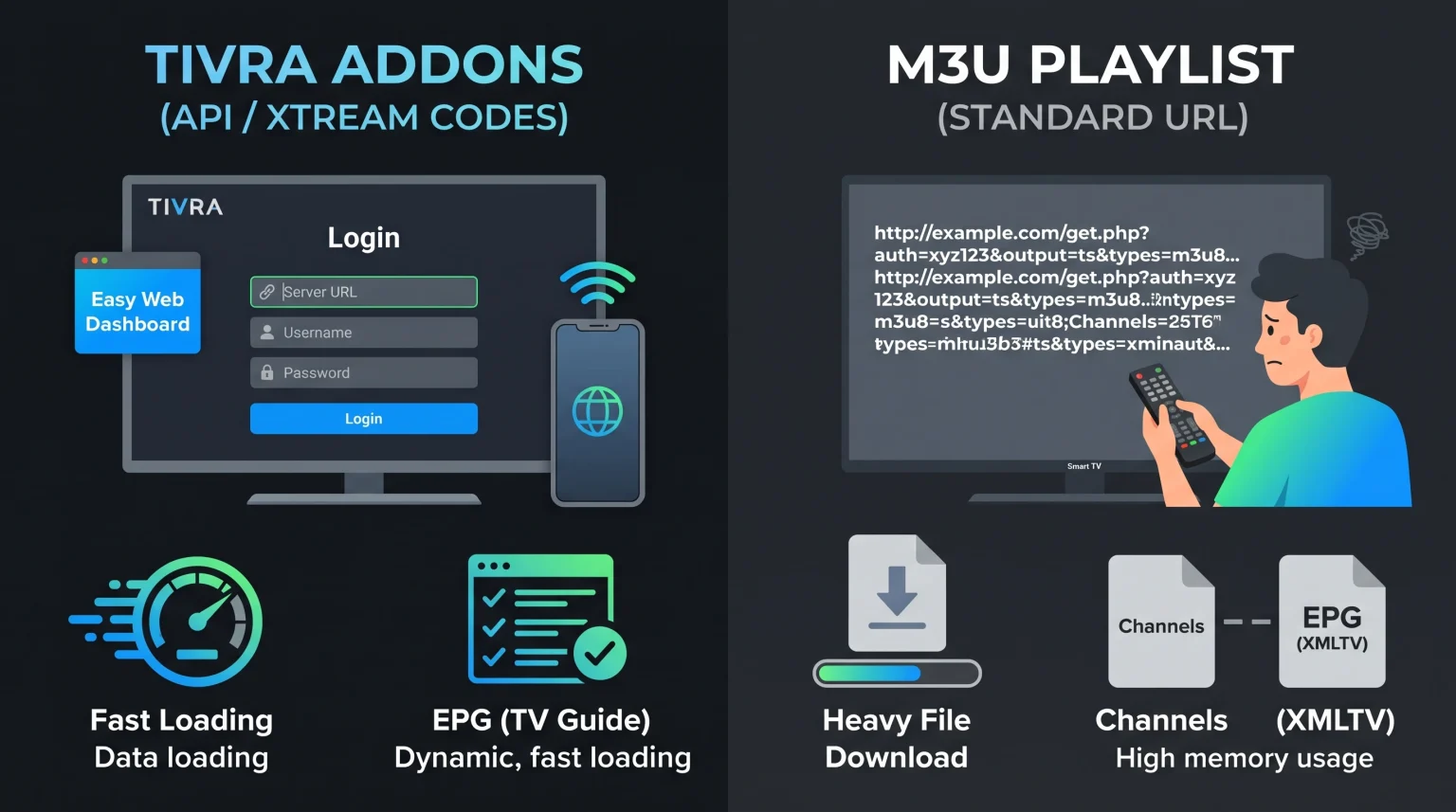
The main difference between TIVRA addons vs M3U playlists is how they deliver information to your media player. An M3U playlist is a simple text file containing links to video streams. It requires the media player to download the entire list at once. TIVRA addons, such as Xtream Codes API connections or Stalker portals, connect directly to the provider’s server. M3U playlists offer maximum compatibility with older devices. TIVRA addons offer a better user interface, faster loading times, and automatic updates for your TV guide.
Entender lo básico
To understand the comparison between TIVRA addons vs M3U playlists, we must first define how each technology works.
What Is an M3U Playlist?
An M3U playlist is a standard file format. The name stands for MP3 URL. Originally, people used this format for audio files. Today, the IPTV industry uses this format for live television channels and video-on-demand content.
When you purchase an IPTV service, the provider often gives you an M3U URL. This URL is a long web address. When you enter this web address into a media player, the player downloads a text file. This text file contains the name of every channel and the direct link to every video stream.
M3U playlists are universal. Almost every media player in the world can read an M3U file.
What Are TIVRA Addons?
TIVRA is an advanced media player application available for Android TV and Google TV devices. It does not provide any video content. Instead, it plays the content that you provide.
In the context of the TIVRA app, “addons” refer to advanced connection methods. Instead of using a basic M3U file, TIVRA allows you to connect using API logins. The most common API login is Xtream Codes. TIVRA also supports Stalker portals and local media servers like Jellyfin and Emby.
These advanced connections act as addons to the basic player. They allow the TIVRA application to communicate directly with the streaming server in real time.
TIVRA Addons vs M3U: Main Differences
There are several important differences between using a basic M3U playlist and using advanced TIVRA addons.
Setup and Installation
Setting up an M3U playlist can be difficult with a television remote control. An M3U URL is usually very long. It contains many random letters and numbers. If you type one letter incorrectly, the playlist will not load.
TIVRA addons offer a simpler setup process. If you use the Xtream Codes API connection, you only need to enter three short pieces of information. You must enter the server address, your username, and your password. This method is much faster to type with a standard remote control. TIVRA also offers a web dashboard. You can use your smartphone to paste your connection details directly into the TIVRA web dashboard, and the details will automatically appear on your television.
Data Loading and Speed
Speed is a major difference between TIVRA addons vs M3U playlists.
Some IPTV providers offer more than 50,000 channels and movies. If you use an M3U playlist, the media player must download the entire list of 50,000 items every time you update the application. This process requires a lot of memory. It can make older Smart TVs run very slowly.
TIVRA addons solve this problem. When you connect via an API, the application does not download the entire list at once. Instead, the application asks the server for specific categories. If you open the sports category, the application only loads the sports channels. This method uses less memory and keeps the television interface very fast.
Guía electrónica de programas (EPG)
The Electronic Program Guide (EPG) shows you what television programs are playing now and what programs will play next.
If you use an M3U playlist, you usually need a second URL for your EPG data. You must enter the M3U URL for the channels, and then you must enter an XMLTV URL for the television guide. This requires extra setup time.
If you use TIVRA addons like Xtream Codes, the EPG data is included automatically. The application downloads the channel list and the television guide at the same time. Furthermore, TIVRA includes a “Lighter Guide” feature. This feature downloads a compressed version of the television guide overnight while the television sleeps. This ensures your TV guide is always ready when you turn on the television.
Advanced Features and Organization
A standard M3U file is a flat list. It does not contain advanced organization data.
TIVRA addons support advanced organization. The application can read the server data to create individual profiles for different family members. TIVRA also features a dedicated Sports Hub. If you use an advanced API connection, the Sports Hub can match live sports scores with the exact channels in your subscription. This feature is not always reliable with a basic M3U file.
If you are deciding which television operating system is best for these features, our guide to El mejor sistema operativo para Smart TV para IPTV en 2026 explains the differences between Tizen, Google TV, and webOS.
Tabla comparativa de características
This table summarizes the technical differences between TIVRA addons (API connections) and basic M3U playlists.
| Característica | TIVRA Addons (API/Xtream Codes) | Basic M3U Playlist |
| Método de conexión | URL del servidor, nombre de usuario y contraseña | One long web address (URL) |
| Device memory usage | Bajo | Alto |
| Setup difficulty | Fácil | Difficult to type on a TV remote |
| TV guide (EPG) integration | Automatic | Often requires a separate URL |
| Data loading style | Dynamic (loads only what you open) | Static (loads everything at once) |
| Live sports data matching | High compatibility | Low compatibility |
| Universal app support | Supported by modern applications | Supported by all applications |
Compatibility with TV Shadow IPTV
TV Shadow IPTV provides a premium streaming connection. We want our users to have the best possible experience on their devices.
Our service is fully compatible with both connection methods. When you use TV Shadow IPTV, you receive an M3U URL for maximum compatibility. You also receive an Xtream Codes API username, password, and server URL.
Because we provide both options, you can choose the method that works best for your specific application. If you use an older television, you can use the M3U playlist. If you use a modern Android TV device with the TIVRA application, we recommend using the API connection. The API connection will provide a faster menu and a more reliable television guide.
Please note that TV Shadow IPTV does not have an official relationship with the developers of the TIVRA application. TIVRA is an independent media player. You can use TV Shadow IPTV with many different media players.
Which Method Is Better for Live Football?
Live football and other fast-moving sports require excellent technical performance. When choosing between TIVRA addons vs M3U playlists for sports, you must consider streaming stability and hardware performance.
Streaming Stability
Live football broadcasts require a stable internet connection. We strongly recommend connecting your television to your internet router using an Ethernet cable. An Ethernet cable provides a more stable connection than Wi-Fi.
When you use TIVRA addons via an API connection, the channel list loads dynamically. This means the application can quickly switch between different server connections if one channel stops working. With a basic M3U playlist, the application might take longer to reconnect to a dropped signal. For live football, the API connection method is generally faster and more stable.
Refresh Rate and Motion Handling
Your connection method is only one part of the equation. Your television hardware also affects how live football looks.
European football broadcasts usually transmit at 50 frames per second. North American sports often transmit at 60 frames per second. Your television must process these frames smoothly. A television with a native 120Hz refresh rate will handle fast-moving footballs better than a television with a 60Hz refresh rate.
If you are buying a new television specifically for sports, you should read our guide about Televisores de 60 Hz frente a 120 Hz para ver el fútbol en directo.
Additionally, some modern 4K televisions struggle to display lower-resolution sports streams clearly. If your picture is not clear, read our article explaining ¿Por qué se ve borrosa la IPTV en un televisor 4K nuevo?.
Conclusión
Understanding the difference between TIVRA addons vs M3U playlists helps you optimize your streaming setup.
An M3U playlist is a universal text file that works on every media player. It is highly compatible but can be slow to load on older devices. It also requires you to type long web addresses using a television remote control.
TIVRA addons, particularly API connections like Xtream Codes, offer a modern solution. They load data dynamically, they update your television guide automatically, and they require much less typing during setup. They also allow applications to offer advanced features like sports score matching and user profiles.
If your media player supports API connections, we highly recommend using this method instead of a basic M3U file. TV Shadow IPTV proudly provides both connection details to all customers, ensuring you can enjoy high-quality streaming on any device in your home.
Preguntas frecuentes (FAQ)
Here are the most common questions users ask about TIVRA addons vs M3U playlists.
What is the main difference between TIVRA addons and M3U?
The main difference is the data format. An M3U is a static text file containing links. TIVRA addons (like Xtream Codes) use an active server connection to load data dynamically.
Can I use an M3U playlist inside the TIVRA app?
Yes, you can. The TIVRA application supports standard M3U playlists. However, you will miss some advanced features that require an API connection.
Does TV Shadow IPTV support TIVRA addons?
Yes. TV Shadow IPTV provides Xtream Codes API login details. You can enter these details into the TIVRA application to use its advanced features.