
Samsung Smart TVs use an operating system called Tizen. This means Samsung televisions do not use Android. You cannot install Android applications from Google Play on a Samsung Smart TV. Instead, you must download applications directly from the official Samsung App Store.
In 2026, many popular IPTV players are available for Samsung Tizen. This guide explains which applications work best on Samsung televisions. We will compare the most reliable options, explain how to install them, and discuss how to get the best picture quality for live football. If you want a complete overview of the operating system, read our guide to whether Le système Tizen de Samsung est-il adapté à l'IPTV en 2026 ?.
Réponse rapide
In 2026, the best IPTV apps for Samsung Tizen are IBO Player Pro, Smart IPTV, and HOT IPTV Player. You must download these applications directly from the Samsung App Store. Tizen does not support Android APK files. IBO Player Pro is the best choice for fast performance with large channel lists. Smart IPTV is very reliable for older Samsung televisions. IPTV Smarters Pro is popular, but its availability in the Samsung App Store depends strictly on your country.
Understanding Samsung Tizen and IPTV
Every modern Samsung Smart TV uses the Tizen operating system. Tizen is a closed software system created by Samsung. This system controls how you install applications.
Because Tizen is closed, you cannot sideload Android APK files. Sideloading means installing an application from a USB drive or an unofficial website. On a Samsung television, you can only install applications that Samsung officially approves.
This strict policy means some popular IPTV applications are not available on Samsung Tizen. However, software developers have created excellent dedicated applications specifically for the Samsung App Store. These Tizen applications fully support standard IPTV formats such as M3U playlists and the Xtream Codes API.
If you are choosing a new television, you can read our comparison between Samsung Tizen ou Sony BRAVIA Google TV : lequel est le meilleur pour l'IPTV en 2026 ? to understand the differences in application support.
Best IPTV Apps for Samsung Tizen in 2026
Here are the most reliable IPTV applications available in the Samsung App Store in 2026.
IBO Player Pro
IBO Player Pro is currently one of the best applications for Samsung Tizen. The application processes video streams and menus very quickly. This fast processing is excellent for large channel lists and large video-on-demand libraries. IBO Player Pro offers a seven-day free trial. After the trial ends, you must pay a small one-time activation fee. IBO Player Pro supports both M3U links and the Xtream Codes API.
Smart IPTV (SIPTV)
Smart IPTV is a very famous application. The application has been available on Samsung televisions for many years. The interface is simple and lightweight. This lightweight design makes Smart IPTV an excellent choice for older Samsung Smart TVs. The application loads quickly and rarely crashes. Smart IPTV requires a small one-time fee after a short free trial.
IPTV Smarters Pro
IPTV Smarters Pro is extremely popular worldwide. The application has a very clean interface that is easy to navigate. However, using IPTV Smarters Pro on a Samsung television can be complicated. Samsung frequently removes and returns this application to the Samsung App Store. The availability depends strictly on your country. If the application is available in your local Samsung App Store, it is an excellent free choice.
HOT IPTV Player
HOT IPTV Player is a newer alternative that works very well on Tizen. The application provides a modern interface and excellent support for the Electronic Program Guide (EPG). The application handles 4K video streaming smoothly on recent Samsung models. Like IBO Player Pro, HOT IPTV Player requires a paid activation after a free testing period.
SS IPTV
SS IPTV is a completely free application. You do not need to pay an activation fee. The application works well with M3U playlists. However, SS IPTV can be slower than IBO Player Pro or Smart IPTV when loading very large channel lists. The interface is also older and less modern than newer applications.
Comparison: Top IPTV Apps on Samsung Tizen
This table compares the most popular IPTV applications available for Samsung Smart TVs.
| Fonctionnalité | IBO Player Pro | Télévision IP intelligente | IPTV Smarters Pro |
| Price | Paid (one-time fee) | Paid (one-time fee) | Gratuit (version Premium disponible) |
| Playlist support | M3U and Xtream Codes | Mostly M3U | Codes Xtream |
| Performance | Très rapide | Very stable | Bien |
| Interface | Moder | Notions de base | Moderne |
| Store availability | Most countries | Most countries | Depends on country |
Compatibilité TV Shadow IPTV
TV Shadow IPTV works perfectly with the applications mentioned above. We provide access using both M3U links and the Xtream Codes API.
You can enter your TV Shadow IPTV connection details directly into IBO Player Pro, Smart IPTV, or HOT IPTV Player. These applications will download our channel list automatically. The applications also support our Electronic Program Guide (EPG), which shows you the television schedule correctly.
Please note that TV Shadow IPTV does not have an official partnership with Samsung. The performance of TV Shadow IPTV depends on your television’s hardware. A dedicated Android streaming box will often be faster than the built-in Samsung Smart TV operating system. However, for most users, the native Tizen applications provide a very good experience.
How to Install IPTV Apps on Samsung Tizen
Installing an application on a Samsung television is simple. Follow these exact steps:
Turn on your Samsung Smart TV.
Ensure the television is connected to the internet.
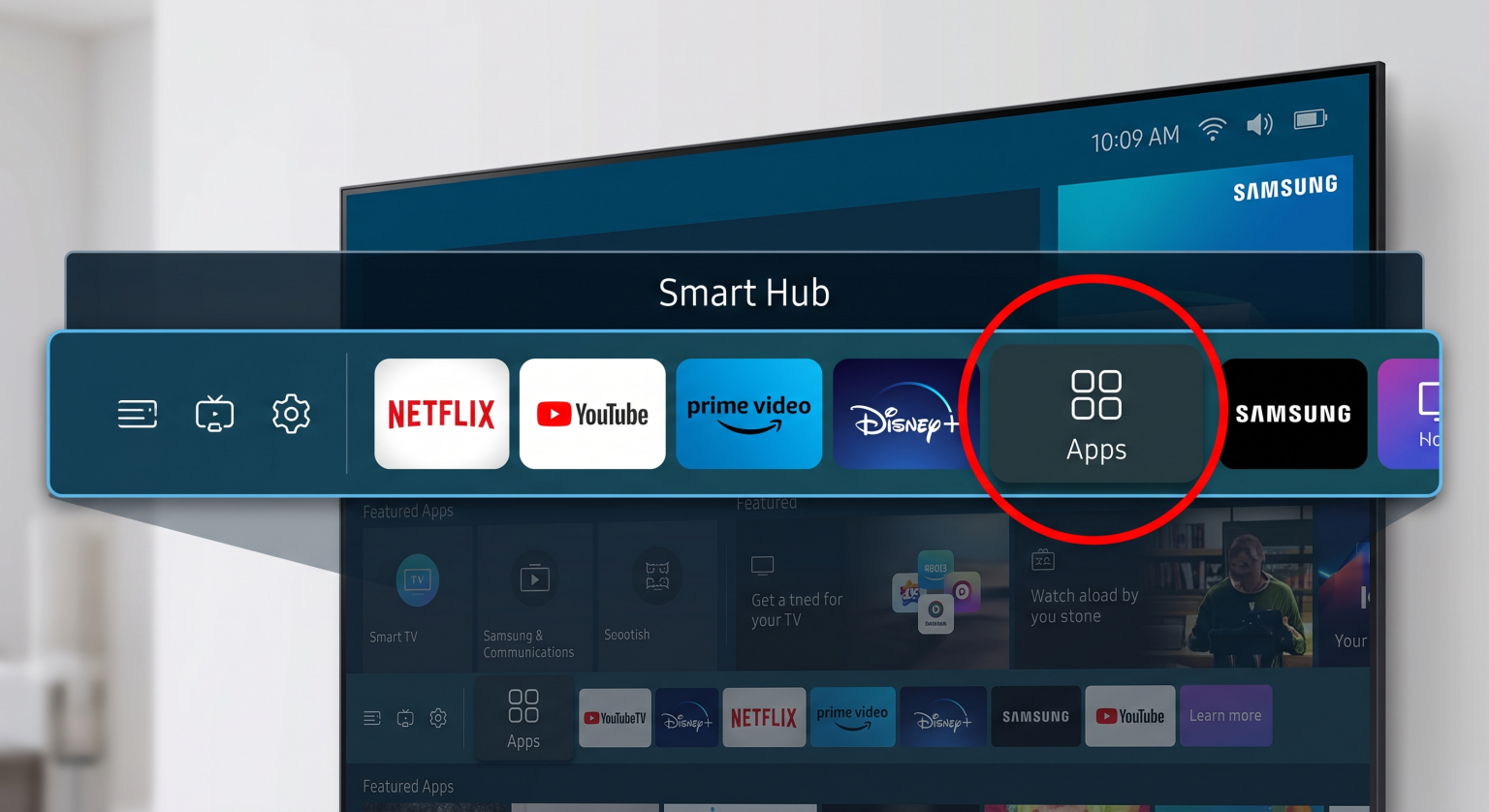
Press the Home button on your Samsung remote control.
Navigate left on the screen menu and select the “Apps” icon.
Select the Search icon in the top right corner. This icon looks like a magnifying glass.
Type the name of the application using the on-screen keyboard (for example, “IBO Player Pro”).
Select the application from the search results.
Select the “Install” button.
Wait for the download to finish, then select “Open”.
You do not need a computer to install these applications. You can do everything using your television remote control.
Watching Live Football on a Samsung Smart TV
Many users buy IPTV subscriptions to watch live sports. Samsung Smart TVs are generally excellent for watching live football, but you must configure the television correctly.
Motion handling is very important for sports. Fast camera movements can cause a blurry picture. If you have a premium Samsung television with a 120Hz refresh rate, the football will look smoother than on a cheaper 60Hz model. You can read more about this hardware difference in our guide to Téléviseurs 60 Hz ou 120 Hz pour le football en direct.
To get the best results when watching live football via IPTV, follow these rules:
Utilisez un câble Ethernet : Always connect your Samsung television directly to your internet router using an Ethernet cable. Wi-Fi connections can be unstable. An Ethernet cable prevents buffering during important football matches.
Turn off unnecessary picture processing: Samsung televisions have a feature called “Auto Motion Plus” or “Picture Clarity”. Sometimes, this feature makes a live football broadcast look unnatural. Try turning this feature off in the television settings.
Vérifiez votre débit Internet : Live sports require a constant data stream. Ensure your internet connection is at least 30 Mbps for high-definition streaming.
Conclusion
In 2026, Samsung Tizen remains a very capable platform for streaming television. While you cannot install Android applications, the official Samsung App Store offers several excellent IPTV alternatives.
IBO Player Pro and HOT IPTV Player offer modern interfaces and fast performance. Smart IPTV remains the most reliable choice for older Samsung models. The availability of IPTV Smarters Pro is inconsistent, but it is a good option if you can find it in your local Samsung store.
For the best experience with TV Shadow IPTV, we recommend choosing IBO Player Pro and connecting your television to your router with an Ethernet cable. This combination provides a stable and enjoyable television experience.
Foire aux questions
Can I install Android APK files on a Samsung Smart TV?
No. Samsung Smart TVs use the Tizen operating system. Tizen cannot read or install Android APK files. You must use applications from the official Samsung App Store.
Is IPTV Smarters Pro available on Samsung Tizen?
The availability of IPTV Smarters Pro depends on your country. Samsung sometimes removes the application from the official store. If you cannot find IPTV Smarters Pro, we recommend using IBO Player Pro instead.
How do I update IPTV apps on my Samsung TV?
Samsung Smart TVs normally update applications automatically. You can also open the Samsung App Store, select the Settings icon, and turn on the “Auto Update” feature.
Do I need a VPN for my Samsung TV?
You cannot install most VPN applications directly onto a Samsung television because Tizen does not support them. If you need a VPN, you must install the VPN software directly on your internet router.
Why does my IPTV app buffer on my Samsung TV?
Buffering is usually caused by a weak internet connection. Wi-Fi signals can drop temporarily. Always use an Ethernet cable to connect your Samsung television to your router for the most stable connection.