
Choosing a new Smart TV for IPTV requires careful consideration. The television operating system determines which IPTV applications you can install. Samsung, Sony, LG, and TCL use different software platforms. Samsung uses Tizen. LG uses webOS. Sony and TCL use Google TV. Each platform offers different application stores and different features. A fast television processor ensures smooth navigation through electronic program guides (EPGs). Good motion handling is important for watching live sports. In 2026, many manufacturers offer long software support. For example, Samsung offers seven years of Tizen upgrades for new models, and LG offers a webOS Re:New program. This article compares Samsung, Sony, LG, and TCL televisions to help you find the most suitable screen for TV Shadow IPTV streaming.
Snel antwoord
The best Smart TV for IPTV depends on your application preferences. Sony and TCL televisions with Google TV provide the largest selection of IPTV applications because they support the Google Play store. LG televisions with webOS offer a fast interface and excellent motion handling for sports. Samsung televisions with Tizen provide a premium picture quality, but the Tizen application store has fewer native IPTV applications than Google TV. Choose Google TV for application flexibility, LG for sports performance, or Samsung for premium brightness and color.
Operating Systems and Application Stores
The operating system is the most important factor for IPTV compatibility.
Sony and TCL: Google TV
Sony and TCL use Google TV. Google TV is based on Android. This means Sony and TCL televisions have access to the Google Play store. The Google Play store contains thousands of applications. Users can find many popular IPTV players in the Google Play store. Google TV also allows users to install applications from outside the official store. This process is called sideloading. Because of this flexibility, Google TV is excellent for IPTV users. If you want maximum application choice, Het beste besturingssysteem voor smart-tv’s voor IPTV in 2026: Tizen vs Google TV vs webOS.
Samsung: Tizen OS
Samsung uses the Tizen operating system. Tizen is a closed system. The Samsung application store includes some popular IPTV players. However, Tizen does not support Google Play applications. You cannot install Android APK files on a Samsung television. Application availability on Samsung televisions often depends on the user’s country. Samsung now promises up to seven years of Tizen operating system upgrades for new models. This long support makes Samsung televisions a safe long-term investment.
LG: webOS
LG televisions use the webOS platform. The webOS interface is very fast. The LG Magic Remote makes navigation simple. You can point the remote at the screen like a computer mouse. The LG application store offers several good IPTV applications. However, webOS does not support Android applications. LG now offers the webOS Re:New program. This program provides five years of software upgrades for new LG televisions.
Installing IPTV Applications
The process of adding new software depends on the television brand.
Installing Applications on Google TV
To install an IPTV application on a Sony or TCL television, open the Google Play store. Search for the application name. Press the install button. If the application is not in the Google Play store, you can download a downloader application. This tool allows you to install external Android APK files directly onto the television storage.
Installing Applications on Tizen and webOS
Samsung and LG do not support external Android files. You must use the official Samsung application store or the LG Content Store. Search for your preferred IPTV player using the television remote. Press the download button. If an application is removed from the official store in your country, you cannot install the application easily. This is an important limitation to remember.
IPTV Application Compatibility
An IPTV service requires a software player to read M3U playlists or Xtream Codes.
Built-in Smart TV Limitations
Not every television supports every IPTV player. For example, Samsung vs LG Smart TV for IPTV: Tizen vs webOS. Before you buy a television, check if your preferred IPTV player is available in the television’s application store. If the application is missing, you must use a different application. Alternatively, you can connect an external Android TV streaming stick to the television via an HDMI port.
Electronic Program Guide (EPG) Speed
IPTV services often include an Electronic Program Guide. A large EPG requires television processing power. High-end televisions from Sony, Samsung, and LG have fast processors. These processors load the EPG quickly. Cheaper televisions may struggle to scroll through a large EPG smoothly.
Comparison Table: Smart TV Platforms
| Functie | Sony & TCL | Samsung | LG |
| Besturingssysteem | Google TV | Tizen | webOS |
| App Store | Google Play | Samsung Apps | LG Content Store |
| Ondersteuning voor Android-apps | Ja | Nee | Nee |
| Software updates | Depends on manufacturer | Up to 7 years | Tot 5 jaar |
| Interface navigation | Standard remote | Standard remote | Magic Remote pointer |
Picture Quality and Live Football
Watching live football is a popular use for IPTV. Sports broadcasting requires specific television features.
Bewegingsverwerking en verversingsfrequentie
Football moves quickly across the screen. A television with poor motion handling will make the football look blurry. Televisions with a 120Hz refresh rate display fast movement better than televisions with a 60Hz refresh rate. LG OLED televisions and high-end Sony Mini-LED televisions offer excellent motion handling. If you watch a lot of football, a 120Hz television is a major advantage.
Upscaling Technology
IPTV streams are often broadcast in 1080p resolution or 720p resolution. Modern Smart TVs have 4K resolution screens. The television must process the lower-resolution signal to fit the 4K screen. This process is called upscaling. Sony XR processors provide exceptional upscaling quality. Samsung and LG also offer strong upscaling on their premium models. Good upscaling makes an IPTV football stream look sharper. If your current stream looks soft, Waarom ziet IPTV er wazig uit op een nieuwe 4K-tv?.
Network Connectivity
Stable internet is essential for IPTV. Wi-Fi can be unstable. Most Samsung, Sony, LG, and TCL televisions include an Ethernet port. Connecting the television directly to the internet router with an Ethernet cable prevents buffering during important football matches.
HDR, HDR10+, and Dolby Vision
High Dynamic Range (HDR) improves television contrast and color. IPTV services sometimes offer HDR movies. Sony, LG, and TCL televisions support Dolby Vision. Dolby Vision is a premium HDR format. Samsung televisions do not support Dolby Vision. Samsung televisions support a different format called HDR10+. If you watch many movies through your IPTV provider, Dolby Vision support is a useful feature to have.
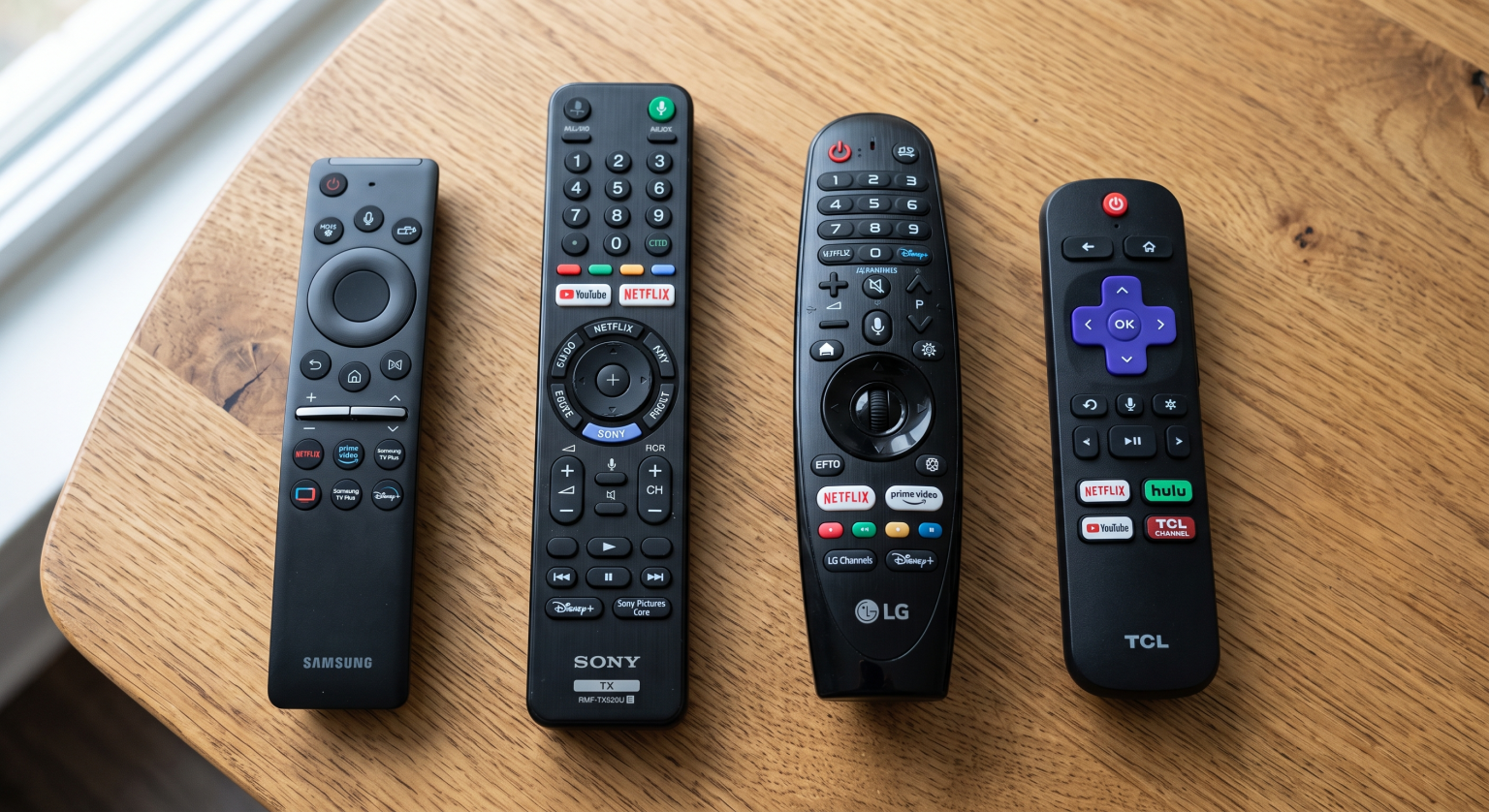
Ease of Use and Remote Controls
The remote control is your primary tool for navigating IPTV menus.
LG Magic Remote: This remote has a motion sensor. It is very fast for typing passwords or searching for movies.
Sony Remote: Sony provides a compact, backlit remote on premium models. It is easy to use in a dark room.
Samsung Remote: Samsung uses a minimalist remote with a solar panel. It has very few buttons. This minimalism can make EPG navigation slightly slower.
TCL Remote: TCL provides a standard remote with many buttons. The number pad is useful for selecting television channels quickly.
Conclusie
The ideal Smart TV depends on your specific needs. Sony and TCL televisions with Google TV provide the best software flexibility and the largest choice of IPTV applications. LG televisions with webOS offer a very fast interface and excellent motion handling for live football. Samsung televisions offer bright screens and seven years of software updates, but the Tizen platform has stricter application limits. Always check if your favorite IPTV player is available on the television before purchasing. TV Shadow IPTV works across many different devices, but choosing the right television operating system makes daily viewing much easier.
Veelgestelde vragen (FAQ)
Can I install Android applications on a Samsung Smart TV?
No, you cannot install Android applications on a Samsung Smart TV. Samsung uses the Tizen operating system, which does not support Android APK files or the Google Play store.
Is Google TV better than Tizen for IPTV?
Google TV is generally better for IPTV because it supports the Google Play store. This provides access to a much larger selection of IPTV players compared to the Samsung application store.
Do all Smart TVs have Ethernet ports?
Most mid-range and high-end Smart TVs have Ethernet ports. However, always check the television specifications before buying, because some budget models only support Wi-Fi.
Why does live football look blurry on my new 4K TV?
The blurriness is often caused by a low-quality IPTV stream or incorrect television motion settings. A 4K television must stretch a low-resolution stream, which can highlight imperfections.
How long will my Smart TV receive software updates?
In 2026, software support is improving. Samsung offers up to seven years of updates for new models. LG offers five years of updates through the webOS Re:New program.
Do I need a 120Hz TV for IPTV?
You do not strictly need a 120Hz TV for standard movies and television shows. However, a 120Hz television provides much smoother movement for live football and fast sports.
Can I use an M3U playlist on an LG Smart TV?
Yes, you can use an M3U playlist on an LG Smart TV. You must download an IPTV player application from the LG Content Store that supports M3U playlists, and then upload your playlist to the application.