
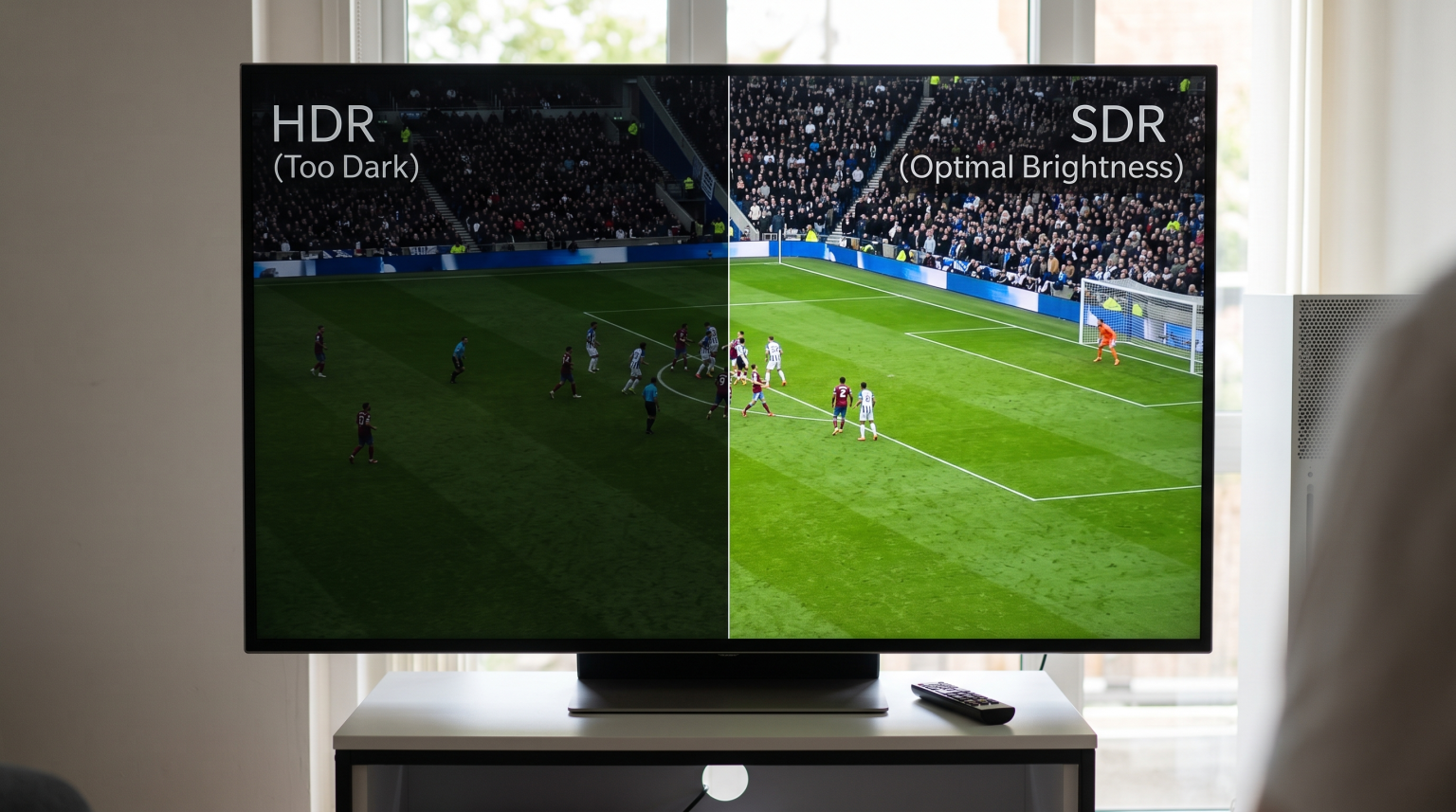
Many football fans buy a new 4K Smart TV to watch live sports. Viewers expect excellent picture quality from modern televisions. However, a common problem occurs during live football matches. When the television broadcast uses High Dynamic Range (HDR), the picture often looks much darker than a standard broadcast. This frustrates viewers who expect a bright and colorful image. This article explains why the HDR football too dark problem happens and explains how you can fix this issue on your Smart TV.
Snel antwoord
HDR football is often too dark on some Smart TVs because the television lacks sufficient peak brightness. Peak brightness is measured in nits. High Dynamic Range (HDR) requires a very bright screen to display contrast correctly. When a television has low peak brightness, the television darkens the entire picture to show highlights. Watching daylight football in a brightly lit room makes this dark picture harder to see. You can fix this problem by disabling ambient light sensors, increasing the television backlight to maximum, or switching the broadcast to a Standard Dynamic Range (SDR) channel.
What Is High Dynamic Range (HDR)?
HDR stands for High Dynamic Range. HDR technology expands the contrast between the brightest white colors and the darkest black colors on a television screen. HDR also displays a wider range of colors than older television standards.
Standard television broadcasts use Standard Dynamic Range (SDR). SDR was created for older televisions that could not produce very bright light. HDR was created for modern televisions that can produce intense light.
To display an HDR image correctly, the Smart TV must create high peak brightness. Manufacturers measure television brightness using a unit called nits. A higher nit number means a brighter television screen.
The Role of Hybrid Log-Gamma (HLG)
Live sports usually use a specific type of HDR called Hybrid Log-Gamma (HLG). Broadcasters use HLG because HLG is compatible with both HDR televisions and older SDR televisions. When your Smart TV receives an HLG signal during a football match, the television automatically switches into HDR mode.
Main Reasons HDR Football Looks Too Dark
If you are watching a football match and the green grass looks dark and gray, several factors cause this problem.
1. Low Peak Brightness on Budget Televisions
The most common reason for a dark HDR picture is low television hardware capabilities. Budget and mid-range Smart TVs cannot produce enough nits.
A high-quality HDR experience requires a television that can produce 700 to 1,000 nits of brightness. Many affordable 4K televisions only produce 250 to 400 nits. When a 300-nit television receives an HDR signal that requires 1,000 nits, the television cannot display the bright areas correctly.
To solve this hardware limitation, the television darkens the entire picture. The television lowers the brightness of the football pitch so that the television can still show details in the bright stadium lights or the bright white clouds.
2. Bright Room Lighting
Live football matches often happen during the daytime. Viewers often watch these matches in a living room with large windows and bright sunlight.
HDR is designed for dark rooms. Movie directors grade HDR content in dark studios. When a Smart TV displays a dark HDR football match in a bright living room, the human eye cannot see the dark details on the screen. The sunlight in the room overpowers the light coming from the television.
3. Aggressive Tone Mapping
Tone mapping is a software process inside the Smart TV. When the television receives a video signal that is brighter than the television screen can handle, the television uses tone mapping to adjust the image.
Some television brands use aggressive tone mapping. The television software tries to preserve every highlight detail. This aggressive processing causes the mid-tones to drop. In a football match, the grass and the players are mid-tones. Therefore, aggressive tone mapping makes the players and the grass look very dark.
4. Active Eco Settings
Modern Smart TVs include energy-saving features. Many televisions have an ambient light sensor. This sensor measures the light in your room and automatically lowers the television screen brightness to save electricity. If the light sensor is active while you watch an HDR football match, the television will restrict the maximum brightness.
SDR vs HDR for Live Football
Sometimes, watching a football match in SDR provides a better experience than watching the match in HDR. This table compares the two formats for live sports.
| Functie | Standard Dynamic Range (SDR) | High Dynamic Range (HDR / HLG) |
| Average brightness | Usually very bright | Often darker on average |
| Highlight detail | White areas can look solid | Shows details in bright clouds |
| Hardware requirement | Works well on cheap televisions | Requires an expensive bright television |
| Room lighting | Good for bright rooms | Best for dark rooms |
| Color depth | Standard colors | Wider and more realistic colors |
How to Fix Dark HDR Football on Your Smart TV
You can improve the brightness of HDR football matches by changing your television settings. The exact setting names depend on your television brand, but the concepts apply to Samsung, Sony, LG, and TCL televisions.
Disable Energy Saving Features
Open your television system settings. Find the section for power, energy, or eco settings. Disable the “Ambient Light Sensor” or “Eco Sensor”. Disabling this sensor stops the television from lowering the screen brightness automatically.
Maximize the Backlight
When the television is playing HDR content, open the picture settings. Find the “Backlight” or “Brightness” setting. Increase this setting to the maximum level. Do not confuse the backlight setting with the “Black Level” setting.
Use the Dynamic or Sports Picture Mode
Smart TVs have different picture modes such as “Cinema”, “Standard”, and “Vivid”. The “Cinema” mode is usually the most accurate, but “Cinema” mode is also the darkest. If the HDR football match is too dark, switch the picture mode to “Standard”, “Dynamic”, or “Sports”. These modes increase the brightness and saturation.
Adjust the Contrast Enhancer
Many televisions have a setting called “Contrast Enhancer” or “Dynamic Contrast”. Setting this feature to “High” can artificially boost the brightness of the mid-tones. This makes the green grass on the football pitch look brighter.
Switch to the SDR Channel
If you cannot make the HDR picture bright enough, the best solution is to avoid the HDR broadcast. Many broadcasters provide two versions of a live football match. One channel shows the 4K HDR version. Another channel shows the High Definition (HD) SDR version. Switch to the SDR channel. The SDR channel will look consistently bright.
Does IPTV Support HDR Football?
If you use TV Shadow IPTV to stream live television, you may wonder if IPTV supports HDR football. The answer depends on the source stream and the IPTV player application.
IPTV services deliver video streams over the internet. If the original television broadcaster provides a football match in 4K HDR, the IPTV stream can also contain that 4K HDR signal.
However, playing HDR streams correctly requires compatible software. Not all IPTV applications communicate properly with the Smart TV operating system. If the IPTV application does not send the correct HDR metadata to the television, the television will not switch into HDR mode. This can cause the picture to look washed out or gray with incorrect colors.
If you experience HDR problems with IPTV, try using a different IPTV player application. Applications that use modern video decoders usually support HDR and HLG signals better than older applications. If you are choosing a new television for IPTV applications, you can read our guide comparing the Het beste besturingssysteem voor smart-tv's voor IPTV in 2026 to understand which systems support the best software.
Important TV Features for Live Football
When watching live football, peak brightness is only one important feature. Football is a fast sport. The camera moves quickly across the pitch. Therefore, motion handling is very important.
Refresh Rate
The refresh rate measures how many times the television screen updates the image every second. A 60Hz television updates 60 times per second. A 120Hz television updates 120 times per second.
A 120Hz television generally handles the fast movement of a football better than a 60Hz television. A higher refresh rate reduces motion blur. If you want to understand this difference deeply, read our complete guide explaining a Een tv van 60 Hz versus een tv van 120 Hz voor live voetbal.
OLED vs Mini-LED
If you are buying a new television specifically for HDR football, you must choose between OLED technology and Mini-LED technology.
OLED televisions provide perfect black colors and excellent motion handling. However, OLED televisions are generally less bright than LED televisions. Mini-LED televisions use thousands of small lights behind the screen. Mini-LED televisions can reach very high peak brightness levels. A high-quality Mini-LED television can display bright HDR football easily, even in a sunny room. You can learn more in our detailed comparison of OLED versus Mini-LED voor live voetbal.
Kwaliteitsverbetering
Many football matches are still broadcast in 1080p High Definition (HD), not 4K. If you watch a 1080p stream on a 4K television, the television must enlarge the image. This process is called upscaling. If your television has poor upscaling, the football players will look blurry. This is a common issue with cheaper television brands. If you experience blurry streams, read our article explaining Waarom ziet IPTV er wazig uit op een nieuwe 4K-tv?.
Conclusie
The “HDR football too dark” problem is a frustrating experience for many Smart TV owners. This issue primarily happens because many affordable televisions lack the peak brightness required to display High Dynamic Range content correctly. The television darkens the green pitch to save bright details in the stadium lights.
You can improve the brightness of HDR football by adjusting your Smart TV settings. Always disable ambient light sensors and maximize the television backlight when watching HDR content. Changing the picture mode to “Sports” or “Dynamic” can also help. However, if your television hardware simply cannot produce enough brightness, the best solution is to watch the football match on a standard SDR channel. By understanding how HDR works, you can adjust your setup and enjoy live football with a clear and bright picture.
Veelgestelde vragen (FAQ)
Why is my 4K TV so dark during sports?
Your 4K TV is dark during sports because it is receiving an HDR signal but lacks the peak brightness required to display it properly. The television darkens the overall image to preserve details in the bright areas. You can fix this by increasing the backlight or disabling eco mode.
What does HLG mean on my TV?
HLG stands for Hybrid Log-Gamma. HLG is a specific format of High Dynamic Range (HDR) used for live television broadcasts. When your television shows an HLG logo, the television is receiving an HDR signal from a live event like a football match.
Should I use HDR or SDR for live football?
You should use SDR for live football if you have a budget television or if you are watching in a very bright room. SDR provides a consistently bright picture. You should use HDR if you have a high-end, high-brightness television and want to see more realistic stadium lighting.
Can I turn off HDR on my Smart TV?
Most Smart TVs do not allow you to disable HDR processing in the main settings menu. The television switches to HDR automatically when it detects an HDR signal. The best way to “turn off” HDR is to select the SDR version of the television channel on your receiver or IPTV application.
Why do the colors look washed out on IPTV?
Colors look washed out on IPTV when the stream is broadcast in HDR, but your television or IPTV player application does not read the HDR signal correctly. The television stays in SDR mode while playing HDR colors. This results in a flat, gray, and washed-out image.
Is OLED good for daytime football?
OLED televisions provide excellent picture quality, but they are not the best choice for very bright living rooms. Direct sunlight can make an OLED screen difficult to see. Mini-LED televisions are usually much brighter and are better for watching daytime football in bright rooms.