
Watching Romanian television in the Netherlands is straightforward with an Internet Protocol Television (IPTV) setup. Many Romanian residents and families in the Netherlands want reliable access to Romanian news, entertainment, movies, and live sports without installing a satellite dish. Traditional Dutch cable providers rarely include a full package of Romanian television channels. An IPTV setup delivers live television channels and Video on Demand (VOD) content directly over a Dutch home internet connection. This guide explains which Romanian TV channels viewers commonly look for, how to set up IPTV on Smart TVs and streaming devices, and how to optimize your connection for smooth playback.
Snel antwoord
Watching Romanian IPTV in the Netherlands requires a stable internet connection, a compatible Smart TV or streaming device, an IPTV player application, and a valid playlist or account. For users who want a simple setup without extra hardware, a Samsung Smart TV or LG Smart TV can run supported IPTV player apps directly. For users who want more application choices and advanced playlist management, a Google TV or Android TV device is often more suitable.
Why Viewers Choose Romanian IPTV in the Netherlands
Installing a satellite dish in the Netherlands is often difficult. Many Dutch apartment buildings and rental agreements prohibit satellite dishes on balconies or exterior walls. In addition, Dutch cable and fiber television packages focus mainly on Dutch, British, German, and Belgian channels.
Internet Protocol Television (IPTV) solves these limitations because the television signal travels through your existing fiber or cable internet connection. The Netherlands has widespread high-speed broadband infrastructure, which supports High Definition (HD) and Ultra High Definition (4K UHD) video streams. Viewers can watch Romanian television on a living-room television, a tablet, or a smartphone without extra roof or wall installations.
Popular Romanian TV Channels and Categories
Viewers searching for Romanian IPTV in the Netherlands usually look for a balanced mix of general entertainment, news, documentaries, music, and sports channels. While exact channel lineups vary by provider and broadcast rights, Romanian television generally falls into the following main categories:
General Entertainment Channels
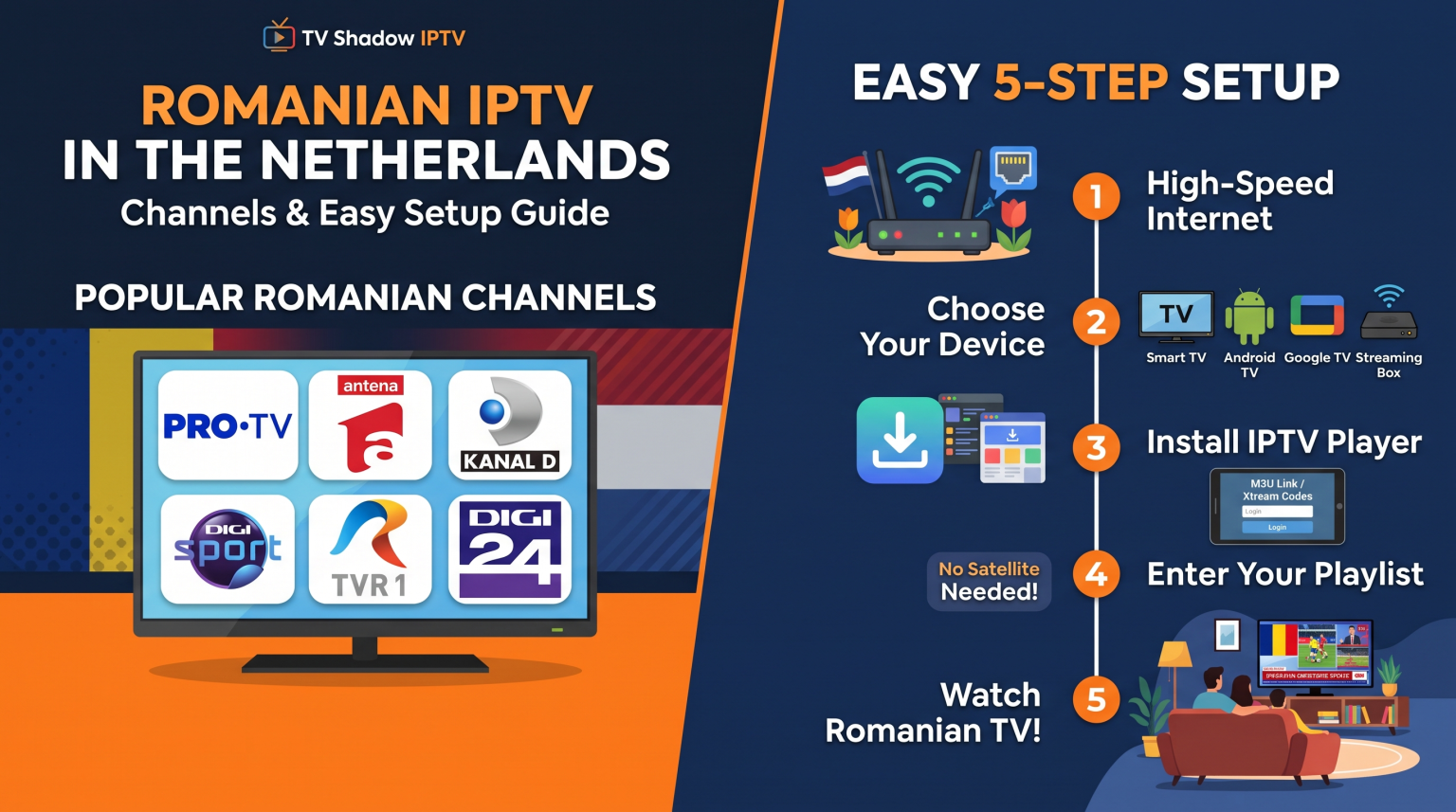
PRO TV: One of the most watched private television stations in Romania, featuring daily news, local comedy series, movies, and entertainment shows.
Antena 1: A major private network known for cooking competitions, reality television, and talk shows.
Kanal D: A popular general entertainment channel offering Turkish dramas, local shows, and daily news.
Prima TV: A private channel broadcasting comedy programs, news, and family entertainment.
TVR 1 and TVR 2: Romania’s public national television channels, operated by Televiziunea Română (TVR), offering cultural programs, public debates, and national events.
News and Documentary Channels
Digi 24: A dedicated 24-hour Romanian news station.
Antena 3 CNN: A major Romanian news and political analysis channel.
TVR Info: The public broadcaster’s news channel.
Digi World and Digi Life: Documentary and lifestyle channels broadcast in Romanian.
Sports Channels
Digi Sport (1, 2, 3, and 4): Leading Romanian sports channels that cover domestic football and international competitions.
Prima Sport (1, 2, 3, 4, and 5): Dedicated sports networks broadcasting live matches and sports analysis.
PRO Arena: A sports and entertainment channel operated by the PRO TV group.
Movies, Music, and International Channels
PRO Cinema and Film Cafe: Dedicated movie channels.
Kiss TV, Magic TV, and Etno TV: Romanian music and folk entertainment channels.
TVR Internațional and PRO TV Internațional: Channels specifically designed for Romanian audiences living abroad.
Comparing Devices for Romanian IPTV Setup
Choosing the right hardware is an important part of your Romanian IPTV Netherlands setup. Different television operating systems have different rules for installing IPTV player applications.
| Functie | Samsung Smart TV (Tizen) | LG Smart TV (webOS) | Google TV / Android TV |
| Besturingssysteem | Tizen | webOS | Google TV or Android TV |
| Official app store | Samsung Apps | LG Content Store | Google Play Store |
| Ondersteuning voor Android-apps | Geen ingebouwde ondersteuning voor Google Play | Geen ingebouwde ondersteuning voor Google Play | Native Google Play support |
| IPTV player selection | Moderate selection, depends on model and country | Moderate selection, depends on model and country | Wide selection of IPTV players |
| External device needed | No, if a compatible app is available | No, if a compatible app is available | Built into compatible TVs or streaming boxes |
| Playlist setup method | Usually via a web portal using a MAC address | Usually via a web portal using a MAC address | Direct entry via remote control or companion app |
Samsung Tizen may be suitable for users who already own a Samsung television and prefer using one remote control without buying an external box. LG webOS offers a similar direct experience for LG television owners. Google TV or Android TV may be more suitable for users who want access to advanced IPTV player applications such as TiviMate or Televizo.
If you are deciding which television platform fits your home setup, our guide to Het beste besturingssysteem voor smart-tv’s voor IPTV in 2026: Tizen vs Google TV vs webOS explains the technical differences between Tizen, Google TV, and webOS.
IPTV Compatibility and Technical Requirements
Understanding how IPTV player applications work helps prevent setup errors. An IPTV player application is only a media player. The IPTV player application does not include television channels by itself. You must load your own playlist or login details from your IPTV provider, such as TV Shadow IPTV, into the player application.
IPTV Player Availability
App availability always depends on your country, television model, model year, operating-system version, and app-store policy. For example, Samsung Tizen does not support Android applications from Google Play. On Samsung Tizen and LG webOS televisions, users commonly choose applications such as Smart IPTV or IBO Player Pro. On Google TV and Android TV devices, users often choose applications such as TiviMate, Televizo, or XCIPTV. TV Shadow IPTV has no official relationship with Samsung, Sony, LG, Google, or any other television manufacturer. Not every IPTV application works on every television model.
If you own a Samsung television and want to check specific platform details, read our guide asking Is Samsung Tizen geschikt voor IPTV in 2026?.
M3U and Xtream Codes Compatibility
Most IPTV services provide two main login formats:
M3U Playlist: A Uniform Resource Locator (URL) link that contains the list of live channels and on-demand titles. Many Samsung and LG IPTV applications rely on uploading this M3U link through the application developer’s website.
Xtream Codes Application Programming Interface (API): A login method that uses a server URL, a username, and a password. Xtream Codes is widely supported on Google TV, Android TV, and newer Smart TV players because it separates live television, movies, and series cleanly.
Electronic Program Guide (EPG) Support
An Electronic Program Guide (EPG) displays the television schedule, including current and upcoming program titles. When watching Romanian channels in the Netherlands, remember that Romania is in Eastern European Time (EET), which is one hour ahead of Central European Time (CET) used in the Netherlands. Most modern IPTV player applications include an EPG time-shift setting. Adjusting the EPG time-shift by minus one hour ensures that Romanian program schedules match Dutch local time accurately.
Gebruiksvriendelijkheid van de afstandsbediening
Navigating hundreds of channels requires a responsive remote control. Standard television remote controls with directional arrows, a back button, and dedicated channel up/down buttons make daily browsing easier. Minimalist remote controls without number pads can slow down channel switching, although voice search on Google TV can help you find specific channels quickly.
Step-by-Step Setup for Romanian IPTV in the Netherlands
Setting up Romanian IPTV on your television follows five clear steps.
Check your internet connection: Verify that your Dutch internet connection is stable. A minimum download speed of 25 Megabits per second (Mbps) is recommended for smooth High Definition (HD) and 4K UHD streaming.
Choose your viewing device: Decide whether you will use your Smart TV’s built-in operating system or an external streaming device such as a Google TV streamer or Android TV box.
Install a compatible IPTV player: Open the official app store on your television or streaming device. Search for a supported IPTV player application and install it. Remember that many Smart TV IPTV players offer a free trial period followed by a one-time activation fee paid to the app developer.
Load your playlist or login details: Open the IPTV player application. Enter your Xtream Codes login details directly on the screen, or upload your M3U playlist link via the player’s official activation website if required by the app.
Configure the EPG and favorites: Allow the Electronic Program Guide (EPG) to load completely. Create a favorites list for your most-watched Romanian channels so you can access PRO TV, Antena 1, Digi 24, or sports channels without scrolling through international folders.
Watching Live Football and Sports on Romanian Channels
Many viewers in the Netherlands use Romanian television to follow Romanian Liga 1 football, European club competitions, and international tournaments. Live sports streams are more demanding than regular studio shows or news broadcasts. Fast camera pans and moving players require strong motion handling and a stable network connection.
Refresh Rate and Motion Handling
Televisions display images at a specific refresh rate, usually 60 Hertz (Hz) or 120 Hertz (Hz). A 120Hz television panel can display fast-moving sports with less motion blur than a standard 60Hz panel, provided the television’s picture processor handles the video signal well. If you watch a lot of live football, you can learn more in our comparison of Een tv van 60 Hz versus een tv van 120 Hz voor live voetbal.
Picture Processing and 4K Televisions
Most live Romanian television channels broadcast in 1080p Full HD or 720p HD rather than native 4K UHD. When you watch a 1080p stream on a 4K television, the television uses a process called upscaling to stretch the image to fit the higher-resolution screen. Good picture processing keeps the grass, jerseys, and scoreboard sharp. If your live channels look soft or pixelated, our guide explaining Waarom ziet IPTV er wazig uit op een nieuwe 4K-tv? covers the most common causes and picture settings.
Wi-Fi vs Ethernet for Streaming Stability
A wired Ethernet cable is always more reliable than Wi-Fi for live sports. Wi-Fi signals in Dutch homes can experience interference from thick concrete walls or neighboring wireless networks. Connecting your Smart TV or streaming box directly to your router with an Ethernet cable reduces buffering and frame drops during peak evening match times.
Picture Settings and High Dynamic Range (HDR)
For live football, select your television’s “Sports” or “Standard” picture mode, and turn down heavy noise-reduction filters that can make moving players look blurry. High Dynamic Range (HDR) improves brightness and color contrast, but HDR only improves the image when the original broadcast is produced in HDR. Note that TV Shadow IPTV does not own broadcasting rights for UEFA Champions League or any other sports competition. Viewers should always ensure their streaming setup complies with local laws and broadcasting rules.
Conclusie
Setting up Romanian IPTV in the Netherlands gives you convenient access to Romanian news, entertainment, and sports without needing a satellite dish. If you prefer a minimal setup with one remote control, using a compatible IPTV player on a Samsung Tizen or LG webOS television is a practical choice. If you want the widest selection of IPTV player applications and easier playlist management, a Google TV or Android TV device offers more flexibility. Regardless of the device you choose, pairing a compatible IPTV player with a wired Ethernet connection and a reliable service such as TV Shadow IPTV will give you the most stable viewing experience.
Veelgestelde vragen (FAQ)
Do I need a satellite dish to watch Romanian TV in the Netherlands?
No, you do not need a satellite dish to watch Romanian television in the Netherlands. An IPTV setup delivers Romanian television channels directly through your home internet connection using a Smart TV or streaming device.
What internet speed do I need for Romanian IPTV in the Netherlands?
A stable download speed of at least 25 Mbps is recommended for reliable HD and 4K UHD streaming. If multiple people in your household use the internet at the same time, a 50 Mbps or higher fiber or cable connection provides better stability.
Can I install any IPTV app on a Samsung or LG Smart TV?
No, you cannot install every IPTV application on a Samsung or LG Smart TV. Samsung Tizen and LG webOS use their own app stores and do not support Android applications from Google Play. App availability depends on your television model, model year, and country.